
使用 Python 为演示文稿添加数字签名
Contents
[
Hide
]
数字证书 用于创建受密码保护的 PowerPoint 演示文稿,并标记为由特定组织或个人创建。可以通过联系授权机构——证书颁发机构来获取数字证书。将数字证书安装到系统后,可通过 文件 -> 信息 -> 保护演示文稿 为演示文稿添加数字签名:
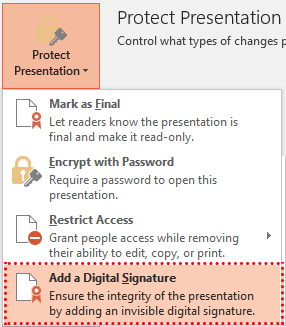
演示文稿可能包含多个数字签名。数字签名添加到演示文稿后,PowerPoint 中会出现特殊提示:

要对演示文稿进行签名或检查签名的真实性,Aspose.Slides API 提供了 DigitalSignature 类、DigitalSignatureCollection 类以及 Presentation.digital_signatures 属性。目前,仅支持 PPTX 格式的数字签名。
从 PFX 证书添加数字签名
下面的代码示例演示如何使用 PFX 证书添加数字签名:
- 打开 PFX 文件并将 PFX 密码传递给 DigitalSignature 对象。
- 将创建的签名添加到演示文稿对象。
#[TODO:Exception] RuntimeError: 代理错误(FileNotFoundException):无法加载文件或程序集 'System.Security.Cryptography.Xml, Version=4.0.2.0, Culture=neutral, PublicKeyToken=cc7b13ffcd2ddd51'。未找到文件。

import aspose.slides as slides

with slides.Presentation() as pres:
    # 创建 DigitalSignature 对象,使用 PFX 文件和 PFX 密码
    signature = slides.DigitalSignature(path + "testsignature1.pfx", "testpass1")

    # 为新数字签名添加注释
    signature.comments = "Aspose.Slides digital signing test."

    # 将数字签名添加到演示文稿
    pres.digital_signatures.add(signature)

    # 保存演示文稿
    pres.save("SomePresentationSigned.pptx", slides.export.SaveFormat.PPTX)
现在可以检查演示文稿是否已进行数字签名且未被修改:
# 打开演示文稿
with slides.Presentation("SomePresentationSigned.pptx") as pres:
    if len(pres.digital_signatures) > 0:
        allSignaturesAreValid = True

        print("Signatures used to sign the presentation: ")
        # 检查所有数字签名是否有效
        for signature in pres.digital_signatures :
            print(signature.certificate.subject_name.name + ", "
                    + signature.sign_time.strftime("yyyy-MM-dd HH:mm") + " -- " + "VALID" if signature.is_valid else "INVALID")
            allSignaturesAreValid = allSignaturesAreValid and signature.is_valid


        if allSignaturesAreValid:
            print("Presentation is genuine, all signatures are valid.")
        else:
            print("Presentation has been modified since signing.")
常见问题
我可以从文件中删除已有的签名吗?
可以。数字签名集合支持删除单个项和完全清空;保存文件后,演示文稿将不再包含任何签名。
文件在签名后会变成“只读”吗?
不会。签名只保证完整性和作者身份,不会阻止编辑。若需限制编辑,可结合“只读"或密码使用。
签名在不同版本的 PowerPoint 中会正确显示吗?
签名是针对 OOXML(PPTX)容器创建的。支持 OOXML 签名的现代 PowerPoint 版本会正确显示此类签名的状态。