
Android में PowerPoint टेबल्स की पंक्तियों और कॉलम्स का प्रबंधन
परिचय
Aspose.Slides for Android via Java आपको PowerPoint प्रस्तुतियों में टेबल संरचना और फ़ॉर्मैटिंग को टेबल क्लास और ITable इंटरफ़ेस के माध्यम से प्रबंधित करने देता है। आप एक हेडर पंक्ति निर्धारित कर सकते हैं, पंक्तियों और कॉलमों को क्लोन या हटाना, और पूरी पंक्ति या कॉलम पर टेक्स्ट फ़ॉर्मैटिंग लागू कर सकते हैं।
यह लेख इन ऑपरेशन को Java उदाहरणों के साथ समझाता है। यह दिखाता है कि कैसे टेबल की शैली प्रीसैट को पुन: उपयोग किया जा सकता है। टेबल पंक्ति और कॉलम संकेतक शून्य‑आधारित होते हैं।
पंक्ति की ऊँचाई नियंत्रित करें
पंक्ति की न्यूनतम ऊँचाई पॉइंट में सेट करने के लिए IRow.setMinimalHeight का उपयोग करें। यह एक निचली सीमा है, निश्चित ऊँचाई नहीं। IRow.getHeight वास्तविक ऊँचाई लौटाता है। पंक्ति तक पहुँचने के लिए ITable.getRows का उपयोग करें।
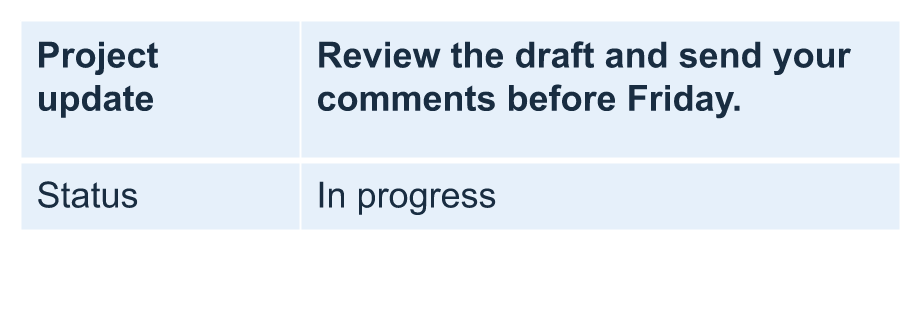
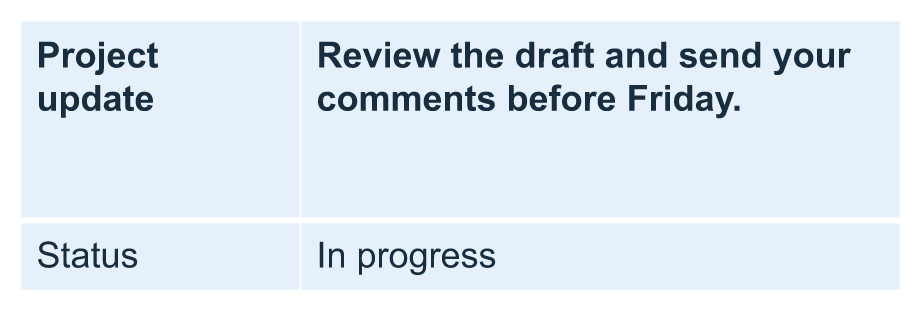
उदाहरण row-height-input.pptx लोड करता है, जिसमें पहली स्लाइड पर पहली आकृति के रूप में एक टेबल है। उसकी पहली पंक्ति 70 पॉइंट पर शुरू होती है। सेल्स 18‑पॉइंट Arial टेक्स्ट, रैपिंग, और 6‑पॉइंट शीर्ष तथा निचले मार्जिन का उपयोग करते हैं; दूसरे कॉलम में लंबा टेक्स्ट कई लाइनों में रैप होता है। उदाहरण न्यूनतम को 100 पॉइंट बढ़ाता है, फिर इसे 20 पॉइंट घटाता है, प्रत्येक परिवर्तन के बाद वास्तविक ऊँचाई प्रिंट करता है, और दोनों परिणाम सहेजता है।
import com.aspose.slides.*;

Presentation presentation = new Presentation("row-height-input.pptx");
try {
    ISlide slide = presentation.getSlides().get_Item(0);

    ITable table = (ITable)slide.getShapes().get_Item(0);
    IRow row = table.getRows().get_Item(0);

    row.setMinimalHeight(100);
    System.out.printf("Increased: minimum = %.1f, actual = %.1f pt%n", row.getMinimalHeight(), row.getHeight());
    presentation.save("row-height-increased.pptx", SaveFormat.Pptx);

    row.setMinimalHeight(20);
    System.out.printf("Decreased: minimum = %.1f, actual = %.1f pt%n", row.getMinimalHeight(), row.getHeight());
    presentation.save("row-height-decreased.pptx", SaveFormat.Pptx);
} finally {
    presentation.dispose();
}
प्रदान किए गए प्रेजेंटेशन में, न्यूनतम बढ़ाने से पंक्ति में जगह जुड़ती है। इसे घटाने से वह अतिरिक्त जगह हटती है, लेकिन वास्तविक ऊँचाई 20 पॉइंट से अधिक रहती है क्योंकि टेक्स्ट और सेल मार्जिन को अधिक जगह चाहिए। केवल न्यूनतम घटाने से पंक्ति को उसके सामग्री द्वारा आवश्यक स्थान से नीचे नहीं धकेला जा सकता।
वास्तविक ऊँचाई को कई कारक प्रभावित करते हैं:
- टेक्स्ट और फ़ॉन्ट आकार: लंबा टेक्स्ट, स्पष्ट लाइन ब्रेक, या बड़ा फ़ॉन्ट अधिक ऊर्ध्वाधर जगह की आवश्यकता कर सकता है।
- रैपिंग और कॉलम चौड़ाई: रैपिंग सक्षम होने पर, IColumn.setWidth के साथ कॉलम की चौड़ाई घटाने से अधिक लाइन्स बनती हैं। व्यापक कॉलम ऊँचाई की आवश्यकता को घटा सकता है।
- सेल मार्जिन: ICell.setMarginTop और ICell.setMarginBottom ऊर्ध्वरद जगह जोड़ते हैं। ICell.setMarginLeft और ICell.setMarginRight टेक्स्ट के लिए उपलब्ध चौड़ाई घटाते हैं और अतिरिक्त रैपिंग का कारण बन सकते हैं।
इस टेबल में बिना मर्ज किए हुए सेल्स के, वह सेल जिसका सबसे अधिक ऊर्ध्वरद स्थान चाहिए, पूरी पंक्ति के लिए सामग्री‑प्रेरित निचली सीमा तय करता है। पंक्ति को छोटा करने के लिए, आपको टेक्स्ट को छोटा करना, फ़ॉन्ट आकार या मार्जिन घटाना, या कॉलम को चौड़ा करना पड़ सकता है।
नीचे की छवियाँ एक ही टेबल को समान स्केल पर दर्शाती हैं। चित्रित परिणामों में वास्तविक ऊँचाइयाँ 70, 100, और 55.2 पॉइंट थीं: अंतिम पंक्ति अपने 20‑पॉइंट न्यूनतम से ऊँची बनी रही। सटीक टेक्स्ट मापन आपके वातावरण में उपलब्ध फ़ॉन्ट्स पर निर्भर कर सकता है। सहेजे गए परिणाम डाउनलोड करें: बढ़ाया गया न्यूनतम और घटाया गया न्यूनतम.
| मूल: न्यूनतम 70 pt, वास्तविक 70 pt | बढ़ाया गया: न्यूनतम 100 pt, वास्तविक 100 pt | घटाया गया: न्यूनतम 20 pt, वास्तविक 55.2 pt |
|---|---|---|
 |
 |
 |
पहली पंक्ति को हेडर के रूप में सेट करें
setFirstRow मेथड का उपयोग करके पहली पंक्ति को हेडर फ़ॉर्मैटिंग के लिए चिह्नित करें। इसका स्वरूप टेबल पर लागू टेबल शैली पर निर्भर करता है।
- Presentation क्लास का उपयोग करके प्रेजेंटेशन लोड करें।
- पहली स्लाइड तक पहुँचें।
- स्लाइड पर पहली आकृति के रूप में संग्रहित टेबल तक पहुँचें।
- उसकी पहली पंक्ति के लिए हेडर फ़ॉर्मैटिंग सक्रिय करें।
- संशोधित प्रेजेंटेशन सहेजें।
उदाहरण के लिए table.pptx आवश्यक है जिसमें पहली स्लाइड पर पहली आकृति के रूप में टेबल है। यह पहली पंक्ति के लिए हेडर फ़ॉर्मैटिंग को सक्रिय करता है और First_row_header.pptx सहेजता है।
import com.aspose.slides.*;

Presentation presentation = new Presentation("table.pptx");
try {
    ISlide slide = presentation.getSlides().get_Item(0);

    ITable table = (ITable)slide.getShapes().get_Item(0);
    table.setFirstRow(true);

    presentation.save("First_row_header.pptx", SaveFormat.Pptx);
} finally {
    presentation.dispose();
}
टेबल की पंक्ति या कॉलम की क्लोन बनाएं
पंक्तियों या कॉलमों को क्लोन करके उनकी सामग्री और फ़ॉर्मैटिंग को पुनः उपयोग करें। आप कॉपी को टेबल के अंत में जोड़ सकते हैं या किसी विशिष्ट स्थान पर सम्मिलित कर सकते हैं।
- Presentation क्लास का उपयोग करके प्रेजेंटेशन लोड करें।
- पहली स्लाइड तक पहुँचें।
- कॉलम चौड़ाइयाँ और पंक्ति ऊँचाइयाँ निर्धारित करें।
- addTable मेथड का उपयोग करके टेबल जोड़ें।
- आवश्यक पंक्तियों को क्लोन करें।
- आवश्यक कॉलमों को क्लोन करें।
- संशोधित प्रेजेंटेशन सहेजें।
उदाहरण के लिए Test.pptx आवश्यक है जिसमें कम से कम एक स्लाइड हो। यह तीन कॉलम और पाँच पंक्तियों वाली टेबल बनाता है, जिनके आयाम पॉइंट में निर्दिष्ट हैं। यह पहली पंक्ति और कॉलम की प्रतियां जोड़ता है, फिर दूसरी पंक्ति और कॉलम की प्रतियां इंडेक्स 3 (चौथा स्थान) पर सम्मिलित करता है। परिणामी टेबल में सात पंक्तियाँ और पाँच कॉलम होते हैं। false तर्क निकटवर्ती मर्ज किए हुए पंक्तियों या कॉलमों में क्लोनिंग को निष्क्रिय करता है; इस टेबल में कोई मर्ज किए हुए सेल नहीं हैं।
import com.aspose.slides.*;

Presentation presentation = new Presentation("Test.pptx");
try {
    ISlide slide = presentation.getSlides().get_Item(0);

    double[] columnWidths = new double[] { 50, 50, 50 };
    double[] rowHeights = new double[] { 50, 30, 30, 30, 30 };
    ITable table = slide.getShapes().addTable(100, 50, columnWidths, rowHeights);

    table.get_Item(0, 0).getTextFrame().setText("Row 1 Cell 1");
    table.get_Item(1, 0).getTextFrame().setText("Row 1 Cell 2");
    table.getRows().addClone(table.getRows().get_Item(0), false);

    table.get_Item(0, 1).getTextFrame().setText("Row 2 Cell 1");
    table.get_Item(1, 1).getTextFrame().setText("Row 2 Cell 2");
    table.getRows().insertClone(3, table.getRows().get_Item(1), false);

    table.getColumns().addClone(table.getColumns().get_Item(0), false);
    table.getColumns().insertClone(3, table.getColumns().get_Item(1), false);

    presentation.save("table_out.pptx", SaveFormat.Pptx);
} finally {
    presentation.dispose();
}
टेबल से पंक्ति या कॉलम हटाएँ
टेबल में अब आवश्यक नहीं रही पंक्तियों या कॉलमों को हटाएँ। आइटम हटाने से उसके बाद आने वाली पंक्तियों या कॉलमों के संकेतक शिफ्ट हो जाते हैं।
- Presentation क्लास का उपयोग करके प्रेजेंटेशन बनाएं।
- पहली स्लाइड तक पहुँचें।
- कॉलम चौड़ाइयाँ और पंक्ति ऊँचाइयाँ निर्धारित करें।
- addTable मेथड का उपयोग करके टेबल जोड़ें।
- दूसरी पंक्ति और दूसरी कॉलम हटाएँ।
- संशोधित प्रेजेंटेशन सहेजें।
यह उदाहरण तीन‑बाय‑तीन टेबल बनाता है और इंडेक्स 1 पर पंक्ति और कॉलम हटाता है, जिससे TestTable_out.pptx में दो‑बाय‑दो टेबल बचता है। आयाम पॉइंट में हैं। false तर्क निकटवर्ती मर्ज किए हुए पंक्तियों या कॉलमों के हटाने को निष्क्रिय करता है; इस टेबल में कोई मर्ज किए हुए सेल नहीं हैं।
import com.aspose.slides.*;

Presentation presentation = new Presentation();
try {
    ISlide slide = presentation.getSlides().get_Item(0);

    double[] columnWidths = new double[] { 100, 50, 30 };
    double[] rowHeights = new double[] { 30, 50, 30 };
    ITable table = slide.getShapes().addTable(100, 100, columnWidths, rowHeights);

    table.getRows().removeAt(1, false);
    table.getColumns().removeAt(1, false);

    presentation.save("TestTable_out.pptx", SaveFormat.Pptx);
} finally {
    presentation.dispose();
}
टेबल पंक्ति स्तर पर टेक्स्ट फ़ॉर्मैटिंग सेट करें
पूरी पंक्ति पर टेक्स्ट फ़ॉर्मैटिंग लागू करें ताकि उसके सेल्स सुसंगत रहें। आप फ़ॉन्ट गुण, पैराग्राफ फ़ॉर्मैटिंग, और टेक्स्ट दिशा को प्रत्येक सेल को अलग‑अलग फ़ॉर्मेट किए बिना सेट कर सकते हैं।
- Presentation क्लास का उपयोग करके प्रेजेंटेशन लोड करें।
- पहली स्लाइड पर टेबल तक पहुंचें।
- पहली पंक्ति के लिए setFontHeight का उपयोग करें।
- पहली पंक्ति के लिए setAlignment और setMarginRight का उपयोग करें।
- दूसरी पंक्ति के लिए setTextVerticalType का उपयोग करें।
- संशोधित प्रेजेंटेशन सहेजें।
उदाहरण के लिए table.pptx आवश्यक है जिसमें पहली स्लाइड पर पहली आकृति के रूप में टेबल हो और कम से कम दो पंक्तियाँ हों। यह पहली पंक्ति पर 25‑पॉइंट टेक्स्ट, दाएँ संरेखण, और 20‑पॉइंट दाएँ पैराग्राफ मार्जिन लागू करता है, फिर दूसरी पंक्ति में ऊर्ध्वाधर टेक्स्ट सेट करता है।
import com.aspose.slides.*;

Presentation presentation = new Presentation("table.pptx");
try {
    ISlide slide = presentation.getSlides().get_Item(0);

    ITable table = (ITable)slide.getShapes().get_Item(0);

    PortionFormat portionFormat = new PortionFormat();
    portionFormat.setFontHeight(25);
    table.getRows().get_Item(0).setTextFormat(portionFormat);

    ParagraphFormat paragraphFormat = new ParagraphFormat();
    paragraphFormat.setAlignment(TextAlignment.Right);
    paragraphFormat.setMarginRight(20);
    table.getRows().get_Item(0).setTextFormat(paragraphFormat);

    TextFrameFormat textFrameFormat = new TextFrameFormat();
    textFrameFormat.setTextVerticalType(TextVerticalType.Vertical);
    table.getRows().get_Item(1).setTextFormat(textFrameFormat);

    presentation.save("row_formatting.pptx", SaveFormat.Pptx);
} finally {
    presentation.dispose();
}
टेबल कॉलम स्तर पर टेक्स्ट फ़ॉर्मैटिंग सेट करें
पूरे कॉलम पर टेक्स्ट फ़ॉर्मैटिंग लागू करें ताकि उसके सेल्स सुसंगत रहें। आप फ़ॉन्ट गुण, पैराग्राफ फ़ॉर्मैटिंग, और टेक्स्ट दिशा को प्रत्येक सेल को अलग‑अलग फ़ॉर्मेट किए बिना सेट कर सकते हैं।
- Presentation क्लास का उपयोग करके प्रेजेंटेशन लोड करें।
- पहली स्लाइड पर टेबल तक पहुँचें।
- पहली कॉलम के लिए setFontHeight का उपयोग करें।
- पहली कॉलम के लिए setAlignment और setMarginRight का उपयोग करें।
- दूसरी कॉलम के लिए setTextVerticalType का उपयोग करें।
- संशोधित प्रेजेंटेशन सहेजें।
उदाहरण के लिए table.pptx आवश्यक है जिसमें पहली स्लाइड पर पहली आकृति के रूप में टेबल हो और कम से कम दो कॉलम हों। यह पहली कॉलम पर 25‑पॉइंट टेक्स्ट, दाएँ संरेखण, और 20‑पॉइंट दाएँ पैराग्राफ मार्जिन लागू करता है, फिर दूसरी कॉलम में ऊर्ध्वाधर टेक्स्ट सेट करता है।
import com.aspose.slides.*;

Presentation presentation = new Presentation("table.pptx");
try {
    ISlide slide = presentation.getSlides().get_Item(0);

    ITable table = (ITable)slide.getShapes().get_Item(0);

    PortionFormat portionFormat = new PortionFormat();
    portionFormat.setFontHeight(25);
    table.getColumns().get_Item(0).setTextFormat(portionFormat);

    ParagraphFormat paragraphFormat = new ParagraphFormat();
    paragraphFormat.setAlignment(TextAlignment.Right);
    paragraphFormat.setMarginRight(20);
    table.getColumns().get_Item(0).setTextFormat(paragraphFormat);

    TextFrameFormat textFrameFormat = new TextFrameFormat();
    textFrameFormat.setTextVerticalType(TextVerticalType.Vertical);
    table.getColumns().get_Item(1).setTextFormat(textFrameFormat);

    presentation.save("column_formatting.pptx", SaveFormat.Pptx);
} finally {
    presentation.dispose();
}
टेबल शैली गुण प्राप्त करें
getStylePreset मेथड का उपयोग करके टेबल पर लागू प्रीसैट को प्राप्त करें और उसे किसी अन्य टेबल पर पुनः उपयोग करें। यह व्यक्तिगत सेल फ़ॉर्मैटिंग ओवरराइड के बजाय प्रीसैट की पहचान करता है।
उदाहरण एक टेबल बनाता है, TableStylePreset.DarkStyle1 लागू करता है, और प्रीसैट को पुनः पढ़ता है। यह DarkStyle1 के अनुरूप पूर्णांक मान को प्रिंट करता है और टेबल को table.pptx में सहेजता है।
import com.aspose.slides.*;

Presentation presentation = new Presentation();
try {
    ISlide slide = presentation.getSlides().get_Item(0);

    double[] columnWidths = new double[] { 100, 150 };
    double[] rowHeights = new double[] { 5, 5, 5 };
    ITable table = slide.getShapes().addTable(10, 10, columnWidths, rowHeights);
    table.setStylePreset(TableStylePreset.DarkStyle1);

    int stylePreset = table.getStylePreset();
    System.out.println(stylePreset);

    presentation.save("table.pptx", SaveFormat.Pptx);
} finally {
    presentation.dispose();
}
अक्सर पूछे जाने वाले प्रश्न
क्या मैं पहले से बनी टेबल पर PowerPoint थीम/स्टाइल्स लागू कर सकता हूँ?
हाँ। टेबल स्लाइड/लेआउट/मास्टर थीम को विरासत में लेती है, और आप फिर भी उस थीम पर फ़िल, बॉर्डर, और टेक्स्ट रंगों को ओवरराइड कर सकते हैं।
क्या मैं टेबल की पंक्तियों को Excel की तरह सॉर्ट कर सकता हूँ?
नहीं, Aspose.Slides टेबल में अंतर्निहित सॉर्टिंग या फ़िल्टर नहीं होते। पहले अपने डेटा को मेमोरी में सॉर्ट करें, फिर उस क्रम में टेबल पंक्तियों को पुनः भरें।
क्या मैं बैंडेड (धारीदार) कॉलम रख सकता हूँ जबकि विशिष्ट सेल्स पर कस्टम रंग बनाए रख सकूँ?
हाँ। बैंडेड कॉलम सक्रिय करें, फिर विशिष्ट सेल्स को स्थानीय फ़ॉर्मैटिंग से ओवरराइड करें; सेल‑स्तर की फ़ॉर्मैटिंग टेबल शैली पर प्राथमिकता लेती है।