
C++ でプレゼンテーション情報を取得および更新する
概要
Aspose.Slides はプレゼンテーションの形式を識別し、完全なプレゼンテーションオブジェクトモデルを作成せずにドキュメントメタデータを読み取ることができます。これは、ファイルを分類したり、インベントリを作成したり、プレゼンテーションの内容をロードして処理するかどうかを判断する前にプロパティを検査したりする場合に便利です。
本記事では、PresentationFactory と IPresentationInfo を使用した軽量な検査と、IDocumentProperties を使用した対象を絞った更新方法を示します。
プレゼンテーション形式の確認
ロード済みのプレゼンテーションがある場合は、ロード後の検出とレガシー PPT、PPS、POT ストリームの制限については、Determine the Original Presentation Format を参照してください。
IPresentationFactory::GetPresentationInfo を使用して、Presentation インスタンスを作成せずにファイルを検査します。IPresentationInfo::get_LoadFormat メソッドは、PPTX、PPT、ODP などの検出された形式を報告します。
#include <DOM/IPresentationInfo.h>
#include <DOM/PresentationFactory.h>
#include <LoadFormat.h>
#include <system/array.h>
#include <system/console.h>
#include <system/object_ext.h>
#include <system/string.h>

using namespace Aspose::Slides;
using namespace System;

auto fileNames = MakeArray<String>({u"pres.pptx", u"pres.ppt", u"pres.odp"});

for (const auto& fileName : fileNames)
{
    auto presentationInfo = PresentationFactory::get_Instance()->GetPresentationInfo(fileName);
    Console::WriteLine(String::Format(u"{0}: {1}", fileName, ObjectExt::ToString(presentationInfo->get_LoadFormat())));
}
軽量なプレゼンテーションインベントリの作成
多数のプレゼンテーションファイルを処理する場合、検証、インデックス作成、または文書管理システムのためにコンパクトなインベントリが必要になることがあります。このシナリオでは、IPresentationFactory::GetPresentationInfo を使用して、IPresentationInfo オブジェクトを取得し、次に IPresentationInfo::ReadDocumentProperties を呼び出してドキュメントメタデータを読み取ります。このアプローチでは、Presentation インスタンスを作成したり、完全なプレゼンテーションオブジェクトモデルを走査したりする必要はありません。
IDocumentProperties が提供する拡張プロパティは、以下のインベントリ値を提供します。
| メソッド | インベントリ値 |
|---|---|
| get_Slides | スライドの総数。 |
| get_HiddenSlides | 非表示スライドの数。 |
| get_Notes | ノートを含むスライドの数。 |
| get_Paragraphs | 利用可能な場合の段落の総数。 |
| get_Words | 単語の総数。 |
| get_MultimediaClips | オーディオおよびビデオクリップの総数。 |
以下の例は、Presentation オブジェクトを作成せずにこれらの値を読み取り、コンパクトなインベントリを出力します。また、IDocumentProperties::get_HeadingPairs と IDocumentProperties::get_TitlesOfParts を組み合わせて、フォント、テーマ、スライドタイトルなどのコンテンツ グループを表示します。
#include <DOM/IDocumentProperties.h>
#include <DOM/IHeadingPair.h>
#include <DOM/IPresentationInfo.h>
#include <DOM/PresentationFactory.h>
#include <LoadFormat.h>
#include <system/console.h>
#include <system/io/path.h>
#include <system/object_ext.h>
#include <system/string.h>

using namespace Aspose::Slides;
using namespace System;
using namespace System::IO;

auto filePath = String(u"sample.pptx");
auto presentationInfo = PresentationFactory::get_Instance()->GetPresentationInfo(filePath);
auto documentProperties = presentationInfo->ReadDocumentProperties();

Console::WriteLine(String::Format(u"File: {0}", Path::GetFileName(filePath)));
Console::WriteLine(String::Format(u"Format: {0}", ObjectExt::ToString(presentationInfo->get_LoadFormat())));
Console::WriteLine(String::Format(u"Title: {0}", documentProperties->get_Title()));
Console::WriteLine(String::Format(u"Author: {0}", documentProperties->get_Author()));
Console::WriteLine(u"Statistics:");
Console::WriteLine(String::Format(u"  Slides: {0}", documentProperties->get_Slides()));
Console::WriteLine(String::Format(u"  Hidden slides: {0}", documentProperties->get_HiddenSlides()));
Console::WriteLine(String::Format(u"  Slides with notes: {0}", documentProperties->get_Notes()));
Console::WriteLine(String::Format(u"  Paragraphs: {0}", documentProperties->get_Paragraphs()));
Console::WriteLine(String::Format(u"  Words: {0}", documentProperties->get_Words()));
Console::WriteLine(String::Format(u"  Multimedia clips: {0}", documentProperties->get_MultimediaClips()));

auto headingPairs = documentProperties->get_HeadingPairs();
auto titlesOfParts = documentProperties->get_TitlesOfParts();
auto partIndex = 0;

if (headingPairs == nullptr || titlesOfParts == nullptr || headingPairs->get_Length() == 0 || titlesOfParts->get_Length() == 0)
{
    Console::WriteLine(u"Content groups: not available");
}
else
{
    Console::WriteLine(u"Content groups:");

    for (const auto& headingPair : headingPairs)
    {
        auto partCount = headingPair->get_Count();
        Console::WriteLine(String::Format(u"  {0} ({1})", headingPair->get_Name(), partCount));

        for (auto partOffset = 0; partOffset < partCount && partIndex < titlesOfParts->get_Length(); partOffset++)
        {
            Console::WriteLine(String::Format(u"    - {0}", titlesOfParts[partIndex]));
            partIndex++;
        }
    }

    if (partIndex < titlesOfParts->get_Length())
    {
        Console::WriteLine(u"  Other parts:");

        while (partIndex < titlesOfParts->get_Length())
        {
            Console::WriteLine(String::Format(u"    - {0}", titlesOfParts[partIndex]));
            partIndex++;
        }
    }
}
各 IHeadingPair は、IHeadingPair::get_Name によってグループ名を提供し、IHeadingPair::get_Count によってそのグループ内の項目数を提供します。IDocumentProperties::get_TitlesOfParts はフラットで順序付けされた配列を返すため、各ヘッダー ペアで指定された連続したタイトル数を消費します。
保存されたメタデータと形式の制限
IPresentationInfo::ReadDocumentProperties が返すインベントリ プロパティは、ソース ドキュメントで利用可能なメタデータを反映しています。Aspose.Slides はこの呼び出しのためにプレゼンテーションオブジェクトモデルをロードして走査し、これらの値を再計算しません。欠落したプロパティはデフォルト値で表され、最後にファイルを保存したアプリケーションがドキュメントプロパティを更新していない場合、保存された値は古くなっている可能性があります。
- PPTX: フォーマットは、スライド、ノート、非表示スライド、段落、単語、マルチメディアのカウント、およびヘッダー ペアとパート タイトル用の拡張ドキュメントプロパティを提供します。利用可能性は、ドキュメント作成者が書き込んだプロパティに依存します。
- PPT: バイナリ フォーマットは、対応するドキュメント サマリ プロパティを保存できます。プロパティが存在しない、またはドキュメント作成者によって更新されていない場合、Aspose.Slides はスライドから計算するのではなく、保存された値またはデフォルト値を返します。
- ODP: OpenDocument メタデータは、ページ、段落、単語カウントなどの一般的なドキュメント統計情報を提供しますが、これらの値は PowerPoint 固有の拡張プロパティすべてにマッピングされません。非表示スライド、ノートスライド、マルチメディア、ヘッダー ペア、パート タイトルのメタデータは利用できない場合があり、インベントリ プロパティはデフォルト値を返すことがあります。ゼロ値や空配列を、対応するコンテンツが存在しない決定的な証拠として扱わないでください。
軽量メタデータ アプローチはインベントリや事前チェックに使用してください。結果がメモリ内の変更を反映する必要がある場合や、実際のプレゼンテーション コンテンツを検証する必要がある場合は、プレゼンテーションをロードしてライブ オブジェクトモデルを検査します。
プレゼンテーションプロパティの更新
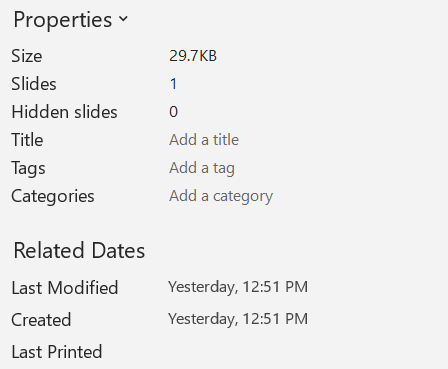
IPresentationInfo::ReadDocumentProperties が返すプロパティは、Presentation インスタンスを作成せずに変更することもできます。IPresentationInfo::UpdateDocumentProperties で変更を適用し、次に IPresentationInfo::WriteBindedPresentation でバインドされたプレゼンテーションを書き込みます。
以下の画像は、元のドキュメントプロパティを示しています。
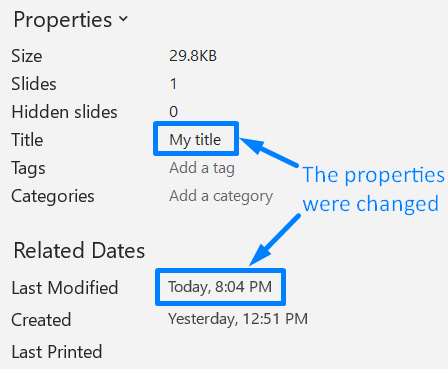
以下の例は、タイトルと最終保存時刻を変更し、結果を新しいファイルに書き込みます:
#include <DOM/IDocumentProperties.h>
#include <DOM/IPresentationInfo.h>
#include <DOM/PresentationFactory.h>
#include <system/date_time.h>
#include <system/string.h>

using namespace Aspose::Slides;
using namespace System;

auto sourceFile = String(u"sample.pptx");
auto outputFile = String(u"sample_with_updated_properties.pptx");
auto presentationInfo = PresentationFactory::get_Instance()->GetPresentationInfo(sourceFile);
auto documentProperties = presentationInfo->ReadDocumentProperties();

documentProperties->set_Title(u"Quarterly sales report");
documentProperties->set_LastSavedTime(DateTime::get_UtcNow());

presentationInfo->UpdateDocumentProperties(documentProperties);
presentationInfo->WriteBindedPresentation(outputFile);
以下の画像は、変更されたドキュメントプロパティを示しています。
便利なリンク
関連するセキュリティチェックと保護設定については、以下の記事をご参照ください:
FAQ
フォントが埋め込まれているか、どのフォントが埋め込まれているかを確認する方法は?
プレゼンテーションをロードし、Presentation::get_FontsManager を使用します。FontsManager::GetEmbeddedFonts で埋め込まれたフォントを取得し、FontsManager::GetFonts でプレゼンテーションで使用されているフォントを取得します。両方の結果を比較して、レンダリングに必要だが埋め込まれていないフォントを特定してください。
ファイルに非表示スライドが含まれているか、またその数をすばやく確認する方法は?
保存されたドキュメントメタデータが十分である場合は、IPresentationFactory::GetPresentationInfo と IPresentationInfo::ReadDocumentProperties を通じて IDocumentProperties::get_HiddenSlides を読み取ります。これは軽量なインベントリに適しています。メモリ上でプレゼンテーションが変更されている可能性がある場合や、保存されたメタデータが欠落または古い場合は、Presentation::get_Slides を走査し、各スライドの Slide::get_Hidden メソッドで確認してください。
カスタムスライドサイズと方向が使用されているか、デフォルトと異なるかを検出できますか?
はい。プレゼンテーションをロードし、Presentation::get_SlideSize を読み取ります。ISlideSize::get_Type、ISlideSize::get_Size、ISlideSize::get_Orientation を調べて、現在の設定と期待されるプリセットや寸法を比較してください。
チャートが外部データ ソースを参照しているかどうかをすばやく確認する方法は?
はい。各 Chart を見つけ、ChartData::get_DataSourceType をチェックします。外部ブックの場合は、ChartData::get_ExternalWorkbookPath を読み取ります。データ ソースの種類とパスが外部参照を示しますが、対象が利用可能かどうかは別途リソースチェックが必要です。
レンダリングや PDF エクスポートを遅くする可能性のある「重い」スライドを評価する方法は?
単一の複雑度プロパティは存在しません。Presentation::get_Slides と各スライドの IBaseSlide::get_Shapes コレクションを走査してください。シェイプ数や大きな画像、エフェクト、アニメーション、マルチメディアの有無を指標として使用し、代表的なレンダリングまたはエクスポートを測定して、スライドを実際のパフォーマンス ボトルネックとして確定する前に評価してください。