
在 C++ 中检索并更新演示文稿信息
概述
Aspose.Slides 可以识别演示文稿的格式并读取其文档元数据,而无需创建完整的演示文稿对象模型。当您需要对文件进行分类、建立清单或在决定是否加载并处理演示内容之前检查属性时,这非常有用。
本文演示如何通过PresentationFactory和IPresentationInfo进行轻量级检查,以及如何通过IDocumentProperties进行有针对性的更新。
检查演示文稿格式
如果您已经加载了演示文稿,请参阅确定原始演示文稿格式以了解加载后检测以及传统 PPT、PPS 和 POT 流的限制。
使用IPresentationFactory::GetPresentationInfo在不创建Presentation实例的情况下检查文件。IPresentationInfo::get_LoadFormat方法报告检测到的格式,例如 PPTX、PPT 或 ODP。
#include <DOM/IPresentationInfo.h>
#include <DOM/PresentationFactory.h>
#include <LoadFormat.h>
#include <system/array.h>
#include <system/console.h>
#include <system/object_ext.h>
#include <system/string.h>

using namespace Aspose::Slides;
using namespace System;

auto fileNames = MakeArray<String>({u"pres.pptx", u"pres.ppt", u"pres.odp"});

for (const auto& fileName : fileNames)
{
    auto presentationInfo = PresentationFactory::get_Instance()->GetPresentationInfo(fileName);
    Console::WriteLine(String::Format(u"{0}: {1}", fileName, ObjectExt::ToString(presentationInfo->get_LoadFormat())));
}
构建轻量级演示文稿清单
在处理大量演示文稿文件时,您可能需要一个紧凑的清单用于验证、索引或文档管理系统。在这种情况下,使用IPresentationFactory::GetPresentationInfo获取IPresentationInfo对象,然后调用IPresentationInfo::ReadDocumentProperties读取文档元数据。此方法不会创建Presentation实例,也不需要遍历完整的演示文稿对象模型。
IDocumentProperties公开的扩展属性提供以下清单值:
| 方法 | 库存值 |
|---|---|
| get_Slides | 幻灯片总数。 |
| get_HiddenSlides | 隐藏幻灯片的数量。 |
| get_Notes | 含备注的幻灯片数量。 |
| get_Paragraphs | (如果可用)段落总数。 |
| get_Words | 单词总数。 |
| get_MultimediaClips | 音频和视频剪辑的总数。 |
以下示例在不创建Presentation对象的情况下读取这些值并打印紧凑清单。它还将IDocumentProperties::get_HeadingPairs与IDocumentProperties::get_TitlesOfParts结合使用,以显示字体、主题和幻灯片标题等内容组。
#include <DOM/IDocumentProperties.h>
#include <DOM/IHeadingPair.h>
#include <DOM/IPresentationInfo.h>
#include <DOM/PresentationFactory.h>
#include <LoadFormat.h>
#include <system/console.h>
#include <system/io/path.h>
#include <system/object_ext.h>
#include <system/string.h>

using namespace Aspose::Slides;
using namespace System;
using namespace System::IO;

auto filePath = String(u"sample.pptx");
auto presentationInfo = PresentationFactory::get_Instance()->GetPresentationInfo(filePath);
auto documentProperties = presentationInfo->ReadDocumentProperties();

Console::WriteLine(String::Format(u"File: {0}", Path::GetFileName(filePath)));
Console::WriteLine(String::Format(u"Format: {0}", ObjectExt::ToString(presentationInfo->get_LoadFormat())));
Console::WriteLine(String::Format(u"Title: {0}", documentProperties->get_Title()));
Console::WriteLine(String::Format(u"Author: {0}", documentProperties->get_Author()));
Console::WriteLine(u"Statistics:");
Console::WriteLine(String::Format(u"  Slides: {0}", documentProperties->get_Slides()));
Console::WriteLine(String::Format(u"  Hidden slides: {0}", documentProperties->get_HiddenSlides()));
Console::WriteLine(String::Format(u"  Slides with notes: {0}", documentProperties->get_Notes()));
Console::WriteLine(String::Format(u"  Paragraphs: {0}", documentProperties->get_Paragraphs()));
Console::WriteLine(String::Format(u"  Words: {0}", documentProperties->get_Words()));
Console::WriteLine(String::Format(u"  Multimedia clips: {0}", documentProperties->get_MultimediaClips()));

auto headingPairs = documentProperties->get_HeadingPairs();
auto titlesOfParts = documentProperties->get_TitlesOfParts();
auto partIndex = 0;

if (headingPairs == nullptr || titlesOfParts == nullptr || headingPairs->get_Length() == 0 || titlesOfParts->get_Length() == 0)
{
    Console::WriteLine(u"Content groups: not available");
}
else
{
    Console::WriteLine(u"Content groups:");

    for (const auto& headingPair : headingPairs)
    {
        auto partCount = headingPair->get_Count();
        Console::WriteLine(String::Format(u"  {0} ({1})", headingPair->get_Name(), partCount));

        for (auto partOffset = 0; partOffset < partCount && partIndex < titlesOfParts->get_Length(); partOffset++)
        {
            Console::WriteLine(String::Format(u"    - {0}", titlesOfParts[partIndex]));
            partIndex++;
        }
    }

    if (partIndex < titlesOfParts->get_Length())
    {
        Console::WriteLine(u"  Other parts:");

        while (partIndex < titlesOfParts->get_Length())
        {
            Console::WriteLine(String::Format(u"    - {0}", titlesOfParts[partIndex]));
            partIndex++;
        }
    }
}
每个IHeadingPair通过IHeadingPair::get_Name提供组名,并通过IHeadingPair::get_Count提供该组中的项数。IDocumentProperties::get_TitlesOfParts返回一个扁平、已排序的数组,因此请按每个标题对指定的连续标题数量进行消费。
存储的元数据和格式限制
IPresentationInfo::ReadDocumentProperties返回的清单属性反映了源文档中可用的元数据。Aspose.Slides 不会加载并遍历演示文稿对象模型来重新计算这些值。缺失的属性将以默认值表示,如果上次保存文件的应用程序未更新其文档属性,则存储的值可能已过时。
- PPTX: 该格式为幻灯片、备注、隐藏幻灯片、段落、单词和多媒体计数以及标题对和部件标题提供扩展文档属性。可用性取决于文档生成者写入了哪些属性。
- PPT: 二进制格式可以存储相应的文档摘要属性。如果属性缺失或未由文档生成者刷新,Aspose.Slides 将返回其存储的或默认值,而不是从幻灯片计算得到的值。
- ODP: OpenDocument 元数据提供诸如页面、段落和单词计数等通用文档统计信息,但这些值并不映射到每个 PowerPoint 专用的扩展属性。隐藏幻灯片、备注幻灯片、多媒体、标题对和部件标题元数据可能不可用,清单属性可能返回默认值。不要将零值或空数组视为对应内容不存在的权威证明。
在进行清单和初步检查时使用轻量级元数据方法。当结果必须反映内存中的更改或需要验证实际演示内容时,请加载演示文稿并检查其实时对象模型。
更新演示文稿属性
IPresentationInfo::ReadDocumentProperties返回的属性也可以在不创建Presentation实例的情况下进行修改。使用IPresentationInfo::UpdateDocumentProperties应用更改,然后使用IPresentationInfo::WriteBindedPresentation写入绑定的演示文稿。
下图显示了原始文档属性。
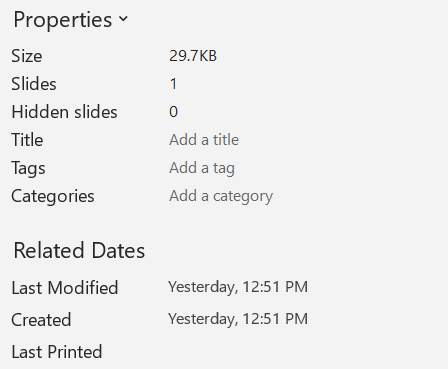
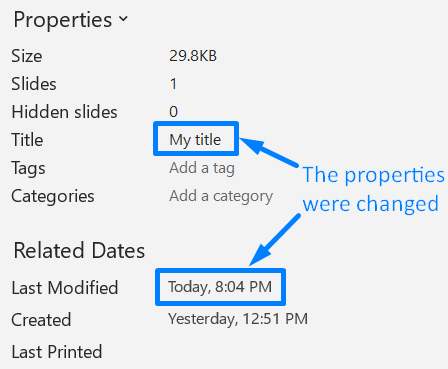
以下示例更改标题和最后保存时间并将结果写入新文件:
#include <DOM/IDocumentProperties.h>
#include <DOM/IPresentationInfo.h>
#include <DOM/PresentationFactory.h>
#include <system/date_time.h>
#include <system/string.h>

using namespace Aspose::Slides;
using namespace System;

auto sourceFile = String(u"sample.pptx");
auto outputFile = String(u"sample_with_updated_properties.pptx");
auto presentationInfo = PresentationFactory::get_Instance()->GetPresentationInfo(sourceFile);
auto documentProperties = presentationInfo->ReadDocumentProperties();

documentProperties->set_Title(u"Quarterly sales report");
documentProperties->set_LastSavedTime(DateTime::get_UtcNow());

presentationInfo->UpdateDocumentProperties(documentProperties);
presentationInfo->WriteBindedPresentation(outputFile);
下图显示了更新后的文档属性。
有用链接
有关相关的安全检查和保护设置,请参阅以下文章:
常见问题
如何检查是否嵌入了字体以及具体是哪一些?
加载演示文稿并使用Presentation::get_FontsManager。调用FontsManager::GetEmbeddedFonts获取嵌入的字体,调用FontsManager::GetFonts获取演示文稿使用的字体。比较两者结果即可找出需要渲染但未嵌入的字体。
如何快速判断文件是否包含隐藏幻灯片以及数量?
当存储的文档元数据足够时,读取通过IPresentationFactory::GetPresentationInfo和IPresentationInfo::ReadDocumentProperties获取的IDocumentProperties::get_HiddenSlides即可。这适用于轻量级清单。如果演示文稿在内存中已被修改,存储的元数据可能缺失或已过时,或者需要验证实时值,则遍历Presentation::get_Slides并检查每张幻灯片的Slide::get_Hidden方法。
我能否检测自定义幻灯片尺寸和方向是否被使用,以及它们是否与默认值不同?
可以。加载演示文稿并读取Presentation::get_SlideSize。检查ISlideSize::get_Type、ISlideSize::get_Size和ISlideSize::get_Orientation以将当前设置与预设的默认尺寸和方向进行比较。
有没有快速方法查看图表是否引用外部数据源?
有。定位每个Chart并检查ChartData::get_DataSourceType。对于外部工作簿,读取ChartData::get_ExternalWorkbookPath。数据源类型和路径可以标识外部引用,但要验证目标是否可用需另行进行资源检查。
如何评估可能导致渲染或 PDF 导出变慢的“重量”幻灯片?
没有单一的复杂度属性。遍历Presentation::get_Slides以及每张幻灯片的IBaseSlide::get_Shapes集合。使用形状数量以及大型图像、效果、动画或多媒体的存在作为筛选信号,并在确认幻灯片为性能瓶颈前进行代表性的渲染或导出测量。