
C++에서 프레젠테이션 정보 검색 및 업데이트
개요
Aspose.Slides는 프레젠테이션 형식을 식별하고 전체 프레젠테이션 개체 모델을 생성하지 않고도 문서 메타데이터를 읽을 수 있습니다. 이는 파일을 분류하거나, 인벤토리를 구축하거나, 프레젠테이션 내용을 로드하고 처리할지 결정하기 전에 속성을 검사해야 할 때 유용합니다.
이 문서에서는 PresentationFactory와 IPresentationInfo를 통한 가벼운 검사와 IDocumentProperties를 통한 대상 업데이트를 보여줍니다.
프레젠테이션 형식 확인
이미 로드된 프레젠테이션이 있는 경우, 로드 후 형식 감지 및 기존 PPT, PPS, POT 스트림의 제한 사항에 대해서는 Determine the Original Presentation Format을 참조하십시오.
IPresentationFactory::GetPresentationInfo를 사용하여 Presentation 인스턴스를 생성하지 않고 파일을 검사합니다. IPresentationInfo::get_LoadFormat 메서드는 PPTX, PPT, ODP와 같은 감지된 형식을 반환합니다.
#include <DOM/IPresentationInfo.h>
#include <DOM/PresentationFactory.h>
#include <LoadFormat.h>
#include <system/array.h>
#include <system/console.h>
#include <system/object_ext.h>
#include <system/string.h>

using namespace Aspose::Slides;
using namespace System;

auto fileNames = MakeArray<String>({u"pres.pptx", u"pres.ppt", u"pres.odp"});

for (const auto& fileName : fileNames)
{
    auto presentationInfo = PresentationFactory::get_Instance()->GetPresentationInfo(fileName);
    Console::WriteLine(String::Format(u"{0}: {1}", fileName, ObjectExt::ToString(presentationInfo->get_LoadFormat())));
}
가벼운 프레젠테이션 인벤토리 구축
많은 프레젠테이션 파일을 처리할 때 검증, 인덱싱 또는 문서 관리 시스템을 위한 간결한 인벤토리가 필요할 수 있습니다. 이러한 경우 IPresentationFactory::GetPresentationInfo를 사용하여 IPresentationInfo 객체를 얻고, 이어서 IPresentationInfo::ReadDocumentProperties를 호출해 문서 메타데이터를 읽습니다. 이 방법은 Presentation 인스턴스를 생성하거나 전체 프레젠테이션 개체 모델을 순회할 필요가 없습니다.
IDocumentProperties가 제공하는 확장 속성은 다음 인벤토리 값을 제공합니다:
| Method | 인벤토리 값 |
|---|---|
| get_Slides | 전체 슬라이드 수. |
| get_HiddenSlides | 숨겨진 슬라이드 수. |
| get_Notes | 노트를 포함한 슬라이드 수. |
| get_Paragraphs | 가능한 경우 전체 단락 수. |
| get_Words | 전체 단어 수. |
| get_MultimediaClips | 전체 오디오 및 비디오 클립 수. |
다음 예제는 이러한 값을 Presentation 객체를 생성하지 않고 읽어 간결한 인벤토리를 출력합니다. 또한 IDocumentProperties::get_HeadingPairs와 IDocumentProperties::get_TitlesOfParts를 결합해 폰트, 테마, 슬라이드 제목과 같은 콘텐츠 그룹을 표시합니다.
#include <DOM/IDocumentProperties.h>
#include <DOM/IHeadingPair.h>
#include <DOM/IPresentationInfo.h>
#include <DOM/PresentationFactory.h>
#include <LoadFormat.h>
#include <system/console.h>
#include <system/io/path.h>
#include <system/object_ext.h>
#include <system/string.h>

using namespace Aspose::Slides;
using namespace System;
using namespace System::IO;

auto filePath = String(u"sample.pptx");
auto presentationInfo = PresentationFactory::get_Instance()->GetPresentationInfo(filePath);
auto documentProperties = presentationInfo->ReadDocumentProperties();

Console::WriteLine(String::Format(u"File: {0}", Path::GetFileName(filePath)));
Console::WriteLine(String::Format(u"Format: {0}", ObjectExt::ToString(presentationInfo->get_LoadFormat())));
Console::WriteLine(String::Format(u"Title: {0}", documentProperties->get_Title()));
Console::WriteLine(String::Format(u"Author: {0}", documentProperties->get_Author()));
Console::WriteLine(u"Statistics:");
Console::WriteLine(String::Format(u"  Slides: {0}", documentProperties->get_Slides()));
Console::WriteLine(String::Format(u"  Hidden slides: {0}", documentProperties->get_HiddenSlides()));
Console::WriteLine(String::Format(u"  Slides with notes: {0}", documentProperties->get_Notes()));
Console::WriteLine(String::Format(u"  Paragraphs: {0}", documentProperties->get_Paragraphs()));
Console::WriteLine(String::Format(u"  Words: {0}", documentProperties->get_Words()));
Console::WriteLine(String::Format(u"  Multimedia clips: {0}", documentProperties->get_MultimediaClips()));

auto headingPairs = documentProperties->get_HeadingPairs();
auto titlesOfParts = documentProperties->get_TitlesOfParts();
auto partIndex = 0;

if (headingPairs == nullptr || titlesOfParts == nullptr || headingPairs->get_Length() == 0 || titlesOfParts->get_Length() == 0)
{
    Console::WriteLine(u"Content groups: not available");
}
else
{
    Console::WriteLine(u"Content groups:");

    for (const auto& headingPair : headingPairs)
    {
        auto partCount = headingPair->get_Count();
        Console::WriteLine(String::Format(u"  {0} ({1})", headingPair->get_Name(), partCount));

        for (auto partOffset = 0; partOffset < partCount && partIndex < titlesOfParts->get_Length(); partOffset++)
        {
            Console::WriteLine(String::Format(u"    - {0}", titlesOfParts[partIndex]));
            partIndex++;
        }
    }

    if (partIndex < titlesOfParts->get_Length())
    {
        Console::WriteLine(u"  Other parts:");

        while (partIndex < titlesOfParts->get_Length())
        {
            Console::WriteLine(String::Format(u"    - {0}", titlesOfParts[partIndex]));
            partIndex++;
        }
    }
}
각 IHeadingPair은 IHeadingPair::get_Name을 통해 그룹 이름을 제공하고, IHeadingPair::get_Count을 통해 해당 그룹의 항목 수를 제공합니다. IDocumentProperties::get_TitlesOfParts는 평면형 순서 배열을 반환하므로, 각 헤딩 페어가 지정한 연속 제목 수만큼 사용합니다.
저장된 메타데이터 및 형식 제한
IPresentationInfo::ReadDocumentProperties가 반환하는 인벤토리 속성은 원본 문서에 존재하는 메타데이터를 반영합니다. Aspose.Slides는 이 호출을 위해 프레젠테이션 개체 모델을 로드하고 순회하여 이러한 값을 다시 계산하지 않습니다. 누락된 속성은 기본값으로 표시되며, 마지막으로 파일을 저장한 애플리케이션이 문서 속성을 업데이트하지 않은 경우 저장된 값이 오래될 수 있습니다.
- PPTX: 형식은 슬라이드, 노트, 숨겨진 슬라이드, 단락, 단어 및 멀티미디어 수와 같은 확장 문서 속성을 제공하며, 헤딩 페어와 파트 제목도 포함합니다. 가용성은 문서 작성자가 어떤 속성을 기록했는지에 따라 달라집니다.
- PPT: 이진 형식은 해당 문서 요약 속성을 저장할 수 있습니다. 속성이 없거나 문서 작성자가 갱신하지 않은 경우, Aspose.Slides는 슬라이드에서 계산하지 않고 저장된 값 또는 기본값을 반환합니다.
- ODP: OpenDocument 메타데이터는 페이지, 단락, 단어 수와 같은 일반 문서 통계를 제공하지만 이러한 값은 모든 PowerPoint 고유 확장 속성과 매핑되지 않을 수 있습니다. 숨겨진 슬라이드, 노트 슬라이드, 멀티미디어, 헤딩‑페어 및 파트‑제목 메타데이터는 없을 수 있으며, 인벤토리 속성은 기본값을 반환할 수 있습니다. 값이 0이거나 빈 배열이라고 해서 해당 콘텐츠가 없다고 단정하지 마십시오.
인벤토리 및 예비 검사를 위해 가벼운 메타데이터 방식을 사용하십시오. 결과가 메모리 내 변경을 반영해야 하거나 실제 프레젠테이션 콘텐츠를 검증해야 할 경우 프레젠테이션을 로드하고 실시간 개체 모델을 검사하십시오.
프레젠테이션 속성 업데이트
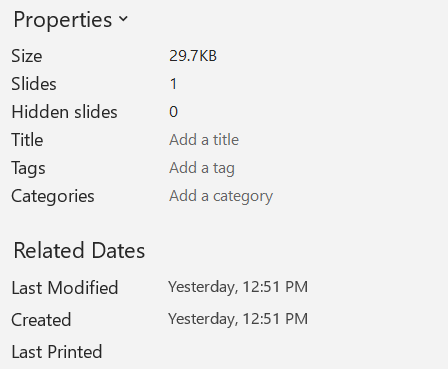
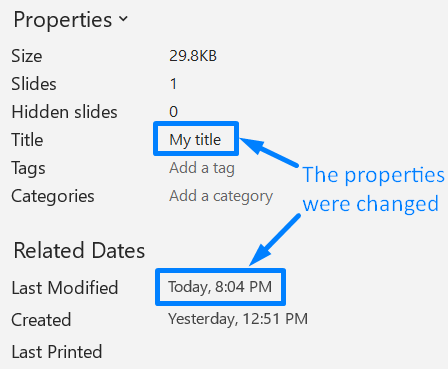
IPresentationInfo::ReadDocumentProperties가 반환하는 속성은 Presentation 인스턴스를 생성하지 않고도 변경할 수 있습니다. 변경사항을 적용하려면 IPresentationInfo::UpdateDocumentProperties를 사용하고, 이어서 IPresentationInfo::WriteBindedPresentation로 바인딩된 프레젠테이션을 기록합니다.
다음 이미지는 원본 문서 속성을 보여줍니다.
다음 예제는 제목과 마지막 저장 시간을 변경하고 결과를 새 파일에 기록합니다:
#include <DOM/IDocumentProperties.h>
#include <DOM/IPresentationInfo.h>
#include <DOM/PresentationFactory.h>
#include <system/date_time.h>
#include <system/string.h>

using namespace Aspose::Slides;
using namespace System;

auto sourceFile = String(u"sample.pptx");
auto outputFile = String(u"sample_with_updated_properties.pptx");
auto presentationInfo = PresentationFactory::get_Instance()->GetPresentationInfo(sourceFile);
auto documentProperties = presentationInfo->ReadDocumentProperties();

documentProperties->set_Title(u"Quarterly sales report");
documentProperties->set_LastSavedTime(DateTime::get_UtcNow());

presentationInfo->UpdateDocumentProperties(documentProperties);
presentationInfo->WriteBindedPresentation(outputFile);
다음 이미지는 변경된 문서 속성을 보여줍니다.
유용한 링크
관련 보안 검사 및 보호 설정에 대해서는 다음 문서를 참조하십시오:
FAQ
폰트가 임베드 되었는지 및 어떤 폰트인지 어떻게 확인할 수 있나요?
프레젠테이션을 로드하고 Presentation::get_FontsManager를 사용합니다. FontsManager::GetEmbeddedFonts를 호출해 임베드된 폰트를 얻고, FontsManager::GetFonts를 호출해 프레젠테이션에서 사용된 폰트를 얻습니다. 두 결과를 비교하면 렌더링에 필요하지만 임베드되지 않은 폰트를 찾을 수 있습니다.
파일에 숨겨진 슬라이드가 있는지 그리고 개수가 얼마인지 빠르게 확인하려면 어떻게 해야 하나요?
저장된 문서 메타데이터가 충분할 때는 IPresentationFactory::GetPresentationInfo와 IPresentationInfo::ReadDocumentProperties를 통해 IDocumentProperties::get_HiddenSlides를 읽습니다. 이는 가벼운 인벤토리에 적합합니다. 프레젠테이션이 메모리에서 수정된 경우 저장된 메타데이터가 없거나 오래될 수 있으므로, 실제 값을 확인하려면 Presentation::get_Slides를 순회하고 각 슬라이드의 Slide::get_Hidden 메서드를 검사하십시오.
사용자 지정 슬라이드 크기와 방향이 사용 중인지, 그리고 기본값과 다른지 감지할 수 있나요?
네. 프레젠테이션을 로드하고 Presentation::get_SlideSize를 읽습니다. ISlideSize::get_Type, ISlideSize::get_Size, ISlideSize::get_Orientation를 검사해 현재 설정을 예상 프리셋 및 치수와 비교합니다.
차트가 외부 데이터 소스를 참조하고 있는지 빠르게 확인하는 방법이 있나요?
네. 각 Chart를 찾아 ChartData::get_DataSourceType를 검사합니다. 외부 워크북인 경우 ChartData::get_ExternalWorkbookPath를 읽습니다. 데이터 소스 유형과 경로가 외부 참조를 식별하지만, 대상이 실제로 사용 가능한지는 별도의 리소스 확인이 필요합니다.
렌더링이나 PDF 내보내기를 늦출 수 있는 ‘무거운’ 슬라이드를 어떻게 평가할 수 있나요?
단일 복잡도 속성이 존재하지는 않습니다. Presentation::get_Slides와 각 슬라이드의 IBaseSlide::get_Shapes 컬렉션을 순회합니다. 도형 수, 대용량 이미지, 효과, 애니메이션, 멀티미디어 존재 여부를 스크리닝 신호로 사용하고, 대표적인 렌더링 또는 내보내기 성능을 측정한 후에 슬라이드를 실제 성능 병목으로 판단하십시오.