Master Slide
Master slides form the top level of the slide inheritance hierarchy in PowerPoint. A master slide defines common design elements such as backgrounds, logos, and text formatting. Layout slides inherit from master slides, and normal slides inherit from layout slides.
This article demonstrates how to create, modify, and manage master slides using Aspose.Slides for Python via Java.
Install the package as described in Installation. Each example imports asposeslides before starting the JVM, then imports the API after the JVM is running.
Add a Master Slide
This example shows how to create a new master slide by cloning the default one. It then adds a company name banner to all slides through layout inheritance.
import jpype
import asposeslides

if not jpype.isJVMStarted():
    jpype.startJVM()

from asposeslides.api import FillType, Presentation, ShapeType
from java.awt import Color

presentation = Presentation()
try:
    # Clone the default master slide.
    default_master_slide = presentation.getMasters().get_Item(0)
    new_master_slide = presentation.getMasters().addClone(default_master_slide)

    # Add a banner with the company name to the top of the master slide.
    text_box = new_master_slide.getShapes().addAutoShape(ShapeType.Rectangle, 0, 0, 720, 25)
    text_box.getTextFrame().setText("Company Name")
    paragraph = text_box.getTextFrame().getParagraphs().get_Item(0)
    paragraph.getParagraphFormat().getDefaultPortionFormat().getFillFormat().setFillType(FillType.Solid)
    paragraph.getParagraphFormat().getDefaultPortionFormat().getFillFormat().getSolidFillColor().setColor(Color.BLACK)
    text_box.getFillFormat().setFillType(FillType.NoFill)

    # Assign the new master slide to a layout slide.
    layout_slide = presentation.getLayoutSlides().get_Item(0)
    layout_slide.setMasterSlide(new_master_slide)

    # Assign the layout slide to the first slide in the presentation.
    presentation.getSlides().get_Item(0).setLayoutSlide(layout_slide)
finally:
    presentation.dispose()
Note
Master slides provide a way to apply consistent branding or shared design elements across all slides. Changes made to a master are automatically reflected on dependent layout and normal slides.Note
Shapes and formatting added to a master slide are inherited by layout slides and, in turn, by all normal slides that use those layouts. The image below illustrates how a text box added to a master slide is automatically rendered on the final slide.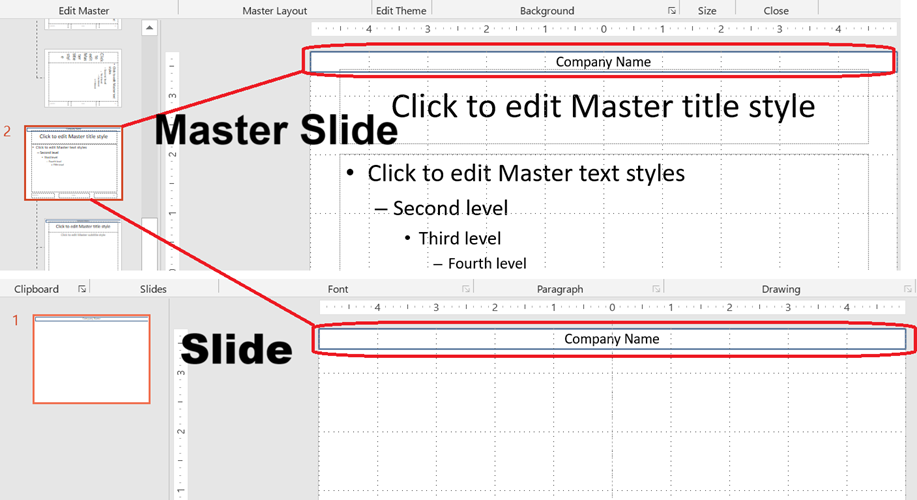
Access a Master Slide
You can access master slides through the presentation’s master collection. This example retrieves the first master slide and changes its background type.
import jpype
import asposeslides

if not jpype.isJVMStarted():
    jpype.startJVM()

from asposeslides.api import BackgroundType, Presentation

presentation = Presentation()
try:
    first_master_slide = presentation.getMasters().get_Item(0)
    first_master_slide.getBackground().setType(BackgroundType.OwnBackground)
finally:
    presentation.dispose()
Remove a Master Slide
A master slide can be removed by index or by reference after it is no longer used. This example assigns a cloned master slide to the presentation and then removes the original master by index.
import jpype
import asposeslides

if not jpype.isJVMStarted():
    jpype.startJVM()

from asposeslides.api import Presentation

presentation = Presentation()
try:
    default_master_slide = presentation.getMasters().get_Item(0)
    new_master_slide = presentation.getMasters().addClone(default_master_slide)

    layout_slide = presentation.getLayoutSlides().get_Item(0)
    layout_slide.setMasterSlide(new_master_slide)
    presentation.getSlides().get_Item(0).setLayoutSlide(layout_slide)

    # Remove the unused original master slide by index.
    presentation.getMasters().removeAt(0)

    # Alternatively, remove an unused master slide by reference:
    # presentation.getMasters().remove(unused_master_slide)
finally:
    presentation.dispose()
Remove Unused Master Slides
Some presentations contain master slides that are not in use. Removing these slides can help reduce the file size.
import jpype
import asposeslides

if not jpype.isJVMStarted():
    jpype.startJVM()

from asposeslides.api import Presentation

presentation = Presentation()
try:
    default_master_slide = presentation.getMasters().get_Item(0)
    presentation.getMasters().addClone(default_master_slide)

    # Remove all unused master slides, including those marked as Preserve.
    presentation.getMasters().removeUnused(True)
finally:
    presentation.dispose()