
Slide
This article provides examples that demonstrate how to add, access, clone, reorder, and remove slides using Aspose.Slides for Python via Java.
Install the package as described in Installation. Each example imports asposeslides before starting the JVM, then imports the API after the JVM is running.
Add a Slide
To add a new slide, first select a layout. This example uses a blank layout to add an empty slide to the presentation.
import jpype
import asposeslides

if not jpype.isJVMStarted():
    jpype.startJVM()

from asposeslides.api import Presentation, SlideLayoutType

presentation = Presentation()
try:
    blank_layout = presentation.getLayoutSlides().getByType(SlideLayoutType.Blank)

    presentation.getSlides().addEmptySlide(blank_layout)
finally:
    presentation.dispose()
Note
Each slide layout is derived from a master slide, which defines the overall design and placeholder structure. The image below illustrates how master slides and their associated layouts are organized in PowerPoint.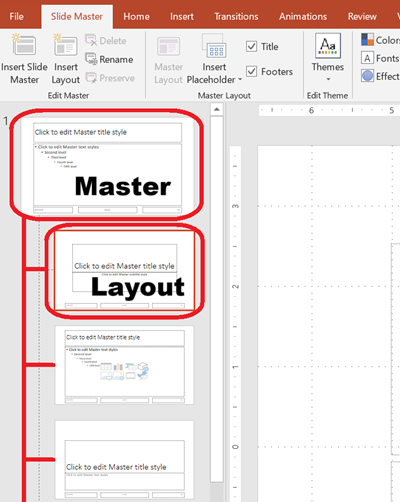
Access Slides by Index
Access slides using their zero-based index, or find a slide’s index based on a reference. This is useful for iterating through or modifying specific slides.
import jpype
import asposeslides

if not jpype.isJVMStarted():
    jpype.startJVM()

from asposeslides.api import Presentation, SlideLayoutType

presentation = Presentation()
try:
    # Add another empty slide.
    blank_layout = presentation.getLayoutSlides().getByType(SlideLayoutType.Blank)
    presentation.getSlides().addEmptySlide(blank_layout)

    # Access slides by index.
    first_slide = presentation.getSlides().get_Item(0)
    second_slide = presentation.getSlides().get_Item(1)

    # Get a slide's index from a reference, then access it by index.
    second_slide_index = presentation.getSlides().indexOf(second_slide)
    second_slide_by_index = presentation.getSlides().get_Item(second_slide_index)
finally:
    presentation.dispose()
Clone a Slide
Clone an existing slide. The cloned slide is automatically added to the end of the slide collection.
import jpype
import asposeslides

if not jpype.isJVMStarted():
    jpype.startJVM()

from asposeslides.api import Presentation

presentation = Presentation()
try:
    first_slide = presentation.getSlides().get_Item(0)

    cloned_slide = presentation.getSlides().addClone(first_slide)

    cloned_slide_index = presentation.getSlides().indexOf(cloned_slide)
finally:
    presentation.dispose()
Reorder Slides
Change the order of slides by moving one to a new index. This example moves a cloned slide to the first position.
import jpype
import asposeslides

if not jpype.isJVMStarted():
    jpype.startJVM()

from asposeslides.api import Presentation

presentation = Presentation()
try:
    first_slide = presentation.getSlides().get_Item(0)

    cloned_slide = presentation.getSlides().addClone(first_slide)

    presentation.getSlides().reorder(0, cloned_slide)
finally:
    presentation.dispose()
Remove a Slide
Remove a slide by passing its reference to the slide collection. This example adds a second slide and then removes the original, leaving only the new one.
import jpype
import asposeslides

if not jpype.isJVMStarted():
    jpype.startJVM()

from asposeslides.api import Presentation, SlideLayoutType

presentation = Presentation()
try:
    blank_layout = presentation.getLayoutSlides().getByType(SlideLayoutType.Blank)
    second_slide = presentation.getSlides().addEmptySlide(blank_layout)

    first_slide = presentation.getSlides().get_Item(0)
    presentation.getSlides().remove(first_slide)
finally:
    presentation.dispose()