
使用 PHP 管理演示文稿中的图像变换效果
概述
Aspose.Slides 将图片调整表示为图像变换操作的有序集合。对于图片框,首先获取帧的 Picture 并访问 Picture::getImageTransform。返回的 ImageTransformOperationCollection 允许在不重写原始图像字节的情况下追加、枚举、检查、移除和清除效果。
本文演示了亮度和对比度、颜色变换、模糊、透明度、有序效果链、有效值、移除以及 PPTX 循环验证的完整工作流。
了解效果所有权与图像复用
图像资源与显示它的图片是不同的对象:
- PPImage 存储或引用演示文稿拥有的源图像数据。
- Picture 属于图片填充,并引用图像资源,同时存储图像变换集合。
- PictureFrame 是拥有相应图片填充、几何、裁剪设置和其他框级格式的幻灯片形状。
因此,图像变换操作不会修改 PPImage 中的字节。当同一个 PPImage 多次传递给 ShapeCollection::addPictureFrame 时,每个新图片框都会获得自己的 Picture 和自己的变换集合。对一个框应用灰度不会使其他框变为灰度,即使它们复用了相同的嵌入图像资源。
相同的 Picture::getImageTransform 模型也用于其他图片填充,例如形状或幻灯片背景。下面的示例聚焦于图片框。
使用有效的参数范围和单位
演示的方法使用以下语义范围和单位。即使某个库版本不会立即拒绝所有超出范围的值,也请保持这些范围内的数值;目标演示文稿格式可能在保存或 PowerPoint 打开文件时规范化、忽略或拒绝无效数据。
| 操作 | 参数 | 有效范围和单位 |
|---|---|---|
| addLuminanceEffect | brightness, contrast |
-100 到 100,百分比;0 表示保持组件不变。 |
| addGrayScaleEffect | 无 | 无数值参数。Alpha 保持不变。 |
| addDuotoneEffect | color1, color2 |
用于暗像素和亮像素的两种颜色。java.awt.Color 的 RGB 和 alpha 通道取值 0 到 255。 |
| addTintEffect | hue, amount |
色相 0(含)至 360(不含),单位为度;幅度 -100 到 100,百分比。 |
| addHSLEffect | hue, saturation, luminance |
色相 0(含)至 360(不含),单位为度;饱和度和亮度 -100 到 100,百分比。 |
| addColorReplaceEffect | color |
替换颜色的通道值为 0 到 255。现有的 alpha 值保持不变。 |
| addBlurEffect | radius, grow |
半径为非负值,单位为点;grow 为布尔值,控制模糊内容是否可超出原始边界。 |
| addAlphaModulateFixedEffect | amount |
非负百分比。使用 0 到 100 表示普通不透明度缩放:0 完全透明,100 保留现有 alpha。 |
| addAlphaReplaceEffect | alpha |
0 到 100,百分比不透明度。 |
| addAlphaBiLevelEffect | threshold |
0 到 100,百分比 alpha 阈值。低于阈值的变为透明,等于或高于阈值的变为不透明。 |
对于固定的 alpha 调制,透明度和不透明度是互补的。例如,35% 透明度对应 alpha 调制量为 65%。
应用亮度和对比度
ImageTransformOperationCollection::addLuminanceEffect 返回一个 Luminance 操作。其标量设置在创建操作时提供。Luminance::getEffective 返回计算后的只读值,可用于检查或记录。
以下示例将亮度提升 15%,对比度提升 20%,然后在不修改嵌入图像的情况下渲染预览:
use aspose\slides\ImageFormat;
use aspose\slides\Images;
use aspose\slides\Presentation;
use aspose\slides\ShapeType;

$presentation = new Presentation();
try {
    $slide = $presentation->getSlides()->get_Item(0);

    $sourceImage = Images::fromFile("photo.png");
    try {
        $image = $presentation->getImages()->addImage($sourceImage);
    } finally {
        if (!java_is_null($sourceImage)) {
            $sourceImage->dispose();
        }
    }

    $pictureFrame = $slide->getShapes()->addPictureFrame(ShapeType::Rectangle, 50, 50, 400, 260, $image);
    $imageTransform = $pictureFrame->getPictureFormat()->getPicture()->getImageTransform();
    $luminance = $imageTransform->addLuminanceEffect(15, 20);

    $effectiveValues = $luminance->getEffective();
    echo "Brightness: " . java_values($effectiveValues->getBrightness()) . "%" . PHP_EOL;
    echo "Contrast: " . java_values($effectiveValues->getContrast()) . "%" . PHP_EOL;

    $preview = $slide->getImage();
    try {
        $preview->save("brightness-contrast-preview.png", ImageFormat::Png);
    } finally {
        if (!java_is_null($preview)) {
            $preview->dispose();
        }
    }
} finally {
    $presentation->dispose();
}
Luminance 是标准 DrawingML 的亮度和对比度效果。当这些设置必须在 PPTX 循环后保持可编辑时,请重新打开已保存的演示文稿并验证操作类型及其有效值。
应用颜色变换
颜色效果可以独立应用于复用同一图像资源的不同图片框。以下示例创建五个框并分别应用灰度、双调、色调、HSL 调整和颜色替换。
Duotone 包含两个可独立编辑的颜色参数:color1 映射暗像素,color2 映射亮像素。这使其成为一个设置比单一标量更复杂的效果示例。
use aspose\slides\Images;
use aspose\slides\Presentation;
use aspose\slides\SaveFormat;
use aspose\slides\ShapeType;

$presentation = new Presentation();
try {
    $slide = $presentation->getSlides()->get_Item(0);

    $sourceImage = Images::fromFile("photo.png");
    try {
        $image = $presentation->getImages()->addImage($sourceImage);
    } finally {
        if (!java_is_null($sourceImage)) {
            $sourceImage->dispose();
        }
    }

    $grayFrame = $slide->getShapes()->addPictureFrame(ShapeType::Rectangle, 20, 20, 180, 120, $image);
    $grayFrame->getPictureFormat()->getPicture()->getImageTransform()->addGrayScaleEffect();

    $duotoneFrame = $slide->getShapes()->addPictureFrame(ShapeType::Rectangle, 220, 20, 180, 120, $image);
    $duotone = $duotoneFrame->getPictureFormat()->getPicture()->getImageTransform()->addDuotoneEffect();
    $duotone->getColor1()->setColor(new Java("java.awt.Color", 0, 0, 128));
    $duotone->getColor2()->setColor(new Java("java.awt.Color", 255, 215, 0));

    $tintFrame = $slide->getShapes()->addPictureFrame(ShapeType::Rectangle, 420, 20, 180, 120, $image);
    $tintFrame->getPictureFormat()->getPicture()->getImageTransform()->addTintEffect(210, 35);

    $hslFrame = $slide->getShapes()->addPictureFrame(ShapeType::Rectangle, 120, 170, 180, 120, $image);
    $hslFrame->getPictureFormat()->getPicture()->getImageTransform()->addHSLEffect(30, 20, -10);

    $replacementFrame = $slide->getShapes()->addPictureFrame(ShapeType::Rectangle, 320, 170, 180, 120, $image);
    $colorReplacement = $replacementFrame->getPictureFormat()->getPicture()->getImageTransform()->addColorReplaceEffect();
    $colorReplacement->getColor()->setColor(new Java("java.awt.Color", 100, 149, 237));

    $presentation->save("color-transformations.pptx", SaveFormat::Pptx);
} finally {
    $presentation->dispose();
}
addColorReplaceEffect 将每个像素的颜色替换为固定颜色,同时保留 alpha。它不同于 addColorChangeEffect,后者将一种源颜色映射为另一种,并公开源颜色和目标颜色的格式。
应用亮度阈值
亮度阈值可以让扫描页面上的淡弱标记更易于与背景区分。addGrayScaleEffect 保留中间灰度。addBiLevelEffect 将亮度映射为黑或白,而 addAlphaBiLevelEffect 对不透明度应用阈值。
亮度阈值范围为 0% 到 100%,含两端。低于阈值的像素变为黑色。等于或高于阈值的像素变为白色。提高阈值会使更多色调变为黑色,因为更多像素落在阈值以下。
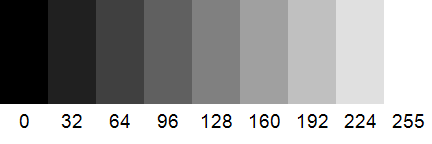
下载 grayscale-swatches.png 到存放 PHP 脚本的目录。每个标签给出原始灰度水平(0~255)。示例将原始图放在两份副本旁边,并将每份副本的阈值保存到演示文稿中。
use aspose\slides\Images;
use aspose\slides\Presentation;
use aspose\slides\SaveFormat;
use aspose\slides\ShapeType;
use aspose\slides\SlideSizeScaleType;

$presentation = new Presentation();
try {
    $presentation->getSlideSize()->setSize(720, 150, SlideSizeScaleType::DoNotScale);
    $shapes = $presentation->getSlides()->get_Item(0)->getShapes();

    $sourceImage = Images::fromFile(__DIR__ . "/grayscale-swatches.png");
    try {
        $image = $presentation->getImages()->addImage($sourceImage);
    } finally {
        $sourceImage->dispose();
    }

    $captions = ["Original", "Threshold 20%", "Threshold 60%"];
    $frames = [];
    foreach ($captions as $index => $caption) {
        $x = 12 + 240 * $index;
        $label = $shapes->addAutoShape(ShapeType::Rectangle, $x, 12, 216, 36);
        $label->getTextFrame()->setText($caption);
        $frames[] = $shapes->addPictureFrame(ShapeType::Rectangle, $x, 60, 216, 72, $image);
    }

    $frames[1]->getPictureFormat()->getPicture()->getImageTransform()->addBiLevelEffect(20);
    $frames[2]->getPictureFormat()->getPicture()->getImageTransform()->addBiLevelEffect(60);

    $presentation->save(__DIR__ . "/luminance-threshold.pptx", SaveFormat::Pptx);
} finally {
    $presentation->dispose();
}
在 PowerPoint 中打开输出的演示文稿,比较这三个框。标记为 96 的色板约为 38% 亮度(96/255)。在 20% 阈值时变为白色,在 60% 阈值时变为黑色。

添加模糊、透明度和 Alpha 效果
addBlurEffect 影响所有颜色通道,包括 alpha。当模糊边缘可能超出原图片边界时,将 grow 设置为 true。
要实现统一透明度,请使用 addAlphaModulateFixedEffect。它会乘以每个现有的 alpha 值,从而保持部分透明像素的相对差异。addAlphaReplaceEffect 则为所有像素分配同一 alpha 值。addAlphaBiLevelEffect 根据阈值将 alpha 转换为两个层级。
use aspose\slides\Images;
use aspose\slides\Presentation;
use aspose\slides\SaveFormat;
use aspose\slides\ShapeType;

$presentation = new Presentation();
try {
    $slide = $presentation->getSlides()->get_Item(0);

    $sourceImage = Images::fromFile("photo.png");
    try {
        $image = $presentation->getImages()->addImage($sourceImage);
    } finally {
        if (!java_is_null($sourceImage)) {
            $sourceImage->dispose();
        }
    }

    $blurredFrame = $slide->getShapes()->addPictureFrame(ShapeType::Rectangle, 20, 20, 200, 140, $image);
    $blur = $blurredFrame->getPictureFormat()->getPicture()->getImageTransform()->addBlurEffect(4.5, true);
    $blur->setRadius(5);

    $transparentFrame = $slide->getShapes()->addPictureFrame(ShapeType::Rectangle, 240, 20, 200, 140, $image);
    $alphaModulate = $transparentFrame->getPictureFormat()->getPicture()->getImageTransform()->addAlphaModulateFixedEffect(65);
    $alphaModulate->setAmount(60);

    $uniformAlphaFrame = $slide->getShapes()->addPictureFrame(ShapeType::Rectangle, 20, 180, 200, 140, $image);
    $uniformAlphaFrame->getPictureFormat()->getPicture()->getImageTransform()->addAlphaReplaceEffect(55);

    $binaryAlphaFrame = $slide->getShapes()->addPictureFrame(ShapeType::Rectangle, 240, 180, 200, 140, $image);
    $alphaBiLevel = $binaryAlphaFrame->getPictureFormat()->getPicture()->getImageTransform()->addAlphaBiLevelEffect(50);
    $alphaBiLevel->setThreshold(45);
    $binaryAlphaFrame->getPictureFormat()->getPicture()->getImageTransform()->addAlphaInverseEffect();

    $presentation->save("blur-and-alpha-effects.pptx", SaveFormat::Pptx);
} finally {
    $presentation->dispose();
}
其他无参数的 alpha 操作包括 addAlphaCeilingEffect,它让所有非零 alpha 变为完全不透明;addAlphaFloorEffect,它让所有低于 100% 的 alpha 变为完全透明;以及 addAlphaInverseEffect,它将 alpha 变为 100% - alpha。
构建有序效果链
每个 add...Effect 方法都会将新操作追加到集合末尾。渲染器将集合视为有序管道:操作 0 的输出成为操作 1 的输入,依此类推。因此,以不同顺序排列相同操作可能产生不同图像。
例如,先灰度后色调会先去除色彩信息再重新着色亮度结果;先色调后灰度则会再次去除色调。类似地,alpha 替换可以覆盖先前操作计算的 alpha 值,而 alpha 调制则保留它们的相对差异。
以下示例构建四操作链,保存为 PPTX,重新打开演示文稿,检查操作类型及其顺序,并渲染重新打开的结果:
use aspose\slides\ImageFormat;
use aspose\slides\Images;
use aspose\slides\Presentation;
use aspose\slides\SaveFormat;
use aspose\slides\ShapeType;

$presentation = new Presentation();
try {
    $slide = $presentation->getSlides()->get_Item(0);

    $sourceImage = Images::fromFile("photo.png");
    try {
        $image = $presentation->getImages()->addImage($sourceImage);
    } finally {
        if (!java_is_null($sourceImage)) {
            $sourceImage->dispose();
        }
    }

    $pictureFrame = $slide->getShapes()->addPictureFrame(ShapeType::Rectangle, 50, 50, 400, 260, $image);
    $imageTransform = $pictureFrame->getPictureFormat()->getPicture()->getImageTransform();
    $imageTransform->addGrayScaleEffect();
    $imageTransform->addTintEffect(220, 25);
    $imageTransform->addBlurEffect(2.5, false);
    $imageTransform->addAlphaModulateFixedEffect(80);

    $presentation->save("image-transform-chain.pptx", SaveFormat::Pptx);
} finally {
    $presentation->dispose();
}

$reopenedPresentation = new Presentation("image-transform-chain.pptx");
try {
    $reopenedShape = $reopenedPresentation->getSlides()->get_Item(0)->getShapes()->get_Item(0);

    if (java_instanceof($reopenedShape, new JavaClass("com.aspose.slides.PictureFrame"))) {
        $reopenedTransform = $reopenedShape->getPictureFormat()->getPicture()->getImageTransform();
        $orderIsPreserved = java_values($reopenedTransform->size()) === 4 &&
            java_instanceof($reopenedTransform->get_Item(0), new JavaClass("com.aspose.slides.GrayScale")) &&
            java_instanceof($reopenedTransform->get_Item(1), new JavaClass("com.aspose.slides.Tint")) &&
            java_instanceof($reopenedTransform->get_Item(2), new JavaClass("com.aspose.slides.Blur")) &&
            java_instanceof($reopenedTransform->get_Item(3), new JavaClass("com.aspose.slides.AlphaModulateFixed"));
        echo $orderIsPreserved ? "The effect chain was preserved." : "The effect chain changed during the round trip.";

        $renderedSlide = $reopenedPresentation->getSlides()->get_Item(0)->getImage();
        try {
            $renderedSlide->save("reopened-effect-chain.png", ImageFormat::Png);
        } finally {
            if (!java_is_null($renderedSlide)) {
                $renderedSlide->dispose();
            }
        }
    } else {
        echo "The reopened shape is not a picture frame.";
    }
} finally {
    $reopenedPresentation->dispose();
}
集合并未强加兼容性矩阵来限制颜色、alpha 和模糊操作必须分开链式使用。它们可以组合,但组合并非总是有用。固定颜色替换会去除先前颜色效果产生的 RGB 变化;在双调后使用灰度会去除两种选定颜色;alpha ceiling、floor、replacement 或 bi‑level 操作会丢弃之前创建的 alpha 细节。请根据所需的像素处理顺序构建链,而不是将其视为无序的格式标志。
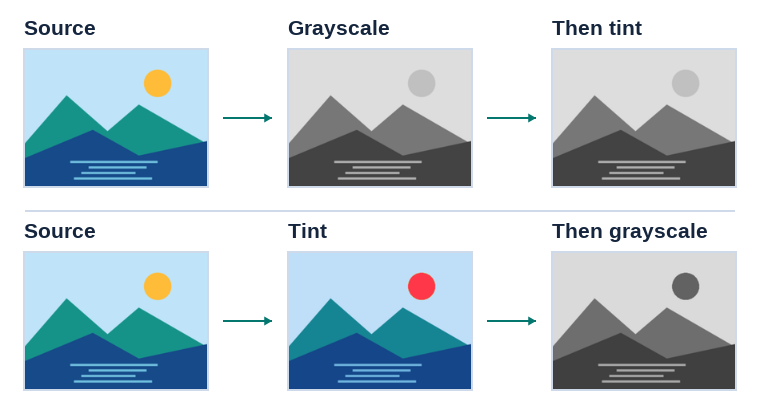
在此 Aspose.Slides for .NET 26.11 渲染示例中,220° 色调在 25% 时保持灰度图像不变。先应用相同色调再灰度会产生不同色调。
检查可编辑和有效值
可编辑的操作是存储在 Picture::getImageTransform 中的对象。根据具体效果,它可能直接公开可写成员。例如,Blur 公开可写的 radius 和 grow,AlphaModulateFixed 公开可写的 amount,而 AlphaBiLevel 公开可写的 threshold。像 Duotone 这样的颜色效果则公开可变的 ColorFormat 对象。
某些操作,如 Luminance、HSL、Tint 和 AlphaReplace,不公开其创建标量为可写属性。要更改这些设置,需要移除该操作并在所需位置添加替代操作。
getEffective() 返回的有效数据是计算后的只读值。它对解析主题相关颜色以及读取渲染器使用的标准化值很有帮助,但不是另一套可编辑界面。以下示例枚举链并在相应 API 提供的情况下检查有效值:
use aspose\slides\Presentation;

$presentation = new Presentation("image-transform-chain.pptx");
try {
    $slide = $presentation->getSlides()->get_Item(0);
    $pictureFrame = null;
    $shapeCount = java_values($slide->getShapes()->size());

    for ($index = 0; $index < $shapeCount; $index++) {
        $shape = $slide->getShapes()->get_Item($index);
        if (java_instanceof($shape, new JavaClass("com.aspose.slides.PictureFrame"))) {
            $pictureFrame = $shape;
            break;
        }
    }

    if ($pictureFrame !== null) {
        $imageTransform = $pictureFrame->getPictureFormat()->getPicture()->getImageTransform();
        $effectCount = java_values($imageTransform->size());

        for ($index = 0; $index < $effectCount; $index++) {
            $operation = $imageTransform->get_Item($index);
            echo $index . ": " . java_values($operation->getClass()->getSimpleName()) . PHP_EOL;

            if (java_instanceof($operation, new JavaClass("com.aspose.slides.Luminance"))) {
                $data = $operation->getEffective();
                echo "  Brightness: " . java_values($data->getBrightness()) . PHP_EOL;
                echo "  Contrast: " . java_values($data->getContrast()) . PHP_EOL;
            } elseif (java_instanceof($operation, new JavaClass("com.aspose.slides.Duotone"))) {
                $data = $operation->getEffective();
                echo "  Dark color: " . java_values($data->getColor1()->toString()) . PHP_EOL;
                echo "  Light color: " . java_values($data->getColor2()->toString()) . PHP_EOL;
            } elseif (java_instanceof($operation, new JavaClass("com.aspose.slides.ColorReplace"))) {
                $data = $operation->getEffective();
                echo "  Replacement color: " . java_values($data->getColor()->toString()) . PHP_EOL;
            } elseif (java_instanceof($operation, new JavaClass("com.aspose.slides.HSL"))) {
                $data = $operation->getEffective();
                echo "  HSL: " . java_values($data->getHue()) . ", " . java_values($data->getSaturation()) . ", " . java_values($data->getLuminance()) . PHP_EOL;
            } elseif (java_instanceof($operation, new JavaClass("com.aspose.slides.Tint"))) {
                $data = $operation->getEffective();
                echo "  Tint: " . java_values($data->getHue()) . ", " . java_values($data->getAmount()) . PHP_EOL;
            } elseif (java_instanceof($operation, new JavaClass("com.aspose.slides.Blur"))) {
                $data = $operation->getEffective();
                echo "  Blur radius: " . java_values($data->getRadius()) . " pt" . PHP_EOL;
            } elseif (java_instanceof($operation, new JavaClass("com.aspose.slides.AlphaModulateFixed"))) {
                $data = $operation->getEffective();
                echo "  Alpha amount: " . java_values($data->getAmount()) . "%" . PHP_EOL;
            } elseif (java_instanceof($operation, new JavaClass("com.aspose.slides.AlphaReplace"))) {
                $data = $operation->getEffective();
                echo "  Replacement alpha: " . java_values($data->getAlpha()) . "%" . PHP_EOL;
            } elseif (java_instanceof($operation, new JavaClass("com.aspose.slides.AlphaBiLevel"))) {
                $data = $operation->getEffective();
                echo "  Alpha threshold: " . java_values($data->getThreshold()) . "%" . PHP_EOL;
            }
        }
    }
} finally {
    $presentation->dispose();
}
如灰度、alpha ceiling 和 alpha inverse 等无参数效果仍然拥有有效数据对象,只是没有可打印的标量设置。它们在集合中的存在和位置才是重要信息。
移除或清除图像变换
使用 ImageTransformOperationCollection::removeAt 按索引移除单个操作。由于移除后索引会变化,先搜索目标再在枚举后移除。使用 ImageTransformOperationCollection::clear 移除整个链。
use aspose\slides\Presentation;
use aspose\slides\SaveFormat;

$presentation = new Presentation("image-transform-chain.pptx");
try {
    $slide = $presentation->getSlides()->get_Item(0);
    $pictureFrame = null;
    $shapeCount = java_values($slide->getShapes()->size());

    for ($index = 0; $index < $shapeCount; $index++) {
        $shape = $slide->getShapes()->get_Item($index);
        if (java_instanceof($shape, new JavaClass("com.aspose.slides.PictureFrame"))) {
            $pictureFrame = $shape;
            break;
        }
    }

    if ($pictureFrame !== null) {
        $imageTransform = $pictureFrame->getPictureFormat()->getPicture()->getImageTransform();
        $effectCount = java_values($imageTransform->size());
        $blurIndex = -1;

        for ($index = 0; $index < $effectCount; $index++) {
            if (java_instanceof($imageTransform->get_Item($index), new JavaClass("com.aspose.slides.Blur"))) {
                $blurIndex = $index;
                break;
            }
        }

        if ($blurIndex >= 0) {
            $imageTransform->removeAt($blurIndex);
            echo "The blur operation was removed." . PHP_EOL;
        }

        $imageTransform->clear();
        echo "Remaining operations: " . java_values($imageTransform->size()) . PHP_EOL;
        $presentation->save("image-transforms-cleared.pptx", SaveFormat::Pptx);
    }
} finally {
    $presentation->dispose();
}
移除或清除变换仅更改图片的格式化,不会删除、重新压缩或以其他方式修改复用的 PPImage 资源。
考虑演示文稿格式和导出目标
图像变换源自 DrawingML,因此 PPTX 是效果链的首选可编辑格式。即使使用 PPTX,也并非所有操作在可移植性上完全相同:
- 标准 DrawingML 操作(如亮度、灰度、双调、色调、HSL、模糊和常见 alpha 操作)最有可能在 PPTX 循环中保留。始终重新打开生成的文件并检查集合,以确保满足保留要求。
- 二进制 PPT 格式早于完整的 DrawingML 效果模型。保存为 PPT 可能会省略不支持的操作、将链缩减为受支持的子集或近似外观。不要将 PPT 用作复杂可编辑链的验证格式。
- 渲染为 PNG、JPEG、TIFF、PDF、SVG、HTML 或其他可视输出时,会将支持的链应用到渲染后的外观。这些输出不包含可编辑的
ImageTransformOperationCollection;光栅格式会将结果平铺为像素,文档或矢量导出则存储自己的渲染表示。 - 效果并不会使链接图像变为自包含。渲染链接图片仍然依赖于加载演示文稿时链接资源的可用性。
不同的演示文稿使用者在渲染边界情况时可能表现不同,尤其是当多个 alpha 或颜色量化操作组合使用时。对于关键输出,请使用生产环境中相同的 Aspose.Slides 版本同时测试可编辑循环和最终导出格式。
常见问题
图像变换效果会修改嵌入的图像数据吗?
不会。操作属于图片填充使用的 Picture。底层的 PPImage 字节保持不变。
复用相同图像的两个图片框会共享它们的效果吗?
不会。复用 PPImage 可以避免重复的图像数据,但每个图片框通常拥有独立的 Picture 和图像变换集合。
可以组合颜色、模糊和 alpha 效果吗?
可以。集合接受它们在同一有序链中。请考虑每个操作对前一个输出的影响,因为替换和阈值操作可能会丢弃先前的颜色或 alpha 细节。
为什么有效值是只读的?
有效数据代表渲染时使用的已计算值,包括已解析的颜色。请在变换集合中编辑具有可写成员的操作;否则移除并使用新创建参数添加替代操作。
应使用哪种格式来保留变换链?
使用 PPTX 并通过重新打开文件进行验证。旧版 PPT 无法完整表示 DrawingML 效果模型,渲染导出格式仅保留外观而非可编辑的变换操作。