
将 PowerPoint 幻灯片转换为 PNG(Python)
概述
本文说明如何使用 Aspose.Slides for Python via Java 将演示文稿幻灯片转换为 PNG 图像。您可以加载 PPT、PPTX 和 ODP 等格式的演示文稿,渲染每张幻灯片,并将其保存为单独的 PNG 图像。
下面的示例演示了默认比例渲染、增加比例、以像素指定输出尺寸以及选择渐变渲染样式。
将 PowerPoint 转换为 PNG
使用 Presentation 类加载演示文稿,并通过 Presentation.getSlides 集合访问其幻灯片。示例使用不带参数的 Slide.getImage 渲染每张幻灯片以创建缩略图。随后调用 IImage.save 并使用 ImageFormat.Png 将每个渲染的幻灯片保存为 PNG 图像。
import jpype
import asposeslides

if not jpype.isJVMStarted():
    jpype.startJVM()

from asposeslides.api import ImageFormat, Presentation

presentation = Presentation("presentation.pptx")
try:
    for index, slide in enumerate(presentation.getSlides()):
        image = slide.getImage()
        try:
            image.save(f"slide_{index}.png", ImageFormat.Png)
        finally:
            image.dispose()
finally:
    presentation.dispose()
Note
无参数的 Slide.getImage 重载以 0.2 的比例渲染。例如,尺寸为 720 × 540 点的幻灯片会生成 144 × 108 像素的缩略图。要控制输出尺寸,请使用带有比例因子的重载或下文所示的显式图像大小。将 PowerPoint 转换为 PNG(自定义尺寸)
向 Slide.getImage 传递水平和垂直比例因子以控制渲染尺寸。在本例中,两者均为 2,因此尺寸为 720 × 540 点的幻灯片会生成 1440 × 1080 像素的图像。相等的比例因子保持幻灯片的宽高比。每个渲染的图像均以 PNG 格式保存。
import jpype
import asposeslides

if not jpype.isJVMStarted():
    jpype.startJVM()

from asposeslides.api import ImageFormat, Presentation

presentation = Presentation("presentation.pptx")
try:
    scale_x = 2.0
    scale_y = scale_x

    for index, slide in enumerate(presentation.getSlides()):
        image = slide.getImage(scale_x, scale_y)
        try:
            image.save(f"slide_{index}.png", ImageFormat.Png)
        finally:
            image.dispose()
finally:
    presentation.dispose()
将 PowerPoint 转换为 PNG(自定义大小)
若要以像素指定输出尺寸,请向 Slide.getImage 传递尺寸而不是比例因子。此示例将每张幻灯片渲染为 960 × 720 像素,并以 PNG 格式保存结果。请选择与幻灯片宽高比匹配的尺寸,以免图像被拉伸。
import jpype
import asposeslides

if not jpype.isJVMStarted():
    jpype.startJVM()

from asposeslides.api import ImageFormat, Presentation
from java.awt import Dimension

presentation = Presentation("presentation.pptx")
try:
    image_size = Dimension(960, 720)

    for index, slide in enumerate(presentation.getSlides()):
        image = slide.getImage(image_size)
        try:
            image.save(f"slide_{index}.png", ImageFormat.Png)
        finally:
            image.dispose()
finally:
    presentation.dispose()
选择渐变渲染样式
假设某张幻灯片包含渐变填充,但导出的 PNG 中的过渡色比 PowerPoint 中显示的更浅或有所不同。您可以使用由 RenderingOptions 继承的 SaveOptions.setGradientStyle 方法来选择渐变的渲染方式。
下载 gradient-styles.pptx 并将其放置在应用程序的工作目录中。其第一张幻灯片包含两个线性渐变:顶部从青色到橙色,底部从蓝色到黄色。每个渐变在 0% 和 100% 处都有两个停止点。
以下示例加载此演示文稿,并使用 Slide.getImage 以两种模式渲染相同的第一张幻灯片。
import jpype
import asposeslides

if not jpype.isJVMStarted():
    jpype.startJVM()

from asposeslides.api import GradientStyle, ImageFormat, Presentation, RenderingOptions

presentation = Presentation("gradient-styles.pptx")
try:
    slide = presentation.getSlides().get_Item(0)

    gradient_styles = (GradientStyle.Default, GradientStyle.PowerPointUI)
    for style in gradient_styles:
        options = RenderingOptions()
        options.setGradientStyle(style)

        style_name = "Default" if style == GradientStyle.Default else "PowerPointUI"
        image = slide.getImage(options, 1.0, 1.0)
        try:
            image.save(f"gradient-{style_name}.png", ImageFormat.Png)
        finally:
            image.dispose()
finally:
    presentation.dispose()
| Default | PowerPointUI |
|---|---|
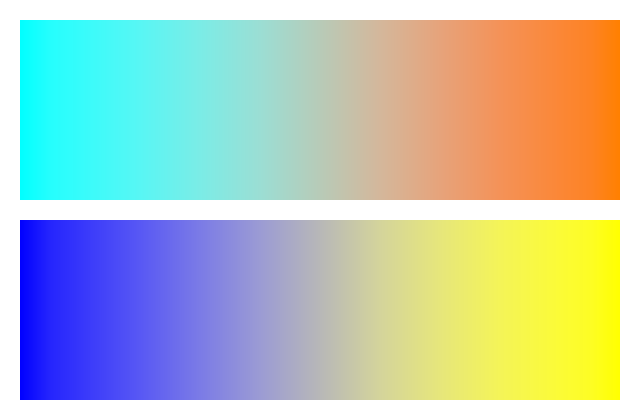 |
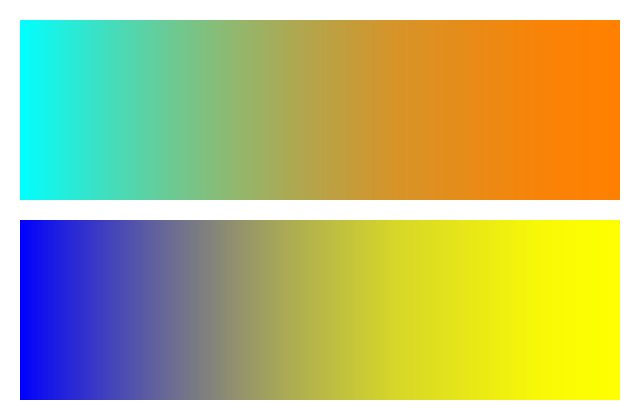 |
在本示例中,Default 产生更浅的中间颜色,而 PowerPointUI 产生更深的中间颜色。差异取决于渐变中的颜色和停止点。
当标准的 Aspose.Slides 输出满足需求时请选择 Default。如果您的首要任务是与 PowerPoint 的外观保持一致,请尝试 PowerPointUI。将两种输出与预期结果进行比较;没有哪种模式是普遍优先的。
常见问题
如何导出特定形状(例如图表或图片),而不是整张幻灯片?
Aspose.Slides 支持 为单个形状生成缩略图,允许您将形状渲染为 PNG 图像。
服务器上是否支持并行转换?
是的。为每个线程或进程使用单独的演示文稿实例;不要在多个线程之间共享同一实例。
导出 PNG 时评估版有哪些限制?
评估模式会在输出图像上添加水印,并在应用许可证之前实施 其他限制。