

Analyzing your prompt, please hold on...
An error occurred while retrieving the results. Please refresh the page and try again.
The SVG <style> element is used to define internal styles within an SVG document. It allows developers to apply CSS rules directly to SVG elements, providing a convenient way to control the appearance of SVG graphics.
Aspose.SVG Builder API offers the
SVGStyleElementBuilder class, which is an element builder for constructing an SVG <style> element. This class facilitates the creation and configuration of an SVG <style> element with CSS rules.
This article is about the RuleBuilder class, which is a builder class for constructing CSS style rules. This class is used to dynamically build a string of CSS styles by setting various attributes and their values.
The Rule Builder enables developers to apply CSS rules for SVG documents programmatically within C# code, offering flexibility and control over the visual appearance of SVG elements. This example shows how to create an SVG <style> element, add a CSS rule @font-face to it, and use the
AddRule() method to define font styles for text elements within an SVG document:
1using Aspose.Svg.Builder;
2using System.Drawing;
3using System.IO; 1// Configure an SVG document's style with external font-face rules in C# using Rule Builder
2
3// Initialize an SVG document
4using (SVGDocument document = new SVGDocument())
5{
6 // Create an <svg> element and use Builder API to add other rules and elements to it
7 SVGSVGElement svg = new SVGSVGElementBuilder()
8
9 .AddDefs(def => def
10 .AddStyle(st => st
11 .Type("text/css")
12 .AddRule("@font-face", r => r
13 .FontFamily("VeinlineRegular")
14 .Attribute("src", "url(https://assets.ithillel.ua/wiki/VeinlineRegular.ttf)")
15 )
16 .AddRule("text", t => t
17 .FontFamily("VeinlineRegular")
18 .FontSize(30, LengthType.Pt)
19 )
20 )
21 )
22 .AddText(t => t
23 .X(20).Y(60).Fill(Color.DarkRed).FontWeight(FontWeight.Bold)
24 .AddContent("Configure SVG Style")
25 )
26 .AddText(t => t
27 .X(20).Y(150)
28 .AddContent("Set your SVG style with Rule Builder!")
29 )
30 .Build(document.FirstChild as SVGSVGElement);
31
32 // Save the SVG document
33 document.Save(Path.Combine(OutputDir, "font-face.svg"));
34}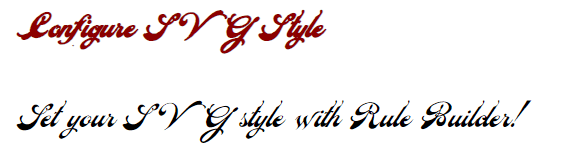
The @font-face CSS rule allows you to specify fonts for displaying text on web pages that can be downloaded either from a remote server or from the user’s computer. The rule defines a custom font family name and specifies the source URL of the font file.
font-family attribute for an SVG element. It specifies the font name that will be used to set font properties.RuleBuilder class sets a scr attribute for the <style> element with the source URL of the font file.In the example above, the @font-face rule defines a custom font family named "VeinlineRegular". This rule ensures that the font is loaded and available for use within the SVG document.
The
AddRule() method is part of the Rule Builder, which allows you to create CSS rules in SVG documents. It takes two parameters: the name of the CSS selector and a lambda expression defining the properties of the style using RuleBuilder.
In the C# example above, two rules are added:
SVG Builder API introduces syntax sugar to further refine the process of SVG creation and manipulation. This includes nested builders for various SVG elements, providing a more intuitive and efficient way to define complex SVG structures. A “builder within a builder” pattern involves the use of multiple builder classes, where one builder is nested within another to facilitate the construction of complex objects or structures.
The following code snippet demonstrates how to use RuleBuilder, which is an example of a builder within a builder, to create and style SVG graphics programmatically:
1using Aspose.Svg.Builder;
2using System.Drawing;
3using System.IO; 1// Create SVG with styled circle and text elements using C# Rule Builder API and fluent syntax
2
3// Initialize an SVG document
4using (SVGDocument document = new SVGDocument())
5{
6 // Create an <svg> element and use Builder API to add other rules and elements to it
7 SVGSVGElement svg = new SVGSVGElementBuilder()
8
9 .AddStyle(st => st
10 .AddRule("circle", r => r
11 .Fill(paint: Paint.None)
12 .Stroke(color: Color.DarkRed)
13 .StrokeWidth(60)
14 )
15 .AddRule("text", t => t
16 .Fill(color: Color.Red)
17 .Stroke(color: Color.Teal)
18 .StrokeWidth(1)
19 .FontFamily("Arial")
20 .FontSize(30, LengthType.Pt)
21 )
22 )
23 .AddG(g => g
24 .AddCircle(circle => circle.Cx(100).Cy(130).R(60).StrokeDashArray(2, 14))
25 .AddText("Rule Builder", x: 230, y: 140)
26 )
27 .Build(document.FirstChild as SVGSVGElement);
28
29 // Save the SVG document
30 document.Save(Path.Combine(OutputDir, "rule-builder.svg"));
31}Aspose.SVG for .NET provides a Rule Builder feature that allows developers to programmatically define CSS rules for SVG elements using the SVG Builder API.
RuleBuilder provides flexibility and control over the visual appearance of SVG elements.RuleBuilder works as a builder within a builder, which makes it easier to create complex objects or structures and improves code readability, making it easier to understand.See also
stroke or fill attributes for various SVG shapes and elements when filling them with paint, pattern, or gradient.
Analyzing your prompt, please hold on...
An error occurred while retrieving the results. Please refresh the page and try again.