

Analyzing your prompt, please hold on...
An error occurred while retrieving the results. Please refresh the page and try again.
This page explains how to render shapes separately from the rest of the document.
When processing documents, a common task is to extract all images found in the document and export them to an external location. This task becomes simple with the Aspose.Words API, which already provides the functionality for extracting and saving image data. However, sometimes you may want to similarly extract other types of graphic content that is represented by a different type of drawing object, for example, a text box containing paragraphs, arrow shapes, and a small image. There is no straightforward way of rendering this object since it is a combination of individual content elements. You may also encounter a case when the contents have been grouped together into the object that looks like a single image.
Aspose.Words provides functionality for extracting this type of content in the same way you can extract a simple image from a shape as rendered content. This article describes how to utilize this functionality to render shapes independently of the document.
All the content in a document drawing layer is represented by the Shape or GroupShape node in the Aspose.Words Document Object Module (DOM). Such contents can be text boxes, images, AutoShapes, OLE objects, etc. Some fields are also imported as shapes, for example, the INCLUDEPICTURE field.
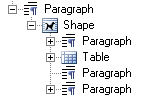
A simple image is represented by a Shape node of ShapeType::Image. This shape node has no child nodes but the image data contained within this shape node can be accessed by the Shape::get_ImageData() property. On the other hand, a shape can also be made up of many child nodes. For instance, a text box shape, which is represented by the ShapeType::TextBox property, can be made up of many nodes, such as Paragraph and Table. Most shapes can include the Paragraph and Table block-level nodes. These are the same nodes as those appearing in the main body. Shapes are always parts of some paragraph, either included directly inline or anchored to the Paragraph, but “floating” anywhere in the document page.
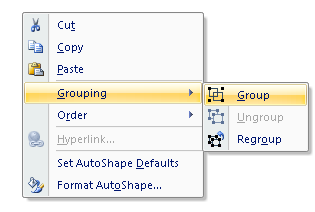
A document can also contain shapes which are grouped together. Grouping can be enabled in Microsoft Word by selecting multiple objects and clicking “Group” in the right‑click menu.
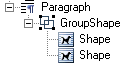
In Aspose.Words, these groups of shapes are represented by the GroupShape node. These can also be invoked in the same way to render the entire group to image.
The DOCX format can contain special types of images, such as diagrams or charts. These shapes are also represented through the Shape node in Aspose.Words, which also provides a similar method for rendering them as images. By design, a shape cannot contain another shape as a child, unless that shape is an image (ShapeType::Image). For example, Microsoft Word does not allow you to insert a text box inside another text box.
The shape types described above provide a special method to render the shapes through the ShapeRenderer class. An instance of the ShapeRenderer class is retrieved for a Shape or GroupShape through the GetShapeRenderer method or by passing the Shape to the constructor of the ShapeRenderer class. This class provides access to members, which allow rendering a shape to the following:
Graphics Object by using the RenderToSize and RenderToScale methodsThe Save method provides overloads that render a shape directly to a file or stream. Both overloads accept an instance of the ImageSaveOptions class, which allows to define options for rendering the shape. This works in the same way as the Document::Save method. Even though this parameter is required, you can pass a null value, specifying that there are no custom options.
The shape can be exported in any image format specified in the SaveFormat enumeration. For example, the image can be rendered as a raster image, such as JPEG by specifying the SaveFormat::Jpeg enumeration, or as a vector image, such as EMF by specifying the SaveFormat::Emf.
The code example below illustrates rendering a shape to an EMF image separately from document, and saving to disk:
The code example below illustrates rendering a shape to a JPEG image separately from document, and saving to a stream:
The ImageSaveOptions class allows you to specify a variety of options that control how the image is rendered. The functionality described above can be applied in the same manner to the GroupShape and Shape nodes.
Rendering directly to a Graphics object allows you to define your own settings and the state for the Graphics object. A common scenario involves rendering a shape directly into a Graphics object retrieved from a Windows Form or a Bitmap. When the Shape node is rendered, the settings will affect the shape appearance. For example, you can rotate or scale the shape by using the RotateTransform or ScaleTransform methods for the Graphics object.
The example below shows how to render a shape to a Graphics object separately from the document and apply rotation to the rendered image:
Similarly, to the RenderToSize method, the RenderToSize method inherited from the NodeRendererBase is useful for creating thumbnails of a document content. The shape size is specified through the constructor. The RenderToSize method accepts the Graphics object, the X and Y coordinates of the image position, and the size of the image (width and height) that will be drawn onto the Graphics object.
The Shape can be rendered to a certain scale using the ShapeRenderer::RenderToScale method inherited from the NodeRendererBase class. This is similar to the Document::RenderToScale method that accepts the same major parameters. The difference between these two methods is that with the ShapeRenderer::RenderToScale method, instead of a literal size, you choose a float value that scales the shape during its rendering. If the float value equals 1.0 causes the shape to be rendered at 100% of its original size. A float value of 0.5 will reduce the image size by half.
The Shape class represents objects in the drawing layer, such as an AutoShape, text box, freeform, OLE object, ActiveX control, or a picture. Using the Shape class, you can create or modify shapes in a Microsoft Word document. An important property of a shape is its ShapeType. Shapes of different types can have different capabilities in a Word document. For example, only image and OLE shapes can have images inside them while most of the shapes can have text only.
The following example shows how to render a Shape image to a JPEG image separately from the document and save it to the disk:
The ShapeRenderer class also provides functionality to retrieve the size of the shape in pixels through the GetSizeInPixels method. This method accepts two float (Single) parameters – the scale and DPI, which are used in calculation of the shape size when the shape is rendered. The method returns the Size object, which contains the width and height of the calculated size. This is useful when it is required to know the size of the rendered shape in advance, for example when creating a new Bitmap from the rendered output.
The below example shows how to create a new Bitmap and Graphics object with the width and height of the shape to be rendered:
When using the RenderToSize or RenderToScale methods, the rendered image size is also returned in the SizeF object. This can be assigned to a variable and used if necessary.
The get_SizeInPoints() property returns the Shape size measured in points (see ShapeRenderer. The result is a SizeF object containing the width and height.
RenderToSize and RenderToScale methods
Analyzing your prompt, please hold on...
An error occurred while retrieving the results. Please refresh the page and try again.