

Analyzing your prompt, please hold on...
An error occurred while retrieving the results. Please refresh the page and try again.
This page explains how to print documents programmatically or through print dialogs using Aspose.Words.
This article describes how to print a word processing document from an ASP.NET or Windows Service application using Aspose.Words and the XpsPrint API. It also demonstrates the methods of printing a document with Settings, Print preview, and Print progress dialogs, and explains how to reduce the time of the first call to print a document.
XpsPrint API
This section is intended for users who want to submit an XPS document to the unmanaged XpsPrint API from a .NET application using Aspose.Words.
When developing a .NET application that produces some printed output, you can typically use classes provided in the System.Drawing.Printing namespace, or Windows Presentation Foundation (WPF) classes. However, if the application is an ASP.NET or Windows Service application, the options for printing are limited, because Microsoft discourages using this approach. The .NET Framework Printing classes are not supported by services application. This includes ASP pages, which generally run in the context of the server service.
The classes within the System.Drawing.Printing namespace are not supported for use within a Windows service or an ASP.NET application or service, and attempting their use may produce decreased service performance, run-time exceptions, and other issues. The use of WPF to build Windows services is likewise not supported. Since WPF is a presentation technology, the Windows service requires appropriate permissions to perform visual operations involving user interaction. If the Windows service does not have such permissions, there may be unexpected results.
The Aspose.Words Document object provides a family of Print methods to print documents. These methods use the .NET printing classes defined in the System.Drawing.Printing namespace. There are many Aspose.Words customers who successfully utilize them for printing in their server-side applications. Nevertheless, this article demonstrates an alternative method for printing that is compliant with Microsoft’s recommendations.
The proper way to print documents according to Microsoft is by using the unmanaged XpsPrint API. This API is available on Windows 7, Windows Server 2008 R2, and on Windows Vista provided the Platform Update for Windows Vista is installed.
Since Aspose.Words can easily convert any document to XPS, you only need to write the code that passes an XPS document to the XpsPrint API. The only problem is that the XpsPrint API is unmanaged and requires some knowledge of the Platform Invoke technology.
To print a document, Aspose.Words provides an XpsPrintHelper class contains a simple Print method, where you just need to specify the following parameters (see more details in the article Print Document via XPS API):
Upon encountering any problems submitting or printing the document, the method will throw an exception.
The code example below shows how to print a document using the XpsPrintHelper class:
When you run the project, it prints a sample document on the specified printer and opens a console window to display print results. When the print job completes or errors out, the system will display a success message or text of the thrown exception.
You can also set some print settings using the PageSetup class. For example, in Microsoft Word, printer trays are defined for each section and are printer-specific. Therefore, you can programmatically change these values for each section via the FirstPageTray and OtherPagesTray properties.
Print method.
There are two overloads of the XpsPrintHelper.Print method. The first overload takes a Document object and saves it into a MemoryStream in the XPS format. The second overload accepts a Stream object. The stream must contain a document in the XPS format.
You can download the examples of method overloading from Aspose.Words GitHub.
You can download the sample file of this example from Aspose.Words GitHub.
When working with documents, it is often required to print them to a selected printer. It is helpful to utilize a print preview dialog to visually inspect how the printed document will appear and choose relevant print options.
The Aspose.Words has no built-in dialogs or forms but implements the AsposeWordsPrintDocument class, based on the .NET PrintDocument class. An instance of this class can be passed to the PrintPreviewDialog form to preview and print the document. Also, the PrintPreviewDialog class defines the output to transmit to a printer.
The following example shows how to use these classes to print a document from Aspose.Words via the Print preview and Settings dialogs:
To optimize the appearance of Print Preview dialog settings, specify properties of the PrintPreviewDialog class.
It is always beneficial to have more flexibility when printing documents. Using .NET and Aspose.Words you can easily fine-tune the printing operation to implement your custom logic by defining the way the document will appear on the printed page.
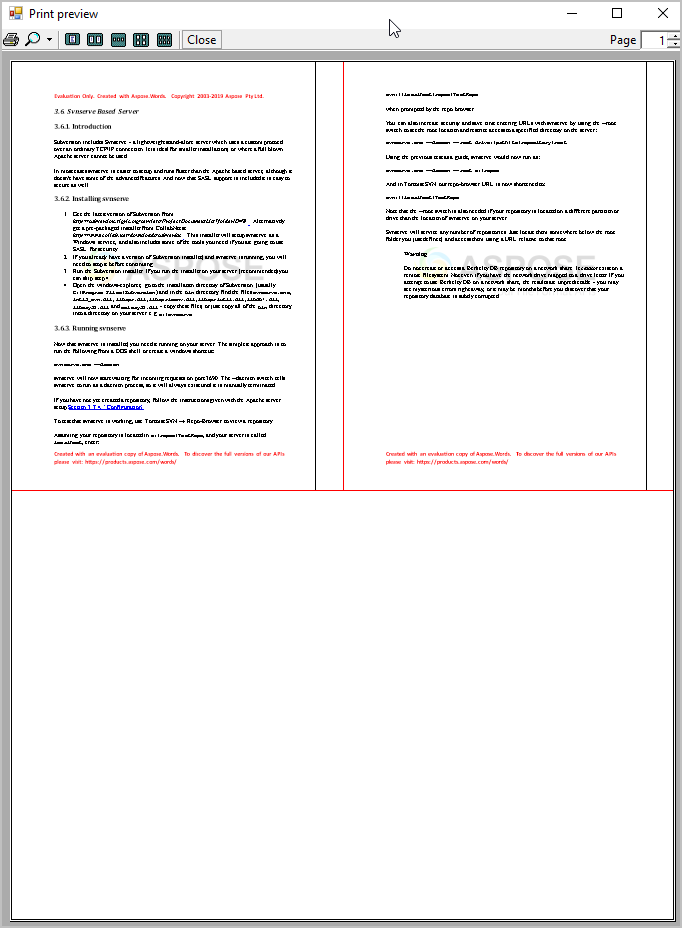
As in the previous section, Aspose.Words implements the MultipagePrintDocument class, which is based on the .NET PrintDocument class. This means that the existing .NET printing infrastructure can be used in such a way that the print and print preview dialogs would enable visualizing of the document before printing. The MultipagePrintDocument class provides the ability to print several pages on one sheet of paper.
The result of this code example is shown below:
The Printing Progress Dialog does not appear when printing a document via the Print method. However, this dialog appears during printing with another Print method. In this case, to prevent the Printing dialog from appearing, you should specify valid printer settings and a standard print controller in this method, as shown in the example below:
You can download the sample file of this example from Aspose.Words GitHub.
Aspose.Words reads and caches some fields of PrinterSettings to reduce printing time. You can achieve this by calling the CachePrinterSettings method. This method is called before the printing starts if it was not executed previously. Note that the total time of printing with and without calling of this method is almost the same. The purpose of using this method is to reduce the time of the first call of the Print method. The following code example shows how to use this method:

Analyzing your prompt, please hold on...
An error occurred while retrieving the results. Please refresh the page and try again.