

Analyzing your prompt, please hold on...
An error occurred while retrieving the results. Please refresh the page and try again.
Purpose Summary. What is this page about?
This page explains how to use Aspose.Words for Python via .NET to convert document fields to static text, including method usage, limitations for certain fields, and code examples.
Replacing fields is often required when you wish to save your document as a static copy. For example, when sending as an attachment in an e-mail. Converting fields such as DATE or TIME to static text will allow the document to display the same date as when it was sent. Also, in some situations, you may need to remove the conditional IF fields from your document and replace them with the most recent text result instead. For example, converting the result of the IF field to static text so it will no longer dynamically change its value when fields in the document are updated.
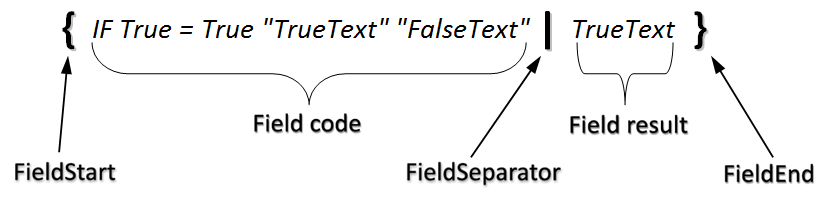
The diagram below shows how the IF field is stored in a document:
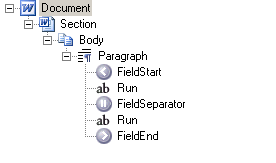
The structure can also be seen below in hierarchical form using the demo project “DocumentExplorer”.
Replacing a field with static text does not work properly for some fields in a header or footer.
For example, trying to convert the PAGE field in a header or footer to static text will result in the same value being displayed on all pages. This is because headers and footers are repeated across multiple pages, and when they remain as fields, they are handled especially so they display the correct result for each page.
However, in the header, the PAGE field translates well to static run of text. This run of text will be evaluated as if it were the last page in the section, which will cause any PAGE field in the header to display the last page over all pages.
The following code example shows how to replace the field with its most recent result:
Since the convert_fields_to_static_text method accepts two parameters – the CompositeNode properties and the FieldType enumeration, it is possible to pass any composite node to this method. This allows fields to be converted to static text only in specific parts of the document.
For example, you can pass a Document object and convert fields of the specified type from the entire document to static text, or you can pass a Body object of a section and only convert the fields found in that body.
The FieldType enumeration passed to the convert_fields_to_static_text method specifies what type of fields should be convert to static text. Any other field type found in the document will remain unchanged.
The following code example shows how to select fields of a specific type – targetFieldType in a specific node – compositeNode and then convert them to static text:
The following code example shows how to convert all IF fields in a document to static text:
The following code example shows how to convert all PAGE fields in a Body of a document to static text:
The following code example shows how to convert all IF fields in the last paragraph to static text:
Q: How can I replace all fields in a document with their current results?
A: Call the static method FieldsHelper.convert_fields_to_static_text() and pass the Document object as the composite node and FieldType.ANY as the field type. This recursively walks the document and replaces every field with its most recently calculated result.
Q: How can I convert only specific field types, such as IF fields?
A: Pass the target CompositeNode (e.g., Document, Body, or Section) and the desired FieldType enumeration value (e.g., FieldType.FIELD_IF) to FieldsHelper.convert_fields_to_static_text(). Only fields matching the specified type will be converted; all others remain unchanged.
Q: Fields span multiple paragraphs, and conversion fails when I pass a Paragraph node. Why?
A: When a field spans multiple paragraphs, passing a Paragraph node will not process the entire field. To ensure full conversion, pass the parent composite node (e.g., Body or Section) instead, which contains the complete field structure.
Q: Why do all pages show the same page number after converting PAGE fields in headers or footers?
A: Converting PAGE fields in headers/footers replaces them with static text reflecting the last page number of the section. This is a limitation of static conversion: repeated content (headers/footers) loses dynamic context. To preserve dynamic behavior, avoid converting PAGE fields in headers/footers.
Q: Can I convert fields only in a specific section or body?
A: Yes. Retrieve the target Section object and pass its Body (or the Section itself, depending on node scope) to FieldsHelper.convert_fields_to_static_text(). Only fields contained within that node hierarchy will be processed.

Analyzing your prompt, please hold on...
An error occurred while retrieving the results. Please refresh the page and try again.