
הגדרת גישה ל-API של OAuth 2.0 לשירותי Google
צור פרויקט ב‑Google Developer Console עבור גישה ל‑API
יצירת פרויקט ב‑Google Developer Console הוא צעד חיוני לגישה ושימוש ב‑API של Google עבור היישומים שלך. תהליך זה כולל הקמת פרויקט, הסכמה לתנאים, אימות זהות, והגדרת הגדרות API בהתאם לצרכיך. הצעדים הבאים ינחו אותך בתהליך יצירת פרויקט וקבלת האישורים הדרושים לשירותים כגון Calendar ו‑Contacts API.
צעדים ליצירת פרויקט ב‑Google Developer Console
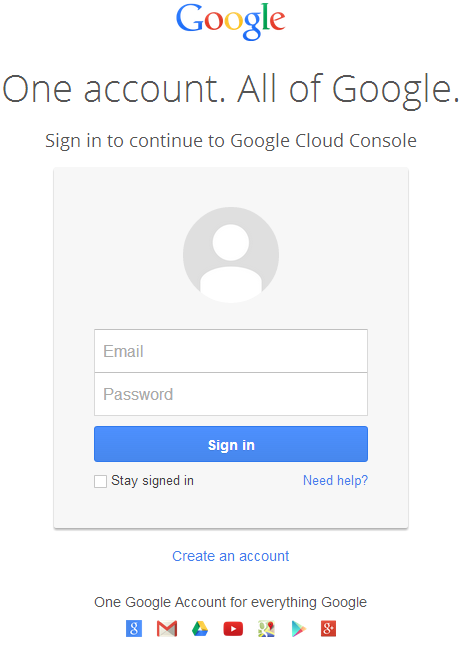
- גש לקישור https://cloud.google.com/console/project והיכנס באמצעות פרטי ה‑gmail שלך
 |
|---|
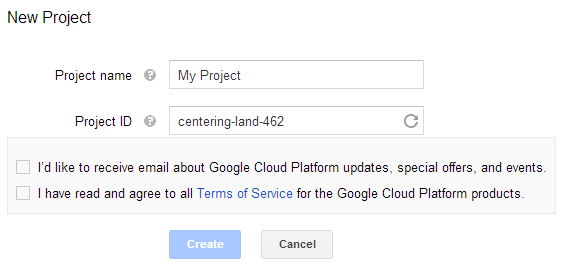
- סמן את התיבה "I have read and agree to all Terms of Service for the Google Cloud Platform products." ולחץ על כפתור Create
 |
|---|
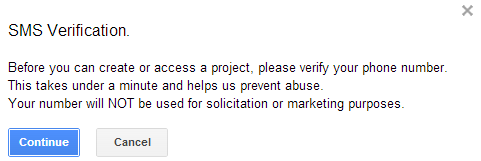
- "SMS Verification" יתבצע. לחץ על כפתור ההמשך:
 |
|---|
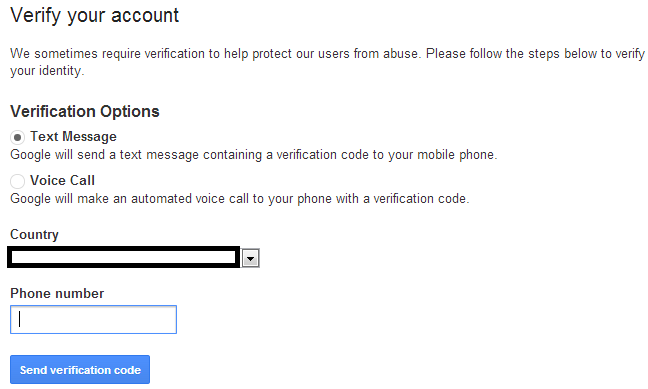
- הזן את שם המדינה שלך והזן את מספר הנייד. לחץ על הכפתור: Send Verification Code
 |
|---|
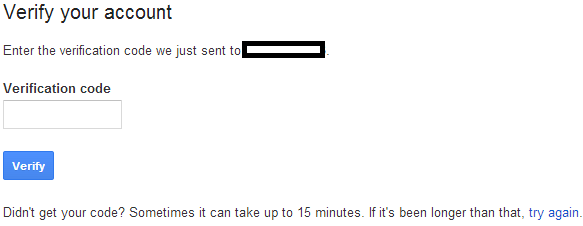
- הזן את קוד האימות שקיבלת בטלפון הנייד שלך.
 |
|---|
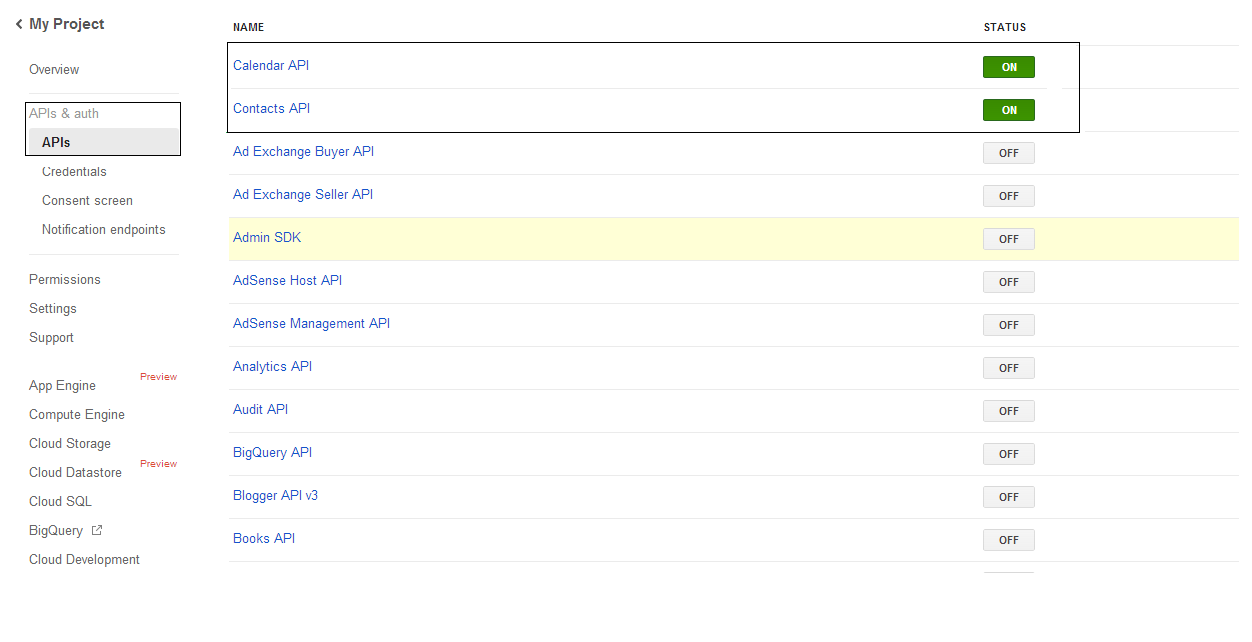
- ברשימת APIs & auth \ APIs הפוך את ה‑status של Calendar API ו‑Contacts API ל‑ON. כבה את כל השאר (OFF).
 |
|---|
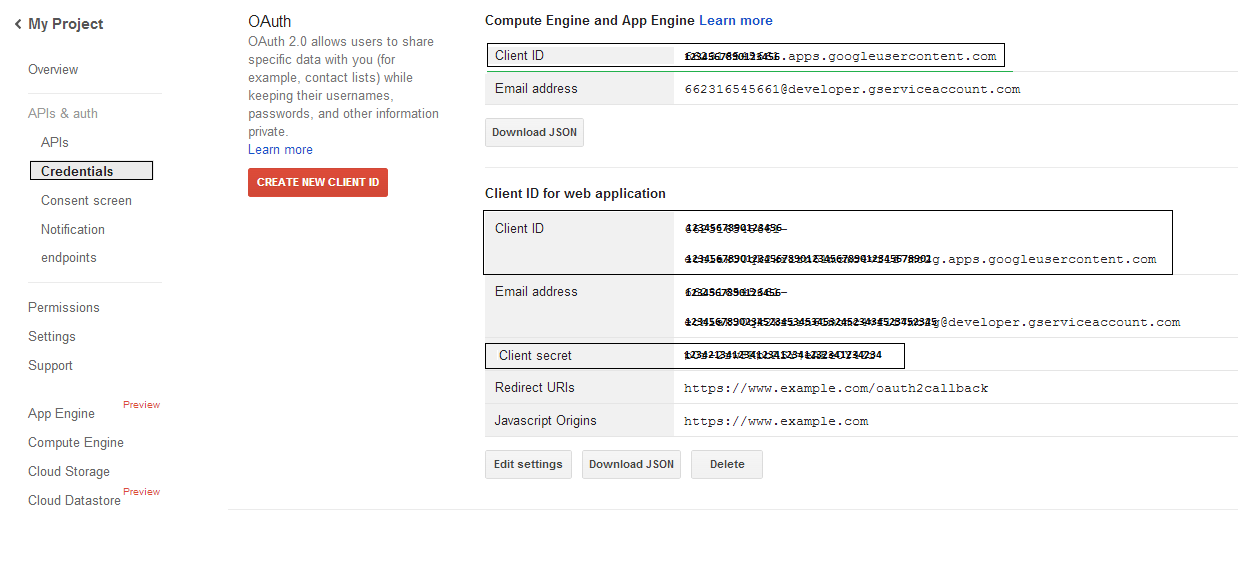
- ב‑APIs & auth -> Credentials, לחץ על הכפתור "CREAET NEW CLIENT ID" תחת סעיף "OAuth". בחר "Installed application" ו‑"Other" מהאפשרויות המוצעות, ולחץ על כפתור "Create Client ID". שים לב ל‑Client ID ול‑Client Secret שיוצגו כאן וישמשו בקוד של הדוגמאות בחלק זה.
 |
|---|
שילוב מאובטח של Google OAuth 2.0
בעת עבודה עם Google OAuth 2.0 ב-Aspose.Email עבור .NET, תצטרך את המחלקות הבאות:
-
מחלקת GoogleOAuthHelper - מפשטת את תהליך האימות של משתמש Google וקבלת האסימונים הדרושים לתקשרות עם API של Google, כגון Calendar, Contacts ו-Gmail.
-
מחלקת GoogleUser - היא נועדה לעטוף ולנהל את האישורים הדרושים למשתמש לאימות ולהתקשרות עם שירותי Google, במיוחד API שדורשים אימות OAuth 2.0 כגון Google Calendar.
-
מחלקת TokenResponse - זהו מודל שנועד לייצג ולטפל בנתוני תגובה מנקודת הקצה של אסימוני OAuth 2.0, שבהם מקבלים אסימוני גישה בתמורה לאישור.
במאמרים הבאים תמצא דוגמאות קוד המדגימות כיצד להשתמש במחלקות אלה בסביבת .NET ליצירת אינטראקציה מאובטחת עם שירותי OAuth 2.0.
אימות OAuth 2.0 עם מחלקת GoogleOAuthHelper
המחלקה מטפלת ביצירת כתובת URL של קוד האימות, ביצירת אתגרי קוד, ובקבלת אסימוני גישה ורענון. על ידי שימוש ב- GoogleOAuthHelper, מפתחים יכולים לייעל את תהליך OAuth 2.0, ולהבטיח תקשורת מאובטחת ויעילה עם שירותי Google. הקטע הקוד הבא מראה איך לממש את GoogleOAuthHelper המחלקה לתוך פרויקט:
// For complete examples and data files, please go to https://github.com/aspose-email/Aspose.Email-for-.NET

using Newtonsoft.Json;
using System;
using System.Collections.Generic;
using System.IO;
using System.Net;
using System.Security.Cryptography;
using System.Text;

/// <summary>
/// Developer console:
/// https://console.cloud.google.com/projectselector2
/// Documentation:
/// https://developers.google.com/identity/protocols/oauth2/native-app
/// </summary>
internal class GoogleOAuthHelper
{
    public const string AUTHORIZATION_URL = "https://accounts.google.com/o/oauth2/v2/auth";
    public const string TOKEN_REQUEST_URL = "https://oauth2.googleapis.com/token";

    public const string REDIRECT_URI = "urn:ietf:wg:oauth:2.0:oob";
    public const string REDIRECT_TYPE = "code";

    public static string codeVerifier;
    public static string codeChallenge;

    public static CodeChallengeMethod codeChallengeMethod = CodeChallengeMethod.S256;

    public const string SCOPE =
        "https%3A%2F%2Fwww.googleapis.com%2Fauth%2Fcalendar" + // Calendar
        "+" +
        "https%3A%2F%2Fwww.google.com%2Fm8%2Ffeeds%2F" + // Contacts
        "+" +
        "https%3A%2F%2Fmail.google.com%2F"; // IMAP & SMTP

    static GoogleOAuthHelper()
    {
        CreateCodeVerifier();
        CreateCodeChallenge();
    }

    internal static string CreateCodeVerifier()
    {
        string allowedChars = "0123456789AaBbCcDdEeFfGgHhIiJjKkLlMmNnOoPpQqRrSsTtUuVvWwXxYyZz-._~";

        const int minLength = 43;
        const int maxLength = 128;

        Random random = new Random();
        int length = minLength + random.Next(maxLength - minLength);
        List<char> codeVerifierChars = new List<char>();

        for (int i = 0; i < length; i++)
        {
            int index = random.Next(allowedChars.Length);
            codeVerifierChars.Add(allowedChars[index]);
        }

        return codeVerifier = string.Join("", codeVerifierChars.ToArray());
    }

    internal static string CreateCodeChallenge()
    {
        if (codeChallengeMethod == CodeChallengeMethod.Plain)
            return codeChallenge = codeVerifier;

        byte[] hashValue = null;
        using (SHA256 sha256 = SHA256.Create())
            hashValue = sha256.ComputeHash(Encoding.ASCII.GetBytes(codeVerifier));

        string b64 = Convert.ToBase64String(hashValue);
        b64 = b64.Split('=')[0];
        b64 = b64.Replace('+', '-');
        b64 = b64.Replace('/', '_');

        return codeChallenge = b64;
    }

    internal static string GetAuthorizationCodeUrl(GoogleUser user)
    {
        return GetAuthorizationCodeUrl(user, SCOPE, REDIRECT_URI, REDIRECT_TYPE);
    }

    internal static string GetAuthorizationCodeUrl(
        GoogleUser user, string scope, string redirectUri, string responseType)
    {
        string state = System.Web.HttpUtility.UrlEncode(Guid.NewGuid().ToString());

        string approveUrl = AUTHORIZATION_URL +
            $"?client_id={user.ClientId}&redirect_uri={redirectUri}&response_type={responseType}&scope={scope}&" +
            $"code_challenge={codeChallenge}&code_challenge_method={codeChallengeMethod.ToString()}&" +
            $"state={state}";

        return approveUrl;
    }

    internal static TokenResponse GetAccessTokenByRefreshToken(GoogleUser user)
    {
        HttpWebRequest request = (HttpWebRequest)WebRequest.Create(TOKEN_REQUEST_URL);
        request.CookieContainer = new CookieContainer();
        request.Method = "POST";
        request.ContentType = "application/x-www-form-urlencoded";

        string clientId = System.Web.HttpUtility.UrlEncode(user.ClientId);
        string clientSecret = System.Web.HttpUtility.UrlEncode(user.ClientSecret);
        string refreshToken = System.Web.HttpUtility.UrlEncode(user.RefreshToken);
        string grantType = System.Web.HttpUtility.UrlEncode("refresh_token");

        string encodedParameters = $"client_id={clientId}&client_secret={clientSecret}&refresh_token={refreshToken}&grant_type={grantType}";

        byte[] requestData = Encoding.UTF8.GetBytes(encodedParameters);
        request.ContentLength = requestData.Length;
        if (requestData.Length > 0)
            using (Stream stream = request.GetRequestStream())
                stream.Write(requestData, 0, requestData.Length);

        HttpWebResponse response = (HttpWebResponse)request.GetResponse();
        string responseText = null;
        using (TextReader reader = new StreamReader(response.GetResponseStream(), Encoding.ASCII))
            responseText = reader.ReadToEnd();

        TokenResponse tokensResponse = JsonConvert.DeserializeObject<TokenResponse>(responseText);

        return tokensResponse;
    }

    internal static TokenResponse GetAccessTokenByAuthCode(string authorizationCode, GoogleUser user)
    {
        HttpWebRequest request = (HttpWebRequest)WebRequest.Create(TOKEN_REQUEST_URL);
        request.CookieContainer = new CookieContainer();
        request.Method = "POST";
        request.ContentType = "application/x-www-form-urlencoded";

        string clientId = System.Web.HttpUtility.UrlEncode(user.ClientId);
        string clientSecret = System.Web.HttpUtility.UrlEncode(user.ClientSecret);
        string authCode = System.Web.HttpUtility.UrlEncode(authorizationCode);
        string redirectUri = System.Web.HttpUtility.UrlEncode(REDIRECT_URI);
        string grantType = System.Web.HttpUtility.UrlEncode("authorization_code");

        string encodedParameters = $"client_id={clientId}&client_secret={clientSecret}&code={authCode}&code_verifier={codeVerifier}&redirect_uri={redirectUri}&grant_type={grantType}";

        byte[] requestData = Encoding.UTF8.GetBytes(encodedParameters);
        request.ContentLength = requestData.Length;
        if (requestData.Length > 0)
            using (Stream stream = request.GetRequestStream())
                stream.Write(requestData, 0, requestData.Length);

        HttpWebResponse response = (HttpWebResponse)request.GetResponse();
        string responseText = null;
        using (TextReader reader = new StreamReader(response.GetResponseStream(), Encoding.ASCII))
            responseText = reader.ReadToEnd();

        TokenResponse tokensResponse = JsonConvert.DeserializeObject<TokenResponse>(responseText);

        return tokensResponse;
    }

    public enum CodeChallengeMethod
    {
        S256,
        Plain
    }
}
Google OAuth Helper צריך לשמש כך:
- קוד URL של קוד האישור צריך להיווצר תחילה.
- פתח את כתובת ה‑URL בדפדפן והשלם את כל הפעולות. כתוצאה מכך, תקבל קוד אישור.
- השתמש בקוד האישור לקבלת אסימון רענון.
- כאשר קיימת אסימון רענון, ניתן להשתמש בו כדי לקבל אסימוני גישה.
GoogleUser user = new GoogleUser(email, password, clientId, clientSecret);

string authUrl = GoogleOAuthHelper.GetAuthorizationCodeUrl(user);

Console.WriteLine("Go to the following URL and get your authorization code:");
Console.WriteLine(authUrl);
Console.WriteLine();

Console.WriteLine("Enter the authorization code:");
string authorizationCode = Console.ReadLine();
Console.WriteLine();

TokenResponse tokenInfo = GoogleOAuthHelper.GetAccessTokenByAuthCode(authorizationCode, user);
Console.WriteLine("The refresh token has been received:");
Console.WriteLine(tokenInfo.RefreshToken);
Console.WriteLine();

user.RefreshToken = tokenInfo.RefreshToken;
tokenInfo = GoogleOAuthHelper.GetAccessTokenByRefreshToken(user);
Console.WriteLine("The new access token has been received:");
Console.WriteLine(tokenInfo.AccessToken);
Console.WriteLine();
מחלקת GoogleUser לאימות OAuth 2.0
הקטע הקוד הבא מראה לך כיצד לממש את ה- GoogleUser מחלקה:
// For complete examples and data files, please go to https://github.com/aspose-email/Aspose.Email-for-.NET

public class GoogleUser
{
    public GoogleUser(string email, string password, string clientId, string clientSecret)
        : this(email, password, clientId, clientSecret, null)
    {
    }

    public GoogleUser(string email, string password, string clientId, string clientSecret, string refreshToken)
    {
        Email = email;
        Password = password;
        ClientId = clientId;
        ClientSecret = clientSecret;
        RefreshToken = refreshToken;
    }

    public readonly string Email;
    public readonly string Password;
    public readonly string ClientId;
    public readonly string ClientSecret;

    public string RefreshToken;
}
אימות עם OAuth 2.0 באמצעות מחלקת TokenResponse
הקטע הקוד הבא מראה לך כיצד ה- TokenResponse ניתן לממש מחלקה:
// For complete examples and data files, please go to https://github.com/aspose-email/Aspose.Email-for-.NET

using Newtonsoft.Json;

public class TokenResponse
{
    [JsonProperty(NullValueHandling = NullValueHandling.Ignore, PropertyName = "access_token", Required = Required.Default)]
    public string AccessToken { get; set; }

    [JsonProperty(NullValueHandling = NullValueHandling.Ignore, PropertyName = "token_type", Required = Required.Default)]
    public string TokenType { get; set; }

    [JsonProperty(NullValueHandling = NullValueHandling.Ignore, PropertyName = "expires_in", Required = Required.Default)]
    public int ExpiresIn { get; set; }

    [JsonProperty(NullValueHandling = NullValueHandling.Ignore, PropertyName = "refresh_token", Required = Required.Default)]
    public string RefreshToken { get; set; }

    [JsonProperty(NullValueHandling = NullValueHandling.Ignore, PropertyName = "scope", Required = Required.Default)]
    public string Scope { get; set; }
}