
กำหนดค่า OAuth 2.0 API Access สำหรับบริการของ Google
สร้างโครงการใน Google Developer Console สำหรับการเข้าถึง API
การสร้างโครงการใน Google Developer Console เป็นขั้นตอนสำคัญสำหรับการเข้าถึงและใช้ Google APIs ในแอปพลิเคชันของคุณ กระบวนการนี้รวมถึงการตั้งค่าโครงการ การยอมรับเงื่อนไข การยืนยันตัวตนของคุณและการกำหนดค่า API ให้ตรงกับความต้องการของคุณ ขั้นตอนต่อไปนี้จะแนะนำคุณผ่านกระบวนการสร้างโครงการและรับข้อมูลรับรองที่จำเป็นสำหรับบริการเช่น Calendar และ Contacts APIs
ขั้นตอนการสร้างโครงการใน Google Developer Console
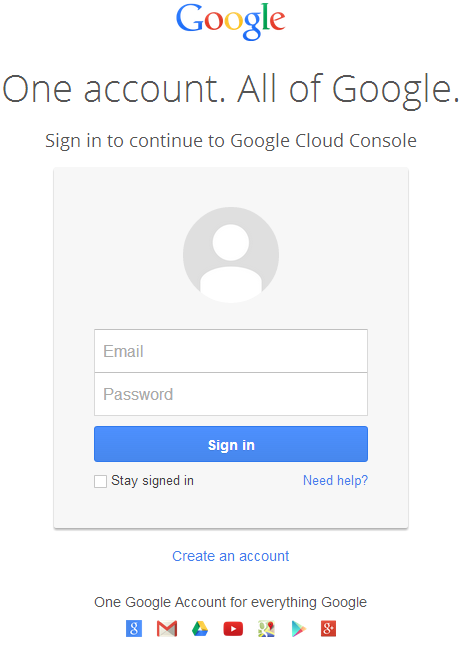
- ไปที่ลิงก์ https://cloud.google.com/console/project แล้วเข้าสู่ระบบด้วยข้อมูลบัญชี Gmail ของคุณ
 |
|---|
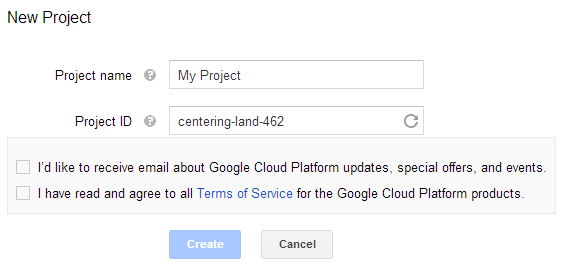
- เลือกช่องทำเครื่องหมาย "I have read and agree to all Terms of Service for the Google Cloud Platform products." แล้วกดปุ่ม Create
 |
|---|
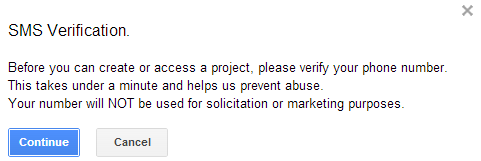
- "SMS Verification" จะถูกขอ ให้กดปุ่มดำเนินการต่อ:
 |
|---|
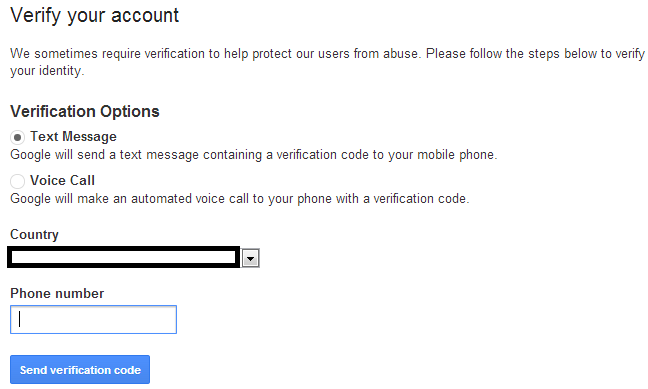
- ใส่ชื่อประเทศของคุณและใส่หมายเลขมือถือ กดปุ่ม: ส่งรหัสยืนยัน
 |
|---|
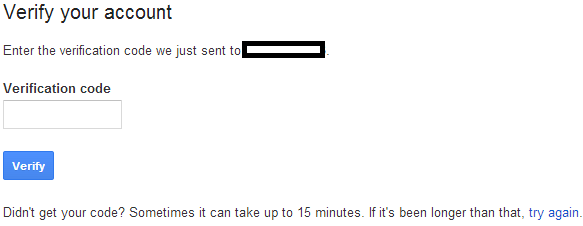
- ใส่รหัสยืนยันที่ได้รับบนมือถือของคุณ
 |
|---|
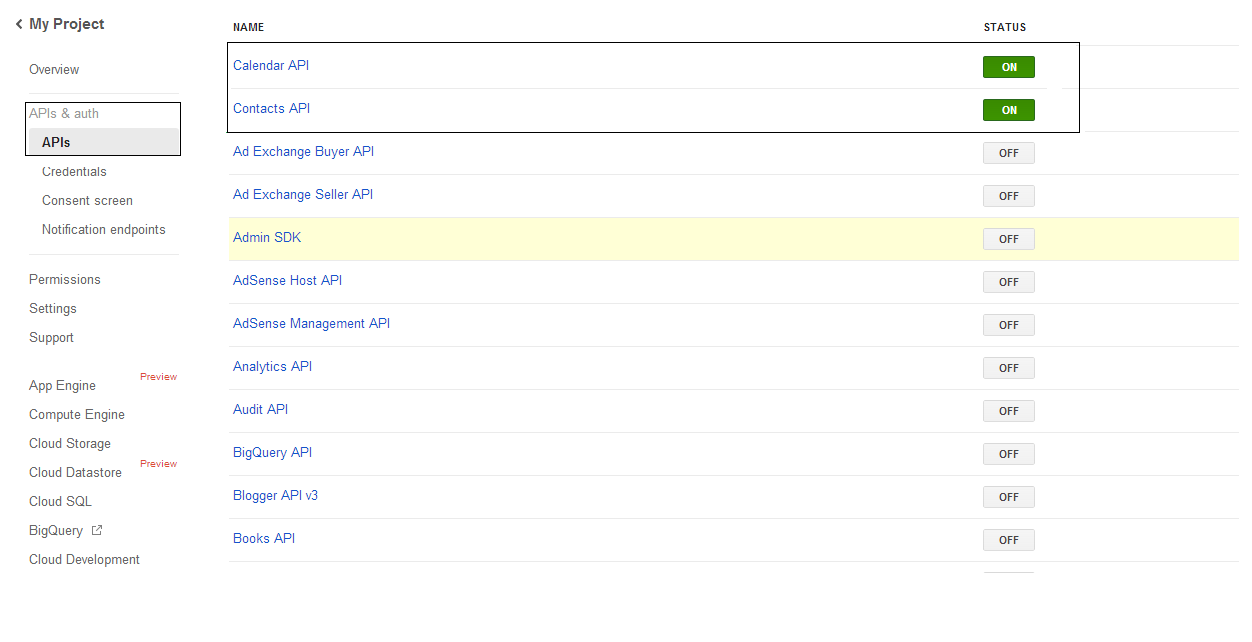
- ในรายการ APIs & auth \ APIs ให้เปิดสถานะของ Calendar API และ Contacts API ปิดทั้งหมดอื่น ๆ
 |
|---|
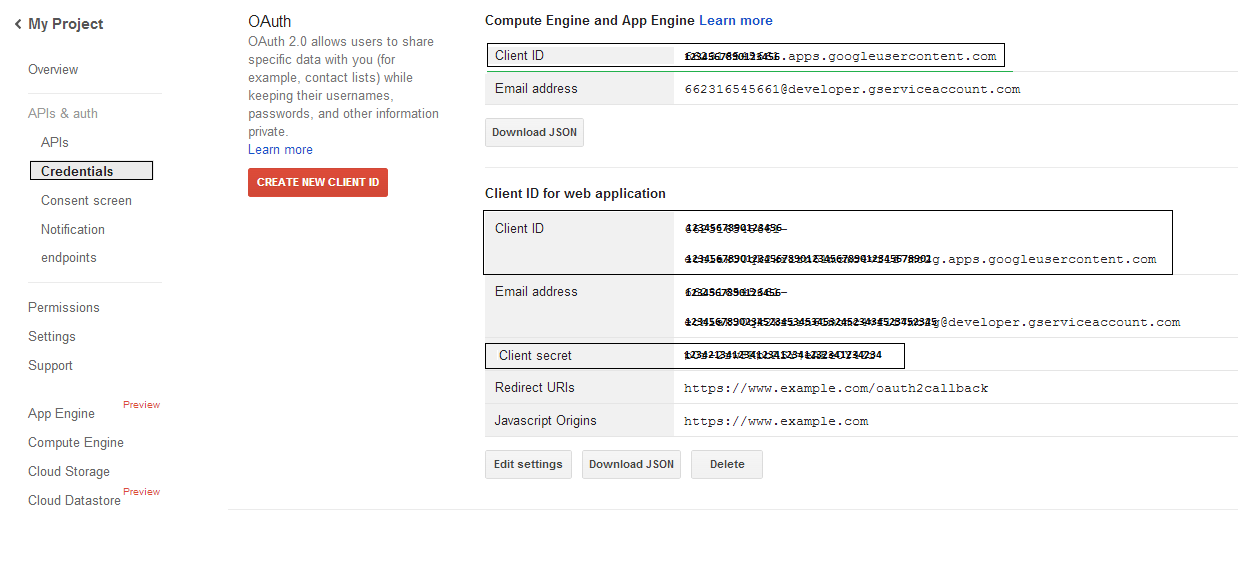
- ในเมนู APIs & auth -> Credentials ให้กดปุ่ม "CREATE NEW CLIENT ID" ใต้ส่วน "OAuth" เลือก "Installed application" และ "Other" จากตัวเลือกที่ให้มา แล้วกดปุ่ม "Create Client ID" บันทึก Client ID และ Client Secret ที่นี่ ซึ่งจะใช้ในโค้ดตัวอย่างในส่วนนี้
 |
|---|
การรวม Google OAuth 2.0 อย่างปลอดภัย
เมื่อทำงานกับ Google OAuth 2.0 ใน Aspose.Email สำหรับ .NET คุณจะต้องใช้คลาสต่อไปนี้:
-
GoogleOAuthHelper class - ทำให้กระบวนการรับรองผู้ใช้ Google ง่ายขึ้นและรับ token ที่จำเป็นเพื่อโต้ตอบกับ Google APIs เช่น Calendar, Contacts, และ Gmail
-
GoogleUser class - ถูกออกแบบให้รวมและจัดการข้อมูลรับรองที่ผู้ใช้ต้องการเพื่อรับรองและโต้ตอบกับบริการของ Google โดยเฉพาะ API ที่ต้องการการรับรอง OAuth 2.0 เช่น Google Calendar
-
TokenResponse class - เป็นโมเดลที่ออกแบบให้แทนและจัดการข้อมูลการตอบกลับจาก OAuth 2.0 token endpoint ซึ่ง access token จะได้รับจากการแลกเปลี่ยนการอนุญาต
ในบทความต่อไปนี้คุณจะพบตัวอย่างโค้ดที่แสดงวิธีใช้คลาสเหล่านี้ในสภาพแวดล้อม .NET เพื่อสร้างการโต้ตอบที่ปลอดภัยกับบริการ OAuth 2.0
การรับรอง OAuth 2.0 ด้วยคลาส GoogleOAuthHelper
คลาสนี้จัดการการสร้าง URL ของโค้ดอนุมัติ การสร้าง code challenges และการรับ access และ refresh token โดยการใช้ GoogleOAuthHelper, นักพัฒนาสามารถทำให้กระบวนการ OAuth 2.0 ราบรื่นขึ้น เพื่อให้การสื่อสารกับบริการของ Google ปลอดภัยและมีประสิทธิภาพ ตัวอย่างโค้ดต่อไปนี้จะแสดงวิธีการนำไปใช้ของ GoogleOAuthHelper คลาสเข้าสู่โครงการ:
// For complete examples and data files, please go to https://github.com/aspose-email/Aspose.Email-for-.NET

using Newtonsoft.Json;
using System;
using System.Collections.Generic;
using System.IO;
using System.Net;
using System.Security.Cryptography;
using System.Text;

/// <summary>
/// Developer console:
/// https://console.cloud.google.com/projectselector2
/// Documentation:
/// https://developers.google.com/identity/protocols/oauth2/native-app
/// </summary>
internal class GoogleOAuthHelper
{
    public const string AUTHORIZATION_URL = "https://accounts.google.com/o/oauth2/v2/auth";
    public const string TOKEN_REQUEST_URL = "https://oauth2.googleapis.com/token";

    public const string REDIRECT_URI = "urn:ietf:wg:oauth:2.0:oob";
    public const string REDIRECT_TYPE = "code";

    public static string codeVerifier;
    public static string codeChallenge;

    public static CodeChallengeMethod codeChallengeMethod = CodeChallengeMethod.S256;

    public const string SCOPE =
        "https%3A%2F%2Fwww.googleapis.com%2Fauth%2Fcalendar" + // Calendar
        "+" +
        "https%3A%2F%2Fwww.google.com%2Fm8%2Ffeeds%2F" + // Contacts
        "+" +
        "https%3A%2F%2Fmail.google.com%2F"; // IMAP & SMTP

    static GoogleOAuthHelper()
    {
        CreateCodeVerifier();
        CreateCodeChallenge();
    }

    internal static string CreateCodeVerifier()
    {
        string allowedChars = "0123456789AaBbCcDdEeFfGgHhIiJjKkLlMmNnOoPpQqRrSsTtUuVvWwXxYyZz-._~";

        const int minLength = 43;
        const int maxLength = 128;

        Random random = new Random();
        int length = minLength + random.Next(maxLength - minLength);
        List<char> codeVerifierChars = new List<char>();

        for (int i = 0; i < length; i++)
        {
            int index = random.Next(allowedChars.Length);
            codeVerifierChars.Add(allowedChars[index]);
        }

        return codeVerifier = string.Join("", codeVerifierChars.ToArray());
    }

    internal static string CreateCodeChallenge()
    {
        if (codeChallengeMethod == CodeChallengeMethod.Plain)
            return codeChallenge = codeVerifier;

        byte[] hashValue = null;
        using (SHA256 sha256 = SHA256.Create())
            hashValue = sha256.ComputeHash(Encoding.ASCII.GetBytes(codeVerifier));

        string b64 = Convert.ToBase64String(hashValue);
        b64 = b64.Split('=')[0];
        b64 = b64.Replace('+', '-');
        b64 = b64.Replace('/', '_');

        return codeChallenge = b64;
    }

    internal static string GetAuthorizationCodeUrl(GoogleUser user)
    {
        return GetAuthorizationCodeUrl(user, SCOPE, REDIRECT_URI, REDIRECT_TYPE);
    }

    internal static string GetAuthorizationCodeUrl(
        GoogleUser user, string scope, string redirectUri, string responseType)
    {
        string state = System.Web.HttpUtility.UrlEncode(Guid.NewGuid().ToString());

        string approveUrl = AUTHORIZATION_URL +
            $"?client_id={user.ClientId}&redirect_uri={redirectUri}&response_type={responseType}&scope={scope}&" +
            $"code_challenge={codeChallenge}&code_challenge_method={codeChallengeMethod.ToString()}&" +
            $"state={state}";

        return approveUrl;
    }

    internal static TokenResponse GetAccessTokenByRefreshToken(GoogleUser user)
    {
        HttpWebRequest request = (HttpWebRequest)WebRequest.Create(TOKEN_REQUEST_URL);
        request.CookieContainer = new CookieContainer();
        request.Method = "POST";
        request.ContentType = "application/x-www-form-urlencoded";

        string clientId = System.Web.HttpUtility.UrlEncode(user.ClientId);
        string clientSecret = System.Web.HttpUtility.UrlEncode(user.ClientSecret);
        string refreshToken = System.Web.HttpUtility.UrlEncode(user.RefreshToken);
        string grantType = System.Web.HttpUtility.UrlEncode("refresh_token");

        string encodedParameters = $"client_id={clientId}&client_secret={clientSecret}&refresh_token={refreshToken}&grant_type={grantType}";

        byte[] requestData = Encoding.UTF8.GetBytes(encodedParameters);
        request.ContentLength = requestData.Length;
        if (requestData.Length > 0)
            using (Stream stream = request.GetRequestStream())
                stream.Write(requestData, 0, requestData.Length);

        HttpWebResponse response = (HttpWebResponse)request.GetResponse();
        string responseText = null;
        using (TextReader reader = new StreamReader(response.GetResponseStream(), Encoding.ASCII))
            responseText = reader.ReadToEnd();

        TokenResponse tokensResponse = JsonConvert.DeserializeObject<TokenResponse>(responseText);

        return tokensResponse;
    }

    internal static TokenResponse GetAccessTokenByAuthCode(string authorizationCode, GoogleUser user)
    {
        HttpWebRequest request = (HttpWebRequest)WebRequest.Create(TOKEN_REQUEST_URL);
        request.CookieContainer = new CookieContainer();
        request.Method = "POST";
        request.ContentType = "application/x-www-form-urlencoded";

        string clientId = System.Web.HttpUtility.UrlEncode(user.ClientId);
        string clientSecret = System.Web.HttpUtility.UrlEncode(user.ClientSecret);
        string authCode = System.Web.HttpUtility.UrlEncode(authorizationCode);
        string redirectUri = System.Web.HttpUtility.UrlEncode(REDIRECT_URI);
        string grantType = System.Web.HttpUtility.UrlEncode("authorization_code");

        string encodedParameters = $"client_id={clientId}&client_secret={clientSecret}&code={authCode}&code_verifier={codeVerifier}&redirect_uri={redirectUri}&grant_type={grantType}";

        byte[] requestData = Encoding.UTF8.GetBytes(encodedParameters);
        request.ContentLength = requestData.Length;
        if (requestData.Length > 0)
            using (Stream stream = request.GetRequestStream())
                stream.Write(requestData, 0, requestData.Length);

        HttpWebResponse response = (HttpWebResponse)request.GetResponse();
        string responseText = null;
        using (TextReader reader = new StreamReader(response.GetResponseStream(), Encoding.ASCII))
            responseText = reader.ReadToEnd();

        TokenResponse tokensResponse = JsonConvert.DeserializeObject<TokenResponse>(responseText);

        return tokensResponse;
    }

    public enum CodeChallengeMethod
    {
        S256,
        Plain
    }
}
Google OAuth Helper ควรใช้ดังต่อไปนี้:
- ต้องสร้าง URL โค้ดการอนุญาตก่อน
- เปิด URL ในเบราว์เซอร์และทำทุกขั้นตอนให้เสร็จ สิ่งที่ได้คือโค้ดการอนุญาต
- ใช้โค้ดการอนุญาตเพื่อรับรีเฟรชโทเค็น
- เมื่อมีรีเฟรชโทเค็น คุณสามารถใช้มันเพื่อรับโทเค็นการเข้าถึง
GoogleUser user = new GoogleUser(email, password, clientId, clientSecret);

string authUrl = GoogleOAuthHelper.GetAuthorizationCodeUrl(user);

Console.WriteLine("Go to the following URL and get your authorization code:");
Console.WriteLine(authUrl);
Console.WriteLine();

Console.WriteLine("Enter the authorization code:");
string authorizationCode = Console.ReadLine();
Console.WriteLine();

TokenResponse tokenInfo = GoogleOAuthHelper.GetAccessTokenByAuthCode(authorizationCode, user);
Console.WriteLine("The refresh token has been received:");
Console.WriteLine(tokenInfo.RefreshToken);
Console.WriteLine();

user.RefreshToken = tokenInfo.RefreshToken;
tokenInfo = GoogleOAuthHelper.GetAccessTokenByRefreshToken(user);
Console.WriteLine("The new access token has been received:");
Console.WriteLine(tokenInfo.AccessToken);
Console.WriteLine();
คลาส GoogleUser สำหรับการรับรอง OAuth 2.0
ตัวอย่างโค้ดต่อไปนี้จะแสดงวิธีการนำไปใช้ของ GoogleUser คลาส:
// For complete examples and data files, please go to https://github.com/aspose-email/Aspose.Email-for-.NET

public class GoogleUser
{
    public GoogleUser(string email, string password, string clientId, string clientSecret)
        : this(email, password, clientId, clientSecret, null)
    {
    }

    public GoogleUser(string email, string password, string clientId, string clientSecret, string refreshToken)
    {
        Email = email;
        Password = password;
        ClientId = clientId;
        ClientSecret = clientSecret;
        RefreshToken = refreshToken;
    }

    public readonly string Email;
    public readonly string Password;
    public readonly string ClientId;
    public readonly string ClientSecret;

    public string RefreshToken;
}
รับรองความถูกต้องด้วย OAuth 2.0 โดยใช้คลาส TokenResponse
ตัวอย่างโค้ดต่อไปนี้จะแสดงวิธีการของ TokenResponse คลาสสามารถนำไปใช้งานได้:
// For complete examples and data files, please go to https://github.com/aspose-email/Aspose.Email-for-.NET

using Newtonsoft.Json;

public class TokenResponse
{
    [JsonProperty(NullValueHandling = NullValueHandling.Ignore, PropertyName = "access_token", Required = Required.Default)]
    public string AccessToken { get; set; }

    [JsonProperty(NullValueHandling = NullValueHandling.Ignore, PropertyName = "token_type", Required = Required.Default)]
    public string TokenType { get; set; }

    [JsonProperty(NullValueHandling = NullValueHandling.Ignore, PropertyName = "expires_in", Required = Required.Default)]
    public int ExpiresIn { get; set; }

    [JsonProperty(NullValueHandling = NullValueHandling.Ignore, PropertyName = "refresh_token", Required = Required.Default)]
    public string RefreshToken { get; set; }

    [JsonProperty(NullValueHandling = NullValueHandling.Ignore, PropertyName = "scope", Required = Required.Default)]
    public string Scope { get; set; }
}