
Google 서비스에 대한 OAuth 2.0 API 액세스 구성
API 액세스를 위한 Google 개발자 콘솔 프로젝트 생성
Google 개발자 콘솔에서 프로젝트를 생성하는 것은 애플리케이션이 Google API에 접근하고 활용하기 위한 필수 단계입니다. 이 과정에는 프로젝트 설정, 약관 동의, 신원 확인 및 API 설정 구성이 포함됩니다. 다음 단계에서는 프로젝트를 생성하고 Calendar 및 Contacts API와 같은 서비스에 필요한 자격 증명을 얻는 방법을 안내합니다.
Google 개발자 콘솔에서 프로젝트 생성 단계
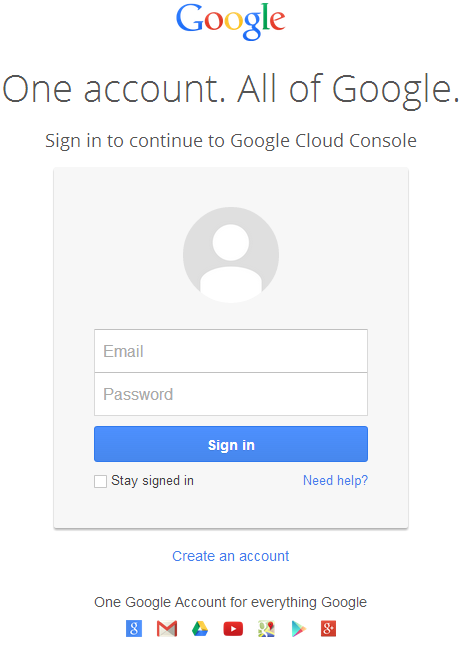
- 링크 https://cloud.google.com/console/project 로 이동하여 Gmail 자격 증명으로 로그인합니다
 |
|---|
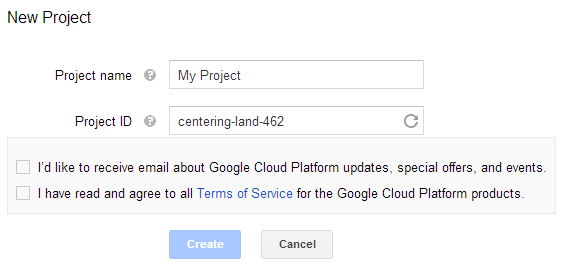
- 체크 박스 "I have read and agree to all Terms of Service for the Google Cloud Platform products."를 선택하고 Create 버튼을 누릅니다
 |
|---|
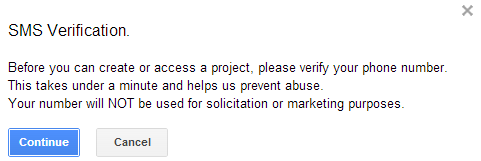
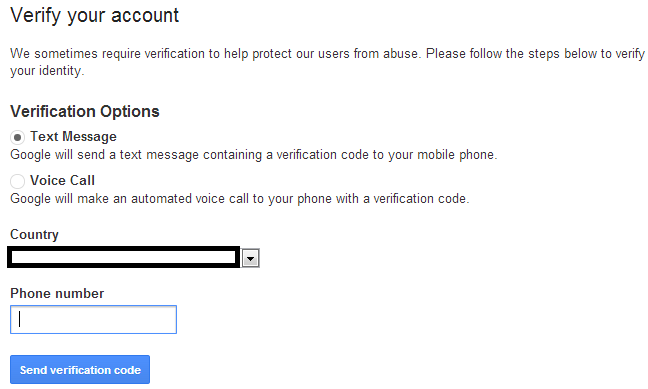
- "SMS Verification"이 요청됩니다. 계속 버튼을 누릅니다:
 |
|---|
- 국가명을 입력하고 전화 번호를 입력합니다. 버튼을 누릅니다: Send Verification Code
 |
|---|
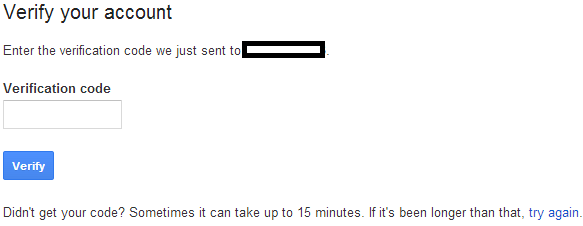
- 휴대폰에서 받은 인증 코드를 입력합니다.
 |
|---|
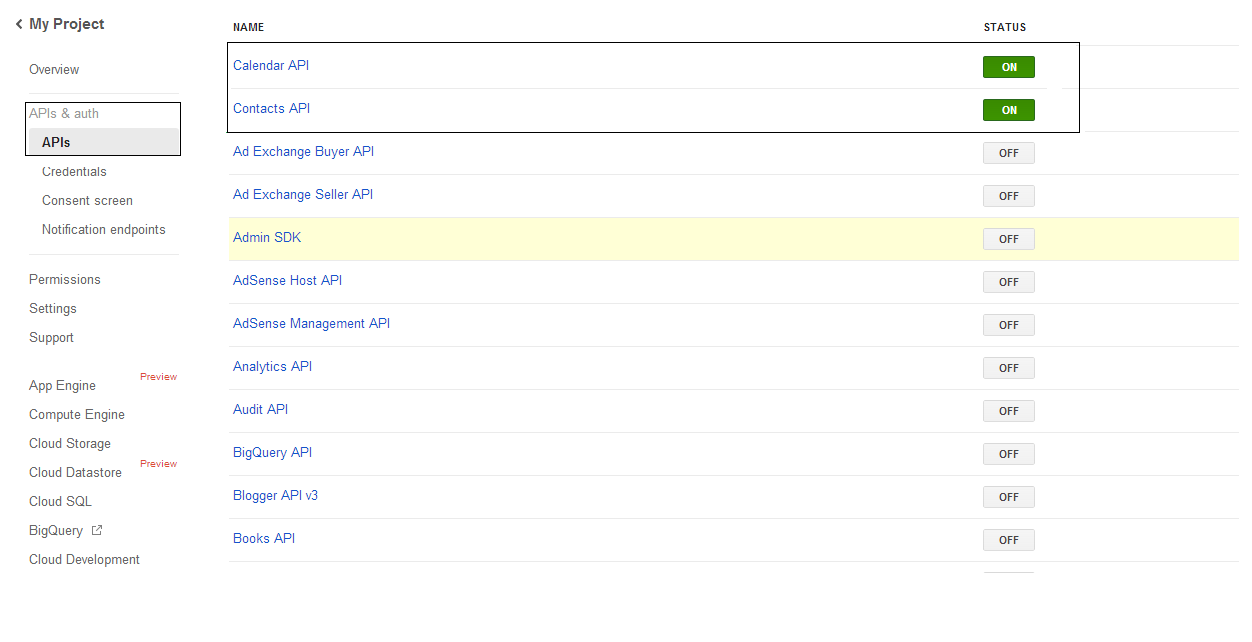
- "APIs & auth \ APIs" 목록에서 Calendar API와 Contacts API의 상태를 켭니다. 다른 모든 API는 끕니다.
 |
|---|
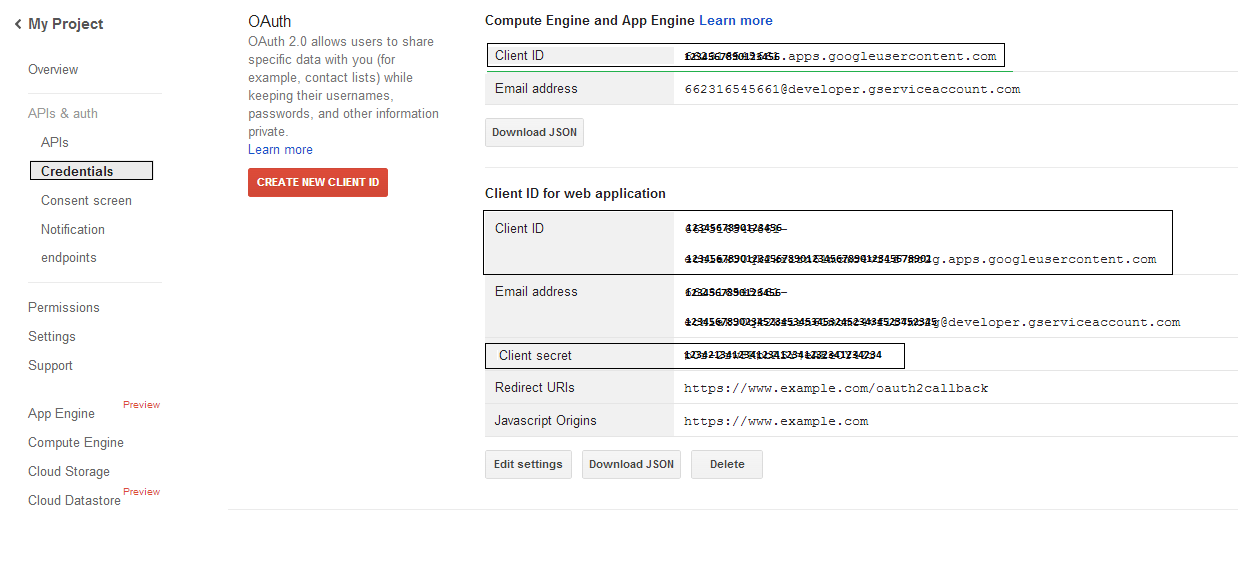
- "APIs & auth -> Credentials"에서 "OAuth" 섹션 아래의 "CREAET NEW CLIENT ID" 버튼을 누릅니다. 제공된 옵션 중 "Installed application"과 "Other"를 선택하고 "Create Client ID" 버튼을 클릭합니다. 이 섹션의 샘플 코드에서 사용할 클라이언트 ID와 클라이언트 비밀을 기록해 두세요.
 |
|---|
보안 Google OAuth 2.0 통합
Aspose.Email for .NET에서 Google OAuth 2.0을 사용할 때는 다음 클래스가 필요합니다:
-
GoogleOAuthHelper 클래스 - Google 사용자를 인증하고 Calendar, Contacts, Gmail과 같은 Google API와 상호 작용하는 데 필요한 토큰을 얻는 과정을 단순화합니다.
-
GoogleUser 클래스 - 사용자가 Google 서비스에 인증하고 상호 작용하는 데 필요한 자격 증명을 캡슐화하고 관리하도록 설계되었습니다. 특히 Google Calendar와 같이 OAuth 2.0 인증이 필요한 API에 사용됩니다.
-
TokenResponse 클래스 - OAuth 2.0 토큰 엔드포인트에서 응답 데이터를 나타내고 처리하도록 설계된 모델이며, 여기서 액세스 토큰은 인가와 교환하여 얻습니다.
다음 문서에서는 .NET 환경에서 이러한 클래스를 사용하여 OAuth 2.0 서비스와 안전하게 상호 작용하는 방법을 보여주는 코드 샘플을 찾을 수 있습니다.
GoogleOAuthHelper 클래스를 이용한 OAuth 2.0 인증
이 클래스는 인가 코드 URL 생성, 코드 챌린지 생성, 액세스 및 리프레시 토큰 조회를 처리합니다. 사용하면 GoogleOAuthHelper, 개발자는 OAuth 2.0 흐름을 간소화하여 Google 서비스와의 안전하고 효율적인 통신을 보장할 수 있습니다. 다음 코드 조각은 이를 구현하는 방법을 보여줍니다. GoogleOAuthHelper 클래스를 프로젝트에 포함시키기:
// For complete examples and data files, please go to https://github.com/aspose-email/Aspose.Email-for-.NET

using Newtonsoft.Json;
using System;
using System.Collections.Generic;
using System.IO;
using System.Net;
using System.Security.Cryptography;
using System.Text;

/// <summary>
/// Developer console:
/// https://console.cloud.google.com/projectselector2
/// Documentation:
/// https://developers.google.com/identity/protocols/oauth2/native-app
/// </summary>
internal class GoogleOAuthHelper
{
    public const string AUTHORIZATION_URL = "https://accounts.google.com/o/oauth2/v2/auth";
    public const string TOKEN_REQUEST_URL = "https://oauth2.googleapis.com/token";

    public const string REDIRECT_URI = "urn:ietf:wg:oauth:2.0:oob";
    public const string REDIRECT_TYPE = "code";

    public static string codeVerifier;
    public static string codeChallenge;

    public static CodeChallengeMethod codeChallengeMethod = CodeChallengeMethod.S256;

    public const string SCOPE =
        "https%3A%2F%2Fwww.googleapis.com%2Fauth%2Fcalendar" + // Calendar
        "+" +
        "https%3A%2F%2Fwww.google.com%2Fm8%2Ffeeds%2F" + // Contacts
        "+" +
        "https%3A%2F%2Fmail.google.com%2F"; // IMAP & SMTP

    static GoogleOAuthHelper()
    {
        CreateCodeVerifier();
        CreateCodeChallenge();
    }

    internal static string CreateCodeVerifier()
    {
        string allowedChars = "0123456789AaBbCcDdEeFfGgHhIiJjKkLlMmNnOoPpQqRrSsTtUuVvWwXxYyZz-._~";

        const int minLength = 43;
        const int maxLength = 128;

        Random random = new Random();
        int length = minLength + random.Next(maxLength - minLength);
        List<char> codeVerifierChars = new List<char>();

        for (int i = 0; i < length; i++)
        {
            int index = random.Next(allowedChars.Length);
            codeVerifierChars.Add(allowedChars[index]);
        }

        return codeVerifier = string.Join("", codeVerifierChars.ToArray());
    }

    internal static string CreateCodeChallenge()
    {
        if (codeChallengeMethod == CodeChallengeMethod.Plain)
            return codeChallenge = codeVerifier;

        byte[] hashValue = null;
        using (SHA256 sha256 = SHA256.Create())
            hashValue = sha256.ComputeHash(Encoding.ASCII.GetBytes(codeVerifier));

        string b64 = Convert.ToBase64String(hashValue);
        b64 = b64.Split('=')[0];
        b64 = b64.Replace('+', '-');
        b64 = b64.Replace('/', '_');

        return codeChallenge = b64;
    }

    internal static string GetAuthorizationCodeUrl(GoogleUser user)
    {
        return GetAuthorizationCodeUrl(user, SCOPE, REDIRECT_URI, REDIRECT_TYPE);
    }

    internal static string GetAuthorizationCodeUrl(
        GoogleUser user, string scope, string redirectUri, string responseType)
    {
        string state = System.Web.HttpUtility.UrlEncode(Guid.NewGuid().ToString());

        string approveUrl = AUTHORIZATION_URL +
            $"?client_id={user.ClientId}&redirect_uri={redirectUri}&response_type={responseType}&scope={scope}&" +
            $"code_challenge={codeChallenge}&code_challenge_method={codeChallengeMethod.ToString()}&" +
            $"state={state}";

        return approveUrl;
    }

    internal static TokenResponse GetAccessTokenByRefreshToken(GoogleUser user)
    {
        HttpWebRequest request = (HttpWebRequest)WebRequest.Create(TOKEN_REQUEST_URL);
        request.CookieContainer = new CookieContainer();
        request.Method = "POST";
        request.ContentType = "application/x-www-form-urlencoded";

        string clientId = System.Web.HttpUtility.UrlEncode(user.ClientId);
        string clientSecret = System.Web.HttpUtility.UrlEncode(user.ClientSecret);
        string refreshToken = System.Web.HttpUtility.UrlEncode(user.RefreshToken);
        string grantType = System.Web.HttpUtility.UrlEncode("refresh_token");

        string encodedParameters = $"client_id={clientId}&client_secret={clientSecret}&refresh_token={refreshToken}&grant_type={grantType}";

        byte[] requestData = Encoding.UTF8.GetBytes(encodedParameters);
        request.ContentLength = requestData.Length;
        if (requestData.Length > 0)
            using (Stream stream = request.GetRequestStream())
                stream.Write(requestData, 0, requestData.Length);

        HttpWebResponse response = (HttpWebResponse)request.GetResponse();
        string responseText = null;
        using (TextReader reader = new StreamReader(response.GetResponseStream(), Encoding.ASCII))
            responseText = reader.ReadToEnd();

        TokenResponse tokensResponse = JsonConvert.DeserializeObject<TokenResponse>(responseText);

        return tokensResponse;
    }

    internal static TokenResponse GetAccessTokenByAuthCode(string authorizationCode, GoogleUser user)
    {
        HttpWebRequest request = (HttpWebRequest)WebRequest.Create(TOKEN_REQUEST_URL);
        request.CookieContainer = new CookieContainer();
        request.Method = "POST";
        request.ContentType = "application/x-www-form-urlencoded";

        string clientId = System.Web.HttpUtility.UrlEncode(user.ClientId);
        string clientSecret = System.Web.HttpUtility.UrlEncode(user.ClientSecret);
        string authCode = System.Web.HttpUtility.UrlEncode(authorizationCode);
        string redirectUri = System.Web.HttpUtility.UrlEncode(REDIRECT_URI);
        string grantType = System.Web.HttpUtility.UrlEncode("authorization_code");

        string encodedParameters = $"client_id={clientId}&client_secret={clientSecret}&code={authCode}&code_verifier={codeVerifier}&redirect_uri={redirectUri}&grant_type={grantType}";

        byte[] requestData = Encoding.UTF8.GetBytes(encodedParameters);
        request.ContentLength = requestData.Length;
        if (requestData.Length > 0)
            using (Stream stream = request.GetRequestStream())
                stream.Write(requestData, 0, requestData.Length);

        HttpWebResponse response = (HttpWebResponse)request.GetResponse();
        string responseText = null;
        using (TextReader reader = new StreamReader(response.GetResponseStream(), Encoding.ASCII))
            responseText = reader.ReadToEnd();

        TokenResponse tokensResponse = JsonConvert.DeserializeObject<TokenResponse>(responseText);

        return tokensResponse;
    }

    public enum CodeChallengeMethod
    {
        S256,
        Plain
    }
}
Google OAuth Helper는 다음과 같이 사용해야 합니다:
- 먼저 인증 코드 URL을 생성해야 합니다.
- 브라우저에서 URL을 열고 모든 절차를 완료하세요. 그 결과 인증 코드를 받게 됩니다.
- 인증 코드를 사용해 리프레시 토큰을 받으세요.
- 리프레시 토큰이 있으면 이를 사용해 액세스 토큰을 조회할 수 있습니다.
GoogleUser user = new GoogleUser(email, password, clientId, clientSecret);

string authUrl = GoogleOAuthHelper.GetAuthorizationCodeUrl(user);

Console.WriteLine("Go to the following URL and get your authorization code:");
Console.WriteLine(authUrl);
Console.WriteLine();

Console.WriteLine("Enter the authorization code:");
string authorizationCode = Console.ReadLine();
Console.WriteLine();

TokenResponse tokenInfo = GoogleOAuthHelper.GetAccessTokenByAuthCode(authorizationCode, user);
Console.WriteLine("The refresh token has been received:");
Console.WriteLine(tokenInfo.RefreshToken);
Console.WriteLine();

user.RefreshToken = tokenInfo.RefreshToken;
tokenInfo = GoogleOAuthHelper.GetAccessTokenByRefreshToken(user);
Console.WriteLine("The new access token has been received:");
Console.WriteLine(tokenInfo.AccessToken);
Console.WriteLine();
OAuth 2.0 인증을 위한 GoogleUser 클래스
다음 코드 조각은 어떻게 구현하는지 보여줍니다 GoogleUser 클래스:
// For complete examples and data files, please go to https://github.com/aspose-email/Aspose.Email-for-.NET

public class GoogleUser
{
    public GoogleUser(string email, string password, string clientId, string clientSecret)
        : this(email, password, clientId, clientSecret, null)
    {
    }

    public GoogleUser(string email, string password, string clientId, string clientSecret, string refreshToken)
    {
        Email = email;
        Password = password;
        ClientId = clientId;
        ClientSecret = clientSecret;
        RefreshToken = refreshToken;
    }

    public readonly string Email;
    public readonly string Password;
    public readonly string ClientId;
    public readonly string ClientSecret;

    public string RefreshToken;
}
TokenResponse 클래스를 사용한 OAuth 2.0 인증
다음 코드 조각은 어떻게 TokenResponse 클래스를 구현할 수 있습니다:
// For complete examples and data files, please go to https://github.com/aspose-email/Aspose.Email-for-.NET

using Newtonsoft.Json;

public class TokenResponse
{
    [JsonProperty(NullValueHandling = NullValueHandling.Ignore, PropertyName = "access_token", Required = Required.Default)]
    public string AccessToken { get; set; }

    [JsonProperty(NullValueHandling = NullValueHandling.Ignore, PropertyName = "token_type", Required = Required.Default)]
    public string TokenType { get; set; }

    [JsonProperty(NullValueHandling = NullValueHandling.Ignore, PropertyName = "expires_in", Required = Required.Default)]
    public int ExpiresIn { get; set; }

    [JsonProperty(NullValueHandling = NullValueHandling.Ignore, PropertyName = "refresh_token", Required = Required.Default)]
    public string RefreshToken { get; set; }

    [JsonProperty(NullValueHandling = NullValueHandling.Ignore, PropertyName = "scope", Required = Required.Default)]
    public string Scope { get; set; }
}