
پیکربندی دسترسی API OAuth 2.0 به خدمات گوگل
ایجاد پروژه در کنسول توسعهدهندگان گوگل برای دسترسی به API
ایجاد یک پروژه در کنسول توسعهدهندگان گوگل گامی ضروری برای دسترسی و استفاده از APIهای گوگل در برنامههای شما است. این فرایند شامل تنظیم یک پروژه، پذیرش شرایط، تأیید هویت و پیکربندی تنظیمات API برای نیازهای شما میشود. مراحل زیر شما را در فرآیند ایجاد پروژه و دریافت اعتبارهای لازم برای سرویسهایی مانند Calendar و Contacts API راهنمایی میکند.
مراحل ایجاد پروژه در کنسول توسعهدهندگان گوگل
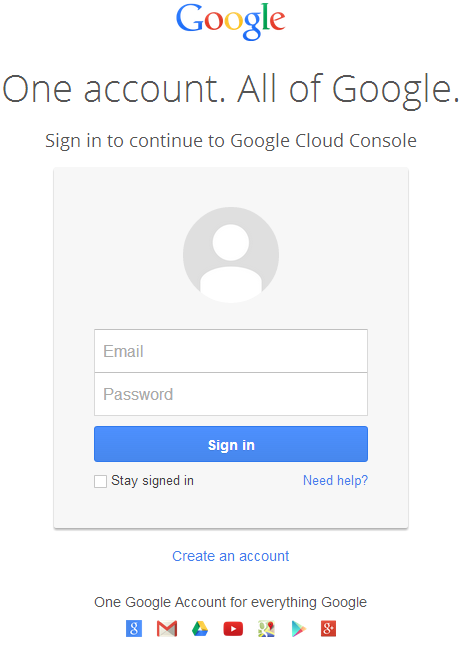
- به لینک https://cloud.google.com/console/project بروید و با اطلاعات حساب جیمیل خود وارد شوید
 |
|---|
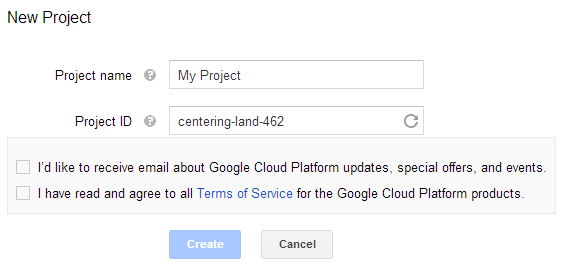
- کادر "I have read and agree to all Terms of Service for the Google Cloud Platform products." را تیک بزنید و دکمه Create را فشار دهید
 |
|---|
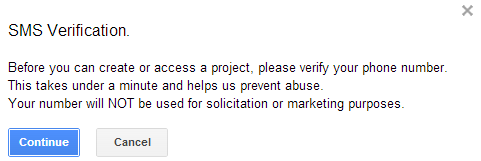
- "SMS Verification" درخواست خواهد شد. دکمه ادامه (continue) را فشار دهید:
 |
|---|
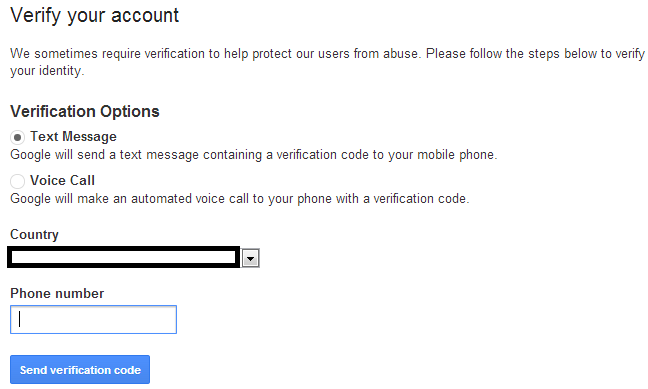
- کشور خود را وارد کنید و شماره موبایل را وارد کنید. دکمه: Send Verification Code را فشار دهید.
 |
|---|
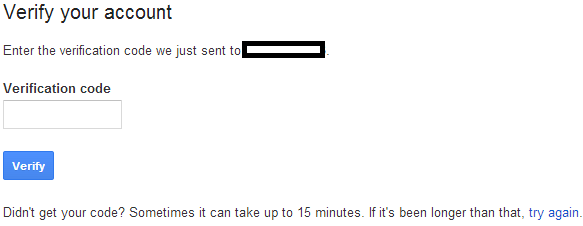
- کد تأیید دریافتشده روی موبایل خود را وارد کنید.
 |
|---|
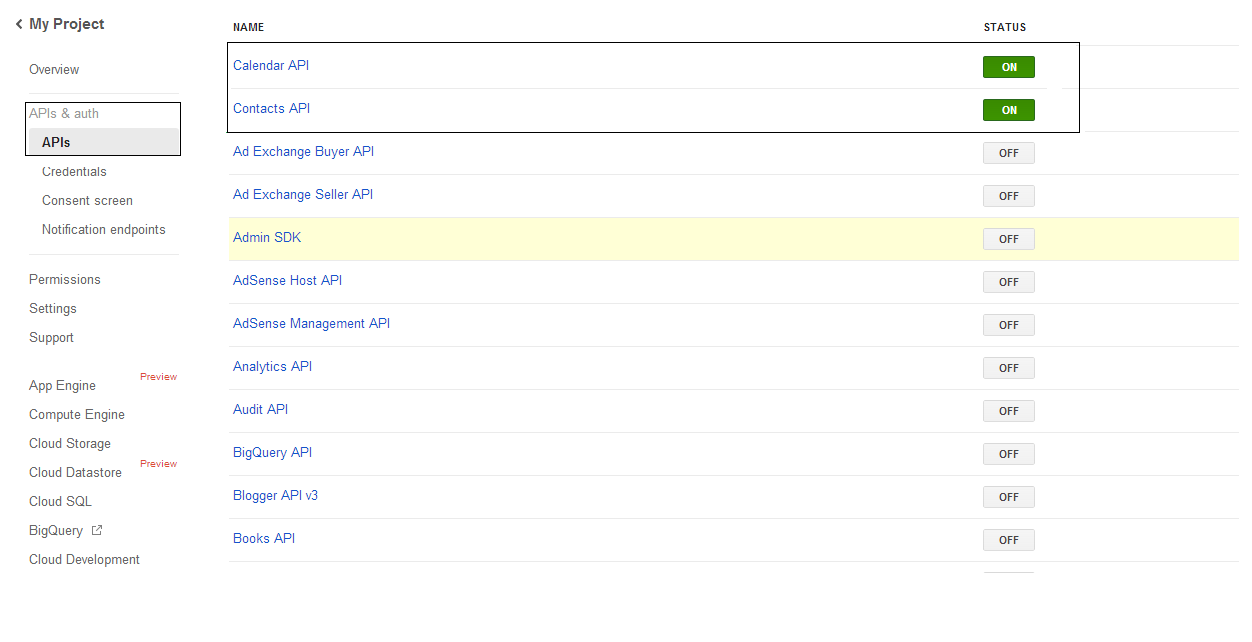
- در لیست APIs & auth \ APIs وضعیت APIهای Calendar و Contacts را روشن کنید. همه سایر APIها را خاموش کنید.
 |
|---|
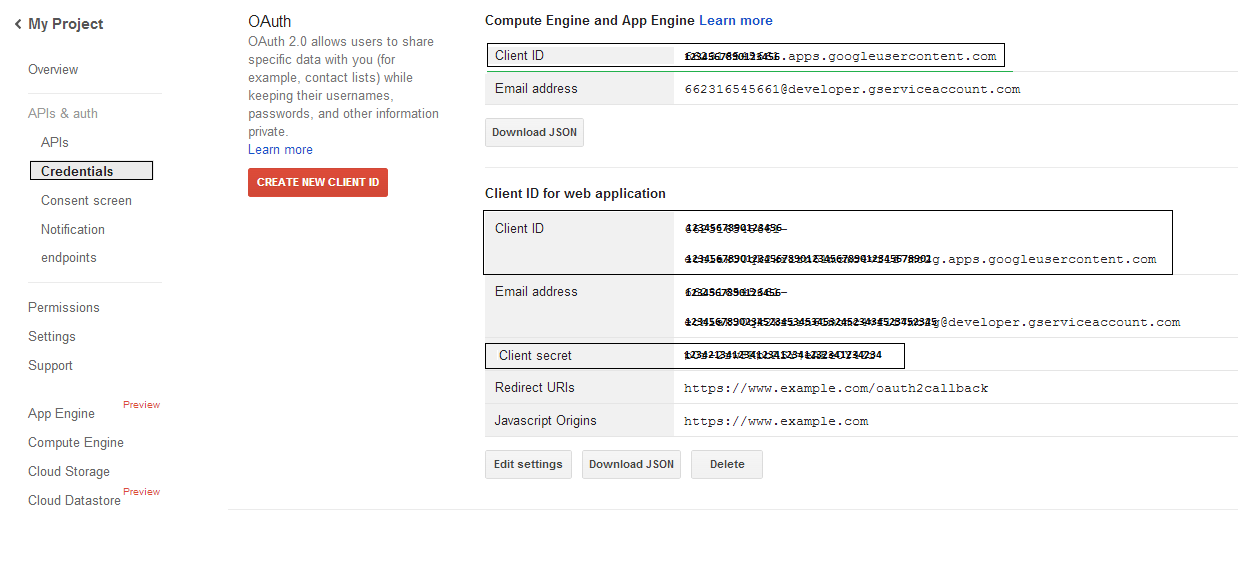
- در بخش APIs & auth → Credentials، دکمه "CREAET NEW CLIENT ID" را زیر بخش "OAuth" فشار دهید. گزینه "Installed application" و "Other" را انتخاب کنید و سپس دکمه "Create Client ID" را بزنید. شناسه مشتری (Client ID) و راز مشتری (Client Secret) را یادداشت کنید؛ این مقادیر در کدهای نمونه در این بخش استفاده خواهند شد.
 |
|---|
یکپارچهسازی امن Google OAuth 2.0
هنگام کار با Google OAuth 2.0 در Aspose.Email برای .NET، به کلاسهای زیر نیاز خواهید داشت:
-
کلاس GoogleOAuthHelper - فرآیند احراز هویت کاربر گوگل و دریافت توکنهای لازم برای تعامل با APIهای گوگل مانند Calendar، Contacts و Gmail را ساده میکند.
-
کلاس GoogleUser - برای بستهبندی و مدیریت اعتبارهای مورد نیاز برای احراز هویت کاربر و تعامل با خدمات گوگل، بهویژه APIهایی که به احراز هویت OAuth 2.0 نیاز دارند مانند تقویم گوگل، طراحی شده است.
-
کلاس TokenResponse - مدلی است که برای نمایش و مدیریت دادههای پاسخ از نقطه انتهای توکن OAuth 2.0 طراحی شده است، جایی که توکنهای دسترسی در ازای مجوز دریافت میشوند.
در مقالات زیر نمونههای کد میتوانید پیدا کنید که نحوه استفاده از این کلاسها را در محیط .NET برای برقراری تعامل امن با خدمات OAuth 2.0 نشان میدهند.
احراز هویت OAuth 2.0 با کلاس GoogleOAuthHelper
این کلاس ایجاد URL کد مجوز، تولید چالشهای کد و بازیابی توکنهای دسترسی و توکنهای تازهسازی را مدیریت میکند. با استفاده از GoogleOAuthHelper، توسعهدهندگان میتوانند جریان OAuth 2.0 را سادهسازند و ارتباط امن و کارآمدی با خدمات گوگل برقرار کنند. قطعه کد زیر نشان میدهد چگونه پیادهسازی کنید GoogleOAuthHelper کلاس را در یک پروژه اضافه کنید:
using Newtonsoft.Json;
using System;
using System.Collections.Generic;
using System.IO;
using System.Net;
using System.Security.Cryptography;
using System.Text;

/// <summary>
/// Developer console:
/// https://console.cloud.google.com/projectselector2
/// Documentation:
/// https://developers.google.com/identity/protocols/oauth2/native-app
/// </summary>
internal class GoogleOAuthHelper
{
    public const string AUTHORIZATION_URL = "https://accounts.google.com/o/oauth2/v2/auth";
    public const string TOKEN_REQUEST_URL = "https://oauth2.googleapis.com/token";

    public const string REDIRECT_URI = "urn:ietf:wg:oauth:2.0:oob";
    public const string REDIRECT_TYPE = "code";

    public static string codeVerifier;
    public static string codeChallenge;

    public static CodeChallengeMethod codeChallengeMethod = CodeChallengeMethod.S256;

    public const string SCOPE =
        "https%3A%2F%2Fwww.googleapis.com%2Fauth%2Fcalendar" + // Calendar
        "+" +
        "https%3A%2F%2Fwww.google.com%2Fm8%2Ffeeds%2F" + // Contacts
        "+" +
        "https%3A%2F%2Fmail.google.com%2F"; // IMAP & SMTP

    static GoogleOAuthHelper()
    {
        CreateCodeVerifier();
        CreateCodeChallenge();
    }

    internal static string CreateCodeVerifier()
    {
        string allowedChars = "0123456789AaBbCcDdEeFfGgHhIiJjKkLlMmNnOoPpQqRrSsTtUuVvWwXxYyZz-._~";

        const int minLength = 43;
        const int maxLength = 128;

        Random random = new Random();
        int length = minLength + random.Next(maxLength - minLength);
        List<char> codeVerifierChars = new List<char>();

        for (int i = 0; i < length; i++)
        {
            int index = random.Next(allowedChars.Length);
            codeVerifierChars.Add(allowedChars[index]);
        }

        return codeVerifier = string.Join("", codeVerifierChars.ToArray());
    }

    internal static string CreateCodeChallenge()
    {
        if (codeChallengeMethod == CodeChallengeMethod.Plain)
            return codeChallenge = codeVerifier;

        byte[] hashValue = null;
        using (SHA256 sha256 = SHA256.Create())
            hashValue = sha256.ComputeHash(Encoding.ASCII.GetBytes(codeVerifier));

        string b64 = Convert.ToBase64String(hashValue);
        b64 = b64.Split('=')[0];
        b64 = b64.Replace('+', '-');
        b64 = b64.Replace('/', '_');

        return codeChallenge = b64;
    }

    internal static string GetAuthorizationCodeUrl(GoogleUser user)
    {
        return GetAuthorizationCodeUrl(user, SCOPE, REDIRECT_URI, REDIRECT_TYPE);
    }

    internal static string GetAuthorizationCodeUrl(
        GoogleUser user, string scope, string redirectUri, string responseType)
    {
        string state = System.Web.HttpUtility.UrlEncode(Guid.NewGuid().ToString());

        string approveUrl = AUTHORIZATION_URL +
            $"?client_id={user.ClientId}&redirect_uri={redirectUri}&response_type={responseType}&scope={scope}&" +
            $"code_challenge={codeChallenge}&code_challenge_method={codeChallengeMethod.ToString()}&" +
            $"state={state}";

        return approveUrl;
    }

    internal static TokenResponse GetAccessTokenByRefreshToken(GoogleUser user)
    {
        HttpWebRequest request = (HttpWebRequest)WebRequest.Create(TOKEN_REQUEST_URL);
        request.CookieContainer = new CookieContainer();
        request.Method = "POST";
        request.ContentType = "application/x-www-form-urlencoded";

        string clientId = System.Web.HttpUtility.UrlEncode(user.ClientId);
        string clientSecret = System.Web.HttpUtility.UrlEncode(user.ClientSecret);
        string refreshToken = System.Web.HttpUtility.UrlEncode(user.RefreshToken);
        string grantType = System.Web.HttpUtility.UrlEncode("refresh_token");

        string encodedParameters = $"client_id={clientId}&client_secret={clientSecret}&refresh_token={refreshToken}&grant_type={grantType}";

        byte[] requestData = Encoding.UTF8.GetBytes(encodedParameters);
        request.ContentLength = requestData.Length;
        if (requestData.Length > 0)
            using (Stream stream = request.GetRequestStream())
                stream.Write(requestData, 0, requestData.Length);

        HttpWebResponse response = (HttpWebResponse)request.GetResponse();
        string responseText = null;
        using (TextReader reader = new StreamReader(response.GetResponseStream(), Encoding.ASCII))
            responseText = reader.ReadToEnd();

        TokenResponse tokensResponse = JsonConvert.DeserializeObject<TokenResponse>(responseText);

        return tokensResponse;
    }

    internal static TokenResponse GetAccessTokenByAuthCode(string authorizationCode, GoogleUser user)
    {
        HttpWebRequest request = (HttpWebRequest)WebRequest.Create(TOKEN_REQUEST_URL);
        request.CookieContainer = new CookieContainer();
        request.Method = "POST";
        request.ContentType = "application/x-www-form-urlencoded";

        string clientId = System.Web.HttpUtility.UrlEncode(user.ClientId);
        string clientSecret = System.Web.HttpUtility.UrlEncode(user.ClientSecret);
        string authCode = System.Web.HttpUtility.UrlEncode(authorizationCode);
        string redirectUri = System.Web.HttpUtility.UrlEncode(REDIRECT_URI);
        string grantType = System.Web.HttpUtility.UrlEncode("authorization_code");

        string encodedParameters = $"client_id={clientId}&client_secret={clientSecret}&code={authCode}&code_verifier={codeVerifier}&redirect_uri={redirectUri}&grant_type={grantType}";

        byte[] requestData = Encoding.UTF8.GetBytes(encodedParameters);
        request.ContentLength = requestData.Length;
        if (requestData.Length > 0)
            using (Stream stream = request.GetRequestStream())
                stream.Write(requestData, 0, requestData.Length);

        HttpWebResponse response = (HttpWebResponse)request.GetResponse();
        string responseText = null;
        using (TextReader reader = new StreamReader(response.GetResponseStream(), Encoding.ASCII))
            responseText = reader.ReadToEnd();

        TokenResponse tokensResponse = JsonConvert.DeserializeObject<TokenResponse>(responseText);

        return tokensResponse;
    }

    public enum CodeChallengeMethod
    {
        S256,
        Plain
    }
}
Google OAuth Helper باید به شکل زیر استفاده شود:
- ابتدا باید یک URL کد مجوز تولید شود.
- آدرس را در مرورگر باز کنید و تمام عملیات را تکمیل کنید. در نتیجه، یک کد مجوز دریافت خواهید کرد.
- از کد مجوز برای دریافت توکن تازهسازی استفاده کنید.
- هنگامی که توکن تازهسازی موجود باشد، میتوانید از آن برای دریافت توکنهای دسترسی استفاده کنید.
GoogleUser user = new GoogleUser(email, password, clientId, clientSecret);

string authUrl = GoogleOAuthHelper.GetAuthorizationCodeUrl(user);

Console.WriteLine("Go to the following URL and get your authorization code:");
Console.WriteLine(authUrl);
Console.WriteLine();

Console.WriteLine("Enter the authorization code:");
string authorizationCode = Console.ReadLine();
Console.WriteLine();

TokenResponse tokenInfo = GoogleOAuthHelper.GetAccessTokenByAuthCode(authorizationCode, user);
Console.WriteLine("The refresh token has been received:");
Console.WriteLine(tokenInfo.RefreshToken);
Console.WriteLine();

user.RefreshToken = tokenInfo.RefreshToken;
tokenInfo = GoogleOAuthHelper.GetAccessTokenByRefreshToken(user);
Console.WriteLine("The new access token has been received:");
Console.WriteLine(tokenInfo.AccessToken);
Console.WriteLine();
کلاس GoogleUser برای احراز هویت OAuth 2.0
قطعه کد زیر نشان میدهد چطور پیادهسازی کنید GoogleUser کلاس:
public class GoogleUser
{
    public GoogleUser(string email, string password, string clientId, string clientSecret)
        : this(email, password, clientId, clientSecret, null)
    {
    }

    public GoogleUser(string email, string password, string clientId, string clientSecret, string refreshToken)
    {
        Email = email;
        Password = password;
        ClientId = clientId;
        ClientSecret = clientSecret;
        RefreshToken = refreshToken;
    }

    public readonly string Email;
    public readonly string Password;
    public readonly string ClientId;
    public readonly string ClientSecret;

    public string RefreshToken;
}
احراز هویت با OAuth 2.0 با استفاده از کلاس TokenResponse
قطعه کد زیر نشان میدهد چطور TokenResponse کلاس میتواند پیادهسازی شود:
using Newtonsoft.Json;

public class TokenResponse
{
    [JsonProperty(NullValueHandling = NullValueHandling.Ignore, PropertyName = "access_token", Required = Required.Default)]
    public string AccessToken { get; set; }

    [JsonProperty(NullValueHandling = NullValueHandling.Ignore, PropertyName = "token_type", Required = Required.Default)]
    public string TokenType { get; set; }

    [JsonProperty(NullValueHandling = NullValueHandling.Ignore, PropertyName = "expires_in", Required = Required.Default)]
    public int ExpiresIn { get; set; }

    [JsonProperty(NullValueHandling = NullValueHandling.Ignore, PropertyName = "refresh_token", Required = Required.Default)]
    public string RefreshToken { get; set; }

    [JsonProperty(NullValueHandling = NullValueHandling.Ignore, PropertyName = "scope", Required = Required.Default)]
    public string Scope { get; set; }
}