
Cấu hình truy cập API OAuth 2.0 tới các dịch vụ Google
Tạo dự án Google Developer Console để truy cập API
Tạo một dự án trong Google Developer Console là bước quan trọng để truy cập và sử dụng các API của Google cho ứng dụng của bạn. Quá trình này bao gồm thiết lập dự án, đồng ý với các điều khoản, xác minh danh tính và cấu hình các thiết lập API phù hợp với nhu cầu. Các bước sau sẽ hướng dẫn bạn qua quá trình tạo dự án và nhận các thông tin xác thực cần thiết cho các dịch vụ như Calendar và Contacts API.
Các bước tạo dự án trong Google Developer Console
- Truy cập liên kết https://cloud.google.com/console/project và đăng nhập bằng thông tin Gmail của bạn
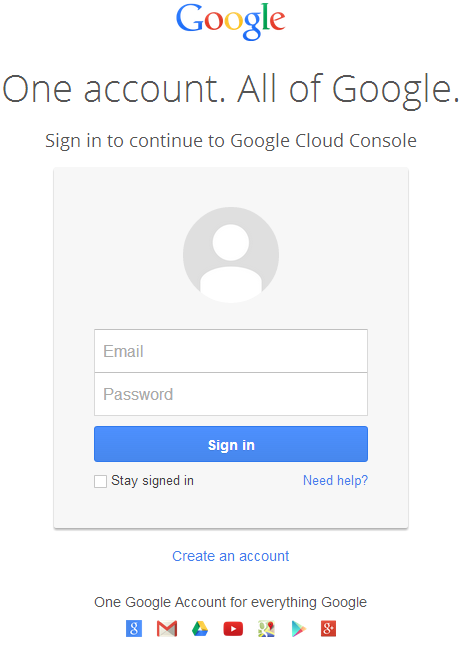 |
|---|
- Chọn ô kiểm "I have read and agree to all Terms of Service for the Google Cloud Platform products." và nhấn nút Create
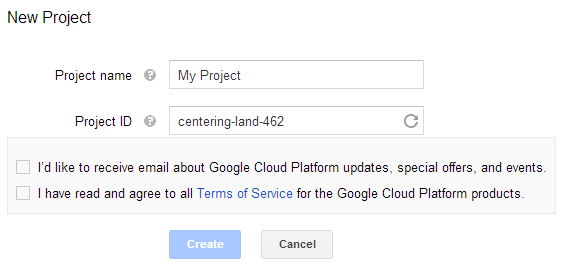 |
|---|
- "SMS Verification" sẽ được yêu cầu. Nhấn nút tiếp tục:
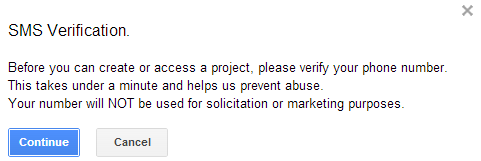 |
|---|
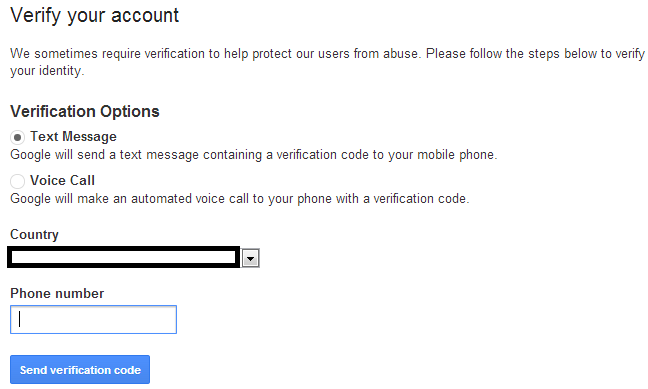
- Nhập tên quốc gia của bạn và nhập số điện thoại di động. Nhấn nút: Send Verification Code
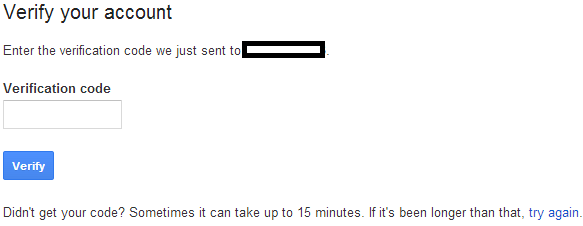 |
|---|
- Nhập mã xác nhận nhận được trên điện thoại của bạn.
 |
|---|
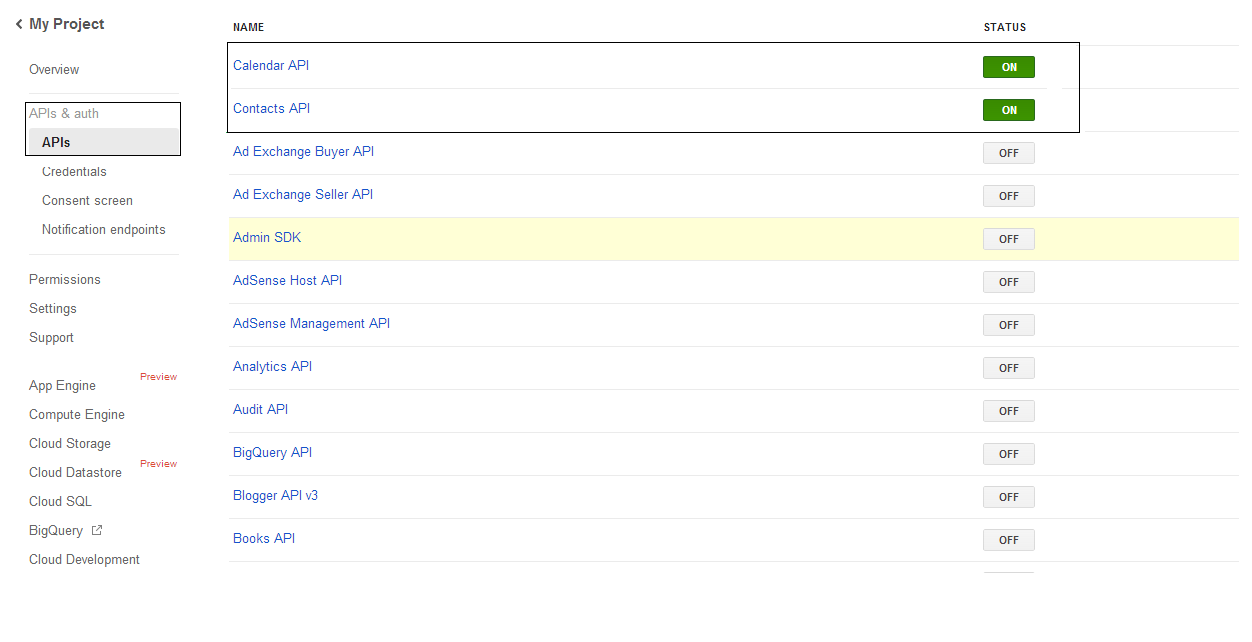
- Trong danh sách APIs & auth \ APIs, bật trạng thái của Calendar API và Contacts API. Tắt tất cả các API khác.
 |
|---|
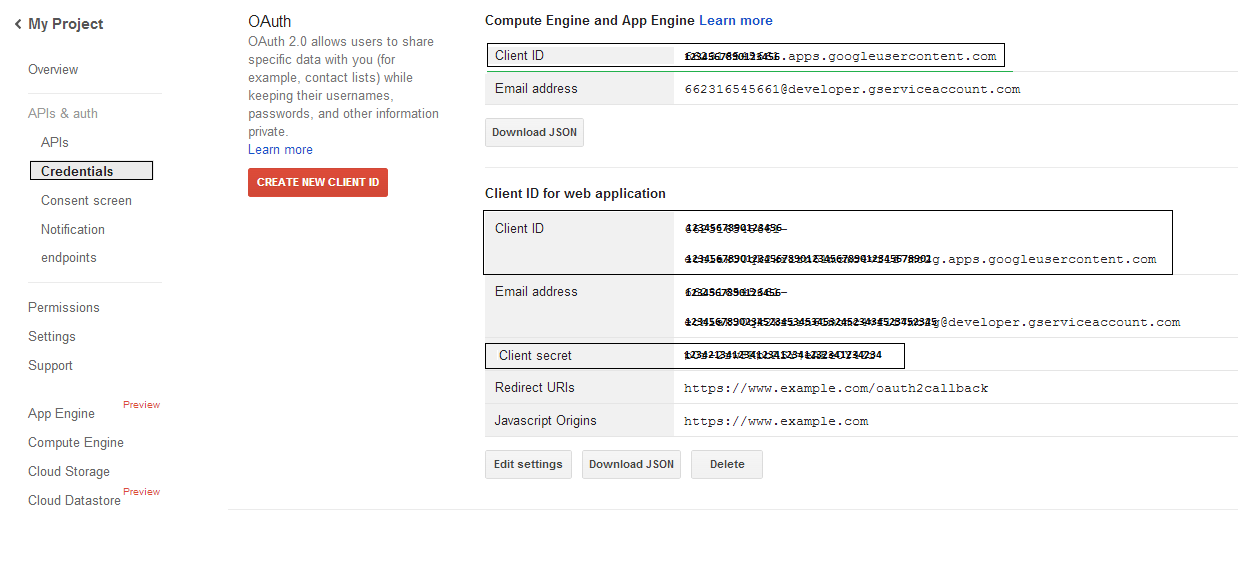
- Trong mục APIs & auth -> Credentials, nhấn nút "CREAET NEW CLIENT ID" trong phần "OAuth". Chọn "Installed application" và "Other" từ các lựa chọn, sau đó nhấn nút "Create Client ID". Ghi lại Client ID và Client Secret ở đây sẽ được sử dụng trong các đoạn mã mẫu trong phần này.
 |
|---|
Tích hợp Google OAuth 2.0 bảo mật
Khi làm việc với Google OAuth 2.0 trong Aspose.Email cho .NET, bạn sẽ cần các lớp sau:
-
GoogleOAuthHelper class - Đơn giản hoá quá trình xác thực người dùng Google và lấy các token cần thiết để tương tác với các API Google, chẳng hạn như Calendar, Contacts và Gmail.
-
GoogleUser class - Được thiết kế để đóng gói và quản lý thông tin xác thực cần thiết cho người dùng để xác thực và tương tác với các dịch vụ Google, đặc biệt là các API yêu cầu xác thực OAuth 2.0 như Google Calendar.
-
TokenResponse class - Đây là mô hình được thiết kế để đại diện và xử lý dữ liệu phản hồi từ endpoint token OAuth 2.0, nơi các token truy cập được lấy đổi lấy ủy quyền.
Trong các bài viết sau, bạn sẽ tìm thấy các mẫu mã minh họa cách sử dụng những lớp này trong môi trường .NET để thiết lập tương tác bảo mật với các dịch vụ OAuth 2.0.
Xác thực OAuth 2.0 với Lớp GoogleOAuthHelper
Lớp này xử lý việc tạo URL mã ủy quyền, tạo các thử thách mã, và lấy token truy cập và refresh. Bằng cách sử dụng GoogleOAuthHelper, các nhà phát triển có thể tinh giản luồng OAuth 2.0, đảm bảo giao tiếp an toàn và hiệu quả với các dịch vụ Google. Đoạn mã sau cho bạn thấy cách triển khai GoogleOAuthHelper lớp vào dự án:
// For complete examples and data files, please go to https://github.com/aspose-email/Aspose.Email-for-.NET

using Newtonsoft.Json;
using System;
using System.Collections.Generic;
using System.IO;
using System.Net;
using System.Security.Cryptography;
using System.Text;

/// <summary>
/// Developer console:
/// https://console.cloud.google.com/projectselector2
/// Documentation:
/// https://developers.google.com/identity/protocols/oauth2/native-app
/// </summary>
internal class GoogleOAuthHelper
{
    public const string AUTHORIZATION_URL = "https://accounts.google.com/o/oauth2/v2/auth";
    public const string TOKEN_REQUEST_URL = "https://oauth2.googleapis.com/token";

    public const string REDIRECT_URI = "urn:ietf:wg:oauth:2.0:oob";
    public const string REDIRECT_TYPE = "code";

    public static string codeVerifier;
    public static string codeChallenge;

    public static CodeChallengeMethod codeChallengeMethod = CodeChallengeMethod.S256;

    public const string SCOPE =
        "https%3A%2F%2Fwww.googleapis.com%2Fauth%2Fcalendar" + // Calendar
        "+" +
        "https%3A%2F%2Fwww.google.com%2Fm8%2Ffeeds%2F" + // Contacts
        "+" +
        "https%3A%2F%2Fmail.google.com%2F"; // IMAP & SMTP

    static GoogleOAuthHelper()
    {
        CreateCodeVerifier();
        CreateCodeChallenge();
    }

    internal static string CreateCodeVerifier()
    {
        string allowedChars = "0123456789AaBbCcDdEeFfGgHhIiJjKkLlMmNnOoPpQqRrSsTtUuVvWwXxYyZz-._~";

        const int minLength = 43;
        const int maxLength = 128;

        Random random = new Random();
        int length = minLength + random.Next(maxLength - minLength);
        List<char> codeVerifierChars = new List<char>();

        for (int i = 0; i < length; i++)
        {
            int index = random.Next(allowedChars.Length);
            codeVerifierChars.Add(allowedChars[index]);
        }

        return codeVerifier = string.Join("", codeVerifierChars.ToArray());
    }

    internal static string CreateCodeChallenge()
    {
        if (codeChallengeMethod == CodeChallengeMethod.Plain)
            return codeChallenge = codeVerifier;

        byte[] hashValue = null;
        using (SHA256 sha256 = SHA256.Create())
            hashValue = sha256.ComputeHash(Encoding.ASCII.GetBytes(codeVerifier));

        string b64 = Convert.ToBase64String(hashValue);
        b64 = b64.Split('=')[0];
        b64 = b64.Replace('+', '-');
        b64 = b64.Replace('/', '_');

        return codeChallenge = b64;
    }

    internal static string GetAuthorizationCodeUrl(GoogleUser user)
    {
        return GetAuthorizationCodeUrl(user, SCOPE, REDIRECT_URI, REDIRECT_TYPE);
    }

    internal static string GetAuthorizationCodeUrl(
        GoogleUser user, string scope, string redirectUri, string responseType)
    {
        string state = System.Web.HttpUtility.UrlEncode(Guid.NewGuid().ToString());

        string approveUrl = AUTHORIZATION_URL +
            $"?client_id={user.ClientId}&redirect_uri={redirectUri}&response_type={responseType}&scope={scope}&" +
            $"code_challenge={codeChallenge}&code_challenge_method={codeChallengeMethod.ToString()}&" +
            $"state={state}";

        return approveUrl;
    }

    internal static TokenResponse GetAccessTokenByRefreshToken(GoogleUser user)
    {
        HttpWebRequest request = (HttpWebRequest)WebRequest.Create(TOKEN_REQUEST_URL);
        request.CookieContainer = new CookieContainer();
        request.Method = "POST";
        request.ContentType = "application/x-www-form-urlencoded";

        string clientId = System.Web.HttpUtility.UrlEncode(user.ClientId);
        string clientSecret = System.Web.HttpUtility.UrlEncode(user.ClientSecret);
        string refreshToken = System.Web.HttpUtility.UrlEncode(user.RefreshToken);
        string grantType = System.Web.HttpUtility.UrlEncode("refresh_token");

        string encodedParameters = $"client_id={clientId}&client_secret={clientSecret}&refresh_token={refreshToken}&grant_type={grantType}";

        byte[] requestData = Encoding.UTF8.GetBytes(encodedParameters);
        request.ContentLength = requestData.Length;
        if (requestData.Length > 0)
            using (Stream stream = request.GetRequestStream())
                stream.Write(requestData, 0, requestData.Length);

        HttpWebResponse response = (HttpWebResponse)request.GetResponse();
        string responseText = null;
        using (TextReader reader = new StreamReader(response.GetResponseStream(), Encoding.ASCII))
            responseText = reader.ReadToEnd();

        TokenResponse tokensResponse = JsonConvert.DeserializeObject<TokenResponse>(responseText);

        return tokensResponse;
    }

    internal static TokenResponse GetAccessTokenByAuthCode(string authorizationCode, GoogleUser user)
    {
        HttpWebRequest request = (HttpWebRequest)WebRequest.Create(TOKEN_REQUEST_URL);
        request.CookieContainer = new CookieContainer();
        request.Method = "POST";
        request.ContentType = "application/x-www-form-urlencoded";

        string clientId = System.Web.HttpUtility.UrlEncode(user.ClientId);
        string clientSecret = System.Web.HttpUtility.UrlEncode(user.ClientSecret);
        string authCode = System.Web.HttpUtility.UrlEncode(authorizationCode);
        string redirectUri = System.Web.HttpUtility.UrlEncode(REDIRECT_URI);
        string grantType = System.Web.HttpUtility.UrlEncode("authorization_code");

        string encodedParameters = $"client_id={clientId}&client_secret={clientSecret}&code={authCode}&code_verifier={codeVerifier}&redirect_uri={redirectUri}&grant_type={grantType}";

        byte[] requestData = Encoding.UTF8.GetBytes(encodedParameters);
        request.ContentLength = requestData.Length;
        if (requestData.Length > 0)
            using (Stream stream = request.GetRequestStream())
                stream.Write(requestData, 0, requestData.Length);

        HttpWebResponse response = (HttpWebResponse)request.GetResponse();
        string responseText = null;
        using (TextReader reader = new StreamReader(response.GetResponseStream(), Encoding.ASCII))
            responseText = reader.ReadToEnd();

        TokenResponse tokensResponse = JsonConvert.DeserializeObject<TokenResponse>(responseText);

        return tokensResponse;
    }

    public enum CodeChallengeMethod
    {
        S256,
        Plain
    }
}
Google OAuth Helper nên được sử dụng như sau:
- Phải tạo URL mã ủy quyền trước.
- Mở URL trong trình duyệt và hoàn thành tất cả các thao tác. Kết quả, bạn sẽ nhận được mã ủy quyền.
- Sử dụng mã ủy quyền để nhận token làm mới.
- Khi token làm mới tồn tại, bạn có thể sử dụng nó để lấy token truy cập.
GoogleUser user = new GoogleUser(email, password, clientId, clientSecret);

string authUrl = GoogleOAuthHelper.GetAuthorizationCodeUrl(user);

Console.WriteLine("Go to the following URL and get your authorization code:");
Console.WriteLine(authUrl);
Console.WriteLine();

Console.WriteLine("Enter the authorization code:");
string authorizationCode = Console.ReadLine();
Console.WriteLine();

TokenResponse tokenInfo = GoogleOAuthHelper.GetAccessTokenByAuthCode(authorizationCode, user);
Console.WriteLine("The refresh token has been received:");
Console.WriteLine(tokenInfo.RefreshToken);
Console.WriteLine();

user.RefreshToken = tokenInfo.RefreshToken;
tokenInfo = GoogleOAuthHelper.GetAccessTokenByRefreshToken(user);
Console.WriteLine("The new access token has been received:");
Console.WriteLine(tokenInfo.AccessToken);
Console.WriteLine();
Lớp GoogleUser cho Xác thực OAuth 2.0
Đoạn mã sau cho bạn thấy cách triển khai GoogleUser lớp:
// For complete examples and data files, please go to https://github.com/aspose-email/Aspose.Email-for-.NET

public class GoogleUser
{
    public GoogleUser(string email, string password, string clientId, string clientSecret)
        : this(email, password, clientId, clientSecret, null)
    {
    }

    public GoogleUser(string email, string password, string clientId, string clientSecret, string refreshToken)
    {
        Email = email;
        Password = password;
        ClientId = clientId;
        ClientSecret = clientSecret;
        RefreshToken = refreshToken;
    }

    public readonly string Email;
    public readonly string Password;
    public readonly string ClientId;
    public readonly string ClientSecret;

    public string RefreshToken;
}
Xác thực với OAuth 2.0 bằng lớp TokenResponse
Đoạn mã sau cho bạn thấy cách TokenResponse có thể triển khai lớp:
// For complete examples and data files, please go to https://github.com/aspose-email/Aspose.Email-for-.NET

using Newtonsoft.Json;

public class TokenResponse
{
    [JsonProperty(NullValueHandling = NullValueHandling.Ignore, PropertyName = "access_token", Required = Required.Default)]
    public string AccessToken { get; set; }

    [JsonProperty(NullValueHandling = NullValueHandling.Ignore, PropertyName = "token_type", Required = Required.Default)]
    public string TokenType { get; set; }

    [JsonProperty(NullValueHandling = NullValueHandling.Ignore, PropertyName = "expires_in", Required = Required.Default)]
    public int ExpiresIn { get; set; }

    [JsonProperty(NullValueHandling = NullValueHandling.Ignore, PropertyName = "refresh_token", Required = Required.Default)]
    public string RefreshToken { get; set; }

    [JsonProperty(NullValueHandling = NullValueHandling.Ignore, PropertyName = "scope", Required = Required.Default)]
    public string Scope { get; set; }
}