
إدارة صناديق النص في العروض التقديمية باستخدام JavaScript
المقدمة
في Aspose.Slides لـ Node.js عبر Java، يتم تخزين نص الشريحة في إطارات النص التي تنتمي إلى الأشكال. تمثل فئة AutoShape الشكل الأكثر شيوعًا الذي يحمل نصًا وتوفر نصه عبر طريقة AutoShape.getTextFrame.
ملاحظة
كل شكل تلقائي يشتق من Shape، لكن ليس كل شكل هو شكل تلقائي أو يدعم إطار نص. عند معالجة عرض تقديمي موجود، تحقق من أن الشكل هو نسخة من AutoShape قبل الوصول إلى نصه.إنشاء مربع نص على شريحة
لإنشاء مربع نص، أضف شكلاً تلقائيًا إلى شريحة، وأضف نصًا إلى إطار النص الخاص به، ثم احفظ العرض التقديمي. المثال التالي ينشئ مربع نص مستطيل:
const aspose = { slides: require("aspose.slides.via.java") };

const presentation = new aspose.slides.Presentation();
try {
    const slide = presentation.getSlides().get_Item(0);
    const textBox = slide.getShapes().addAutoShape(aspose.slides.ShapeType.Rectangle, 150, 75, 300, 50);
    textBox.addTextFrame("Aspose TextBox");

    presentation.save("TextBox.pptx", aspose.slides.SaveFormat.Pptx);
} finally {
    presentation.dispose();
}
الإحداثيات والأبعاد التي تُمرَّر إلى ShapeCollection.addAutoShape تُقاس بالنقاط. تقوم طريقة AutoShape.addTextFrame بتهيئة إطار النص بالنص المزوَّد.
التحقق من شكل مربع النص
استخدم طريقة AutoShape.isTextBox لتحديد ما إذا كان الشكل التلقائي يُعامل كمربع نص. هذا مفيد عندما يحتوي العرض التقديمي على كل من الأشكال التي تحمل نصًا والأشكال الرسومية البحتة.
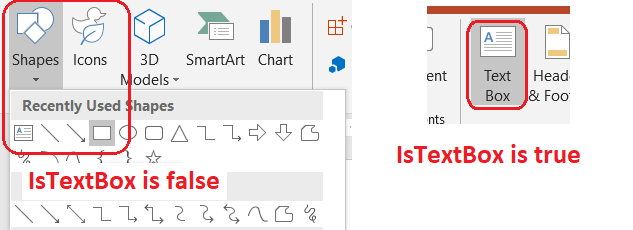
المثال التالي يفحص كل شكل تلقائي في العرض التقديمي:
const aspose = { slides: require("aspose.slides.via.java") };
const java = require("java");

const presentation = new aspose.slides.Presentation();
try {
    const slide = presentation.getSlides().get_Item(0);
    const textBox = slide.getShapes().addAutoShape(aspose.slides.ShapeType.Rectangle, 10, 10, 120, 40);
    textBox.addTextFrame("Text box");
    slide.getShapes().addAutoShape(aspose.slides.ShapeType.Ellipse, 150, 10, 40, 40);

    for (let slideIndex = 0; slideIndex < presentation.getSlides().size(); slideIndex++) {
        const currentSlide = presentation.getSlides().get_Item(slideIndex);
        for (let shapeIndex = 0; shapeIndex < currentSlide.getShapes().size(); shapeIndex++) {
            const shape = currentSlide.getShapes().get_Item(shapeIndex);
            if (java.instanceOf(shape, "com.aspose.slides.AutoShape")) {
                console.log(shape.isTextBox() ? "The shape is a text box." : "The shape is not a text box.");
            }
        }
    }
} finally {
    presentation.dispose();
}
لا يُعد الشكل التلقائي المضاف حديثًا مربع نص حتى يحتوي على نص غير فارغ. يمكنك تزويد هذا النص عبر AutoShape.addTextFrame أو TextFrame.setText. إضافة أو تعيين سلسلة فارغة يجعل طريقة AutoShape.isTextBox تُعيد false:
const aspose = { slides: require("aspose.slides.via.java") };

const presentation = new aspose.slides.Presentation();
try {
    const slide = presentation.getSlides().get_Item(0);

    const shape1 = slide.getShapes().addAutoShape(aspose.slides.ShapeType.Rectangle, 10, 10, 100, 40);
    shape1.addTextFrame("Shape 1");
    console.log(shape1.isTextBox());

    const shape2 = slide.getShapes().addAutoShape(aspose.slides.ShapeType.Rectangle, 10, 70, 100, 40);
    shape2.getTextFrame().setText("Shape 2");
    console.log(shape2.isTextBox());

    const shape3 = slide.getShapes().addAutoShape(aspose.slides.ShapeType.Rectangle, 10, 130, 100, 40);
    shape3.addTextFrame("");
    console.log(shape3.isTextBox());

    const shape4 = slide.getShapes().addAutoShape(aspose.slides.ShapeType.Rectangle, 10, 190, 100, 40);
    shape4.getTextFrame().setText("");
    console.log(shape4.isTextBox());
} finally {
    presentation.dispose();
}
النداؤان الأولان يطبعان true؛ والنداؤان الأخيران يطبعان false.
العثور على الشكل الذي يمتلك إطار النص
قد تتلقى شفرة معالجة نص عامة كائنًا من نوع TextFrame دون معرفة أي عرض تقديمي يحتويه. استخدم طريقة القراءة فقط TextFrame.getParentShape للعودة إلى الـShape المالك.
لإطار نص مملوك من قبل شكل تلقائي أو شكل آخر يحمل نصًا، تُعيد طريقة TextFrame.getParentShape المالك وتُعيد طريقة TextFrame.getParentCell القيمة null. تحقق من القيمة المرجعة قبل الوصول إليها. لتحديد كل من مالكي الأشكال وخلايا الجداول، بما في ذلك الأشكال المرتبطة بعقد SmartArt، راجع Search and Replace Text.
إضافة أعمدة إلى مربع النص
تقسّم طريقة TextFrameFormat.setColumnCount إطار النص إلى أعمدة، بينما تحدد طريقة TextFrameFormat.setColumnSpacing الفجوة بين الأعمدة بالنقاط. كلا الإعدادين ينتميان إلى TextFrameFormat ويمكن تغييره عبر إطار النص لمربع نص موجود. يُعاد تدفق النص بين الأعمدة داخل الشكل نفسه؛ ولا يمتد إلى شكل آخر.
المثال التالي ينشئ مربع نص ثلاثي الأعمدة مع مسافة 10 نقاط بين الأعمدة، يحفظ العرض التقديمي، ثم يقرأ الإعدادات المخزنة من ملف الإخراج:
const aspose = { slides: require("aspose.slides.via.java") };

const presentation = new aspose.slides.Presentation();
try {
    const slide = presentation.getSlides().get_Item(0);
    const textBox = slide.getShapes().addAutoShape(aspose.slides.ShapeType.Rectangle, 100, 100, 300, 200);
    textBox.addTextFrame("This text is distributed automatically across all columns in the text box.");

    const textFrameFormat = textBox.getTextFrame().getTextFrameFormat();
    textFrameFormat.setColumnCount(3);
    textFrameFormat.setColumnSpacing(10);

    presentation.save("TextBoxColumns.pptx", aspose.slides.SaveFormat.Pptx);

    const savedPresentation = new aspose.slides.Presentation("TextBoxColumns.pptx");
    try {
        const savedTextBox = savedPresentation.getSlides().get_Item(0).getShapes().get_Item(0);
        const savedFormat = savedTextBox.getTextFrame().getTextFrameFormat();
        console.log("Columns: " + savedFormat.getColumnCount() + "; spacing: " + savedFormat.getColumnSpacing() + " points");
    } finally {
        savedPresentation.dispose();
    }
} finally {
    presentation.dispose();
}
استخراج النص من الأعمدة الفردية
استخدم طريقة TextFrame.splitTextByColumns لاسترجاع النص المخصص لكل عمود بصري في إطار نص موجود. تُعيد الطريقة سلسلة واحدة لكل عمود، بترتيب القراءة القائم على الأعمدة. ينتج إطار نص أحادي العمود مصفوفة عنصر واحد، ويُمثَّل العمود الفارغ بسلسلة فارغة. تحتوي السلاسل على نص عادي فقط؛ ولا يتم الحفاظ على تنسيق المستوى الجزئي.
هذا مفيد عندما تحتاج إلى:
- استخراج النص مع الحفاظ على ترتيب القراءة القائم على الأعمدة.
- فهرسة أو مقارنة محتوى الشرائح متعددة الأعمدة.
- تصدير كل عمود إلى ملف منفصل أو حقل قاعدة بيانات أو وجهة أخرى.
- فحص كيفية إعادة توزيع النص بعد تغيير عدد الأعمدة باستخدام TextFrameFormat.setColumnCount، أو الفجوة باستخدام TextFrameFormat.setColumnSpacing، أو الخط، أو حجم إطار النص.
تُبلغ الطريقة عن النص الموزَّع داخل الـTextFrame الحالي؛ ولا تُجري تدفقًا تلقائيًا بين أشكال أو مربعات نص منفصلة. يمكن أن تعتمد توزيع الأعمدة على الخطوط المتاحة وإعدادات تخطيط النص الأخرى، لذا تأكد من توفر الخطوط المطلوبة عندما تكون النتائج المتسقة مهمة.
المثال التالي يحمل عرض تقديمي، يجد أول شكل تلقائي متعدد الأعمدة يحتوي على إطار نص، يقرأ عدد الأعمدة المكوَّن، ويكتب النص من كل عمود إلى ملف منفصل. تُتجاوز الأشكال التي لا توفر إطار نص.
const aspose = { slides: require("aspose.slides.via.java") };
const java = require("java");
const fs = require("fs");

const presentation = new aspose.slides.Presentation("MultiColumnText.pptx");
try {
    const slide = presentation.getSlides().get_Item(0);
    let textBox = null;
    for (let shapeIndex = 0; shapeIndex < slide.getShapes().size(); shapeIndex++) {
        const shape = slide.getShapes().get_Item(shapeIndex);
        if (java.instanceOf(shape, "com.aspose.slides.AutoShape")) {
            const textFrame = shape.getTextFrame();
            if (textFrame != null) {
                const columnCount = textFrame.getTextFrameFormat().getColumnCount();
                if (columnCount > 1) {
                    textBox = shape;
                    break;
                }
            }
        }
    }

    if (textBox == null) {
        console.log("No multi-column text frame was found.");
    } else {
        const textFrame = textBox.getTextFrame();
        const configuredColumnCount = textFrame.getTextFrameFormat().getColumnCount();
        const columnTexts = textFrame.splitTextByColumns();

        console.log("Configured columns: " + configuredColumnCount);

        for (let columnIndex = 0; columnIndex < columnTexts.length; columnIndex++) {
            const columnNumber = columnIndex + 1;
            const columnText = columnTexts[columnIndex];
            console.log("Column " + columnNumber + ": " + columnText);
            const outputPath = "Column-" + columnNumber + ".txt";
            try {
                fs.writeFileSync(outputPath, columnText, "utf8");
            } catch (error) {
                console.log("Could not write column " + columnNumber + ": " + error.message);
            }
        }
    }
} finally {
    presentation.dispose();
}
تحديث النص
لتحديث النص في جميع أنحاء العرض التقديمي، كرّر عبر الشرائح والأشكال، اختر الأشكال التلقائية، ثم حرّر أقسام النص الخاصة بها. يتيح العمل على مستوى الجزء تغيير كل من النص وتنسيق الأحرف.
المثال التالي يستبدل كل ظهور لـ years بـ months في نص الشكل التلقائي ويجعل كل جزء متأثر بالاستبدال غامق:
const aspose = { slides: require("aspose.slides.via.java") };
const java = require("java");

const fontBold = java.newByte(aspose.slides.NullableBool.True);
const presentation = new aspose.slides.Presentation("Text.pptx");
try {
    for (let slideIndex = 0; slideIndex < presentation.getSlides().size(); slideIndex++) {
        const slide = presentation.getSlides().get_Item(slideIndex);
        for (let shapeIndex = 0; shapeIndex < slide.getShapes().size(); shapeIndex++) {
            const shape = slide.getShapes().get_Item(shapeIndex);
            if (!java.instanceOf(shape, "com.aspose.slides.AutoShape")) {
                continue;
            }

            const textFrame = shape.getTextFrame();
            if (textFrame == null) {
                continue;
            }

            for (let paragraphIndex = 0; paragraphIndex < textFrame.getParagraphs().getCount(); paragraphIndex++) {
                const paragraph = textFrame.getParagraphs().get_Item(paragraphIndex);
                for (let portionIndex = 0; portionIndex < paragraph.getPortions().getCount(); portionIndex++) {
                    const portion = paragraph.getPortions().get_Item(portionIndex);
                    const text = portion.getText();
                    if (text != null && text.includes("years")) {
                        portion.setText(text.replace(/years/g, "months"));
                        portion.getPortionFormat().setFontBold(fontBold);
                    }
                }
            }
        }
    }

    presentation.save("TextChanged.pptx", aspose.slides.SaveFormat.Pptx);
} finally {
    presentation.dispose();
}
هذا التجوال يُحدّث النص فقط في الأشكال التلقائية. النص المخزَّن في الجداول أو المخططات أو SmartArt أو الأشكال المجمعة يتطلب تجوال مجموعات تلك الكائنات الخاصة.
إضافة مربع نص مع ارتباط تشعبي
يمكن تعيين ارتباط تشعبي إلى جزء نصي محدد، بحيث يكون ذلك الجزء فقط هو القابل للنقر. استخدم HyperlinkManager.setExternalHyperlinkClick لربط الجزء بعنوان URL خارجي.
المثال التالي ينشئ نصًا مرتبطًا ويحفظه إلى عرض تقديمي:
const aspose = { slides: require("aspose.slides.via.java") };

const presentation = new aspose.slides.Presentation();
try {
    const slide = presentation.getSlides().get_Item(0);
    const textBox = slide.getShapes().addAutoShape(aspose.slides.ShapeType.Rectangle, 150, 150, 200, 50);
    textBox.addTextFrame("Aspose.Slides");

    const textPortion = textBox.getTextFrame().getParagraphs().get_Item(0).getPortions().get_Item(0);
    textPortion.getPortionFormat().getHyperlinkManager().setExternalHyperlinkClick("https://www.aspose.com/");

    presentation.save("Hyperlink.pptx", aspose.slides.SaveFormat.Pptx);
} finally {
    presentation.dispose();
}
الأسئلة المتكررة
ما هو الفرق بين مربع النص وعنصر النائب للنص على شريحة رئيسية أو شريحة تخطيط؟
يمكن لـ placeholder أن يرث موضعه وتنسيقه من master slide أو layout slide. مربع النص العادي هو شكل مستقل على الشريحة التي تم إنشاؤه فيها ولا يكتسب سلوك العنصر النائب عندما تتغير التخطيط.
كيف يمكنني استبدال النص دون تغيير النص في المخططات أو الجداول أو SmartArt؟
حدِّد التجوال على الأشكال التي هي نسخ من AutoShape، كما هو موضح في مثال تحديث النص. المخططات والجداول وSmartArt تخزن النص في نماذج الأشياء الخاصة بها، لذا لا يتم تعديلها بهذه الحلقة.