
اضافهکردن معادلات ریاضی به ارائههای PowerPoint در JavaScript
مرور کلی
PowerPoint معادلات را به صورت Office Math Markup Language (OMML) ذخیره میکند. با Aspose.Slides برای Node.js از طریق Java، میتوانید همان نوع محتویات ریاضی را بهصورت برنامهنویسی ایجاد کنید: کسرها، رادیکالها، توابع، حدها، عملگرهای N-ary، ماتریسها، آرایهها و بلوکهای ریاضی قالببندیشده.
در PowerPoint، کاربران معمولاً معادلات را از Insert > Equation اضافه میکنند:
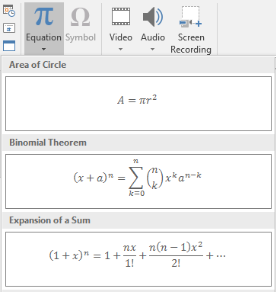
نتیجه متن ریاضی قابل ویرایش بر روی اسلاید است:

Aspose.Slides این متن ریاضی را از طریق سه شیء اصلی میسازد:
- یک شکل ریاضی، که با addMathShape ساخته میشود، شکلی است که معادله را در خود دارد.
- MathPortion محتویات ریاضی را در داخل فریم متن شکل ذخیره میکند.
- MathParagraph شامل یک یا چند شیء MathBlock است.
بیشتر مثالهای زیر از MathematicalText و متدهای زنجیرهای MathElementBase استفاده میکنند تا کد کوتاه و خوانا بماند.
برای سناریوهای صدور MathML، به صدور معادلات ریاضی از ارائهها در Node.js از طریق Java مراجعه کنید.
ایجاد یک معادله
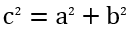
این مثال یک شکل ریاضی ایجاد کرده و قضیه فیثاغورس را اضافه میکند:
let presentation = new aspose.slides.Presentation();
try {
    let slide = presentation.getSlides().get_Item(0);

    let mathShape = slide.getShapes().addMathShape(20, 20, 700, 120);
    let mathParagraph = mathShape.getTextFrame().getParagraphs()
            .get_Item(0).getPortions().get_Item(0).getMathParagraph();

    let equation = new aspose.slides.MathematicalText("c")
            .setSuperscript("2")
            .join("=")
            .join(new aspose.slides.MathematicalText("a").setSuperscript("2"))
            .join("+")
            .join(new aspose.slides.MathematicalText("b").setSuperscript("2"));

    mathParagraph.add(equation);

    presentation.save("pythagorean-theorem.pptx", aspose.slides.SaveFormat.Pptx);
} finally {
    presentation.dispose();
}
addMathShape یک شکل ایجاد میکند که قبلاً شامل یک پاراگراف ریاضی است. اولین MathPortion را دسترسی پیدا کنید، MathParagraph آن را بگیرید و بلوکهای ریاضی یا عناصر ریاضی را به آن اضافه کنید.
افزودن کسرها
از divide برای ایجاد یک کسر استفاده کنید. میتوانید یک سبک کسر را با MathFractionTypes انتخاب کنید.

let presentation = new aspose.slides.Presentation();
try {
    let slide = presentation.getSlides().get_Item(0);

    let mathShape = slide.getShapes().addMathShape(20, 20, 700, 100);
    let mathParagraph = mathShape.getTextFrame().getParagraphs()
            .get_Item(0).getPortions().get_Item(0).getMathParagraph();

    let fraction = new aspose.slides.MathematicalText("1")
            .divide("x", aspose.slides.MathFractionTypes.Skewed);

    mathParagraph.add(new aspose.slides.MathBlock(fraction));

    presentation.save("fraction.pptx", aspose.slides.SaveFormat.Pptx);
} finally {
    presentation.dispose();
}
برای یک کسر لایهای، از MathFractionTypes.Bar استفاده کنید:
let stackedFraction = new aspose.slides.MathematicalText("x + 1").divide("y - 1", aspose.slides.MathFractionTypes.Bar);
افزودن رادیکالها
از radical برای ایجاد ریشه دوم، ریشه سوم یا ریشههای دیگر استفاده کنید. عنصر فعلی به عنوان پایه میشود و آرگومان درجه ریشه را تعیین میکند.

let presentation = new aspose.slides.Presentation();
try {
    let slide = presentation.getSlides().get_Item(0);

    let mathShape = slide.getShapes().addMathShape(20, 20, 700, 100);
    let mathParagraph = mathShape.getTextFrame().getParagraphs()
            .get_Item(0).getPortions().get_Item(0).getMathParagraph();

    let radical = new aspose.slides.MathematicalText("x")
            .radical("n");

    mathParagraph.add(new aspose.slides.MathBlock(radical));

    presentation.save("radical.pptx", aspose.slides.SaveFormat.Pptx);
} finally {
    presentation.dispose();
}
افزودن توابع و حدود
از asArgumentOfFunction یا function برای توابعی مانند sin(x), log(x) یا نامهای تابع سفارشی استفاده کنید. برای حدود، lim را در یک MathLimit قرار دهید یا از setLowerLimit استفاده کنید.

let presentation = new aspose.slides.Presentation();
try {
    let slide = presentation.getSlides().get_Item(0);

    let mathShape = slide.getShapes().addMathShape(20, 20, 700, 100);
    let mathParagraph = mathShape.getTextFrame().getParagraphs()
            .get_Item(0).getPortions().get_Item(0).getMathParagraph();

    let limit = new aspose.slides.MathematicalText("lim")
            .setLowerLimit("x\u2192\u221E")
            .function("x");

    mathParagraph.add(new aspose.slides.MathBlock(limit));

    presentation.save("functions-and-limits.pptx", aspose.slides.SaveFormat.Pptx);
} finally {
    presentation.dispose();
}
برای نام تابع سفارشی، نام تابع را عنصر فعلی کنید:
let customFunction = new aspose.slides.MathematicalText("f").function("x + 1");
افزودن عملگرهای N-ary و انتگرالها
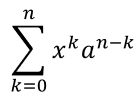
از nary برای جمعها، اتحادیهها، تقاطعها و دیگر عملگرهای بزرگ استفاده کنید. از integral برای انتگرالها استفاده کنید. هر دو متد به شما امکان تنظیم حد پایین و بالا را میدهند.
let presentation = new aspose.slides.Presentation();
try {
    let slide = presentation.getSlides().get_Item(0);

    let mathShape = slide.getShapes().addMathShape(20, 20, 700, 120);
    let mathParagraph = mathShape.getTextFrame().getParagraphs()
            .get_Item(0).getPortions().get_Item(0).getMathParagraph();

    let summationBase = new aspose.slides.MathematicalText("x")
            .setSuperscript("k")
            .join(new aspose.slides.MathematicalText("a").setSuperscript("n-k"));

    let summation = summationBase.nary(aspose.slides.MathNaryOperatorTypes.Summation, "k=0", "n");

    mathParagraph.add(new aspose.slides.MathBlock(summation));

    presentation.save("nary-operators.pptx", aspose.slides.SaveFormat.Pptx);
} finally {
    presentation.dispose();
}
عملگرهای N-ary برای عملگرهای بزرگ با حدهای اختیاری هستند. عملگرهای ساده مانند +, -, = معمولاً بهعنوان MathematicalText اضافه شده و به عبارت پیوست میشوند.
برای یک انتگرال، از integral استفاده کنید:
let integralBase = new aspose.slides.MathematicalText("x").join(new aspose.slides.MathematicalText("dx").toBox());
let integral = integralBase.integral(aspose.slides.MathIntegralTypes.Simple, "0", "1");
افزودن ماتریسها
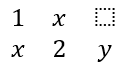
از MathMatrix برای ردیفها و ستونها استفاده کنید. ماتریسها بهطور پیشفرض پرانتز یا کروشه ندارند، بنابراین هنگام نیاز به پرانتز، کروشه یا آکولاد، ماتریس را درون آنها بپیچید.
let presentation = new aspose.slides.Presentation();
try {
    let slide = presentation.getSlides().get_Item(0);

    let mathShape = slide.getShapes().addMathShape(20, 20, 700, 120);
    let mathParagraph = mathShape.getTextFrame().getParagraphs()
            .get_Item(0).getPortions().get_Item(0).getMathParagraph();

    let matrix = new aspose.slides.MathMatrix(2, 3);
    matrix.set_Item(0, 0, new aspose.slides.MathematicalText("1"));
    matrix.set_Item(0, 1, new aspose.slides.MathematicalText("x"));
    matrix.set_Item(1, 0, new aspose.slides.MathematicalText("x"));
    matrix.set_Item(1, 1, new aspose.slides.MathematicalText("2"));
    matrix.set_Item(1, 2, new aspose.slides.MathematicalText("y"));

    mathParagraph.add(new aspose.slides.MathBlock(matrix));

    presentation.save("matrix.pptx", aspose.slides.SaveFormat.Pptx);
} finally {
    presentation.dispose();
}
افزودن آرایههای معادله
از toMathArray وقتی به معادلات همتراز یا یک پشته عمودی از عبارات نیاز دارید، استفاده کنید.

let presentation = new aspose.slides.Presentation();
try {
    let slide = presentation.getSlides().get_Item(0);

    let mathShape = slide.getShapes().addMathShape(20, 20, 700, 140);
    let mathParagraph = mathShape.getTextFrame().getParagraphs()
            .get_Item(0).getPortions().get_Item(0).getMathParagraph();

    let equationArray = new aspose.slides.MathematicalText("x")
            .join("y")
            .toMathArray();

    mathParagraph.add(new aspose.slides.MathBlock(equationArray));

    presentation.save("equation-array.pptx", aspose.slides.SaveFormat.Pptx);
} finally {
    presentation.dispose();
}
افزودن توابع مثلثاتی
از asArgumentOfFunction وقتی آرگومان عنصر فعلی است و نام تابع شناخته شده است، استفاده کنید.

let presentation = new aspose.slides.Presentation();
try {
    let slide = presentation.getSlides().get_Item(0);

    let mathShape = slide.getShapes().addMathShape(20, 20, 700, 100);
    let mathParagraph = mathShape.getTextFrame().getParagraphs()
            .get_Item(0).getPortions().get_Item(0).getMathParagraph();

    let cosine = new aspose.slides.MathematicalText("2x")
            .asArgumentOfFunction(aspose.slides.MathFunctionsOfOneArgument.Cos);

    mathParagraph.add(new aspose.slides.MathBlock(cosine));

    presentation.save("trigonometric-function.pptx", aspose.slides.SaveFormat.Pptx);
} finally {
    presentation.dispose();
}
افزودن زیرنویس و بالانویس
از کمککنندههای زیرنویس و بالانویس برای شاخصها و توانها استفاده کنید. وقتی شاخصها باید در سمت چپ پایه ظاهر شوند، از setSubSuperscriptOnTheLeft استفاده کنید.

let presentation = new aspose.slides.Presentation();
try {
    let slide = presentation.getSlides().get_Item(0);

    let mathShape = slide.getShapes().addMathShape(20, 20, 700, 100);
    let mathParagraph = mathShape.getTextFrame().getParagraphs()
            .get_Item(0).getPortions().get_Item(0).getMathParagraph();

    let scripts = new aspose.slides.MathematicalText("Y")
            .setSubSuperscriptOnTheLeft("1", "n");

    mathParagraph.add(new aspose.slides.MathBlock(scripts));

    presentation.save("subscript-superscript.pptx", aspose.slides.SaveFormat.Pptx);
} finally {
    presentation.dispose();
}
افزودن جداکنندهها
از enclose برای قرار دادن یک عبارت داخل جداکنندهها استفاده کنید. میتوانید برای عبارات جداکننده که شامل چند عنصر هستند، کاراکتر جدا کننده تعیین کنید.

let presentation = new aspose.slides.Presentation();
try {
    let slide = presentation.getSlides().get_Item(0);

    let mathShape = slide.getShapes().addMathShape(20, 20, 700, 100);
    let mathParagraph = mathShape.getTextFrame().getParagraphs()
            .get_Item(0).getPortions().get_Item(0).getMathParagraph();

    let delimiter = new aspose.slides.MathematicalText("x")
            .join("y")
            .join("z")
            .enclose(java.newChar('<'), java.newChar('>'));
    delimiter.setSeparatorCharacter(java.newChar('|'));

    mathParagraph.add(new aspose.slides.MathBlock(delimiter));

    presentation.save("delimiters.pptx", aspose.slides.SaveFormat.Pptx);
} finally {
    presentation.dispose();
}
افزودن جعبه حاشیهدار
از toBorderBox وقتی معادله خود بهصورت چارچوبدار باشد، استفاده کنید.
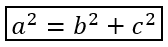
let presentation = new aspose.slides.Presentation();
try {
    let slide = presentation.getSlides().get_Item(0);

    let mathShape = slide.getShapes().addMathShape(20, 20, 700, 100);
    let mathParagraph = mathShape.getTextFrame().getParagraphs()
            .get_Item(0).getPortions().get_Item(0).getMathParagraph();

    let boxedEquation = new aspose.slides.MathematicalText("a")
            .setSuperscript("2")
            .join("=")
            .join(new aspose.slides.MathematicalText("b").setSuperscript("2"))
            .join("+")
            .join(new aspose.slides.MathematicalText("c").setSuperscript("2"))
            .toBorderBox();

    mathParagraph.add(new aspose.slides.MathBlock(boxedEquation));

    presentation.save("border-box.pptx", aspose.slides.SaveFormat.Pptx);
} finally {
    presentation.dispose();
}
گروهبندی عبارات
از group برای قرار دادن یک کاراکتر گروهبندی بالای یا زیر یک عبارت استفاده کنید. برای برچسبگذاری عبارات گروهبندی شده میتوانید حدی اضافه کنید.

let presentation = new aspose.slides.Presentation();
try {
    let slide = presentation.getSlides().get_Item(0);

    let mathShape = slide.getShapes().addMathShape(20, 20, 700, 120);
    let mathParagraph = mathShape.getTextFrame().getParagraphs()
            .get_Item(0).getPortions().get_Item(0).getMathParagraph();

    let grouped = new aspose.slides.MathematicalText("x + y")
            .group(java.newChar('\u23DF'), aspose.slides.MathTopBotPositions.Bottom, aspose.slides.MathTopBotPositions.Top)
            .setLowerLimit("any text");

    mathParagraph.add(new aspose.slides.MathBlock(grouped));

    presentation.save("grouped-terms.pptx", aspose.slides.SaveFormat.Pptx);
} finally {
    presentation.dispose();
}
قالببندی عناصر ریاضی
از کمککنندههای قالببندی فقط در جایی استفاده کنید که فرمول را واضحتر میکنند. برای مثال، overbar یک خط بالای یک عنصر ریاضی میگذارد.

let presentation = new aspose.slides.Presentation();
try {
    let slide = presentation.getSlides().get_Item(0);

    let mathShape = slide.getShapes().addMathShape(20, 20, 700, 100);
    let mathParagraph = mathShape.getTextFrame().getParagraphs()
            .get_Item(0).getPortions().get_Item(0).getMathParagraph();

    let overbar = new aspose.slides.MathematicalText("ABC").overbar();

    mathParagraph.add(new aspose.slides.MathBlock(overbar));

    presentation.save("overbar.pptx", aspose.slides.SaveFormat.Pptx);
} finally {
    presentation.dispose();
}
مرجع سریع
| وظیفه | API اصلی |
|---|---|
| ایجاد متن ریاضی | MathematicalText |
| ترکیب عناصر | join |
| ایجاد کسرها | divide |
| افزودن بالانویس یا زیرنویس | setSuperscript, setSubscript |
| افزودن توابع | function, asArgumentOfFunction |
| افزودن رادیکالها | radical |
| افزودن حدود | setLowerLimit, setUpperLimit |
| افزودن اسکریپتهای سمت چپ | setSubSuperscriptOnTheLeft |
| افزودن جمعها و انتگرالها | nary, integral |
| افزودن ماتریسها | MathMatrix |
| افزودن آرایههای معادله | toMathArray |
| افزودن جداکنندهها | enclose |
| افزودن نوارها و حاشیهها | overbar, toBorderBox |
| گروهبندی عبارات | group |
FAQ
آیا میتوانم یک معادله موجود در PowerPoint را ویرایش کنم؟
بله. ارائه را باز کنید، شکل حاوی MathPortion را پیدا کنید، MathParagraph آن را دریافت کنید و بلوکهای ریاضی در آن پاراگراف را بهروزرسانی کنید.
آیا معادلات بهصورت ریاضی قابل ویرایش PowerPoint ذخیره میشوند؟
بله. هنگام ذخیره به PPTX، Aspose.Slides معادله را بهعنوان محتویات ریاضی Office قابل ویرایش مینویسد.
آیا میتوانم معادلات را به LaTeX صادر کنم؟
بله. MathParagraph معادله را از MathPortion دریافت کنید و متد MathParagraph.toLatex را فراخوانی کنید تا مستقیماً صادر شود. برای مثال کامل، به صدور معادلات ریاضی از ارائهها در Node.js از طریق Java مراجعه کنید.