
ایجاد اثرات 3D در ارائهها با استفاده از Python
نمای کلی
Aspose.Slides for Python via .NET میتواند قالببندی 3 بعدی شبیه PowerPoint را برای اشکال و متن ایجاد، ویرایش، حفظ و رندر کند. این مقاله اثرات 3 بعدی مانند چرخش، برآمدگی، لبهها، نورپردازی، مواد، پرکردن گرادیان یا تصویر، و متن 3 بعدی را پوشش میدهد.
Note
این مقاله دربارهٔ اثرات قالببندی 3 بعدی روی اشکال و متنهای PowerPoint است. دربارهٔ وارد کردن یا ویرایش فایلهای مدل 3 بعدی مستقل نیست. وقتی یک اسلاید را به تصویر، PDF یا HTML صادر میکنید، Aspose.Slides این اثرات 3 بعدی را در خروجی 2 بعدی صادر شده رندر میکند.مفاهیم قالببندی 3 بعدی
از ویژگی Shape.three_d_format برای اعمال قالببندی 3 بعدی به یک شکل استفاده کنید. این ویژگی، ThreeDFormat را افشا میکند که صحنهٔ 3 بعدی آن شکل را کنترل میکند.
برای متن، از ویژگی TextFrameFormat.three_d_format استفاده کنید. این ویژگی قالببندی 3 بعدی را به قاب متن اعمال میکند نه به بدنهٔ شکل.
مهمترین ویژگیها عبارتند از:
| ویژگی | کنترل چه چیزی | چه زمانی استفاده شود |
|---|---|---|
| camera | نقطهٔ دید، نوع دوربین پیشتنظیمشده، چرخش، بزرگنمایی و پرسپکتیو. | چرخاندن شیء در فضای 3 بعدی یا تطبیق با پیشتنظیم چرخش 3 بعدی PowerPoint. |
| light_rig | پیشتنظیم نور، جهت، و چرخش نور. | تغییر ظاهر نقاط روشن و سایهها بر سطح 3 بعدی. |
| material | جنس سطح، مانند صاف، مات، پلاستیک یا فلز. | باعث میشود همان هندسه صافتر، نرمتر، براق یا فلزی به نظر برسد. |
| extrusion_height | چقدر شکل از سطح جلویی خود به سمت عقب گسترش مییابد. | یک شکل صاف را به یک جسم 3 بعدی با ضخامت قابل مشاهده تبدیل کنید. |
| extrusion_color | رنگ طرفهای برآمده. | عمق را قابل رؤیت کنید یا رنگ طرف را با پرکردن جلو هماهنگ کنید. |
| depth | عمق 3 بعدی اضافهای که PowerPoint برای قالببندی 3 بعدی استفاده میکند. | عمق را برای اشکال یا متن بهدقت تنظیم کنید، بهویژه همراه با تنظیمات bevel و material. |
| bevel_top و bevel_bottom | لبههای برجسته یا گرد شده بر روی سطوح جلوی و پشت. | یک لبهٔ نرم یا قالبدار اضافه کنید به جای یک سطح صاف و تیز. |
| contour_color و contour_width | خط دور شیء 3 بعدی. | مرز شیء را در خروجی رندر شده برجسته کنید. |
ایجاد یک شکل 3 بعدی
یک شکل معمولاً قبل از اینکه بهظاهر 3 بعدی قانعکننده باشد، به چهار نوع تنظیم نیاز دارد:
- تنظیمات دوربین، چون نمای پیشفرض ممکن است برآمدگی را پنهان کند.
- تنظیمات نور، چون نورپردازی باعث خوانایی وجهها و طرفها میشود.
- تنظیمات ماده، چون سطح بر نحوهٔ رندر نور تأثیر میگذارد.
- تنظیمات برآمدگی یا عمق، چون یک شکل صاف به ضخامت نیاز دارد.
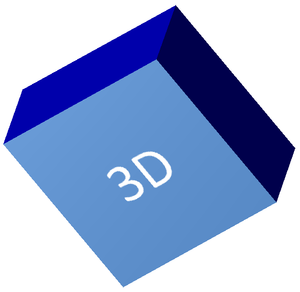
مثال زیر یک مستطیل ایجاد میکند، متن را به سطح جلوی آن اضافه میسازد و قالببندی 3 بعدی را اعمال میکند. مقادیر چرخش دوربین بر حسب درجه هستند و ارتفاع برآمدگی 100 پوینت است. مثال اسلاید را به تصویر PNG با دو برابر ابعاد پیشفرض رندر میکند و ارائه را به صورت PPTX ذخیره مینماید.
import aspose.pydrawing as drawing
import aspose.slides as slides

image_scale = 2

with slides.Presentation() as presentation:
    slide = presentation.slides[0]

    shape = slide.shapes.add_auto_shape(slides.ShapeType.RECTANGLE, 200, 150, 200, 200)

    shape.text_frame.text = "3D"
    shape.text_frame.paragraphs[0].paragraph_format.default_portion_format.font_height = 64

    shape.fill_format.fill_type = slides.FillType.SOLID
    shape.fill_format.solid_fill_color.color = drawing.Color.cornflower_blue

    shape.three_d_format.camera.camera_type = slides.CameraPresetType.ORTHOGRAPHIC_FRONT
    shape.three_d_format.camera.set_rotation(20, 30, 40)
    shape.three_d_format.light_rig.light_type = slides.LightRigPresetType.FLAT
    shape.three_d_format.light_rig.direction = slides.LightingDirection.TOP
    shape.three_d_format.material = slides.MaterialPresetType.FLAT
    shape.three_d_format.extrusion_height = 100
    shape.three_d_format.extrusion_color.color = drawing.Color.blue

    with slide.get_image(image_scale, image_scale) as thumbnail:
        thumbnail.save("shape_3d.png")

    presentation.save("shape_3d.pptx", slides.export.SaveFormat.PPTX)
تصویر رندر شده اسلاید، مستطیل را بهصورت بلوک ضخیم 3 بعدی نشان میدهد:
چرخاندن یک شکل با دوربین
در PowerPoint، چرخش 3‑بعدی از پنل 3‑D Rotation تنظیم میشود. مقادیر چرخش X، Y و Z متناظر با چرخشی هستند که از طریق API دوربین تنظیم میکنید.
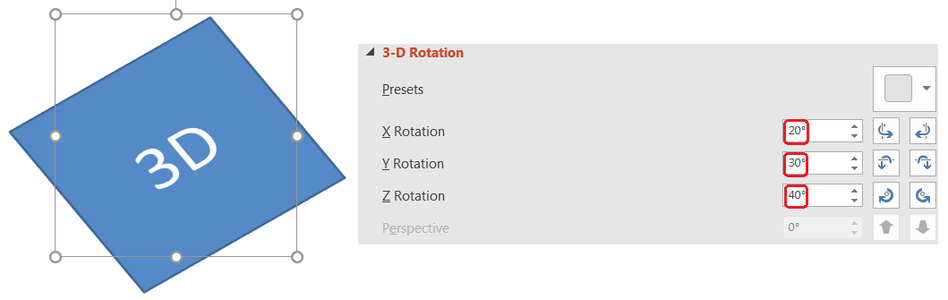
در Aspose.Slides، به دوربین از طریق ThreeDFormat.camera دسترسی پیدا میکنید. این مثال یک مستطیل ایجاد میکند، نمای جلویی ارتوگرافیک را انتخاب میکند و چرخشهای X، Y و Z آن را به ترتیب 20، 30 و 40 درجه تنظیم میکند. شکل در حافظه پیکربندی میشود بدون اینکه فایلی ذخیره شود:
import aspose.slides as slides

with slides.Presentation() as presentation:
    slide = presentation.slides[0]

    shape = slide.shapes.add_auto_shape(slides.ShapeType.RECTANGLE, 200, 150, 200, 200)

    shape.three_d_format.camera.camera_type = slides.CameraPresetType.ORTHOGRAPHIC_FRONT
    shape.three_d_format.camera.set_rotation(20, 30, 40)
از دوربین زمانی استفاده کنید که بخواهید نحوهٔ مشاهده شیء توسط بیننده را تغییر دهید. این کار هندسهٔ 2 بعدی شکل را در اسلاید تغییر نمیدهد؛ فقط نقطهٔ دید 3 بعدی استفادهشده توسط PowerPoint و Aspose.Slides هنگام رندر را تغییر میدهد.
افزودن برآمدگی و عمق
برآمدگی باعث میشود شکل بهنظر ضخیم بیاید چون به پشت سطح جلویی گسترش مییابد. در PowerPoint، کنترل عمق این ضخامت قابل مشاهده را تعیین میکند و کنترل رنگ، رنگ طرفهای جانبی را تنظیم میکند.
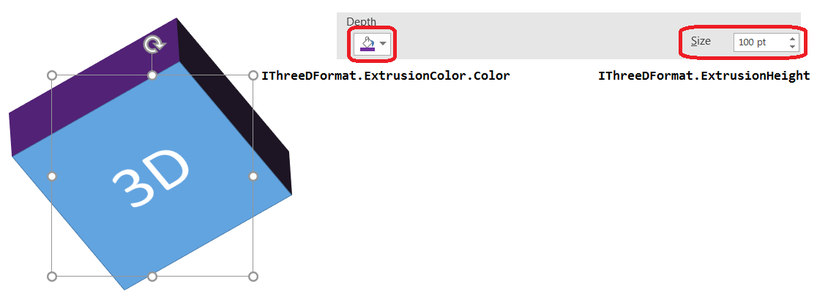
برای ضخامت، ویژگی ThreeDFormat.extrusion_height و برای رنگ جانبی، ویژگی ThreeDFormat.extrusion_color را تنظیم کنید. این مثال یک مستطیل با برآمدگی 100 پوینت و طرفهای بنفش میسازد و دوربین را میچرخاند تا ضخامت آن نمایان شود. شکل در حافظه پیکربندی میشود بدون اینکه فایلی ذخیره شود:
import aspose.pydrawing as drawing
import aspose.slides as slides

with slides.Presentation() as presentation:
    slide = presentation.slides[0]

    shape = slide.shapes.add_auto_shape(slides.ShapeType.RECTANGLE, 200, 150, 200, 200)

    shape.three_d_format.camera.camera_type = slides.CameraPresetType.ORTHOGRAPHIC_FRONT
    shape.three_d_format.camera.set_rotation(20, 30, 40)
    shape.three_d_format.light_rig.light_type = slides.LightRigPresetType.FLAT
    shape.three_d_format.light_rig.direction = slides.LightingDirection.TOP
    shape.three_d_format.material = slides.MaterialPresetType.FLAT
    shape.three_d_format.extrusion_height = 100
    shape.three_d_format.extrusion_color.color = drawing.Color.purple
ویژگی ThreeDFormat.depth عمق یک شکل 3 بعدی را تنظیم میکند. ویژگی extrusion_height ارتفاع اثر برآمدگی را که در این مثال نشان داده شده کنترل میکند.
استفاده از پرکردن گرادیان یا تصویر با اثرات 3 بعدی
قالببندی 3 بعدی مستقل از پرکردن شکل است. میتوانید رنگ ثابت، گرادیان، الگو یا تصویر را بر روی سطح جلویی اعمال کنید و همچنان از همان تنظیمات دوربین، نور، ماده و برآمدگی استفاده کنید.
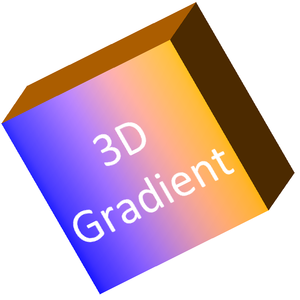
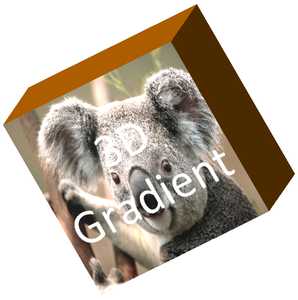
این مثال یک گرادیان آبی‑به‑نارنجی را بر روی سطح جلویی و یک رنگ نارنجی تاریک را بر روی برآمدگی 150 پوینتی اعمال میکند. نقاط توقف گرادیان در 0 و 100 شروع و پایان گرادیان را نشان میدهند. مقادیر چرخش دوربین بر حسب درجه هستند. اسلاید به تصویر PNG با دو برابر ابعاد پیشفرض رندر میشود:
import aspose.pydrawing as drawing
import aspose.slides as slides

image_scale = 2

with slides.Presentation() as presentation:
    slide = presentation.slides[0]

    shape = slide.shapes.add_auto_shape(slides.ShapeType.RECTANGLE, 200, 150, 250, 250)

    shape.text_frame.text = "3D Gradient"
    shape.text_frame.paragraphs[0].paragraph_format.default_portion_format.font_height = 64

    shape.fill_format.fill_type = slides.FillType.GRADIENT
    shape.fill_format.gradient_format.gradient_stops.add(0, drawing.Color.blue)
    shape.fill_format.gradient_format.gradient_stops.add(100, drawing.Color.orange)

    shape.three_d_format.camera.camera_type = slides.CameraPresetType.ORTHOGRAPHIC_FRONT
    shape.three_d_format.camera.set_rotation(10, 20, 30)
    shape.three_d_format.light_rig.light_type = slides.LightRigPresetType.FLAT
    shape.three_d_format.light_rig.direction = slides.LightingDirection.TOP
    shape.three_d_format.material = slides.MaterialPresetType.FLAT
    shape.three_d_format.extrusion_height = 150
    shape.three_d_format.extrusion_color.color = drawing.Color.dark_orange

    with slide.get_image(image_scale, image_scale) as thumbnail:
        thumbnail.save("gradient_3d.png")
خروجی رندر شده گرادیان را در سطح جلویی حفظ میکند و برآمدگی را بهصورت جداگانه رندر مینماید:
برای استفاده از پرکردن تصویر، تصویر را به ارائه اضافه کنید و به پرکردن شکل اختصاص دهید. این مثال نیاز به فایلی به نام «image.jpg» در پوشهٔ کاری دارد. تصویر را بهگونهای کش میدهد که مستطیل را پر کند، برآمدگی 150 پوینت را اعمال میکند و چرخش دوربین را بر حسب درجه تنظیم میکند. شکل در حافظه پیکربندی میشود بدون ذخیره یا رندر فایل:
import aspose.pydrawing as drawing
import aspose.slides as slides

with open("image.jpg", "rb") as image_file:
    image_data = image_file.read()

with slides.Presentation() as presentation:
    slide = presentation.slides[0]

    shape = slide.shapes.add_auto_shape(slides.ShapeType.RECTANGLE, 200, 150, 250, 250)

    image = presentation.images.add_image(image_data)

    shape.fill_format.fill_type = slides.FillType.PICTURE
    shape.fill_format.picture_fill_format.picture.image = image
    shape.fill_format.picture_fill_format.picture_fill_mode = slides.PictureFillMode.STRETCH

    shape.three_d_format.camera.camera_type = slides.CameraPresetType.ORTHOGRAPHIC_FRONT
    shape.three_d_format.camera.set_rotation(10, 20, 30)
    shape.three_d_format.light_rig.light_type = slides.LightRigPresetType.FLAT
    shape.three_d_format.light_rig.direction = slides.LightingDirection.TOP
    shape.three_d_format.material = slides.MaterialPresetType.FLAT
    shape.three_d_format.extrusion_height = 150
    shape.three_d_format.extrusion_color.color = drawing.Color.dark_orange
تصویر بر روی سطح جلویی رندر میشود، در حالی که برآمدگی بهعنوان سطح جانبی 3 بعدی رندر میشود:
اعمال قالببندی 3 بعدی به متن
قالببندی 3 بعدی شکل بر بدنهٔ شکل اثر میگذارد. قالببندی 3 بعدی متن بر قاب متن اثر میکند. این برای اثرات شبیه به WordArt مفید است که حروف خود نیاز به برآمدگی، ماده، نورپردازی و تنظیمات دوربین دارند.
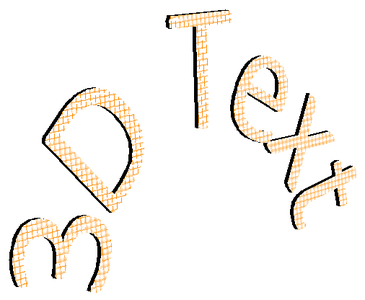
مثال زیر متنی با الگوی مشبک نارنجی‑سفید ایجاد میکند، یک قوس upward اعمال میکند و تنظیمات 3 بعدی را از طریق TextFrameFormat.three_d_format پیکربندی میکند. ارتفاع برآمدگی و عمق بر حسب پوینت است و چرخش نور بر حسب درجه. پرکردن و خط مرز شکل مخفی شدهاند تا فقط متن قابل مشاهده باشد. مثال تصویر PNG با دو برابر ابعاد پیشفرض اسلاید رندر میکند و ارائه را به صورت PPTX ذخیره میکند:
import aspose.pydrawing as drawing
import aspose.slides as slides

image_scale = 2

with slides.Presentation() as presentation:
    slide = presentation.slides[0]

    shape = slide.shapes.add_auto_shape(slides.ShapeType.RECTANGLE, 200, 150, 250, 250)

    shape.fill_format.fill_type = slides.FillType.NO_FILL
    shape.line_format.fill_format.fill_type = slides.FillType.NO_FILL
    shape.text_frame.text = "3D Text"

    portion = shape.text_frame.paragraphs[0].portions[0]
    portion.portion_format.fill_format.fill_type = slides.FillType.PATTERN
    portion.portion_format.fill_format.pattern_format.fore_color.color = drawing.Color.dark_orange
    portion.portion_format.fill_format.pattern_format.back_color.color = drawing.Color.white
    portion.portion_format.fill_format.pattern_format.pattern_style = slides.PatternStyle.LARGE_GRID

    shape.text_frame.paragraphs[0].paragraph_format.default_portion_format.font_height = 128

    text_frame_format = shape.text_frame.text_frame_format
    text_frame_format.transform = slides.TextShapeType.ARCH_UP
    text_frame_format.three_d_format.extrusion_height = 3.5
    text_frame_format.three_d_format.depth = 3
    text_frame_format.three_d_format.material = slides.MaterialPresetType.PLASTIC
    text_frame_format.three_d_format.light_rig.direction = slides.LightingDirection.TOP
    text_frame_format.three_d_format.light_rig.light_type = slides.LightRigPresetType.BALANCED
    text_frame_format.three_d_format.light_rig.set_rotation(0, 0, 40)
    text_frame_format.three_d_format.camera.camera_type = slides.CameraPresetType.PERSPECTIVE_CONTRASTING_RIGHT_FACING

    with slide.get_image(image_scale, image_scale) as thumbnail:
        thumbnail.save("text_3d.png")

    presentation.save("text_3d.pptx", slides.export.SaveFormat.PPTX)
متن بهصورت حروف 3 بعدی منحنی و برآمده رندر میشود:
حفظ متن صاف روی یک شکل 3 بعدی
برای حفظ خوانایی متن در حالی که شکل 3 بعدی خود را حفظ میکند، از TextFrameFormat.keep_text_flat از طریق TextFrame.text_frame_format استفاده کنید. زمانی که مقدار آن True باشد، متن از صحنهٔ 3 بعدی خارج میشود. وقتی False باشد، متن در صحنه شرکت میکند و به جهت 3 بعدی آن پیروی میکند.
این تنظیم قالببندی 3 بعدی شکل را حذف نمیکند: دوربین، نورپردازی، ماده و برآمدگی از طریق Shape.three_d_format همچنان تنظیم شدهاند. همچنین متفاوت از چرخش معمولی است. Shape.rotation شکل را در صفحهٔ اسلاید میچرخاند، در حالی که TextFrameFormat.rotation_angle چرخش سفارشی متن را داخل جعبهٔ مرزیاش کنترل میکند. نگه داشتن متن خارج از صحنهٔ 3 بعدی هیچیک از این زاویهها را بازنشانی نمیکند.
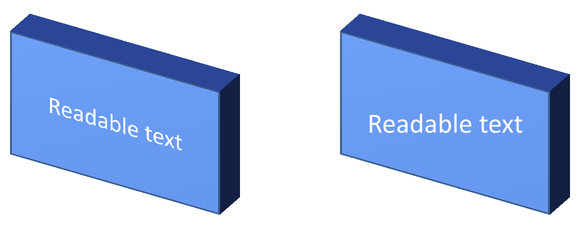
مثال خودکفی زیر یک مستطیل آبی با متن ایجاد میکند و آن را در کنار اصلی کلون مینماید. هر دو شکل همان قالببندی 3 بعدی را دارند؛ تنها تنظیم متن متفاوت است: False در سمت چپ و True در سمت راست. زاویههای دوربین بر حسب درجه هستند و ارتفاع برآمدگی 40 پوینت است. مثال ارائه را به صورت PPTX ذخیره میکند و اسلاید مقایسهای را به PNG با دو برابر ابعاد پیشفرض رندر میکند.
import aspose.pydrawing as drawing
import aspose.slides as slides

with slides.Presentation() as presentation:
    slide = presentation.slides[0]

    shape = slide.shapes.add_auto_shape(slides.ShapeType.RECTANGLE, 70, 160, 240, 140)

    shape.text_frame.text = "Readable text"
    shape.text_frame.paragraphs[0].paragraph_format.default_portion_format.font_height = 28
    shape.text_frame.paragraphs[0].paragraph_format.alignment = slides.TextAlignment.CENTER
    shape.text_frame.text_frame_format.anchoring_type = slides.TextAnchorType.CENTER
    shape.fill_format.fill_type = slides.FillType.SOLID
    shape.fill_format.solid_fill_color.color = drawing.Color.cornflower_blue

    shape.three_d_format.camera.camera_type = slides.CameraPresetType.ORTHOGRAPHIC_FRONT
    shape.three_d_format.camera.set_rotation(30, 30, 0)
    shape.three_d_format.light_rig.light_type = slides.LightRigPresetType.FLAT
    shape.three_d_format.light_rig.direction = slides.LightingDirection.TOP
    shape.three_d_format.material = slides.MaterialPresetType.FLAT
    shape.three_d_format.extrusion_height = 40
    shape.three_d_format.extrusion_color.color = drawing.Color.royal_blue
    shape.text_frame.text_frame_format.keep_text_flat = False

    flat_text_shape = slide.shapes.add_clone(shape, 400, 160)
    flat_text_shape.text_frame.text_frame_format.keep_text_flat = True

    presentation.save("keep_text_flat.pptx", slides.export.SaveFormat.PPTX)
    with slide.get_image(2, 2) as image:
        image.save("keep_text_flat.png")
در سمت چپ، متن جهت 3 بعدی را دنبال میکند. در سمت راست، متن صاف میماند و خواندن آن راحتتر است. هر دو مستطیل همان برآمدگی قابل مشاهده و جهت 3 بعدی را حفظ میکنند.
رفتار صادر کردن و رندرینگ
Aspose.Slides هنگام ذخیره به فرمتهای PowerPoint مانند PPTX قالببندی 3 بعدی را حفظ میکند. هنگام رندر یا صادرات به فرمتهای ثابت‑چیدمان، صحنهٔ 3 بعدی بهصورت تصویر 2 بعدی یا رسم شده در خروجی تبدیل میشود. این برای رندر اسلایدها به PNG، صادرات به PDF، صادرات به HTML، یا تولید فریمها برای تبدیل ویدئو صادق است.
نکات مهم:
- تصاویر و PDFهای صادر شده تعاملی نیستند. پس از صادرات، کاربر نمیتواند شیء را بچرخاند.
- ظاهر نهایی به ترکیب دوربین، نورپردازی، ماده، برآمدگی، پرکردن و مقیاس اسلاید بستگی دارد.
- اگر نیاز به بررسی مقادیر قالببندی ارثبری یا مبتنی بر تم دارید، از ویژگیهای مؤثر شکل استفاده کنید.
- برخی فرمتهای خروجی قادر به ذخیره قالببندی 3 بعدی قابل ویرایش PowerPoint نیستند. در این فرمتها، نتیجه بصری رندر میشود نه بهعنوان تنظیمات 3 بعدی قابل ویرایش.
سوالات متداول
آیا Aspose.Slides میتواند ارائههای 3 بعدی تعاملی ایجاد کند؟
Aspose.Slides اثرات 3 بعدی PowerPoint را برای اشکال و متن ایجاد و رندر میکند. این کتابخانه تصاویر، PDFها یا صفحات HTML صادرشده را به صحنهٔ 3 بعدی تعاملی تبدیل نمیکند که کاربر بتواند بچرخاند. در PPTX، قالببندی 3 بعدی در PowerPoint قابل ویرایش باقی میماند اگر فرمت آن را پشتیبانی کند.
تفاوت بین یک مدل 3 بعدی و یک اثر 3 بعدی چیست؟
یک مدل 3 بعدی یک شیء 3 بعدی جداگانه است که به ارائه اضافه میشود. یک اثر 3 بعدی قالببندیای است که بر روی یک شکل یا متن معمولی PowerPoint اعمال میشود، مانند چرخش، برآمدگی، لبه، نورپردازی و ماده. این مقاله به اثرات 3 بعدی میپردازد.
کدام تنظیمات برای داشتن یک شکل 3 بعدی قابل مشاهده لازم است؟
حداقل باید چرخش دوربین و یا برآمدگی/عمق را تنظیم کنید. در عمل، تنظیم نورپردازی و ماده نیز توصیه میشود تا وجههای رندر شده دارای هایلایت و سایه واضح باشند.
آیا میتوانم اثرات 3 بعدی را هم روی اشکال و هم روی متن اعمال کنم؟
بله. برای بدنهٔ شکل از Shape.three_d_format و برای متن از TextFrameFormat.three_d_format استفاده کنید.
آیا اثرات 3 بعدی هنگام صادرات به تصاویر، PDF، HTML یا فریمهای ویدئو ظاهر میشوند؟
بله. Aspose.Slides اثرات 3 بعدی را هنگام تولید تصاویر اسلاید، خروجی PDF، خروجی HTML و فریمهای مورد استفاده برای تبدیل به ویدئو رندر میکند. خروجی صادرشده ظاهر رندر شده را دارد، نه یک شیء 3 بعدی قابل ویرایش.
آیا میتوانم مقادیر نهایی 3 بعدی را پس از اعمال ارثبری و تنظیمات تم بخوانم؟
بله. از APIهای قالببندی مؤثر توصیفشده در ویژگیهای مؤثر شکل برای خواندن دوربین نهایی، نورپردازی، bevel و مقادیر مرتبط 3 بعدی استفاده کنید.