
PowerPoint 표에서 PHP를 사용하여 행 및 열 관리
소개
Aspose.Slides for PHP via Java를 사용하면 PowerPoint 프레젠테이션에서 Table 클래스를 통해 표 구조와 서식을 관리할 수 있습니다. 헤더 행을 지정하고, 행 및 열을 복제하거나 제거하며, 전체 행 또는 열에 텍스트 서식을 적용할 수 있습니다.
이 문서는 PHP 예제를 통해 이러한 작업을 설명합니다. 또한 표 스타일 프리셋을 검색하여 재사용하는 방법을 보여줍니다. 표 행 및 열 인덱스는 0부터 시작합니다.
행 높이 제어
Row::setMinimalHeight을 사용하여 행의 최소 높이를 포인트 단위로 설정합니다. 이는 고정 높이가 아니라 하한선입니다. Row::getHeight은 실제 높이를 반환합니다. 행은 Table::getRows를 통해 접근합니다.
예제는 첫 번째 슬라이드의 첫 번째 도형으로 표가 포함된 row-height-input.pptx 파일을 로드합니다. 첫 번째 행은 70 포인트에서 시작합니다. 셀은 18포인트 Arial 텍스트, 자동 줄 바꿈, 상하 여백 6포인트를 사용합니다; 두 번째 열의 긴 텍스트는 여러 줄로 자동 줄 바꿈됩니다. 예제는 최소값을 100 포인트로 증가시킨 뒤 20 포인트로 감소시키고, 각 변경 후 실제 높이를 출력한 뒤 두 결과를 저장합니다.
use aspose\slides\Presentation;
use aspose\slides\SaveFormat;

$presentation = new Presentation("row-height-input.pptx");
try {
    $slide = $presentation->getSlides()->get_Item(0);

    $table = $slide->getShapes()->get_Item(0);
    $row = $table->getRows()->get_Item(0);

    $row->setMinimalHeight(100);
    printf("Increased: minimum = %.1f, actual = %.1f pt\n", java_values($row->getMinimalHeight()), java_values($row->getHeight()));
    $presentation->save("row-height-increased.pptx", SaveFormat::Pptx);

    $row->setMinimalHeight(20);
    printf("Decreased: minimum = %.1f, actual = %.1f pt\n", java_values($row->getMinimalHeight()), java_values($row->getHeight()));
    $presentation->save("row-height-decreased.pptx", SaveFormat::Pptx);
} finally {
    $presentation->dispose();
}
제공된 프레젠테이션을 사용하면 최소값을 늘리면 행에 공간이 추가됩니다. 최소값을 줄이면 추가된 공간이 사라지지만, 텍스트와 셀 여백 때문에 실제 높이는 20 포인트보다 크게 유지됩니다. 최소값만 감소시켜서는 내용이 요구하는 공간 이하로 행을 강제로 줄일 수 없습니다.
실제 높이에 영향을 주는 여러 요소가 있습니다:
- 텍스트 및 글꼴 크기: 긴 텍스트, 명시적 줄 바꿈 또는 큰 글꼴은 더 많은 수직 공간을 필요로 할 수 있습니다.
- 줄 바꿈 및 열 너비: 줄 바꿈이 활성화된 상태에서 Column::setWidth를 사용해 열 너비를 줄이면 더 많은 줄이 생성될 수 있습니다. 넓은 열은 수직 공간을 줄일 수 있습니다.
- 셀 여백: Cell::setMarginTop 및 Cell::setMarginBottom은 수직 공간을 추가합니다. Cell::setMarginLeft와 Cell::setMarginRight은 텍스트에 사용할 수 있는 너비를 줄여 추가 줄 바꿈을 유발할 수 있습니다.
병합된 셀이 없는 이 표에서는 가장 수직 공간을 많이 차지하는 셀이 전체 행의 내용 기반 하한을 결정합니다. 행을 더 짧게 만들려면 텍스트를 줄이거나, 글꼴 크기 또는 여백을 줄이거나, 열을 넓혀야 할 수도 있습니다.
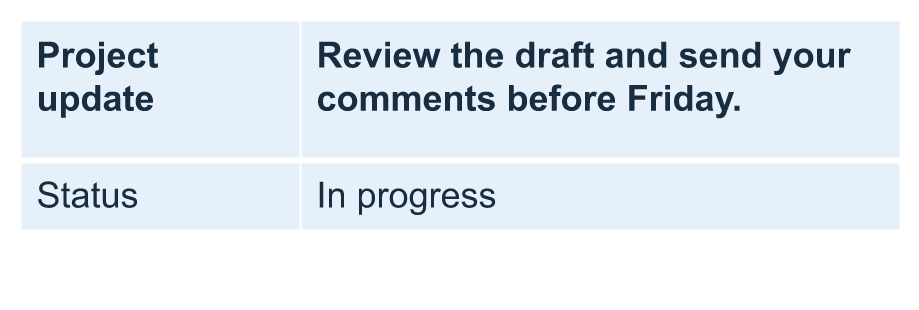
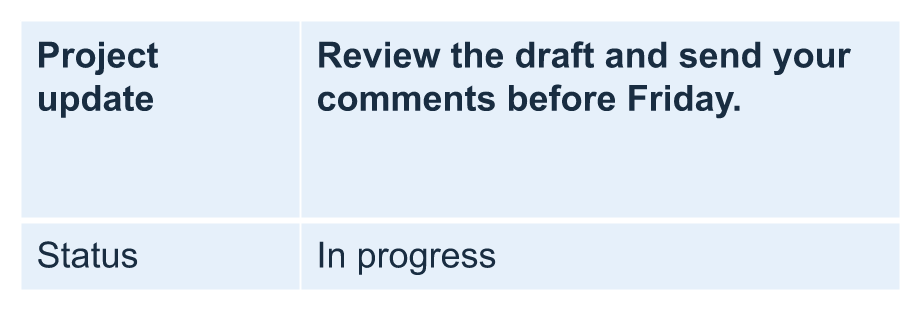
아래 이미지는 동일한 표를 같은 비율로 보여줍니다. 예시 결과에서는 실제 높이가 각각 70, 100, 55.2 포인트였으며, 최종 행은 20 포인트 최소값보다 높게 유지되었습니다. 텍스트 측정값은 사용 환경의 폰트에 따라 달라질 수 있습니다. 저장된 결과를 다운로드하십시오: increased minimum 및 decreased minimum.
| 원본: 최소 70 pt, 실제 70 pt | 증가: 최소 100 pt, 실제 100 pt | 감소: 최소 20 pt, 실제 55.2 pt |
|---|---|---|
 |
 |
 |
첫 번째 행을 헤더로 설정
setFirstRow 메서드를 사용하여 첫 번째 행을 헤더 서식으로 표시합니다. 외관은 표에 적용된 표 스타일에 따라 달라집니다.
- Presentation 클래스로 프레젠테이션을 로드합니다.
- 첫 번째 슬라이드에 접근합니다.
- 슬라이드의 첫 번째 도형으로 저장된 표에 접근합니다.
- 첫 번째 행에 헤더 서식을 활성화합니다.
- 수정된 프레젠테이션을 저장합니다.
예제는 첫 번째 슬라이드의 첫 번째 도형으로 표가 포함된 table.pptx가 필요합니다. 첫 번째 행에 헤더 서식을 적용하고 First_row_header.pptx로 저장합니다.
use aspose\slides\Presentation;
use aspose\slides\SaveFormat;

$presentation = new Presentation("table.pptx");
try {
    $slide = $presentation->getSlides()->get_Item(0);

    $table = $slide->getShapes()->get_Item(0);
    $table->setFirstRow(true);

    $presentation->save("First_row_header.pptx", SaveFormat::Pptx);
} finally {
    $presentation->dispose();
}
표 행 또는 열 복제
행이나 열을 복제하여 내용과 서식을 재사용할 수 있습니다. 복제본을 표 끝에 추가하거나 지정 위치에 삽입할 수 있습니다.
- Presentation 클래스로 프레젠테이션을 로드합니다.
- 첫 번째 슬라이드에 접근합니다.
- 열 너비와 행 높이를 정의합니다.
- addTable 메서드로 표를 추가합니다.
- 필요한 행을 복제합니다.
- 필요한 열을 복제합니다.
- 수정된 프레젠테이션을 저장합니다.
예제는 최소 하나의 슬라이드가 있는 Test.pptx가 필요합니다. 세 개 열과 다섯 개 행을 가진 표를 만들고, 차원은 포인트 단위로 지정합니다. 첫 번째 행과 열의 복제본을 추가하고, 두 번째 행과 열의 복제본을 인덱스 3(네 번째 위치)에 삽입합니다. 결과 표는 7행 5열이 됩니다. false 인자는 인접한 병합된 행이나 열로의 복제를 비활성화합니다; 이 표에는 병합된 셀이 없습니다.
use aspose\slides\Presentation;
use aspose\slides\SaveFormat;

$presentation = new Presentation("Test.pptx");
try {
    $slide = $presentation->getSlides()->get_Item(0);

    $columnWidths = [50, 50, 50];
    $rowHeights = [50, 30, 30, 30, 30];
    $table = $slide->getShapes()->addTable(100, 50, $columnWidths, $rowHeights);

    $table->get_Item(0, 0)->getTextFrame()->setText("Row 1 Cell 1");
    $table->get_Item(1, 0)->getTextFrame()->setText("Row 1 Cell 2");
    $table->getRows()->addClone($table->getRows()->get_Item(0), false);

    $table->get_Item(0, 1)->getTextFrame()->setText("Row 2 Cell 1");
    $table->get_Item(1, 1)->getTextFrame()->setText("Row 2 Cell 2");
    $table->getRows()->insertClone(3, $table->getRows()->get_Item(1), false);

    $table->getColumns()->addClone($table->getColumns()->get_Item(0), false);
    $table->getColumns()->insertClone(3, $table->getColumns()->get_Item(1), false);

    $presentation->save("table_out.pptx", SaveFormat::Pptx);
} finally {
    $presentation->dispose();
}
표에서 행 또는 열 제거
표에서 더 이상 필요 없는 행이나 열을 제거합니다. 항목을 제거하면 그 뒤에 있는 행 또는 열의 인덱스가 이동합니다.
- Presentation 클래스로 프레젠테이션을 생성합니다.
- 첫 번째 슬라이드에 접근합니다.
- 열 너비와 행 높이를 정의합니다.
- addTable 메서드로 표를 추가합니다.
- 두 번째 행과 두 번째 열을 제거합니다.
- 수정된 프레젠테이션을 저장합니다.
이 예제는 3×3 표를 만든 뒤 인덱스 1에 있는 행과 열을 제거하여 TestTable_out.pptx에 2×2 표를 남깁니다. 차원은 포인트 단위입니다. false 인자는 인접한 병합된 행이나 열의 제거를 비활성화합니다; 이 표에는 병합된 셀이 없습니다.
use aspose\slides\Presentation;
use aspose\slides\SaveFormat;

$presentation = new Presentation();
try {
    $slide = $presentation->getSlides()->get_Item(0);

    $columnWidths = [100, 50, 30];
    $rowHeights = [30, 50, 30];
    $table = $slide->getShapes()->addTable(100, 100, $columnWidths, $rowHeights);

    $table->getRows()->removeAt(1, false);
    $table->getColumns()->removeAt(1, false);

    $presentation->save("TestTable_out.pptx", SaveFormat::Pptx);
} finally {
    $presentation->dispose();
}
표 행 수준에서 텍스트 서식 설정
전체 행에 텍스트 서식을 적용하여 셀 간 일관성을 유지합니다. 셀마다 개별적으로 서식을 지정하지 않고도 글꼴 속성, 단락 서식 및 텍스트 방향을 설정할 수 있습니다.
- Presentation 클래스로 프레젠테이션을 로드합니다.
- 첫 번째 슬라이드의 표에 접근합니다.
- 첫 번째 행에 대해 setFontHeight를 사용합니다.
- 첫 번째 행에 대해 setAlignment 및 setMarginRight을 사용합니다.
- 두 번째 행에 대해 setTextVerticalType을 사용합니다.
- 수정된 프레젠테이션을 저장합니다.
예제는 첫 번째 슬라이드의 첫 번째 도형으로 표가 포함된 table.pptx와 최소 두 개 행이 필요합니다. 첫 번째 행에 25포인트 텍스트, 오른쪽 정렬 및 오른쪽 단락 여백 20포인트를 적용하고, 두 번째 행에 수직 텍스트를 설정합니다.
use aspose\slides\Presentation;
use aspose\slides\SaveFormat;
use aspose\slides\PortionFormat;
use aspose\slides\ParagraphFormat;
use aspose\slides\TextFrameFormat;
use aspose\slides\TextAlignment;
use aspose\slides\TextVerticalType;

$presentation = new Presentation("table.pptx");
try {
    $slide = $presentation->getSlides()->get_Item(0);

    $table = $slide->getShapes()->get_Item(0);

    $portionFormat = new PortionFormat();
    $portionFormat->setFontHeight(25);
    $table->getRows()->get_Item(0)->setTextFormat($portionFormat);

    $paragraphFormat = new ParagraphFormat();
    $paragraphFormat->setAlignment(TextAlignment::Right);
    $paragraphFormat->setMarginRight(20);
    $table->getRows()->get_Item(0)->setTextFormat($paragraphFormat);

    $textFrameFormat = new TextFrameFormat();
    $textFrameFormat->setTextVerticalType(TextVerticalType::Vertical);
    $table->getRows()->get_Item(1)->setTextFormat($textFrameFormat);

    $presentation->save("row_formatting.pptx", SaveFormat::Pptx);
} finally {
    $presentation->dispose();
}
표 열 수준에서 텍스트 서식 설정
전체 열에 텍스트 서식을 적용하여 셀 간 일관성을 유지합니다. 셀마다 개별적으로 서식을 지정하지 않고도 글꼴 속성, 단락 서식 및 텍스트 방향을 설정할 수 있습니다.
- Presentation 클래스로 프레젠테이션을 로드합니다.
- 첫 번째 슬라이드의 표에 접근합니다.
- 첫 번째 열에 대해 setFontHeight를 사용합니다.
- 첫 번째 열에 대해 setAlignment 및 setMarginRight을 사용합니다.
- 두 번째 열에 대해 setTextVerticalType을 사용합니다.
- 수정된 프레젠테이션을 저장합니다.
예제는 첫 번째 슬라이드의 첫 번째 도형으로 표가 포함된 table.pptx와 최소 두 개 열이 필요합니다. 첫 번째 열에 25포인트 텍스트, 오른쪽 정렬 및 오른쪽 단락 여백 20포인트를 적용하고, 두 번째 열에 수직 텍스트를 설정합니다.
use aspose\slides\Presentation;
use aspose\slides\SaveFormat;
use aspose\slides\PortionFormat;
use aspose\slides\ParagraphFormat;
use aspose\slides\TextFrameFormat;
use aspose\slides\TextAlignment;
use aspose\slides\TextVerticalType;

$presentation = new Presentation("table.pptx");
try {
    $slide = $presentation->getSlides()->get_Item(0);

    $table = $slide->getShapes()->get_Item(0);

    $portionFormat = new PortionFormat();
    $portionFormat->setFontHeight(25);
    $table->getColumns()->get_Item(0)->setTextFormat($portionFormat);

    $paragraphFormat = new ParagraphFormat();
    $paragraphFormat->setAlignment(TextAlignment::Right);
    $paragraphFormat->setMarginRight(20);
    $table->getColumns()->get_Item(0)->setTextFormat($paragraphFormat);

    $textFrameFormat = new TextFrameFormat();
    $textFrameFormat->setTextVerticalType(TextVerticalType::Vertical);
    $table->getColumns()->get_Item(1)->setTextFormat($textFrameFormat);

    $presentation->save("column_formatting.pptx", SaveFormat::Pptx);
} finally {
    $presentation->dispose();
}
표 스타일 속성 가져오기
getStylePreset 메서드를 사용하면 표에 적용된 프리셋을 검색하고 다른 표에 재사용할 수 있습니다. 이는 개별 셀 서식 재정의가 아닌 프리셋 자체를 식별합니다.
예제는 표를 만든 뒤 TableStylePreset::DarkStyle1 를 적용하고 프리셋을 다시 읽습니다. DarkStyle1에 해당하는 정수 값을 출력하고 표를 table.pptx에 저장합니다.
use aspose\slides\Presentation;
use aspose\slides\SaveFormat;
use aspose\slides\TableStylePreset;

$presentation = new Presentation();
try {
    $slide = $presentation->getSlides()->get_Item(0);

    $columnWidths = [100, 150];
    $rowHeights = [5, 5, 5];
    $table = $slide->getShapes()->addTable(10, 10, $columnWidths, $rowHeights);
    $table->setStylePreset(TableStylePreset::DarkStyle1);

    $stylePreset = $table->getStylePreset();
    echo java_values($stylePreset) . PHP_EOL;

    $presentation->save("table.pptx", SaveFormat::Pptx);
} finally {
    $presentation->dispose();
}
FAQ
이미 만든 표에 PowerPoint 테마/스타일을 적용할 수 있나요?
예. 표는 슬라이드/레이아웃/마스터 테마를 상속받으며, 해당 테마 위에 채우기, 테두리 및 텍스트 색상을 별도로 재정의할 수 있습니다.
Excel처럼 표 행을 정렬할 수 있나요?
아니요, Aspose.Slides 표에는 내장된 정렬이나 필터 기능이 없습니다. 데이터를 메모리에서 먼저 정렬한 다음 해당 순서대로 표 행을 다시 채워야 합니다.
특정 셀에 사용자 정의 색상을 유지하면서 줄무늬(밴디드) 열을 사용할 수 있나요?
예. 줄무늬 열을 켜고, 특정 셀에 로컬 서식을 적용하면 셀 수준 서식이 표 스타일보다 우선합니다.