
使用 PHP 管理 PowerPoint 表格中的行和列
简介
Aspose.Slides for PHP via Java 让您能够通过 Table 类在 PowerPoint 演示文稿中管理表格结构和格式。您可以指定标题行,克隆或删除行和列,并对整行或整列应用文本格式。
本文使用 PHP 示例解释这些操作。它还展示了如何检索表格的样式预设,以便重复使用。表格行和列的索引从零开始。
控制行高
使用 Row::setMinimalHeight 设置行的最小高度(单位:磅)。这只是下限,而不是固定高度。Row::getHeight 返回实际高度。通过 Table::getRows 访问行。
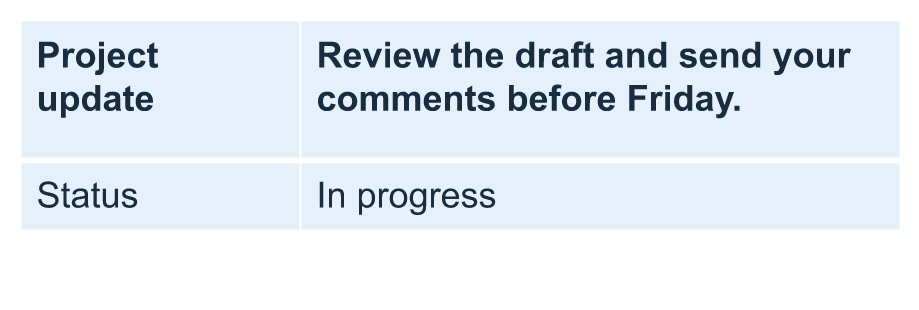
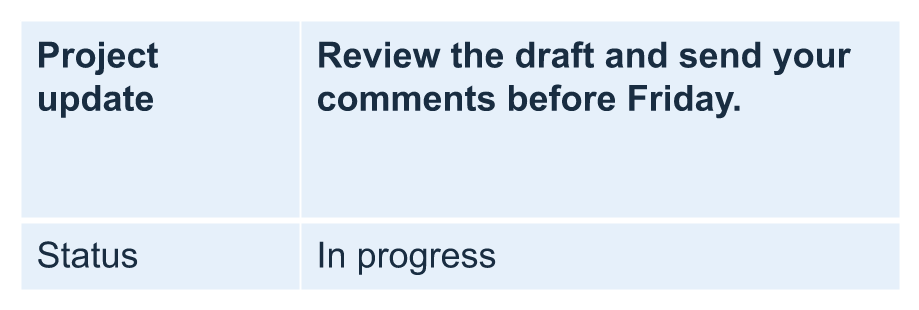
示例加载 row-height-input.pptx,该文件在第一张幻灯片的第一个形状中包含一个表格。其第一行的起始高度为 70 磅。单元格使用 18 磅 Arial 字体、自动换行,并且上下边距为 6 磅;第二列的较长文本会换成多行。示例将最小高度提升至 100 磅,然后降低至 20 磅,在每次更改后打印实际高度,并保存两个结果。
use aspose\slides\Presentation;
use aspose\slides\SaveFormat;

$presentation = new Presentation("row-height-input.pptx");
try {
    $slide = $presentation->getSlides()->get_Item(0);

    $table = $slide->getShapes()->get_Item(0);
    $row = $table->getRows()->get_Item(0);

    $row->setMinimalHeight(100);
    printf("Increased: minimum = %.1f, actual = %.1f pt\n", java_values($row->getMinimalHeight()), java_values($row->getHeight()));
    $presentation->save("row-height-increased.pptx", SaveFormat::Pptx);

    $row->setMinimalHeight(20);
    printf("Decreased: minimum = %.1f, actual = %.1f pt\n", java_values($row->getMinimalHeight()), java_values($row->getHeight()));
    $presentation->save("row-height-decreased.pptx", SaveFormat::Pptx);
} finally {
    $presentation->dispose();
}
使用提供的演示文稿时,增加最小值会为行添加空间。降低最小值会去除该额外空间,但实际高度仍大于 20 磅,因为文本和单元格边距需要更多空间。仅降低最小值无法将行强行压低至内容所需空间以下。
实际高度受以下几个因素影响:
- 文本和字体大小: 更长的文本、显式换行或更大的字体可能需要更多的垂直空间。
- 换行和列宽度: 启用换行时,使用 Column::setWidth 减小列宽会产生更多行。更宽的列可以降低垂直所需空间。
- 单元格边距: Cell::setMarginTop 和 Cell::setMarginBottom 会增加垂直空间。Cell::setMarginLeft 和 Cell::setMarginRight 会减少文本可用宽度,从而导致更多换行。
对于此未合并单元格的表格,需求垂直空间最大的单元格决定整行的内容驱动下限。要使行更短,可能还需要缩短文本、减小字体大小或边距,或加宽列宽。
下图显示了相同比例的同一表格。在示例结果中,实际高度分别为 70、100 和 55.2 磅:最终行仍高于其 20 磅的最小值。文本的精确测量可能因环境中可用的字体而异。下载保存的结果:increased minimum 和 decreased minimum。
| 原始:最小 70 磅,实际 70 磅 | 增加后:最小 100 磅,实际 100 磅 | 减少后:最小 20 磅,实际 55.2 磅 |
|---|---|---|
 |
 |
 |
将首行设为标题
使用 setFirstRow 方法将第一行标记为标题格式。其外观取决于表格所应用的表格样式。
- 使用 Presentation 类加载演示文稿。
- 访问第一张幻灯片。
- 访问存储在该幻灯片第一个形状中的表格。
- 为其第一行启用标题格式。
- 保存修改后的演示文稿。
示例需要 table.pptx,其中第一张幻灯片的第一个形状为表格。它为第一行启用标题格式并保存为 First_row_header.pptx。
use aspose\slides\Presentation;
use aspose\slides\SaveFormat;

$presentation = new Presentation("table.pptx");
try {
    $slide = $presentation->getSlides()->get_Item(0);

    $table = $slide->getShapes()->get_Item(0);
    $table->setFirstRow(true);

    $presentation->save("First_row_header.pptx", SaveFormat::Pptx);
} finally {
    $presentation->dispose();
}
克隆表格行或列
克隆行或列以重复使用其内容和格式。您可以将副本追加到表格末尾或插入到特定位置。
- 使用 Presentation 类加载演示文稿。
- 访问第一张幻灯片。
- 定义列宽和行高。
- 使用 addTable 方法添加表格。
- 克隆所需的行。
- 克隆所需的列。
- 保存修改后的演示文稿。
示例需要 Test.pptx,其中至少有一张幻灯片。它创建一个三列五行的表格,尺寸以磅为单位。它追加第一行和第一列的副本,然后在索引 3(第四个位置)插入第二行和第二列的副本。生成的表格共有七行五列。false 参数用于禁止克隆到相邻的合并行或列;此表格没有合并单元格。
use aspose\slides\Presentation;
use aspose\slides\SaveFormat;

$presentation = new Presentation("Test.pptx");
try {
    $slide = $presentation->getSlides()->get_Item(0);

    $columnWidths = [50, 50, 50];
    $rowHeights = [50, 30, 30, 30, 30];
    $table = $slide->getShapes()->addTable(100, 50, $columnWidths, $rowHeights);

    $table->get_Item(0, 0)->getTextFrame()->setText("Row 1 Cell 1");
    $table->get_Item(1, 0)->getTextFrame()->setText("Row 1 Cell 2");
    $table->getRows()->addClone($table->getRows()->get_Item(0), false);

    $table->get_Item(0, 1)->getTextFrame()->setText("Row 2 Cell 1");
    $table->get_Item(1, 1)->getTextFrame()->setText("Row 2 Cell 2");
    $table->getRows()->insertClone(3, $table->getRows()->get_Item(1), false);

    $table->getColumns()->addClone($table->getColumns()->get_Item(0), false);
    $table->getColumns()->insertClone(3, $table->getColumns()->get_Item(1), false);

    $presentation->save("table_out.pptx", SaveFormat::Pptx);
} finally {
    $presentation->dispose();
}
从表格中删除行或列
删除表格中不再需要的行或列。删除后,后续行或列的索引会向前移动。
- 使用 Presentation 类创建演示文稿。
- 访问第一张幻灯片。
- 定义列宽和行高。
- 使用 addTable 方法添加表格。
- 删除第二行和第二列。
- 保存修改后的演示文稿。
此示例创建一个 3×3 表格,并删除索引为 1 的行和列,生成的 TestTable_out.pptx 为 2×2 表格。尺寸以磅为单位。false 参数用于禁止删除相邻的合并行或列;此表格没有合并单元格。
use aspose\slides\Presentation;
use aspose\slides\SaveFormat;

$presentation = new Presentation();
try {
    $slide = $presentation->getSlides()->get_Item(0);

    $columnWidths = [100, 50, 30];
    $rowHeights = [30, 50, 30];
    $table = $slide->getShapes()->addTable(100, 100, $columnWidths, $rowHeights);

    $table->getRows()->removeAt(1, false);
    $table->getColumns()->removeAt(1, false);

    $presentation->save("TestTable_out.pptx", SaveFormat::Pptx);
} finally {
    $presentation->dispose();
}
在表格行级别设置文本格式
对整行应用文本格式以保持单元格一致性。您可以设置字体属性、段落格式和文字方向,而无需逐个单元格进行格式化。
- 使用 Presentation 类加载演示文稿。
- 访问第一张幻灯片上的表格。
- 对第一行使用 setFontHeight。
- 对第一行使用 setAlignment 和 setMarginRight。
- 对第二行使用 setTextVerticalType。
- 保存修改后的演示文稿。
示例需要 table.pptx,其中第一张幻灯片的第一个形状为表格且至少有两行。它对第一行应用 25 磅文本、右对齐和 20 磅右侧段落边距,然后在第二行设置垂直文字。
use aspose\slides\Presentation;
use aspose\slides\SaveFormat;
use aspose\slides\PortionFormat;
use aspose\slides\ParagraphFormat;
use aspose\slides\TextFrameFormat;
use aspose\slides\TextAlignment;
use aspose\slides\TextVerticalType;

$presentation = new Presentation("table.pptx");
try {
    $slide = $presentation->getSlides()->get_Item(0);

    $table = $slide->getShapes()->get_Item(0);

    $portionFormat = new PortionFormat();
    $portionFormat->setFontHeight(25);
    $table->getRows()->get_Item(0)->setTextFormat($portionFormat);

    $paragraphFormat = new ParagraphFormat();
    $paragraphFormat->setAlignment(TextAlignment::Right);
    $paragraphFormat->setMarginRight(20);
    $table->getRows()->get_Item(0)->setTextFormat($paragraphFormat);

    $textFrameFormat = new TextFrameFormat();
    $textFrameFormat->setTextVerticalType(TextVerticalType::Vertical);
    $table->getRows()->get_Item(1)->setTextFormat($textFrameFormat);

    $presentation->save("row_formatting.pptx", SaveFormat::Pptx);
} finally {
    $presentation->dispose();
}
在表格列级别设置文本格式
对整列应用文本格式以保持单元格一致性。您可以设置字体属性、段落格式和文字方向,而无需逐个单元格进行格式化。
- 使用 Presentation 类加载演示文稿。
- 访问第一张幻灯片上的表格。
- 对第一列使用 setFontHeight。
- 对第一列使用 setAlignment 和 setMarginRight。
- 对第二列使用 setTextVerticalType。
- 保存修改后的演示文稿。
示例需要 table.pptx,其中第一张幻灯片的第一个形状为表格且至少有两列。它对第一列应用 25 磅文本、右对齐和 20 磅右侧段落边距,然后在第二列设置垂直文字。
use aspose\slides\Presentation;
use aspose\slides\SaveFormat;
use aspose\slides\PortionFormat;
use aspose\slides\ParagraphFormat;
use aspose\slides\TextFrameFormat;
use aspose\slides\TextAlignment;
use aspose\slides\TextVerticalType;

$presentation = new Presentation("table.pptx");
try {
    $slide = $presentation->getSlides()->get_Item(0);

    $table = $slide->getShapes()->get_Item(0);

    $portionFormat = new PortionFormat();
    $portionFormat->setFontHeight(25);
    $table->getColumns()->get_Item(0)->setTextFormat($portionFormat);

    $paragraphFormat = new ParagraphFormat();
    $paragraphFormat->setAlignment(TextAlignment::Right);
    $paragraphFormat->setMarginRight(20);
    $table->getColumns()->get_Item(0)->setTextFormat($paragraphFormat);

    $textFrameFormat = new TextFrameFormat();
    $textFrameFormat->setTextVerticalType(TextVerticalType::Vertical);
    $table->getColumns()->get_Item(1)->setTextFormat($textFrameFormat);

    $presentation->save("column_formatting.pptx", SaveFormat::Pptx);
} finally {
    $presentation->dispose();
}
获取表格样式属性
使用 getStylePreset 方法检索应用于表格的样式预设,并在另一个表格上重复使用。它识别的是预设,而不是单个单元格的格式覆盖。
示例创建一个表格,应用 TableStylePreset::DarkStyle1,并读取该预设。它打印对应于 DarkStyle1 的整数值并将表格保存为 table.pptx。
use aspose\slides\Presentation;
use aspose\slides\SaveFormat;
use aspose\slides\TableStylePreset;

$presentation = new Presentation();
try {
    $slide = $presentation->getSlides()->get_Item(0);

    $columnWidths = [100, 150];
    $rowHeights = [5, 5, 5];
    $table = $slide->getShapes()->addTable(10, 10, $columnWidths, $rowHeights);
    $table->setStylePreset(TableStylePreset::DarkStyle1);

    $stylePreset = $table->getStylePreset();
    echo java_values($stylePreset) . PHP_EOL;

    $presentation->save("table.pptx", SaveFormat::Pptx);
} finally {
    $presentation->dispose();
}
常见问题
我可以将 PowerPoint 主题/样式应用于已经创建的表格吗?
可以。表格会继承幻灯片/版面/母版的主题,且您仍然可以在此主题之上覆盖填充、边框和文字颜色。
我可以像在 Excel 中一样对表格行进行排序吗?
不,Aspose.Slides 表格没有内置的排序或筛选功能。请先在内存中对数据进行排序,然后按该顺序重新填充表格行。
我可以在保持特定单元格自定义颜色的同时使用分条(条纹)列吗?
可以。开启分条列后,再对特定单元格进行本地格式覆盖;单元格级别的格式会优先于表格样式。