
Python’da Sunum Grafiklerini Biçimlendirme
Genel Bakış
Bu makale, Aspose.Slides kullanarak PowerPoint sunumlarındaki grafikleri nasıl biçimlendireceğinizi açıklar. Ekseni, ızgara çizgileri, başlıklar, gösterge çizelgeleri, çizim alanı ve duvar doldurmaları gibi temel grafik öğelerini özelleştirerek grafik verilerinin görünümünü ve okunabilirliğini artırmayı gösterir.
Ayrıca grafik metni için yazı tipi özelliklerini nasıl ayarlayacağınızı, grafik verilerine önceden tanımlı sayısal biçimlerin nasıl uygulanacağını ve grafik alanının köşelerinin nasıl yuvarlatılacağını gösterir. Bu örnekler, bir sunumdaki grafiklerin hem görsel stilini hem de veri sunumunu nasıl kontrol edeceğinizi ortaya koyar.
Grafik Varlıklarını Biçimlendir
Use Chart to format chart titles, axes, grid lines, legends, and the plot area. This example creates a line chart with markers and default data, then applies separate text and line styles to its value and category axes. Font sizes and line widths are specified in points; category labels are rotated by 45 degrees.
The value axis uses setNumberFormat independently of the source cells. Its scale runs from -2 to 15, with major intervals of 2 and minor intervals of 0.5. The example also combines percentage formatting with setDisplayUnit set to thousands, so adapt these settings to the meaning and magnitude of your data. The legend stays outside the plot area because setOverlay is called with False. Back-wall and floor fills are configured through getBackWall and getFloor, but these surfaces are only visible in 3D charts.
import jpype
import asposeslides

if not jpype.isJVMStarted():
    jpype.startJVM()

from asposeslides.api import ChartType, DisplayUnitType, FillType, FontData, LineDashStyle, NullableBool, Presentation, PresetColor, SaveFormat, TickLabelPositionType

Color = jpype.JClass("java.awt.Color")

presentation = Presentation()
try:
    slide = presentation.getSlides().get_Item(0)

    chart = slide.getShapes().addChart(ChartType.LineWithMarkers, 50, 50, 500, 400)

    chart.setTitle(True)
    chart.getChartTitle().addTextFrameForOverriding("")
    chart_title = chart.getChartTitle().getTextFrameForOverriding().getParagraphs().get_Item(0).getPortions().get_Item(0)
    chart_title.setText("Sample Chart")
    chart_title.getPortionFormat().getFillFormat().setFillType(FillType.Solid)
    chart_title.getPortionFormat().getFillFormat().getSolidFillColor().setColor(Color.GRAY)
    chart_title.getPortionFormat().setFontHeight(20)
    chart_title.getPortionFormat().setFontBold(NullableBool.True_)
    chart_title.getPortionFormat().setFontItalic(NullableBool.True_)

    chart.getAxes().getVerticalAxis().getMajorGridLinesFormat().getLine().getFillFormat().setFillType(FillType.Solid)
    chart.getAxes().getVerticalAxis().getMajorGridLinesFormat().getLine().getFillFormat().getSolidFillColor().setColor(Color.BLUE)
    chart.getAxes().getVerticalAxis().getMajorGridLinesFormat().getLine().setWidth(5)
    chart.getAxes().getVerticalAxis().getMajorGridLinesFormat().getLine().setDashStyle(LineDashStyle.DashDot)

    chart.getAxes().getVerticalAxis().getMinorGridLinesFormat().getLine().getFillFormat().setFillType(FillType.Solid)
    chart.getAxes().getVerticalAxis().getMinorGridLinesFormat().getLine().getFillFormat().getSolidFillColor().setColor(Color.RED)
    chart.getAxes().getVerticalAxis().getMinorGridLinesFormat().getLine().setWidth(3)

    chart.getAxes().getVerticalAxis().setNumberFormatLinkedToSource(False)
    chart.getAxes().getVerticalAxis().setDisplayUnit(DisplayUnitType.Thousands)
    chart.getAxes().getVerticalAxis().setNumberFormat("0.0%")

    chart.getAxes().getVerticalAxis().setAutomaticMajorUnit(False)
    chart.getAxes().getVerticalAxis().setAutomaticMaxValue(False)
    chart.getAxes().getVerticalAxis().setAutomaticMinorUnit(False)
    chart.getAxes().getVerticalAxis().setAutomaticMinValue(False)

    chart.getAxes().getVerticalAxis().setMaxValue(15)
    chart.getAxes().getVerticalAxis().setMinValue(-2)
    chart.getAxes().getVerticalAxis().setMinorUnit(0.5)
    chart.getAxes().getVerticalAxis().setMajorUnit(2.0)

    value_axis_text = chart.getAxes().getVerticalAxis().getTextFormat().getPortionFormat()
    value_axis_text.setFontBold(NullableBool.True_)
    value_axis_text.setFontHeight(16)
    value_axis_text.setFontItalic(NullableBool.True_)
    value_axis_text.getFillFormat().setFillType(FillType.Solid)
    value_axis_text.getFillFormat().getSolidFillColor().setPresetColor(PresetColor.DarkGreen)
    value_axis_font = FontData("Times New Roman")
    value_axis_text.setLatinFont(value_axis_font)

    chart.getAxes().getVerticalAxis().setTitle(True)
    chart.getAxes().getVerticalAxis().getTitle().addTextFrameForOverriding("")
    value_axis_title = chart.getAxes().getVerticalAxis().getTitle().getTextFrameForOverriding().getParagraphs().get_Item(0).getPortions().get_Item(0)
    value_axis_title.setText("Primary Axis")
    value_axis_title.getPortionFormat().getFillFormat().setFillType(FillType.Solid)
    value_axis_title.getPortionFormat().getFillFormat().getSolidFillColor().setColor(Color.GRAY)
    value_axis_title.getPortionFormat().setFontHeight(20)
    value_axis_title.getPortionFormat().setFontBold(NullableBool.True_)
    value_axis_title.getPortionFormat().setFontItalic(NullableBool.True_)

    chart.getAxes().getHorizontalAxis().getMajorGridLinesFormat().getLine().getFillFormat().setFillType(FillType.Solid)
    category_grid_color = Color(0, 128, 0)
    chart.getAxes().getHorizontalAxis().getMajorGridLinesFormat().getLine().getFillFormat().getSolidFillColor().setColor(category_grid_color)
    chart.getAxes().getHorizontalAxis().getMajorGridLinesFormat().getLine().setWidth(5)

    chart.getAxes().getHorizontalAxis().getMinorGridLinesFormat().getLine().getFillFormat().setFillType(FillType.Solid)
    chart.getAxes().getHorizontalAxis().getMinorGridLinesFormat().getLine().getFillFormat().getSolidFillColor().setColor(Color.YELLOW)
    chart.getAxes().getHorizontalAxis().getMinorGridLinesFormat().getLine().setWidth(3)

    category_axis_text = chart.getAxes().getHorizontalAxis().getTextFormat().getPortionFormat()
    category_axis_text.setFontBold(NullableBool.True_)
    category_axis_text.setFontHeight(16)
    category_axis_text.setFontItalic(NullableBool.True_)
    category_axis_text.getFillFormat().setFillType(FillType.Solid)
    category_axis_text.getFillFormat().getSolidFillColor().setColor(Color.BLUE)
    category_axis_font = FontData("Arial")
    category_axis_text.setLatinFont(category_axis_font)

    chart.getAxes().getHorizontalAxis().setTitle(True)
    chart.getAxes().getHorizontalAxis().getTitle().addTextFrameForOverriding("")

    category_axis_title = chart.getAxes().getHorizontalAxis().getTitle().getTextFrameForOverriding().getParagraphs().get_Item(0).getPortions().get_Item(0)
    category_axis_title.setText("Sample Category")
    category_axis_title.getPortionFormat().getFillFormat().setFillType(FillType.Solid)
    category_axis_title.getPortionFormat().getFillFormat().getSolidFillColor().setColor(Color.GRAY)
    category_axis_title.getPortionFormat().setFontHeight(20)
    category_axis_title.getPortionFormat().setFontBold(NullableBool.True_)
    category_axis_title.getPortionFormat().setFontItalic(NullableBool.True_)

    chart.getAxes().getHorizontalAxis().setTickLabelPosition(TickLabelPositionType.Low)
    chart.getAxes().getHorizontalAxis().setTickLabelRotationAngle(45)

    legend_text = chart.getLegend().getTextFormat().getPortionFormat()
    legend_text.setFontBold(NullableBool.True_)
    legend_text.setFontHeight(16)
    legend_text.setFontItalic(NullableBool.True_)
    legend_text.getFillFormat().setFillType(FillType.Solid)
    legend_text.getFillFormat().getSolidFillColor().setPresetColor(PresetColor.DarkRed)

    chart.getLegend().setOverlay(False)

    chart.getBackWall().setThickness(1)
    chart.getBackWall().getFormat().getFill().setFillType(FillType.Solid)
    back_wall_color = Color(255, 165, 0)
    chart.getBackWall().getFormat().getFill().getSolidFillColor().setColor(back_wall_color)

    chart.getFloor().getFormat().getFill().setFillType(FillType.Solid)
    chart.getFloor().getFormat().getFill().getSolidFillColor().setColor(Color.RED)

    chart.getPlotArea().getFormat().getFill().setFillType(FillType.Solid)
    chart.getPlotArea().getFormat().getFill().getSolidFillColor().setPresetColor(PresetColor.LightCyan)

    presentation.save("FormattedChart_out.pptx", SaveFormat.Pptx)
finally:
    presentation.dispose()
Bir Grafik İçin Yazı Tipi Özelliklerini Ayarla
Set the default font size for chart text through Chart.getTextFormat. The example creates a clustered column chart with a 20-point font and enables value labels for the first series through setShowValue. Text elements with their own explicit font settings can override the chart default.
import jpype
import asposeslides

if not jpype.isJVMStarted():
    jpype.startJVM()

from asposeslides.api import ChartType, Presentation, SaveFormat

presentation = Presentation()
try:
    slide = presentation.getSlides().get_Item(0)

    chart = slide.getShapes().addChart(ChartType.ClusteredColumn, 100, 100, 500, 400)
    chart.getTextFormat().getPortionFormat().setFontHeight(20)
    chart.getChartData().getSeries().get_Item(0).getLabels().getDefaultDataLabelFormat().setShowValue(True)

    presentation.save("FontPropertiesForChart.pptx", SaveFormat.Pptx)
finally:
    presentation.dispose()
Sayısal Biçimi Ayarla
Use ChartDataCell.setPresetNumberFormat to apply a built-in number format to chart workbook cells. This example creates a clustered column chart with default, cell-backed data and applies format index 10 (0.00%) to each series value cell. This changes how the values are displayed in the workbook without changing the underlying numbers; for example, 0.25 is displayed as 25.00%. Axis and data-label formats can be configured separately.
import jpype
import asposeslides

if not jpype.isJVMStarted():
    jpype.startJVM()

from asposeslides.api import ChartType, Presentation, SaveFormat

presentation = Presentation()
try:
    slide = presentation.getSlides().get_Item(0)

    chart = slide.getShapes().addChart(ChartType.ClusteredColumn, 50, 50, 500, 400)
    chart_series_collection = chart.getChartData().getSeries()

    for chart_series in chart_series_collection:
        for data_point in chart_series.getDataPoints():
            data_point.getValue().getAsCell().setPresetNumberFormat(jpype.JByte(10))  # 0.00%

    presentation.save("PresetNumberFormat_out.pptx", SaveFormat.Pptx)
finally:
    presentation.dispose()
The following table lists built-in number format indices with representative Excel formats for the English (United States) locale. The exact format strings and their display can vary by application and locale, particularly for currency and dates. Some Excel formats also differ from the defaults in the OOXML standard, as described in Microsoft’s number format implementation notes.
| İndeks | Biçim |
|---|---|
| 0 | General |
| 1 | 0 |
| 2 | 0.00 |
| 3 | #,##0 |
| 4 | #,##0.00 |
| 5 | "$"#,##0_);("$"#,##0) |
| 6 | "$"#,##0_);[Red]("$"#,##0) |
| 7 | "$"#,##0.00_);("$"#,##0.00) |
| 8 | "$"#,##0.00_);[Red]("$"#,##0.00) |
| 9 | 0% |
| 10 | 0.00% |
| 11 | 0.00E+00 |
| 12 | # ?/? |
| 13 | # ??/?? |
| 14 | m/d/yyyy |
| 15 | d-mmm-yy |
| 16 | d-mmm |
| 17 | mmm-yy |
| 18 | h:mm AM/PM |
| 19 | h:mm:ss AM/PM |
| 20 | h:mm |
| 21 | h:mm:ss |
| 22 | m/d/yyyy h:mm |
| 37 | #,##0_);(#,##0) |
| 38 | #,##0_);[Red](#,##0) |
| 39 | #,##0.00_);(#,##0.00) |
| 40 | #,##0.00_);[Red](#,##0.00) |
| 41 | _(* #,##0_);_(* (#,##0);_(* "-"_);_(@_) |
| 42 | _("$"* #,##0_);_("$"* (#,##0);_("$"* "-"_);_(@_) |
| 43 | _(* #,##0.00_);_(* (#,##0.00);_(* "-"??_);_(@_) |
| 44 | _("$"* #,##0.00_);_("$"* (#,##0.00);_("$"* "-"??_);_(@_) |
| 45 | mm:ss |
| 46 | [h]:mm:ss |
| 47 | mm:ss.0 |
| 48 | ##0.0E+0 |
| 49 | @ |
Grafik Alanı Yuvarlatılmış Kenarlıklar Ayarla
Call Chart.setRoundedCorners with True to round the corners of the chart area. The example creates a clustered column chart and uses getLineFormat to give its outline a solid gray color and a single-line style before saving the presentation.
import jpype
import asposeslides

if not jpype.isJVMStarted():
    jpype.startJVM()

from asposeslides.api import ChartType, FillType, LineStyle, Presentation, SaveFormat

Color = jpype.JClass("java.awt.Color")

presentation = Presentation()
try:
    slide = presentation.getSlides().get_Item(0)

    chart = slide.getShapes().addChart(ChartType.ClusteredColumn, 20, 100, 600, 400)
    chart.getLineFormat().getFillFormat().setFillType(FillType.Solid)
    chart.getLineFormat().getFillFormat().getSolidFillColor().setColor(Color.GRAY)
    chart.getLineFormat().setStyle(LineStyle.Single)
    chart.setRoundedCorners(True)

    presentation.save("out.pptx", SaveFormat.Pptx)
finally:
    presentation.dispose()
Mevcut Grafik Açıklamalarını Düzenle
A chart can contain custom shapes, such as a text annotation explaining the status of a report. Access these shapes through Chart.getUserShapes. The collection returned by getShapes contains the chart-owned shapes.
An ordinary text box placed over a chart belongs to the slide, even if it looks like part of the chart. Iterating through Slide.getShapes finds the chart and ordinary slide shapes, but does not enumerate the individual shapes inside the chart. Chart titles and data labels are separate chart elements, not custom annotations in this collection.
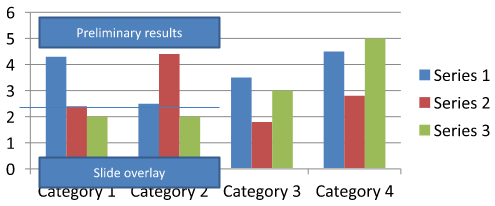
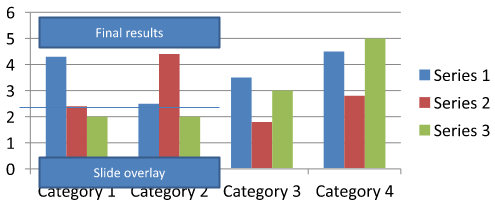
Download chart-annotations.pptx and place it in the application’s working directory. Its first slide contains a chart with an ungrouped annotation reading “Preliminary results”, a chart-owned line, and an ordinary slide text box reading “Slide overlay”. The example finds the first chart on that slide and changes the annotation to “Final results” when the report is ready to publish. It checks for an empty collection and only edits an AutoShape with a text frame other than None returned by getTextFrame and the expected text.
import jpype
import asposeslides

if not jpype.isJVMStarted():
    jpype.startJVM()

from asposeslides.api import AutoShape, Chart, Presentation, SaveFormat

presentation = Presentation("chart-annotations.pptx")
try:
    slide = presentation.getSlides().get_Item(0)

    chart = None
    for shape in slide.getShapes():
        if isinstance(shape, Chart):
            chart = shape
            break

    if chart is None or chart.getUserShapes().getShapes().size() == 0:
        print("No chart or chart-owned shapes found.")
    else:
        updated = False
        for shape in chart.getUserShapes().getShapes():
            if isinstance(shape, AutoShape):
                text_frame = shape.getTextFrame()
                if text_frame is not None and text_frame.getText() == "Preliminary results":
                    text_frame.setText("Final results")
                    updated = True
                    break

        if updated:
            presentation.save("chart-annotations-updated.pptx", SaveFormat.Pptx)
        else:
            print("No matching text annotation found.")
finally:
    presentation.dispose()
The line and the slide text box remain unchanged. The following images show the input and the saved, reopened result:
| Before editing | After editing |
|---|---|
 |
 |
Note
The example inspects only the top-level chart-owned shapes. If an annotation is inside a GroupShape, inspect that group’s getShapes collection as well. Repeat this recursively for nested groups, applying the same text checks to their child shapes. A group itself is a container; do not treat it as a text box.SSS
Can I set semi-transparent fills for columns/areas while keeping the border opaque?
Yes. Fill transparency and the outline are configured separately. This is useful for improving the readability of the grid and data in dense visualizations.
How can I deal with data labels when they overlap?
Reduce the font size, disable nonessential label components (for example, categories), adjust the label position, show labels only for selected points if necessary, or switch the format to “value + legend”.
Can I apply gradient or pattern fills to series?
Yes. Series support solid, gradient, and pattern fills. In practice, use gradients sparingly and avoid combinations that reduce contrast with the grid and text.