
在 Python via Java 中管理簡報投影片母版
概觀
投影片母版 定義一組投影片的共用設計設定。它可以包含共用圖形、標誌、背景、文字樣式、主題設定以及頁尾設定。在 PowerPoint 中,編輯投影片母版是保持簡報一致性的常用方式,無需在每張投影片上重複相同的格式設定。
Aspose.Slides for Python via Java 支援相同的模型。一個簡報可以包含一個或多個母版投影片,而每個母版投影片可以包含多個版面投影片。普通投影片通常不會直接參照母版投影片。相反,普通投影片會使用版面投影片,而該版面投影片屬於某個母版投影片。
層級結構如下:
- 投影片母版 ─ 定義共用的設計與主題。
- 版面投影片 ─ 定義占位元件的具體排列與版面層級格式。
- 普通投影片 ─ 包含實際的簡報內容,並使用一個版面投影片。
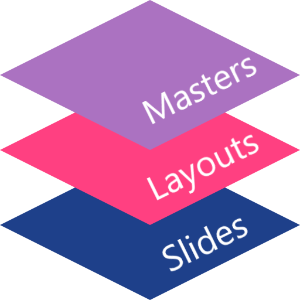
在 Aspose.Slides 中,投影片母版由 MasterSlide 類別表示。簡報中所有的母版投影片可透過 Presentation.getMasters 集合取得,該集合由 MasterSlideCollection 表示。
繼承
當同一屬性在多個層級中都有定義時,較具體的層級會優先。舉例來說,若母版投影片與版面投影片都定義了背景,則基於該版面的投影片會使用版面背景。更多版面投影片的資訊,請參閱 套用或變更投影片版面。存取投影片母版
在 PowerPoint 中,您可以從 檢視 > 投影片母版 開啟投影片母版檢視。
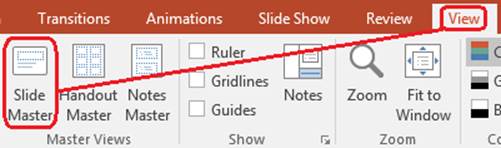
在 Aspose.Slides 中,使用 Presentation.getMasters 集合存取母版投影片:
import jpype
import asposeslides

if not jpype.isJVMStarted():
    jpype.startJVM()

from asposeslides.api import Presentation

presentation = Presentation("presentation.pptx")
try:
    first_master_slide = presentation.getMasters().get_Item(0)
    master_slide_count = presentation.getMasters().size()
    first_master_layout_slide_count = first_master_slide.getLayoutSlides().size()

    print(f"Master slides: {master_slide_count}")
    print(f"Layouts in the first master: {first_master_layout_slide_count}")
finally:
    presentation.dispose()
您也可以透過普通投影片的版面取得其使用的母版投影片:
import jpype
import asposeslides

if not jpype.isJVMStarted():
    jpype.startJVM()

from asposeslides.api import Presentation

presentation = Presentation("presentation.pptx")
try:
    slide = presentation.getSlides().get_Item(0)
    layout_slide = slide.getLayoutSlide()
    master_slide = layout_slide.getMasterSlide()
    master_slide_name = master_slide.getName()

    print(master_slide_name)
finally:
    presentation.dispose()
投影片母版的內容
母版投影片是一種類似投影片的物件。它繼承自 BaseSlide,因此會暴露許多普通投影片與版面投影片使用的相同屬性。母版專屬的成員列於 MasterSlide API 頁面。
常用的母版投影片成員包括:
| 成員 | 目的 |
|---|---|
| getBackground | 設定母版層級的投影片背景。 |
| getShapes | 儲存放置於母版上的圖形,例如標誌、圖片框與共用文字。 |
| getLayoutSlides | 儲存屬於該母版的版面投影片。 |
| getThemeManager | 提供存取母版主題 API 的介面。 |
| getHeaderFooterManager | 控制母版及其子版面的頁首、頁尾、日期與投影片編號。 |
| getDependingSlides | 回傳透過版面依賴於該母版的普通投影片。 |
將圖像加入投影片母版
將圖像加入母版投影片時,使用該母版版面的所有投影片都會顯示該圖像。這對於標誌、水印、裝飾條帶等重複出現的視覺元素非常有用。
以下範例在第一個母版投影片上加入標誌:
import jpype
import asposeslides

if not jpype.isJVMStarted():
    jpype.startJVM()

from asposeslides.api import Images, Presentation, SaveFormat, ShapeType

presentation = Presentation("presentation.pptx")
try:
    master_slide = presentation.getMasters().get_Item(0)
    logo = Images.fromFile("logo.png")
    try:
        logo_image = presentation.getImages().addImage(logo)
        master_slide.getShapes().addPictureFrame(ShapeType.Rectangle, 20, 20, 80, 80, logo_image)
    finally:
        logo.dispose()

    presentation.save("presentation-with-logo.pptx", SaveFormat.Pptx)
finally:
    presentation.dispose()
更多關於圖片框的資訊,請參閱 Picture Frame。
控制母版圖形的可見性
使用 BaseSlide.setShowMasterShapes 來隱藏繼承自母版的圖形(例如標誌或裝飾形狀),但不會從母版中刪除它們。在需要省略這些圖形的投影片上,將 Slide.setShowMasterShapes 設為 False,而在要顯示的投影片上保持 True。
以下獨立範例在母版上建立藍色裝飾條帶,並在兩張使用相同空白版面的投影片上示範其可見與隱藏情況。此範例不需要任何輸入簡報或圖像。
import jpype
import asposeslides

if not jpype.isJVMStarted():
    jpype.startJVM()

from asposeslides.api import FillType, Presentation, SaveFormat, ShapeType, SlideLayoutType

Color = jpype.JClass("java.awt.Color")

presentation = Presentation()
try:
    master_slide = presentation.getMasters().get_Item(0)
    layout_slide = master_slide.getLayoutSlides().getByType(SlideLayoutType.Blank)
    layout_slide.setShowMasterShapes(True)

    slide_height = jpype.JFloat(presentation.getSlideSize().getSize().getHeight())
    band = master_slide.getShapes().addAutoShape(ShapeType.Rectangle, 0, 0, 60, slide_height)
    band_color = Color(70, 130, 180)
    band.getFillFormat().setFillType(FillType.Solid)
    band.getFillFormat().getSolidFillColor().setColor(band_color)
    band.getLineFormat().getFillFormat().setFillType(FillType.NoFill)

    visible_slide = presentation.getSlides().get_Item(0)
    visible_slide.setLayoutSlide(layout_slide)
    visible_slide.getShapes().clear()

    hidden_slide = presentation.getSlides().addEmptySlide(layout_slide)

    visible_slide.setShowMasterShapes(True)
    hidden_slide.setShowMasterShapes(False)

    presentation.save("master-graphics.pptx", SaveFormat.Pptx)
finally:
    presentation.dispose()
範例使用新簡報內建的 Blank 版面,並移除初始投影片的占位元件。
選擇設定的範圍
普通投影片透過 Slide.getLayoutSlide 以及 LayoutSlide.getMasterSlide 取得母版。將屬性設定在單一投影片上僅會影響該投影片本身。將 False 傳遞給 LayoutSlide.setShowMasterShapes 會隱藏使用該共用版面的所有投影片的母版圖形,即使它們自己的設定為 True。若僅想在單一投影片上隱藏圖形,請變更該投影片的屬性,並保留共用版面不變。
此設定在母版投影片本身並不支援可見性控制。對於母版,getShowMasterShapes 永遠回傳 False,且將 True 傳遞給 setShowMasterShapes 會拋出例外。請在普通投影片或版面上使用此功能。
將圖形與背景區分
| 操作 | 影響 |
|---|---|
| 隱藏母版圖形 | 控制繼承自母版的圖形可見性,且不會刪除圖形或變更投影片本身的圖形。 |
| 變更投影片背景填色 | 變更背景的顏色、漸層或圖像。母版圖形是獨立的形狀,可在背景之上保持可見。請參閱 Presentation Background。 |
| 從母版刪除圖形 | 移除共用來源圖形,之後任何使用該母版的投影片皆不會再取得此圖形。 |
使用占位元件
占位元件通常定義於版面投影片上。母版投影片提供共用的樣式與主題,版面則決定哪些占位元件可用以及它們的放置位置。
在 PowerPoint 中,占位元件指令可在投影片母版檢視中使用。
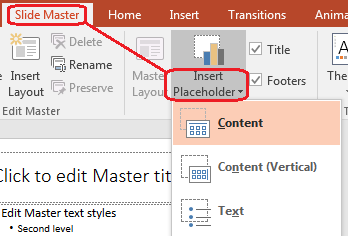
若要使用 Aspose.Slides 新增占位元件,請操作屬於母版的版面投影片:
import jpype
import asposeslides

if not jpype.isJVMStarted():
    jpype.startJVM()

from asposeslides.api import Presentation, SaveFormat, SlideLayoutType

presentation = Presentation("presentation.pptx")
try:
    master_slide = presentation.getMasters().get_Item(0)
    blank_layout_slide = master_slide.getLayoutSlides().getByType(SlideLayoutType.Blank)

    if blank_layout_slide is None:
        blank_layout_slide = master_slide.getLayoutSlides().add(SlideLayoutType.Blank, "Blank")

    blank_layout_slide.getPlaceholderManager().addTextPlaceholder(60, 120, 600, 80)

    presentation.getSlides().addEmptySlide(blank_layout_slide)
    presentation.save("presentation-with-placeholder.pptx", SaveFormat.Pptx)
finally:
    presentation.dispose()
您也可以格式化已存在於母版投影片上的占位元件形狀。以下範例找出標題占位元件並套用線性漸層填色:
import jpype
import asposeslides

if not jpype.isJVMStarted():
    jpype.startJVM()

from asposeslides.api import AutoShape, FillType, GradientShape, PlaceholderType, Presentation, SaveFormat

Color = jpype.JClass("java.awt.Color")

presentation = Presentation("presentation.pptx")
try:
    master_slide = presentation.getMasters().get_Item(0)
    title_placeholder = None

    for shape in master_slide.getShapes():
        if isinstance(shape, AutoShape):
            if shape.getPlaceholder() is not None and shape.getPlaceholder().getType() == PlaceholderType.Title:
                title_placeholder = shape
                break

    if title_placeholder is not None:
        red_gradient_color = Color(255, 0, 0)
        purple_gradient_color = Color(128, 0, 128)

        title_placeholder.getFillFormat().setFillType(FillType.Gradient)
        title_placeholder.getFillFormat().getGradientFormat().setGradientShape(GradientShape.Linear)
        title_placeholder.getFillFormat().getGradientFormat().getGradientStops().add(jpype.JFloat(0.0), red_gradient_color)
        title_placeholder.getFillFormat().getGradientFormat().getGradientStops().add(jpype.JFloat(1.0), purple_gradient_color)

    presentation.save("presentation-title-style.pptx", SaveFormat.Pptx)
finally:
    presentation.dispose()
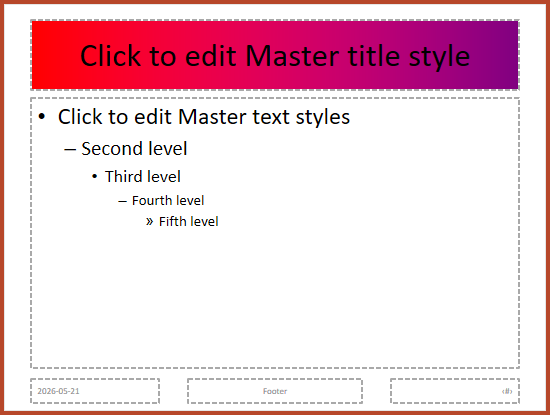
更多占位元件與文字格式化選項,請參閱 Set Prompt Text in Placeholder 與 Text Formatting。
變更投影片母版背景
母版背景會被版面與未覆寫背景的投影片繼承。以下範例為第一個母版投影片設定單色背景:
import jpype
import asposeslides

if not jpype.isJVMStarted():
    jpype.startJVM()

from asposeslides.api import BackgroundType, FillType, Presentation, SaveFormat

Color = jpype.JClass("java.awt.Color")

presentation = Presentation("presentation.pptx")
try:
    master_slide = presentation.getMasters().get_Item(0)
    master_background_color = Color.GREEN

    master_slide.getBackground().setType(BackgroundType.OwnBackground)
    master_slide.getBackground().getFillFormat().setFillType(FillType.Solid)
    master_slide.getBackground().getFillFormat().getSolidFillColor().setColor(master_background_color)

    presentation.save("presentation-master-background.pptx", SaveFormat.Pptx)
finally:
    presentation.dispose()
相關主題請見 Presentation Background 與 Presentation Theme。
將投影片母版複製至其他簡報
使用 MasterSlideCollection.addClone 可將母版投影片複製到另一個簡報。複製後的母版即可被目的簡報中的版面與投影片使用。
import jpype
import asposeslides

if not jpype.isJVMStarted():
    jpype.startJVM()

from asposeslides.api import Presentation, SaveFormat

source_presentation = Presentation("source.pptx")
destination_presentation = Presentation("destination.pptx")
try:
    source_master_slide = source_presentation.getMasters().get_Item(0)
    cloned_master_slide = destination_presentation.getMasters().addClone(source_master_slide)

    destination_presentation.save("destination-with-master.pptx", SaveFormat.Pptx)
finally:
    source_presentation.dispose()
    destination_presentation.dispose()
若需同時複製普通投影片及其母版,請參閱 Clone Slides。
新增多個投影片母版
簡報可包含多個母版投影片。這在不同章節需要不同品牌、頁面結構或主題設定時相當有用。
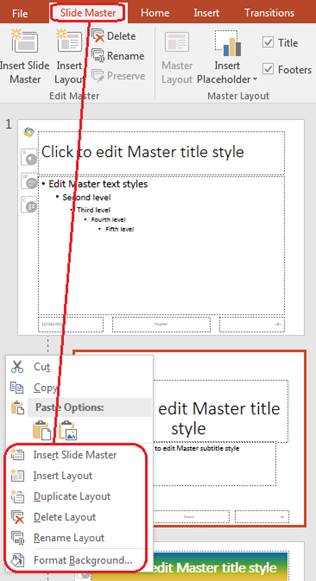
以下範例複製預設母版、為複製品設定不同的背景、在該複製母版下建立版面,並以該版面新增投影片:
import jpype
import asposeslides

if not jpype.isJVMStarted():
    jpype.startJVM()

from asposeslides.api import BackgroundType, FillType, Presentation, SaveFormat, SlideLayoutType

Color = jpype.JClass("java.awt.Color")

presentation = Presentation("presentation.pptx")
try:
    default_master_slide = presentation.getMasters().get_Item(0)
    section_master_slide = presentation.getMasters().addClone(default_master_slide)
    section_master_background_color = Color.LIGHT_GRAY

    section_master_slide.getBackground().setType(BackgroundType.OwnBackground)
    section_master_slide.getBackground().getFillFormat().setFillType(FillType.Solid)
    section_master_slide.getBackground().getFillFormat().getSolidFillColor().setColor(section_master_background_color)

    source_blank_layout = default_master_slide.getLayoutSlides().getByType(SlideLayoutType.Blank)
    if source_blank_layout is None:
        source_blank_layout = default_master_slide.getLayoutSlides().get_Item(0)

    section_blank_layout = section_master_slide.getLayoutSlides().addClone(source_blank_layout)

    presentation.getSlides().addEmptySlide(section_blank_layout)
    presentation.save("presentation-with-multiple-masters.pptx", SaveFormat.Pptx)
finally:
    presentation.dispose()
比較投影片母版
母版投影片可使用繼承自 BaseSlide 的 equals 方法進行比較。比較會檢查結構與靜態內容,例如圖形、文字、格式、動畫以及其他投影片設定;不會比較唯一識別碼(如投影片 ID)或動態占位元件值(如目前日期)。
import jpype
import asposeslides

if not jpype.isJVMStarted():
    jpype.startJVM()

from asposeslides.api import Presentation

first_presentation = Presentation("first.pptx")
second_presentation = Presentation("second.pptx")
try:
    first_presentation_master_count = first_presentation.getMasters().size()
    second_presentation_master_count = second_presentation.getMasters().size()

    for first_master_index in range(first_presentation_master_count):
        for second_master_index in range(second_presentation_master_count):
            first_master_slide = first_presentation.getMasters().get_Item(first_master_index)
            second_master_slide = second_presentation.getMasters().get_Item(second_master_index)
            are_master_slides_equal = first_master_slide.equals(second_master_slide)

            if are_master_slides_equal:
                print(f"first.pptx master #{first_master_index} equals second.pptx master #{second_master_index}")
finally:
    first_presentation.dispose()
    second_presentation.dispose()
更多資訊,請參閱 Compare Presentation Slides。
將投影片母版檢視設為預設檢視
在 ViewProperties 上使用 setLastView 方法,可控制 PowerPoint 首次開啟的檢視。以下範例在投影片母版檢視中開啟簡報:
import jpype
import asposeslides

if not jpype.isJVMStarted():
    jpype.startJVM()

from asposeslides.api import Presentation, SaveFormat, ViewType

presentation = Presentation("presentation.pptx")
try:
    presentation.getViewProperties().setLastView(ViewType.SlideMasterView)
    presentation.save("presentation-master-view.pptx", SaveFormat.Pptx)
finally:
    presentation.dispose()
其他檢視設定請見 Save Presentation。
移除未使用的母版投影片
簡報有時會包含已不再被任何普通投影片使用的母版投影片。移除未使用的母版可以減少檔案大小並簡化模板維護。
使用 removeUnused 從 Presentation.getMasters 集合中移除未使用的母版:
import jpype
import asposeslides

if not jpype.isJVMStarted():
    jpype.startJVM()

from asposeslides.api import Presentation, SaveFormat

presentation = Presentation("presentation.pptx")
try:
    presentation.getMasters().removeUnused(True)
    presentation.save("presentation-clean.pptx", SaveFormat.Pptx)
finally:
    presentation.dispose()
您也可以使用低程式碼的 Compress.removeUnusedMasterSlides 方法:
import jpype
import asposeslides

if not jpype.isJVMStarted():
    jpype.startJVM()

from asposeslides.api import Compress, Presentation, SaveFormat

presentation = Presentation("presentation.pptx")
try:
    Compress.removeUnusedMasterSlides(presentation)
    presentation.save("presentation-clean.pptx", SaveFormat.Pptx)
finally:
    presentation.dispose()
常見問題集
投影片母版與版面投影片有何不同?
投影片母版定義共用的設計設定,例如主題、背景、共用圖形與文字樣式。版面投影片屬於母版,定義占位元件的具體排列。普通投影片使用版面投影片,因此同時繼承版面與母版的設定。
一個簡報可以包含多個投影片母版嗎?
可以。簡報可以包含多個投影片母版。當不同章節需要不同的視覺系統或品牌時,請使用多個母版。
應該在母版投影片還是版面投影片上加入占位元件?
大多數情況下,應在版面投影片上加入占位元件。將共用的視覺元素與共用格式放在母版投影片上,然後在普通投影片會使用的版面上放置內容占位元件。
我可以刪除仍被使用的母版投影片嗎?
不能。仍有依賴投影片的母版投影片無法直接安全刪除。請先將這些投影片移至另一個母版的版面,或使用僅移除未被使用的母版的清理方法。