
管理 C++ 中的演示文稿主题
介绍
演示文稿主题定义了一套协调一致的颜色、字体、背景样式、填充、线条和效果。主题感知对象引用这些共享定义,而不是将每个视觉属性存储为固定值,因此更改主题时可以一次性更新多个对象。
在 Aspose.Slides 中,演示文稿级别的主题可通过 Presentation::get_MasterTheme() 获取。演示文稿还可以在更低层级包含主题覆盖。母版可以通过 MasterThemeManager::get_OverrideTheme() 覆盖演示文稿主题,而布局或单个幻灯片可以使用 IOverrideThemeManager::get_OverrideTheme()。实际情况下,幻灯片的有效主题通过以下继承链解析:演示文稿主题 → 母版覆盖 → 布局覆盖 → 幻灯片覆盖。
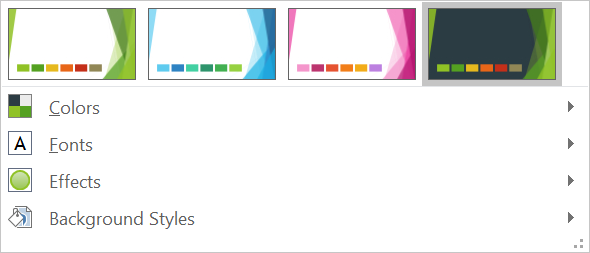
下面的章节展示了最常见的主题工作流:检查主题、更改颜色和字体、复制或应用主题、更新背景和效果样式,以及在继承和覆盖解析后读取有效值。
检查主题
MasterTheme 对象公开了主题的 get_ColorScheme()、get_FontScheme() 和 get_FormatScheme() 方法。在更改之前检查这些集合特别有用,因为来自外部来源的演示文稿其样式条目数量和内容可能不同。
下面的示例读取主要主题属性,并报告主题中存储了多少背景、填充、线条和效果样式:
#include <DOM/IColorFormat.h>
#include <DOM/IFonts.h>
#include <DOM/Presentation.h>
#include <DOM/Theme/IColorScheme.h>
#include <DOM/Theme/IEffectStyleCollection.h>
#include <DOM/Theme/IFillFormatCollection.h>
#include <DOM/Theme/IFontScheme.h>
#include <DOM/Theme/IFormatScheme.h>
#include <DOM/Theme/ILineFormatCollection.h>
#include <DOM/Theme/IMasterTheme.h>
#include <system/console.h>

using namespace Aspose::Slides;
using namespace System;

auto presentation = MakeObject<Presentation>(u"input.pptx");
auto theme = presentation->get_MasterTheme();
auto formatScheme = theme->get_FormatScheme();

Console::WriteLine(u"Theme name: {0}", theme->get_Name());
Console::WriteLine(u"Accent 1: {0}", theme->get_ColorScheme()->get_Accent1()->get_Color());
Console::WriteLine(u"Major Latin font: {0}", theme->get_FontScheme()->get_Major()->get_LatinFont()->get_FontName());
Console::WriteLine(u"Minor Latin font: {0}", theme->get_FontScheme()->get_Minor()->get_LatinFont()->get_FontName());
Console::WriteLine(u"Background fill styles: {0}", formatScheme->get_BackgroundFillStyles()->get_Count());
Console::WriteLine(u"Fill styles: {0}", formatScheme->get_FillStyles()->get_Count());
Console::WriteLine(u"Line styles: {0}", formatScheme->get_LineStyles()->get_Count());
Console::WriteLine(u"Effect styles: {0}", formatScheme->get_EffectStyles()->get_Count());
如果文件使用了多个母版,请不要假设每个幻灯片都有相同的有效主题。检查与幻灯片关联的母版,并在布局或幻灯片覆盖可能存在时使用本文后面展示的有效主题工作流。
更改主题颜色
主题感知的填充、线条和文本可以引用 SchemeColor 枚举中的逻辑颜色。当你在主题的 IColorScheme 中更改相应条目时,所有仍然引用该主题颜色的对象都会解析为新值。使用直接 RGB 颜色的对象不会受到主题颜色更新的影响。
下面的端到端示例创建一个使用 Accent4 的形状,将主题的 Accent4 颜色改为红色,保存演示文稿,重新打开并打印有效填充颜色:
#include <DOM/FillType.h>
#include <DOM/IAutoShape.h>
#include <DOM/IColorFormat.h>
#include <DOM/IFillFormat.h>
#include <DOM/IFillFormatEffectiveData.h>
#include <DOM/IShapeCollection.h>
#include <DOM/ISlide.h>
#include <DOM/Presentation.h>
#include <DOM/SchemeColor.h>
#include <DOM/ShapeType.h>
#include <DOM/Theme/IColorScheme.h>
#include <DOM/Theme/IMasterTheme.h>
#include <Export/SaveFormat.h>
#include <drawing/color.h>
#include <system/console.h>

using namespace Aspose::Slides;
using namespace Aspose::Slides::Export;
using namespace System;
using namespace System::Drawing;

auto presentation = MakeObject<Presentation>();
auto slide = presentation->get_Slide(0);
auto shape = slide->get_Shapes()->AddAutoShape(ShapeType::Rectangle, 10.0f, 10.0f, 100.0f, 100.0f);
shape->get_FillFormat()->set_FillType(FillType::Solid);
shape->get_FillFormat()->get_SolidFillColor()->set_SchemeColor(SchemeColor::Accent4);
presentation->get_MasterTheme()->get_ColorScheme()->get_Accent4()->set_Color(Color::get_Red());
presentation->Save(u"theme-color.pptx", SaveFormat::Pptx);

auto savedPresentation = MakeObject<Presentation>(u"theme-color.pptx");
auto savedSlide = savedPresentation->get_Slide(0);
auto savedShape = savedSlide->get_Shape(0);
auto effectiveFill = savedShape->get_FillFormat()->GetEffective();
Console::WriteLine(u"Effective fill color: {0}", effectiveFill->get_SolidFillColor());
因为矩形仍然链接到 Accent4,所以在更改主题后其可见颜色变为红色。如果你在形状上用直接颜色替换了方案颜色,则后续对 Accent4 的更改将不再影响该填充。
使用附加调色板中的颜色
PowerPoint 通过对主题颜色应用颜色变换来生成更亮和更暗的变体。Aspose.Slides 通过 ColorTransformOperation 暴露这些变换。
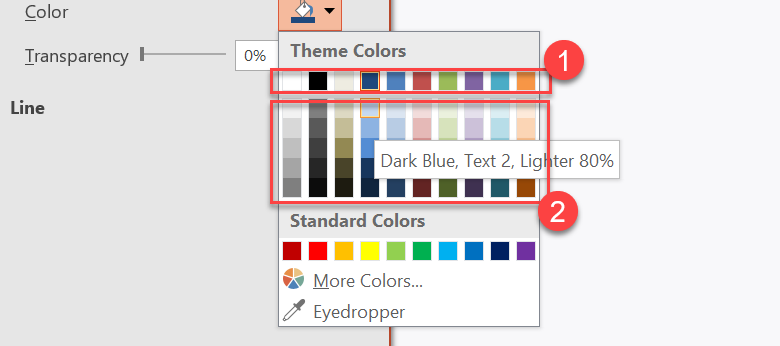
1 - 主要主题颜色。
2 - 基于主要主题颜色生成的更亮和更暗的变体。
下面的示例基于 Accent4 创建六个矩形,对其中五个应用亮度变换,并保存结果:
#include <DOM/ColorTransformOperation.h>
#include <DOM/FillType.h>
#include <DOM/IAutoShape.h>
#include <DOM/IColorFormat.h>
#include <DOM/IColorOperationCollection.h>
#include <DOM/IFillFormat.h>
#include <DOM/IShapeCollection.h>
#include <DOM/ISlide.h>
#include <DOM/Presentation.h>
#include <DOM/SchemeColor.h>
#include <DOM/ShapeType.h>
#include <Export/SaveFormat.h>

using namespace Aspose::Slides;
using namespace Aspose::Slides::Export;
using namespace System;

auto presentation = MakeObject<Presentation>();
auto shapes = presentation->get_Slide(0)->get_Shapes();

auto shape1 = shapes->AddAutoShape(ShapeType::Rectangle, 10.0f, 10.0f, 50.0f, 50.0f);
auto fillFormat1 = shape1->get_FillFormat();
fillFormat1->set_FillType(FillType::Solid);
fillFormat1->get_SolidFillColor()->set_SchemeColor(SchemeColor::Accent4);

auto shape2 = shapes->AddAutoShape(ShapeType::Rectangle, 10.0f, 70.0f, 50.0f, 50.0f);
auto fillFormat2 = shape2->get_FillFormat();
auto solidFillColor2 = fillFormat2->get_SolidFillColor();
fillFormat2->set_FillType(FillType::Solid);
solidFillColor2->set_SchemeColor(SchemeColor::Accent4);
solidFillColor2->get_ColorTransform()->Add(ColorTransformOperation::MultiplyLuminance, 0.2f);
solidFillColor2->get_ColorTransform()->Add(ColorTransformOperation::AddLuminance, 0.8f);

auto shape3 = shapes->AddAutoShape(ShapeType::Rectangle, 10.0f, 130.0f, 50.0f, 50.0f);
auto fillFormat3 = shape3->get_FillFormat();
auto solidFillColor3 = fillFormat3->get_SolidFillColor();
fillFormat3->set_FillType(FillType::Solid);
solidFillColor3->set_SchemeColor(SchemeColor::Accent4);
solidFillColor3->get_ColorTransform()->Add(ColorTransformOperation::MultiplyLuminance, 0.4f);
solidFillColor3->get_ColorTransform()->Add(ColorTransformOperation::AddLuminance, 0.6f);

auto shape4 = shapes->AddAutoShape(ShapeType::Rectangle, 10.0f, 190.0f, 50.0f, 50.0f);
auto fillFormat4 = shape4->get_FillFormat();
auto solidFillColor4 = fillFormat4->get_SolidFillColor();
fillFormat4->set_FillType(FillType::Solid);
solidFillColor4->set_SchemeColor(SchemeColor::Accent4);
solidFillColor4->get_ColorTransform()->Add(ColorTransformOperation::MultiplyLuminance, 0.6f);
solidFillColor4->get_ColorTransform()->Add(ColorTransformOperation::AddLuminance, 0.4f);

auto shape5 = shapes->AddAutoShape(ShapeType::Rectangle, 10.0f, 250.0f, 50.0f, 50.0f);
auto fillFormat5 = shape5->get_FillFormat();
auto solidFillColor5 = fillFormat5->get_SolidFillColor();
fillFormat5->set_FillType(FillType::Solid);
solidFillColor5->set_SchemeColor(SchemeColor::Accent4);
solidFillColor5->get_ColorTransform()->Add(ColorTransformOperation::MultiplyLuminance, 0.75f);

auto shape6 = shapes->AddAutoShape(ShapeType::Rectangle, 10.0f, 310.0f, 50.0f, 50.0f);
auto fillFormat6 = shape6->get_FillFormat();
auto solidFillColor6 = fillFormat6->get_SolidFillColor();
fillFormat6->set_FillType(FillType::Solid);
solidFillColor6->set_SchemeColor(SchemeColor::Accent4);
solidFillColor6->get_ColorTransform()->Add(ColorTransformOperation::MultiplyLuminance, 0.5f);

presentation->Save(u"theme-color-palette.pptx", SaveFormat::Pptx);
这些变体仍然基于主题颜色。如果以后 Accent4 更改,变换后的颜色会根据新的 Accent4 值重新计算。
将 SchemeColor 值映射到 IColorScheme 插槽
SchemeColor 枚举使用 Text1、Background1、Text2 和 Background2,而 IColorScheme 将相同的主题插槽公开为 Dark1、Light1、Dark2 和 Light2。映射固定如下:
Text1=Dark1Background1=Light1Text2=Dark2Background2=Light2
这些是同一主题插槽的别名,并不是会动态相互转换的值。
更改主题字体
主题字体方案包含标题的主字体集和正文的次字体集。FontScheme::get_Major() 和 FontScheme::get_Minor() 方法公开这些集合。
PowerPoint 兼容的主题字体标识符可用于文本格式化:
+mn-lt- 正文字体 Latin(次 Latin 字体)+mj-lt- 标题字体 Latin(主 Latin 字体)+mn-ea- 正文字体 East Asian(次 East Asian 字体)+mj-ea- 标题字体 East Asian(主 East Asian 字体)
下面的示例创建一个使用主 Latin 主题字体的标题和一个使用次 Latin 主题字体的正文行,然后更改主题字体并保存结果:
#include <DOM/Fonts/FontData.h>
#include <DOM/IAutoShape.h>
#include <DOM/IFonts.h>
#include <DOM/IParagraph.h>
#include <DOM/IParagraphCollection.h>
#include <DOM/IPortion.h>
#include <DOM/IPortionCollection.h>
#include <DOM/IPortionFormat.h>
#include <DOM/IShapeCollection.h>
#include <DOM/ISlide.h>
#include <DOM/ITextFrame.h>
#include <DOM/Presentation.h>
#include <DOM/ShapeType.h>
#include <DOM/Theme/IFontScheme.h>
#include <DOM/Theme/IMasterTheme.h>
#include <Export/SaveFormat.h>

using namespace Aspose::Slides;
using namespace Aspose::Slides::Export;
using namespace System;

auto presentation = MakeObject<Presentation>();
auto slide = presentation->get_Slide(0);

auto heading = slide->get_Shapes()->AddAutoShape(ShapeType::Rectangle, 40.0f, 40.0f, 500.0f, 60.0f);
heading->get_TextFrame()->set_Text(u"Theme heading");
heading->get_TextFrame()->get_Paragraph(0)->get_Portion(0)->get_PortionFormat()->set_LatinFont(MakeObject<FontData>(u"+mj-lt"));

auto body = slide->get_Shapes()->AddAutoShape(ShapeType::Rectangle, 40.0f, 120.0f, 500.0f, 60.0f);
body->get_TextFrame()->set_Text(u"Theme body text");
body->get_TextFrame()->get_Paragraph(0)->get_Portion(0)->get_PortionFormat()->set_LatinFont(MakeObject<FontData>(u"+mn-lt"));

presentation->get_MasterTheme()->get_FontScheme()->get_Major()->set_LatinFont(MakeObject<FontData>(u"Aptos Display"));
presentation->get_MasterTheme()->get_FontScheme()->get_Minor()->set_LatinFont(MakeObject<FontData>(u"Arial"));
presentation->Save(u"theme-fonts.pptx", SaveFormat::Pptx);
标题遵循主字体,正文遵循次字体。使用显式字体名称而非主题标识符的文本在主题字体方案更改时不会自动切换。
主次字体集合还可以包含针对特定书写系统(如西里尔文、阿拉伯文、日文、格鲁吉亚文和塔那文)的字体映射。要检查、添加、替换或删除这些映射,请参阅 Script-Specific Theme Fonts。
Tip
有关演示文稿字体的更多信息,请参阅 PowerPoint Fonts。复制或应用主题
以下工作流解决不同的主题相关问题。
将外部主题应用于依赖特定母版的幻灯片
当你拥有 PowerPoint 主题文件(.thmx)并希望重新设置所有依赖于特定母版的幻灯片时,使用 IMasterSlide::ApplyExternalThemeToDependingSlides。从 Presentation::get_Masters 集合(实现了 IMasterSlideCollection)中选择母版,并将主题文件路径传递给该方法。
该方法执行以下操作:
- 基于选定的母版创建一个新母版幻灯片。
- 将外部主题应用到新母版。
- 将选定母版先前依赖的所有幻灯片指派给新母版。
- 返回新创建的 IMasterSlide。
下面的示例将外部主题应用于依赖第一个母版的幻灯片并保存演示文稿:
#include <DOM/IMasterSlide.h>
#include <DOM/Presentation.h>
#include <Export/SaveFormat.h>
#include <iostream>

using namespace Aspose::Slides;
using namespace Aspose::Slides::Export;
using namespace System;

auto presentation = MakeObject<Presentation>(u"presentation.pptx");
auto selectedMaster = presentation->get_Master(0);
auto themedMaster = selectedMaster->ApplyExternalThemeToDependingSlides(u"corporate-theme.thmx");

Console::WriteLine(u"Created master: {0}", themedMaster->get_Name());
presentation->Save(u"presentation-with-external-theme.pptx", SaveFormat::Pptx);
无效、损坏或不受支持的主题可能导致 PptxException 或其格式相关子类。请验证用户提供的路径,处理文件系统访问失败,并仅在主题成功应用后保存演示文稿。
仅重新指派依赖于选定母版的幻灯片。关联其他母版的幻灯片保留其现有母版和主题。主题感知的颜色、字体、填充、线条、背景和效果会根据外部主题解析。直接指定的颜色、字体、填充和其他显式格式可能保持不变。布局级和幻灯片级覆盖也可能优先于从新母版继承的值。
主题可能引用运行时环境中不可用的字体。为获得一致的渲染和导出,请安装所需字体、通过 custom font sources 提供,或配置 font substitution。
这是直接的母版级工作流:该方法接受 .thmx 文件路径,无需手动创建幻灯片级或布局级主题覆盖。
在多母版演示文稿中应用不同的外部主题
当事先不知道相关母版时,可通过 ISlide::get_LayoutSlide 和 ILayoutSlide::get_MasterSlide 从代表性幻灯片获取母版。在应用任何主题之前保存原始母版引用,因为每次调用都会在演示文稿中创建另一个母版。
下面的示例使用两个章节的幻灯片定位其母版,并对每组应用不同的外部主题:
#include <DOM/ILayoutSlide.h>
#include <DOM/IMasterSlide.h>
#include <DOM/Presentation.h>
#include <Export/SaveFormat.h>
#include <iostream>

using namespace Aspose::Slides;
using namespace Aspose::Slides::Export;
using namespace System;

auto presentation = MakeObject<Presentation>(u"multi-master-presentation.pptx");

if (presentation->get_Slides()->get_Count() < 5)
{
    std::cout << "The presentation does not contain the expected representative slides." << std::endl;
}
else
{
    auto firstGroupMaster = presentation->get_Slide(0)->get_LayoutSlide()->get_MasterSlide();
    auto secondGroupMaster = presentation->get_Slide(4)->get_LayoutSlide()->get_MasterSlide();

    if (firstGroupMaster->get_SlideId() == secondGroupMaster->get_SlideId())
    {
        std::cout << "The representative slides use the same master." << std::endl;
    }
    else
    {
        auto firstThemedMaster = firstGroupMaster->ApplyExternalThemeToDependingSlides(u"blue-theme.thmx");
        auto secondThemedMaster = secondGroupMaster->ApplyExternalThemeToDependingSlides(u"green-theme.thmx");

        Console::WriteLine(u"First themed master: {0}", firstThemedMaster->get_Name());
        Console::WriteLine(u"Second themed master: {0}", secondThemedMaster->get_Name());
        presentation->Save(u"multi-master-with-external-themes.pptx", SaveFormat::Pptx);
    }
}
第一次调用仅影响依赖于 firstGroupMaster 的幻灯片,第二次调用仅影响依赖于 secondGroupMaster 的幻灯片。属于其他母版的幻灯片不会被重新样式化。
在移动幻灯片时保留源主题
如果希望将幻灯片移动到另一演示文稿并保留其原始设计,请使用 IMasterSlideCollection::AddClone() 将源母版克隆到目标演示文稿,然后使用 ISlideCollection::AddClone() 将幻灯片连同克隆的母版一起克隆。这样会将母版、其布局及关联的主题一起携带。
#include <DOM/ILayoutSlide.h>
#include <DOM/IMasterSlide.h>
#include <DOM/IMasterSlideCollection.h>
#include <DOM/ISlide.h>
#include <DOM/ISlideCollection.h>
#include <DOM/Presentation.h>
#include <Export/SaveFormat.h>

using namespace Aspose::Slides;
using namespace Aspose::Slides::Export;
using namespace System;

auto source = MakeObject<Presentation>(u"source-theme.pptx");
auto target = MakeObject<Presentation>(u"target.pptx");
auto sourceSlide = source->get_Slide(0);
auto sourceMaster = sourceSlide->get_LayoutSlide()->get_MasterSlide();
auto clonedMaster = target->get_Masters()->AddClone(sourceMaster);
target->get_Slides()->AddClone(sourceSlide, clonedMaster, true);
target->Save(u"theme-preserved.pptx", SaveFormat::Pptx);
当源幻灯片必须在目标中保持相同外观时,这是首选工作流。仅将内容克隆到不相关的目标母版上可能会更改主题驱动的颜色、字体、背景和效果。
将主题值应用于现有幻灯片
如果目标幻灯片必须保持当前母版和布局,请从源主题初始化幻灯片级覆盖。使用 OverrideTheme::InitColorSchemeFrom()、OverrideTheme::InitFontSchemeFrom() 和 OverrideTheme::InitFormatSchemeFrom() 将三个主要主题组件复制到覆盖中。
#include <DOM/ISlide.h>
#include <DOM/Presentation.h>
#include <DOM/Theme/IOverrideTheme.h>
#include <DOM/Theme/IOverrideThemeManager.h>
#include <DOM/Theme/IMasterTheme.h>
#include <Export/SaveFormat.h>

using namespace Aspose::Slides;
using namespace Aspose::Slides::Export;
using namespace System;

auto source = MakeObject<Presentation>(u"source-theme.pptx");
auto target = MakeObject<Presentation>(u"target.pptx");
auto targetSlide = target->get_Slide(0);
auto overrideTheme = targetSlide->get_ThemeManager()->get_OverrideTheme();
overrideTheme->InitColorSchemeFrom(source->get_MasterTheme()->get_ColorScheme());
overrideTheme->InitFontSchemeFrom(source->get_MasterTheme()->get_FontScheme());
overrideTheme->InitFormatSchemeFrom(source->get_MasterTheme()->get_FormatScheme());
target->Save(u"theme-applied-to-slide.pptx", SaveFormat::Pptx);
这会在不更改其他幻灯片继承主题的情况下更改该幻灯片使用的主题。要移除本地覆盖并恢复继承值,请调用 OverrideTheme::Clear()。
将主题覆盖应用于布局
布局级覆盖适用于使用该布局的幻灯片,除非特定幻灯片拥有自己的覆盖。相同的初始化方法可通过布局的 IOverrideThemeManager 使用:
#include <DOM/ILayoutSlide.h>
#include <DOM/ISlide.h>
#include <DOM/Presentation.h>
#include <DOM/Theme/IOverrideTheme.h>
#include <DOM/Theme/IOverrideThemeManager.h>
#include <DOM/Theme/IMasterTheme.h>
#include <Export/SaveFormat.h>

using namespace Aspose::Slides;
using namespace Aspose::Slides::Export;
using namespace System;

auto source = MakeObject<Presentation>(u"source-theme.pptx");
auto target = MakeObject<Presentation>(u"target.pptx");
auto targetSlide = target->get_Slide(0);
auto targetLayout = targetSlide->get_LayoutSlide();
auto overrideTheme = targetLayout->get_ThemeManager()->get_OverrideTheme();
overrideTheme->InitColorSchemeFrom(source->get_MasterTheme()->get_ColorScheme());
overrideTheme->InitFontSchemeFrom(source->get_MasterTheme()->get_FontScheme());
overrideTheme->InitFormatSchemeFrom(source->get_MasterTheme()->get_FormatScheme());
target->Save(u"theme-applied-to-layout.pptx", SaveFormat::Pptx);
当许多布局和幻灯片应共享相同的基础设计时,使用母版或演示文稿级主题;当某个布局族需要不同样式时使用布局覆盖;只有真正的例外才使用幻灯片覆盖。过多的幻灯片级覆盖会使后续全局主题更改难以预测。
更新主题背景样式
主题的背景填充存储在 FormatScheme::get_BackgroundFillStyles() 中。PowerPoint 在 UI 中可以展示比此集合实际存储的填充定义更多的背景选项,因为 UI 可以将主题填充与主题颜色及其他样式引用组合使用。
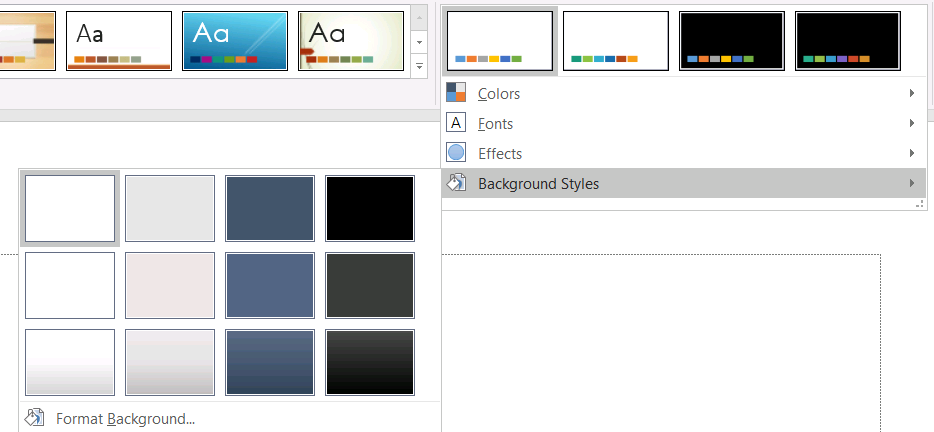
在使用背景样式之前,检查存储的集合以及当前的 Background::get_StyleIndex()。StyleIndex 使用 0 表示无主题填充;正值表示主题背景样式引用。这不同于使用 idx_get(0) 直接索引 C++ 集合时的含义(0 表示第一个存储项)。不要假设每个演示文稿都有相同数量的背景填充样式。
下面的示例报告可用的背景填充计数,将主题化的背景引用分配给第一个母版,并保存演示文稿:
#include <DOM/BackgroundType.h>
#include <DOM/IBackground.h>
#include <DOM/IMasterSlide.h>
#include <DOM/Presentation.h>
#include <DOM/Theme/IFillFormatCollection.h>
#include <DOM/Theme/IFormatScheme.h>
#include <DOM/Theme/IMasterTheme.h>
#include <Export/SaveFormat.h>
#include <system/console.h>

using namespace Aspose::Slides;
using namespace Aspose::Slides::Export;
using namespace System;

auto presentation = MakeObject<Presentation>(u"input.pptx");
auto backgroundStyles = presentation->get_MasterTheme()->get_FormatScheme()->get_BackgroundFillStyles();
Console::WriteLine(u"Background fill styles: {0}", backgroundStyles->get_Count());

if (backgroundStyles->get_Count() > 0)
{
    auto masterSlide = presentation->get_Master(0);
    masterSlide->get_Background()->set_Type(BackgroundType::Themed);
    masterSlide->get_Background()->set_StyleIndex(1);
    presentation->Save(u"theme-background.pptx", SaveFormat::Pptx);
}
可见结果取决于母版引用的主题条目以及布局或幻灯片级的任何背景覆盖。如果幻灯片使用了自己的背景,仅更改母版背景可能不会影响该幻灯片。需要了解继承后最终背景时,请使用 Background::GetEffective()。
Warning
请勿将StyleIndex 视为零基集合索引。同时避免硬编码某文件中的样式编号并假设在另一文件中具有相同外观;主题样式定义是针对特定演示文稿的。
Tip
有关直接背景格式化和背景继承,请参阅 Presentation Background。更新主题效果
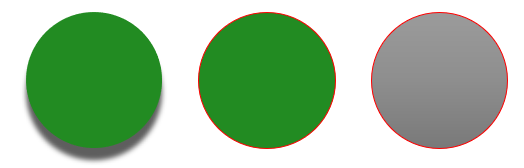
主题格式方案包含独立的 FormatScheme::get_FillStyles()、FormatScheme::get_LineStyles() 和 FormatScheme::get_EffectStyles() 集合。典型的 Office 主题通常包含三个主要样式条目,视觉上对应微妙、适中和强烈的格式,但代码应检查每个集合而不要假设固定数量。
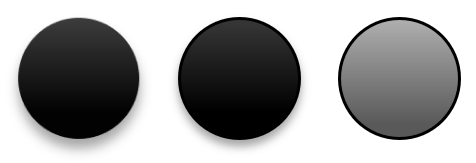
在 C++ 中访问这些集合时,集合索引是零基的:idx_get(0) 为第一个存储的样式,idx_get(2) 为第三个。形状的样式引用索引是另一个概念,通过 IShapeStyle 暴露。修改主题样式会影响引用该主题样式的形状;使用直接格式化的形状可能保持不变。
下面的示例检查所需的样式条目是否存在,修改第一个线条样式,修改第三个填充样式,在第三个效果样式中启用外阴影,并保存结果:
#include <DOM/Effects/IOuterShadow.h>
#include <DOM/FillType.h>
#include <DOM/IColorFormat.h>
#include <DOM/IEffectFormat.h>
#include <DOM/IFillFormat.h>
#include <DOM/ILineFormat.h>
#include <DOM/Presentation.h>
#include <DOM/Theme/IEffectStyle.h>
#include <DOM/Theme/IEffectStyleCollection.h>
#include <DOM/Theme/IFillFormatCollection.h>
#include <DOM/Theme/IFormatScheme.h>
#include <DOM/Theme/ILineFormatCollection.h>
#include <DOM/Theme/IMasterTheme.h>
#include <Export/SaveFormat.h>
#include <drawing/color.h>
#include <system/console.h>

using namespace Aspose::Slides;
using namespace Aspose::Slides::Export;
using namespace System;
using namespace System::Drawing;

auto presentation = MakeObject<Presentation>(u"Subtle_Moderate_Intense.pptx");
auto formatScheme = presentation->get_MasterTheme()->get_FormatScheme();
auto lineStyles = formatScheme->get_LineStyles();
auto fillStyles = formatScheme->get_FillStyles();
auto effectStyles = formatScheme->get_EffectStyles();

if (lineStyles->get_Count() < 1 || fillStyles->get_Count() < 3 || effectStyles->get_Count() < 3)
{
    Console::WriteLine(u"The theme does not contain the style entries required by this example.");
}
else
{
    auto lineStyle = lineStyles->idx_get(0);
    lineStyle->get_FillFormat()->set_FillType(FillType::Solid);
    lineStyle->get_FillFormat()->get_SolidFillColor()->set_Color(Color::get_Red());

    auto fillStyle = fillStyles->idx_get(2);
    fillStyle->set_FillType(FillType::Solid);
    fillStyle->get_SolidFillColor()->set_Color(Color::get_ForestGreen());

    auto effectFormat = effectStyles->idx_get(2)->get_EffectFormat();
    effectFormat->EnableOuterShadowEffect();
    effectFormat->get_OuterShadowEffect()->set_Distance(10.0f);

    presentation->Save(u"theme-effects.pptx", SaveFormat::Pptx);
}
对于引用这些插槽的形状,第一条主题线条样式将变为红色,第三个主题填充样式将变为实心森林绿,第三个效果样式将获得距离为 10 点的外阴影。具体视觉结果仍取决于每个形状引用的样式插槽以及是否有直接格式覆盖主题。
确定有效实心填充是否使用主题颜色
填充可以直接存储在对象上,或从段落、布局、母版、主题样式或其他格式层级继承。调用 IFillFormat::GetEffective 可将该层级解析为不可变的 IFillFormatEffectiveData。首先检查 IFillFormatEffectiveData::get_FillType。仅当其为 FillType::Solid 时才读取实心填充属性。
对于实心填充,IFillFormatEffectiveData::get_SolidFillColor 返回在继承、主题查找和颜色变换后渲染的最终 RGB 值。IFillFormatEffectiveData::get_SolidFillSchemeColor 返回对应的逻辑 SchemeColor 插槽,如 Text1 或 Accent6。SchemeColor::NotDefined 表示有效实心填充并非基于方案颜色。在填充要么是主题颜色要么是直接 RGB 颜色的工作流中,该值标识直接 RGB 填充。
不要仅使用本地的 IColorFormat::get_SchemeColor 值来分类填充。例如,文本片段可能没有本地定义的方案颜色,其本地值为 NotDefined,但其有效填充继承了主题颜色并解析为 Text1 或 Accent6。相反,get_SolidFillSchemeColor 告诉你是哪一个逻辑主题插槽产生了有效颜色,但并不说明该插槽来源于对象、段落、布局、母版或其他层级。
下面的示例加载演示文稿,审计形状填充和文本片段填充,打印每个最终 RGB 值及关联的方案颜色,并标记不会随主题颜色变化的实心填充:
#include <DOM/FillType.h>
#include <DOM/IAutoShape.h>
#include <DOM/IColorFormat.h>
#include <DOM/IFillFormat.h>
#include <DOM/IFillFormatEffectiveData.h>
#include <DOM/IParagraph.h>
#include <DOM/IParagraphCollection.h>
#include <DOM/IPortion.h>
#include <DOM/IPortionCollection.h>
#include <DOM/IShape.h>
#include <DOM/ITextFrame.h>
#include <DOM/Presentation.h>
#include <DOM/SchemeColor.h>
#include <system/console.h>
#include <system/object_ext.h>
#include <system/string.h>

using namespace Aspose::Slides;
using namespace System;

auto auditFill = [](const String& objectName, const SharedPtr<IFillFormat>& localFill)
{
    auto effectiveFill = localFill->GetEffective();

    if (effectiveFill->get_FillType() != FillType::Solid)
    {
        Console::WriteLine(u"{0}: fill type = {1}; not a solid fill.", objectName, effectiveFill->get_FillType());
        return;
    }

    auto rgb = effectiveFill->get_SolidFillColor();
    auto effectiveSchemeColor = effectiveFill->get_SolidFillSchemeColor();
    auto localSchemeColor = localFill->get_SolidFillColor()->get_SchemeColor();

    Console::WriteLine(u"{0}: RGB = #{1:X2}{2:X2}{3:X2}", objectName, rgb.get_R(), rgb.get_G(), rgb.get_B());
    Console::WriteLine(u"{0}: local scheme = {1}, effective scheme = {2}", objectName, localSchemeColor, effectiveSchemeColor);

    if (effectiveSchemeColor == SchemeColor::NotDefined)
    {
        Console::WriteLine(u"{0}: direct RGB or another non-scheme fill; audit as theme-independent.", objectName);
    }
    else
    {
        Console::WriteLine(u"{0}: theme-dependent through {1}.", objectName, effectiveSchemeColor);
    }
};

auto presentation = MakeObject<Presentation>(u"input.pptx");

auto slideCount = presentation->get_Slides()->get_Count();
for (int32_t slideIndex = 0; slideIndex < slideCount; slideIndex++)
{
    auto slide = presentation->get_Slide(slideIndex);

    auto shapeCount = slide->get_Shapes()->get_Count();
    for (int32_t shapeIndex = 0; shapeIndex < shapeCount; shapeIndex++)
    {
        auto shape = slide->get_Shape(shapeIndex);
        auto shapeName = String::Format(u"Slide {0}, shape {1}", slideIndex + 1, shapeIndex + 1);
        auditFill(shapeName, shape->get_FillFormat());

        if (ObjectExt::Is<IAutoShape>(shape))
        {
            auto autoShape = ExplicitCast<IAutoShape>(shape);
            auto textFrame = autoShape->get_TextFrame();
            auto paragraphCount = textFrame->get_Paragraphs()->get_Count();
            for (int32_t paragraphIndex = 0; paragraphIndex < paragraphCount; paragraphIndex++)
            {
                auto paragraph = textFrame->get_Paragraph(paragraphIndex);

                auto portionCount = paragraph->get_Portions()->get_Count();
                for (int32_t portionIndex = 0; portionIndex < portionCount; portionIndex++)
                {
                    auto portion = paragraph->get_Portion(portionIndex);
                    auto portionName = String::Format(u"{0}, paragraph {1}, portion {2}", shapeName, paragraphIndex + 1, portionIndex + 1);
                    auditFill(portionName, portion->get_PortionFormat()->get_FillFormat());
                }
            }
        }
    }
}
NotDefined 分支提供了一个审计列表,列出那些在主题颜色槽更改时不会响应的实心填充。审查这些对象以确保演示文稿遵循新品牌调色板。报告的 RGB 值仍显示当前外观,而方案值说明该外观是否已关联到主题。
有效格式对象是快照。更改演示文稿主题、主题覆盖或任何继承的格式后,需再次调用 GetEffective 并读取新的 IFillFormatEffectiveData 对象后再进行比较或报告颜色。
读取有效主题值
原始主题对象告诉你在特定层级上定义了什么。有效值告诉你幻灯片或形状在继承和本地覆盖解析后实际使用的内容。对于幻灯片,调用 IThemeable::CreateThemeEffective()。对于背景,使用 Background::GetEffective(),对于填充,使用 FillFormat::GetEffective()。
下面的示例读取幻灯片的有效主题、背景和第一个形状的填充:
#include <DOM/FillType.h>
#include <DOM/IBackground.h>
#include <DOM/IBackgroundEffectiveData.h>
#include <DOM/IFillFormat.h>
#include <DOM/IFillFormatEffectiveData.h>
#include <DOM/IFontsEffectiveData.h>
#include <DOM/IShape.h>
#include <DOM/IShapeCollection.h>
#include <DOM/ISlide.h>
#include <DOM/Presentation.h>
#include <DOM/Theme/IFontSchemeEffectiveData.h>
#include <DOM/Theme/IThemeEffectiveData.h>
#include <system/console.h>

using namespace Aspose::Slides;
using namespace System;

auto presentation = MakeObject<Presentation>(u"input.pptx");
auto slide = presentation->get_Slide(0);
auto effectiveTheme = slide->CreateThemeEffective();
auto effectiveBackground = slide->get_Background()->GetEffective();

Console::WriteLine(u"Effective major Latin font: {0}", effectiveTheme->get_FontScheme()->get_Major()->get_LatinFont()->get_FontName());
Console::WriteLine(u"Effective minor Latin font: {0}", effectiveTheme->get_FontScheme()->get_Minor()->get_LatinFont()->get_FontName());
Console::WriteLine(u"Effective background fill type: {0}", effectiveBackground->get_FillFormat()->get_FillType());

if (slide->get_Shapes()->get_Count() > 0)
{
    auto effectiveFill = slide->get_Shape(0)->get_FillFormat()->GetEffective();
    Console::WriteLine(u"First shape effective fill type: {0}", effectiveFill->get_FillType());
    if (effectiveFill->get_FillType() == FillType::Solid)
    {
        Console::WriteLine(u"First shape effective fill color: {0}", effectiveFill->get_SolidFillColor());
    }
}
使用有效数据进行渲染诊断、验证和比较。如果仅检查 Presentation::get_MasterTheme(),可能会遗漏改变最终外观的母版、布局、幻灯片或形状覆盖。
常见问题
应用外部主题是否会影响演示文稿中的每个幻灯片?
不会。IMasterSlide::ApplyExternalThemeToDependingSlides 仅重新指派依赖于选定母版的幻灯片。使用其他母版的幻灯片保留其现有主题。
我能否在不更改母版的情况下将主题应用于单个幻灯片?
可以。使用幻灯片的 IOverrideThemeManager 并初始化其覆盖主题。更改仅局限于该幻灯片,其他幻灯片继续继承各自的主题。
将主题从一个演示文稿迁移到另一个演示文稿的最安全方式是什么?
在移动幻灯片并保留其源外观时,使用 IMasterSlideCollection::AddClone() 将源母版克隆到目标演示文稿,然后使用 ISlideCollection::AddClone() 将幻灯片连同该母版一起克隆。这样可保持母版、布局和主题一起。
如何查看继承和覆盖后的有效值?
对幻灯片或布局主题使用 IThemeable::CreateThemeEffective(),对格式对象使用相应的有效数据方法,如 Background::GetEffective() 和 FillFormat::GetEffective()。这些 API 返回在继承和覆盖应用后解析的值。