
Düğüm hiyerarşisini ekleyin ve 3D sahnesinin birden fazla düğümleri arasında örgü geometrik verilerini paylaşın
Düğüm hiyerarşisini 3D sahne belgesine ekleyin
Aspose.3D for Python via .NET bir düğüm hiyerarşisi oluşturmayı teklif eder. Düğüm, bir sahnenin temel yapı bloğudur. Düğümlerin bir hiyerarşi, bir sahnenin mantıksal yapısını tanımlar ve geometrileri, ışıkları ve kameraları düğümlere bağlayarak görünür içerik sağlar.
Cene cene Graph ample xample
A örnek sahne hiyerarşi gibi görünüyor:
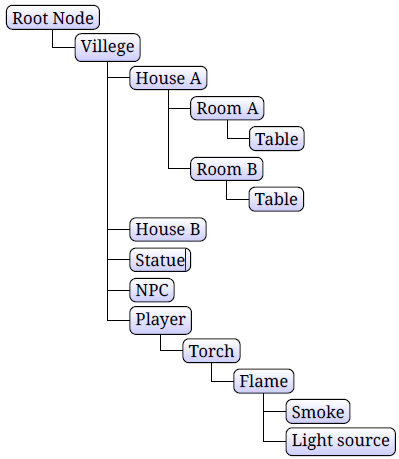
Aspose.3D, her bir Node örneği birden fazla çocuk düğümüne sahip olabilir, bu örnekte, kök düğümünü döndürürsek, tüm çocuk düğümleri de etkilenir:
from aspose.threed import FileFormat, Scene
from aspose.threed.utilities import Quaternion, Vector3
import math
# For complete examples and data files, please go to https:# github.com/aspose-3d/Aspose.3D-for-.NET
# Initialize scene object
scene = Scene()
# Get a child node object
top = scene.root_node.create_child_node()
# Each cube node has their own translation
cube1 = top.create_child_node("cube1")
# Call Common class create mesh using polygon builder method to set mesh instance
mesh = Common.CreateMeshUsingPolygonBuilder()
# Point node to the mesh
cube1.entity = mesh
# Set first cube translation
cube1.transform.translation = Vector3(-10, 0, 0)
cube2 = top.create_child_node("cube2")
# Point node to the mesh
cube2.entity = mesh
# Set second cube translation
cube2.transform.translation = Vector3(10, 0, 0)
# The rotated top node will affect all child nodes
top.transform.rotation = Quaternion.from_euler_angle(math.pi, 4, 0)
# The path to the documents directory.
output = "out" + "NodeHierarchy.fbx"
# Save 3D scene in the supported file formats
scene.save(output, FileFormat.FBX7500ASCII)Hare hare Mesh eoeometry ata ata ultiultiple Nodes arasında
To diminish memory necessities, a single instance of Mesh Class can be bound to various instances of Node Class. Envision that you require a system where all 3D cubes seemed to be indistinguishable, however you required numerous a large number of them. You could spare memory by making one Mesh object when the system begins up. At that point, each time you required another shape, you make another Node object, then point that node to the one Mesh. This is called instancing. Aspose.3D for Python via .NET APIs allow to do instancing.
Instancing örneği
Rts (gerçek zamanlı strateji) oyunlarında, her zaman aynı 3D modeliyle birden fazla npcs (oyuncu olmayan karakter) görebiliriz, belki farklı renklerde, işleme motoru genellikle farklı npc’lerde aynı örgü geometri verilerini paylaşır, bu tekniğe anında denir.
Mesh class object is being used in the code. We can create a Mesh class object as narrated there.
Örnek kodun stration emonstration:
from aspose.threed import FileFormat, Node, Scene
from aspose.threed.shading import LambertMaterial
from aspose.threed.utilities import Vector3
# For complete examples and data files, please go to https:# github.com/aspose-3d/Aspose.3D-for-.NET
# Initialize scene object
scene = Scene()
# Define color vectors
colors = [Vector3(1, 0, 0), Vector3(0, 1, 0), Vector3(0, 0, 1)]
# Call Common class create mesh using polygon builder method to set mesh instance
mesh = Common.CreateMeshUsingPolygonBuilder()
idx = 0
for color in colors:
# Initialize cube node object
cube = Node("cube")
cube.entity = mesh
mat = LambertMaterial()
# Set color
mat.diffuse_color = color
# Set material
cube.material = mat
# Set translation
cube.transform.translation = Vector3(idx * 20, 0, 0)
idx = idx + 1
# Add cube node
scene.root_node.child_nodes.append(cube)
# The path to the documents directory.
output = "out" + "MeshGeometryData.fbx"
# Save 3D scene in the supported file formats
scene.save(output, FileFormat.FBX7400ASCII)In bu örnek biz 3 küp düğümleri aynı örgü paylaşmak, her biri farklı renklerde farklı malzeme var.