Aspose.Cells Template and Smart Markers
Smart Markers
Data Markers
The format of data markers is &=DataSetName.FieldName. For example: &=SalesDetail.sales where SalesDetail is the name of a data set or query and sales is the name of one of its fields. At rendering time, data markers are replaced with the values of dataset provided by Reporting Services.
Reporting Services Formulas Markers
The format of Reporting Services' formulas markers is &=expression. For example: &=sum(SalesDetail.sales)/100. The expression consists of function, dataset fields, operator and so on. At rendering time. Reporting Services formulas markers are replaced with computed values.
Reporting Services Global Variable Markers
The format of Reporting Services' global variable markers is &=Globals! Variable Name. For example: &=Globals!ExecutionTime where ExecutionTime is the name of a global variable. Global variable markers are replaced with global variable values at rendering time.
Reporting Services Parameters Markers
A report parameter has two attributes: value and label. Consequently, parameters markers have two formats: &= Parameters! ParamName.Value and &=Parameters! ParamName.Label. They indicate the name and the label of the parameter respectively. At rendering time, parameters markers are replaced with the parameter values entered by the user.
Dynamic Formulas
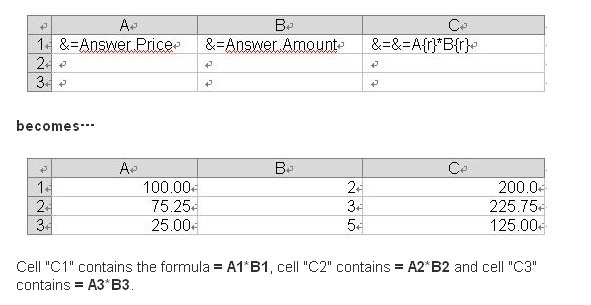
In order to make calculations on inserterd rows, use dynamic formulas. Dynamic formulas allow you to insert Microsoft Excel’s formulas into cells even when a formula references rows that will be inserted during the export process. They can be repeated for each inserted row or used only with cells where data markers are placed for them.
The format of dynamic formulas is &=&=RepeatDynamicFormula.
Dynamic Formulas allow the following additional options:
- {r} – Current row number.
- {2}, {-1} – Offset to current row number.
A repeating dynamic formula and the resulting Excel worksheet