
قالببندی نمودارهای ارائه در PHP
نمای کلی
این مقاله توضیح میدهد که چگونه میتوان نمودارها را در ارائههای PowerPoint با استفاده از Aspose.Slides قالببندی کرد. این مقاله نشان میدهد که چگونه عناصر کلیدی نمودار مانند محورها، خطوط شبکه، عناوین، افسانهها، ناحیه رسم و پر کردن دیوارها را سفارشی کنید تا ظاهر و خوانایی دادههای نمودار بهبود یابد.
همچنین نشان میدهد که چگونه ویژگیهای قلم برای متن نمودار تنظیم شود، قالبهای عددی پیشفرض به دادههای نمودار اعمال گردد و گوشههای ناحیه نمودار گرد شود. این مثالها نشان میدهند که چگونه سبک بصری و ارائه دادههای نمودار در یک ارائه را کنترل کنید.
قالببندی موجودیتهای نمودار
از نمودار برای قالببندی عناوین نمودار، محورها، خطوط شبکه، افسانهها و ناحیه رسم استفاده کنید. این مثال یک نمودار خطی با نشانگرها و دادههای پیشفرض ایجاد میکند و سپس سبکهای متن و خط را به طور جداگانه برای محورهای مقدار و دستهبندی اعمال میکند. اندازههای قلم و عرض خطوط بر حسب نقطه تعیین شدهاند؛ برچسبهای دستهبندی با 45 درجه چرخانده میشوند.
محور مقدار از setNumberFormat مستقل از سلولهای منبع استفاده میکند. مقیاس آن از -2 تا 15 است، با فواصل اصلی 2 و فواصل فرعی 0.5. این مثال همچنین قالببندی درصد را با setDisplayUnit که بر روی هزار تنظیم شده ترکیب میکند، بنابراین این تنظیمات را بر حسب معنای دادهها و مقیاس آن تنظیم کنید. افسانه به دلیل فراخوانی setOverlay با false در خارج از ناحیه رسم میماند. پر کردن دیوار پشت و کف از طریق getBackWall و getFloor پیکربندی میشود، اما این سطوح فقط در نمودارهای 3‑بعدی قابل مشاهده هستند.
use aspose\slides\ChartType;
use aspose\slides\DisplayUnitType;
use aspose\slides\FillType;
use aspose\slides\FontData;
use aspose\slides\LineDashStyle;
use aspose\slides\NullableBool;
use aspose\slides\Presentation;
use aspose\slides\PresetColor;
use aspose\slides\SaveFormat;
use aspose\slides\TickLabelPositionType;

$presentation = new Presentation();
try {
    $slide = $presentation->getSlides()->get_Item(0);

    $chart = $slide->getShapes()->addChart(ChartType::LineWithMarkers, 50, 50, 500, 400);

    $chart->setTitle(true);
    $chart->getChartTitle()->addTextFrameForOverriding("");
    $chartTitle = $chart->getChartTitle()->getTextFrameForOverriding()->getParagraphs()->get_Item(0)->getPortions()->get_Item(0);
    $chartTitle->setText("Sample Chart");
    $chartTitle->getPortionFormat()->getFillFormat()->setFillType(FillType::Solid);
    $chartTitle->getPortionFormat()->getFillFormat()->getSolidFillColor()->setColor(java("java.awt.Color")->GRAY);
    $chartTitle->getPortionFormat()->setFontHeight(20);
    $chartTitle->getPortionFormat()->setFontBold(NullableBool::True);
    $chartTitle->getPortionFormat()->setFontItalic(NullableBool::True);

    $chart->getAxes()->getVerticalAxis()->getMajorGridLinesFormat()->getLine()->getFillFormat()->setFillType(FillType::Solid);
    $chart->getAxes()->getVerticalAxis()->getMajorGridLinesFormat()->getLine()->getFillFormat()->getSolidFillColor()->setColor(java("java.awt.Color")->BLUE);
    $chart->getAxes()->getVerticalAxis()->getMajorGridLinesFormat()->getLine()->setWidth(5);
    $chart->getAxes()->getVerticalAxis()->getMajorGridLinesFormat()->getLine()->setDashStyle(LineDashStyle::DashDot);

    $chart->getAxes()->getVerticalAxis()->getMinorGridLinesFormat()->getLine()->getFillFormat()->setFillType(FillType::Solid);
    $chart->getAxes()->getVerticalAxis()->getMinorGridLinesFormat()->getLine()->getFillFormat()->getSolidFillColor()->setColor(java("java.awt.Color")->RED);
    $chart->getAxes()->getVerticalAxis()->getMinorGridLinesFormat()->getLine()->setWidth(3);

    $chart->getAxes()->getVerticalAxis()->setNumberFormatLinkedToSource(false);
    $chart->getAxes()->getVerticalAxis()->setDisplayUnit(DisplayUnitType::Thousands);
    $chart->getAxes()->getVerticalAxis()->setNumberFormat("0.0%");

    $chart->getAxes()->getVerticalAxis()->setAutomaticMajorUnit(false);
    $chart->getAxes()->getVerticalAxis()->setAutomaticMaxValue(false);
    $chart->getAxes()->getVerticalAxis()->setAutomaticMinorUnit(false);
    $chart->getAxes()->getVerticalAxis()->setAutomaticMinValue(false);

    $chart->getAxes()->getVerticalAxis()->setMaxValue(15);
    $chart->getAxes()->getVerticalAxis()->setMinValue(-2);
    $chart->getAxes()->getVerticalAxis()->setMinorUnit(0.5);
    $chart->getAxes()->getVerticalAxis()->setMajorUnit(2.0);

    $valueAxisText = $chart->getAxes()->getVerticalAxis()->getTextFormat()->getPortionFormat();
    $valueAxisText->setFontBold(NullableBool::True);
    $valueAxisText->setFontHeight(16);
    $valueAxisText->setFontItalic(NullableBool::True);
    $valueAxisText->getFillFormat()->setFillType(FillType::Solid);
    $valueAxisText->getFillFormat()->getSolidFillColor()->setPresetColor(PresetColor::DarkGreen);
    $valueAxisText->setLatinFont(new FontData("Times New Roman"));

    $chart->getAxes()->getVerticalAxis()->setTitle(true);
    $chart->getAxes()->getVerticalAxis()->getTitle()->addTextFrameForOverriding("");
    $valueAxisTitle = $chart->getAxes()->getVerticalAxis()->getTitle()->getTextFrameForOverriding()->getParagraphs()->get_Item(0)->getPortions()->get_Item(0);
    $valueAxisTitle->setText("Primary Axis");
    $valueAxisTitle->getPortionFormat()->getFillFormat()->setFillType(FillType::Solid);
    $valueAxisTitle->getPortionFormat()->getFillFormat()->getSolidFillColor()->setColor(java("java.awt.Color")->GRAY);
    $valueAxisTitle->getPortionFormat()->setFontHeight(20);
    $valueAxisTitle->getPortionFormat()->setFontBold(NullableBool::True);
    $valueAxisTitle->getPortionFormat()->setFontItalic(NullableBool::True);

    $chart->getAxes()->getHorizontalAxis()->getMajorGridLinesFormat()->getLine()->getFillFormat()->setFillType(FillType::Solid);
    $chart->getAxes()->getHorizontalAxis()->getMajorGridLinesFormat()->getLine()->getFillFormat()->getSolidFillColor()->setColor(new Java("java.awt.Color", 0, 128, 0));
    $chart->getAxes()->getHorizontalAxis()->getMajorGridLinesFormat()->getLine()->setWidth(5);

    $chart->getAxes()->getHorizontalAxis()->getMinorGridLinesFormat()->getLine()->getFillFormat()->setFillType(FillType::Solid);
    $chart->getAxes()->getHorizontalAxis()->getMinorGridLinesFormat()->getLine()->getFillFormat()->getSolidFillColor()->setColor(java("java.awt.Color")->YELLOW);
    $chart->getAxes()->getHorizontalAxis()->getMinorGridLinesFormat()->getLine()->setWidth(3);

    $categoryAxisText = $chart->getAxes()->getHorizontalAxis()->getTextFormat()->getPortionFormat();
    $categoryAxisText->setFontBold(NullableBool::True);
    $categoryAxisText->setFontHeight(16);
    $categoryAxisText->setFontItalic(NullableBool::True);
    $categoryAxisText->getFillFormat()->setFillType(FillType::Solid);
    $categoryAxisText->getFillFormat()->getSolidFillColor()->setColor(java("java.awt.Color")->BLUE);
    $categoryAxisText->setLatinFont(new FontData("Arial"));

    $chart->getAxes()->getHorizontalAxis()->setTitle(true);
    $chart->getAxes()->getHorizontalAxis()->getTitle()->addTextFrameForOverriding("");

    $categoryAxisTitle = $chart->getAxes()->getHorizontalAxis()->getTitle()->getTextFrameForOverriding()->getParagraphs()->get_Item(0)->getPortions()->get_Item(0);
    $categoryAxisTitle->setText("Sample Category");
    $categoryAxisTitle->getPortionFormat()->getFillFormat()->setFillType(FillType::Solid);
    $categoryAxisTitle->getPortionFormat()->getFillFormat()->getSolidFillColor()->setColor(java("java.awt.Color")->GRAY);
    $categoryAxisTitle->getPortionFormat()->setFontHeight(20);
    $categoryAxisTitle->getPortionFormat()->setFontBold(NullableBool::True);
    $categoryAxisTitle->getPortionFormat()->setFontItalic(NullableBool::True);

    $chart->getAxes()->getHorizontalAxis()->setTickLabelPosition(TickLabelPositionType::Low);
    $chart->getAxes()->getHorizontalAxis()->setTickLabelRotationAngle(45);

    $legendText = $chart->getLegend()->getTextFormat()->getPortionFormat();
    $legendText->setFontBold(NullableBool::True);
    $legendText->setFontHeight(16);
    $legendText->setFontItalic(NullableBool::True);
    $legendText->getFillFormat()->setFillType(FillType::Solid);
    $legendText->getFillFormat()->getSolidFillColor()->setPresetColor(PresetColor::DarkRed);

    $chart->getLegend()->setOverlay(false);

    $chart->getBackWall()->setThickness(1);
    $chart->getBackWall()->getFormat()->getFill()->setFillType(FillType::Solid);
    $chart->getBackWall()->getFormat()->getFill()->getSolidFillColor()->setColor(new Java("java.awt.Color", 255, 165, 0));

    $chart->getFloor()->getFormat()->getFill()->setFillType(FillType::Solid);
    $chart->getFloor()->getFormat()->getFill()->getSolidFillColor()->setColor(java("java.awt.Color")->RED);

    $chart->getPlotArea()->getFormat()->getFill()->setFillType(FillType::Solid);
    $chart->getPlotArea()->getFormat()->getFill()->getSolidFillColor()->setPresetColor(PresetColor::LightCyan);

    $presentation->save("FormattedChart_out.pptx", SaveFormat::Pptx);
} finally {
    $presentation->dispose();
}
تنظیم ویژگیهای قلم برای نمودار
اندازه پیشفرض قلم برای متن نمودار را از طریق Chart::getTextFormat تنظیم کنید. این مثال یک نمودار ستونی خوشهای با قلم 20‑نقطهای ایجاد میکند و برچسبهای مقدار را برای اولین مجموعه از طریق setShowValue فعال میسازد. عناصر متنی که تنظیمات قلم صریح خود را دارند میتوانند پیشفرض نمودار را بازنویسی کنند.
use aspose\slides\ChartType;
use aspose\slides\Presentation;
use aspose\slides\SaveFormat;

$presentation = new Presentation();
try {
    $slide = $presentation->getSlides()->get_Item(0);

    $chart = $slide->getShapes()->addChart(ChartType::ClusteredColumn, 100, 100, 500, 400);
    $chart->getTextFormat()->getPortionFormat()->setFontHeight(20);
    $chart->getChartData()->getSeries()->get_Item(0)->getLabels()->getDefaultDataLabelFormat()->setShowValue(true);

    $presentation->save("FontPropertiesForChart.pptx", SaveFormat::Pptx);
} finally {
    $presentation->dispose();
}
تنظیم قالب عددی
از ChartDataCell::setPresetNumberFormat برای اعمال یک قالب عددی پیشساخته به سلولهای کتاب کار نمودار استفاده کنید. این مثال یک نمودار ستونی خوشهای با دادههای پیشفرض و پشتیبانیشده توسط سلول ایجاد میکند و ایندکس قالب 10 (0.00%) را به هر سلول مقدار مجموعه اعمال مینماید. این کار نحوه نمایش مقادیر را در کتاب کار بدون تغییر اعداد پایه تغییر میدهد؛ برای مثال 0.25 به صورت 25.00% نمایش داده میشود. قالبهای محور و برچسبهای داده میتوانند بهصورت جداگانه پیکربندی شوند.
use aspose\slides\ChartType;
use aspose\slides\Presentation;
use aspose\slides\SaveFormat;

$presentation = new Presentation();
try {
    $slide = $presentation->getSlides()->get_Item(0);

    $chart = $slide->getShapes()->addChart(ChartType::ClusteredColumn, 50, 50, 500, 400);
    $series = $chart->getChartData()->getSeries();

    for ($i = 0; $i < java_values($series->size()); $i++) {
        $chartSeries = $series->get_Item($i);
        $dataPoints = $chartSeries->getDataPoints();
        for ($j = 0; $j < java_values($dataPoints->size()); $j++) {
            $dataPoint = $dataPoints->get_Item($j);
            $dataPoint->getValue()->getAsCell()->setPresetNumberFormat(10); // 0.00%
        }
    }

    $presentation->save("PresetNumberFormat_out.pptx", SaveFormat::Pptx);
} finally {
    $presentation->dispose();
}
در جدول زیر ایندکسهای قالب عددی پیشساخته به همراه قالبهای نمایشی Excel برای زبان انگلیسی (ایالات متحده) آورده شده است. رشتههای قالب دقیق و نمایش آنها میتواند بر حسب برنامه و محلی متفاوت باشد، بهویژه برای ارز و تاریخها. برخی قالبهای Excel نیز با پیشفرضهای استاندارد OOXML تفاوت دارند، همانطور که در Microsoft’s number format implementation notes توصیف شده است.
| Index | Format |
|---|---|
| 0 | General |
| 1 | 0 |
| 2 | 0.00 |
| 3 | #,##0 |
| 4 | #,##0.00 |
| 5 | "$"#,##0_);("$"#,##0) |
| 6 | "$"#,##0_);[Red]("$"#,##0) |
| 7 | "$"#,##0.00_);("$"#,##0.00) |
| 8 | "$"#,##0.00_);[Red]("$"#,##0.00) |
| 9 | 0% |
| 10 | 0.00% |
| 11 | 0.00E+00 |
| 12 | # ?/? |
| 13 | # ??/?? |
| 14 | m/d/yyyy |
| 15 | d-mmm-yy |
| 16 | d-mmm |
| 17 | mmm-yy |
| 18 | h:mm AM/PM |
| 19 | h:mm:ss AM/PM |
| 20 | h:mm |
| 21 | h:mm:ss |
| 22 | m/d/yyyy h:mm |
| 37 | #,##0_);(#,##0) |
| 38 | #,##0_);[Red](#,##0) |
| 39 | #,##0.00_);(#,##0.00) |
| 40 | #,##0.00_);[Red](#,##0.00) |
| 41 | _(* #,##0_);_(* (#,##0);_(* "-"_);_(@_) |
| 42 | _("$"* #,##0_);_("$"* (#,##0);_("$"* "-"_);_(@_) |
| 43 | _(* #,##0.00_);_(* (#,##0.00);_(* "-"??_);_(@_) |
| 44 | _("$"* #,##0.00_);_("$"* (#,##0.00);_("$"* "-"??_);_(@_) |
| 45 | mm:ss |
| 46 | [h]:mm:ss |
| 47 | mm:ss.0 |
| 48 | ##0.0E+0 |
| 49 | @ |
گرد کردن مرزهای ناحیه نمودار
با فراخوانی Chart::setRoundedCorners با مقدار true گوشههای ناحیه نمودار را گرد کنید. این مثال یک نمودار ستونی خوشهای ایجاد میکند و از getLineFormat برای دادن رنگ خاکستری ثابت و سبک خط تک به خطوط بیرونی آن استفاده میکند قبل از ذخیره ارائه.
use aspose\slides\ChartType;
use aspose\slides\FillType;
use aspose\slides\LineStyle;
use aspose\slides\Presentation;
use aspose\slides\SaveFormat;

$presentation = new Presentation();
try {
    $slide = $presentation->getSlides()->get_Item(0);

    $chart = $slide->getShapes()->addChart(ChartType::ClusteredColumn, 20, 100, 600, 400);
    $chart->getLineFormat()->getFillFormat()->setFillType(FillType::Solid);
    $chart->getLineFormat()->getFillFormat()->getSolidFillColor()->setColor(java("java.awt.Color")->GRAY);
    $chart->getLineFormat()->setStyle(LineStyle::Single);
    $chart->setRoundedCorners(true);

    $presentation->save("out.pptx", SaveFormat::Pptx);
} finally {
    $presentation->dispose();
}
ویرایش حاشیهنویسیهای موجود در نمودار
یک نمودار میتواند شامل اشکال سفارشی باشد، مانند یک حاشیهنویسی متنی که وضعیت یک گزارش را توضیح میدهد. این اشکال از طریق Chart::getUserShapes در دسترس هستند. مجموعهای که توسط getShapes برگردانده میشود شامل اشکال متعلق به نمودار است.
یک کادر متن عادی که بر روی نمودار قرار میگیرد متعلق به اسلاید است، حتی اگر شبیه بخشی از نمودار به نظر برسد. با پیمایش Slide::getShapes میتوان نمودار و اشکال عادی اسلاید را یافت، اما اشکال فردی داخل نمودار را فهرست نمیکند. عناوین نمودار و برچسبهای داده عناصر جداگانهای از نمودار هستند، نه حاشیهنویسیهای سفارشی در این مجموعه.
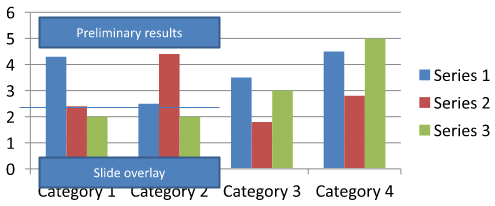
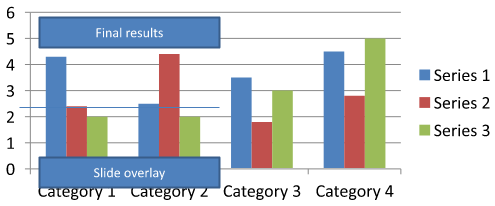
فایل chart-annotations.pptx را دانلود کنید و در پوشه کاری برنامه قرار دهید. اسلاید اول آن شامل یک نمودار با یک حاشیهنویسی جداشده که متن «Preliminary results» دارد، یک خط متعلق به نمودار و یک کادر متن اسلایدی معمولی با متن «Slide overlay» است. مثال اولین نمودار در آن اسلاید را پیدا میکند و حاشیهنویسی را به «Final results» تغییر میدهد وقتی گزارش آماده انتشار باشد. این مثال بررسی میکند که آیا مجموعه خالی است و فقط یک AutoShape با فریم متنی غیر تهی که توسط getTextFrame برگردانده میشود و متن مورد انتظار دارد، ویرایش میکند.
use aspose\slides\Presentation;
use aspose\slides\SaveFormat;

$presentation = new Presentation("chart-annotations.pptx");
try {
    $slide = $presentation->getSlides()->get_Item(0);

    $chartType = new JavaClass("com.aspose.slides.IChart");
    $autoShapeType = new JavaClass("com.aspose.slides.IAutoShape");
    $chart = null;
    for ($i = 0; $i < java_values($slide->getShapes()->size()); $i++) {
        $shape = $slide->getShapes()->get_Item($i);
        if (java_instanceof($shape, $chartType)) {
            $chart = $shape;
            break;
        }
    }

    if ($chart === null || java_values($chart->getUserShapes()->getShapes()->size()) == 0) {
        echo "No chart or chart-owned shapes found." . PHP_EOL;
        return;
    }

    $updated = false;
    $userShapes = $chart->getUserShapes()->getShapes();
    for ($i = 0; $i < java_values($userShapes->size()); $i++) {
        $shape = $userShapes->get_Item($i);
        if (java_instanceof($shape, $autoShapeType)) {
            $annotation = $shape;
            if (!java_is_null($annotation->getTextFrame()) && java_values($annotation->getTextFrame()->getText()) === "Preliminary results") {
                $annotation->getTextFrame()->setText("Final results");
                $updated = true;
                break;
            }
        }
    }

    if ($updated) {
        $presentation->save("chart-annotations-updated.pptx", SaveFormat::Pptx);
    } else {
        echo "No matching text annotation found." . PHP_EOL;
    }
} finally {
    $presentation->dispose();
}
خط و کادر متن اسلاید همانطور که هستند باقی میمانند. تصاویر زیر ورودی و نتیجه ذخیرهشده، بازگشاییشده را نشان میدهند:
| قبل از ویرایش | بعد از ویرایش |
|---|---|
 |
 |
Note
مثال فقط اشکال سطح بالای متعلق به نمودار را بررسی میکند. اگر حاشیهنویسی داخل یک GroupShape باشد، مجموعه getShapes آن گروه را نیز بررسی کنید. این کار را بهصورت بازگشتی برای گروههای تو در تو انجام دهید و همان بررسیهای متنی را برای اشکال فرزند اعمال کنید. یک گروه خود یک محفظه است؛ آن را بهعنوان کادر متن درنظر نگیرید.سؤالات متداول
آیا میتوان پر کردنهای نیمه شفاف برای ستونها/ناحیهها تنظیم کرد در حالی که حاشیه بهصورت مات باقی میماند؟
بله. شفافیت پر کردن و خطوط مرزی بهصورت جداگانه پیکربندی میشوند. این کار برای بهبود خوانایی شبکه و دادهها در بصریسازیهای فشرده مفید است.
چگونه میتوانم با برچسبهای داده که همپوشانی دارند مقابله کنم؟
اندازه قلم را کاهش دهید، مؤلفههای غیرضروری برچسب (مانند دستهها) را غیرفعال کنید، موقعیت برچسب را تنظیم کنید، در صورت لزوم فقط برچسبهای نقاط انتخابی را نمایش دهید، یا قالب را به «value + legend» تغییر دهید.
آیا میتوان پر کردن گرادیان یا الگو را به مجموعهها اعمال کرد؟
بله. مجموعهها از پر کردنهای ثابت، گرادیان و الگو پشتیبانی میکنند. در عمل، از گرادیانها بهصورت مقتصد استفاده کنید و ترکیبهایی که کنتراست با شبکه و متن را کاهش میدهند، خودداری کنید.