
Định dạng biểu đồ trong bài thuyết trình bằng PHP
Tổng quan
Bài viết này giải thích cách định dạng biểu đồ trong bản trình bày PowerPoint bằng cách sử dụng Aspose.Slides. Nó cho thấy cách tùy chỉnh các thành phần chính của biểu đồ như trục, đường lưới, tiêu đề, chú giải, vùng vẽ và màu nền tường để cải thiện giao diện và khả năng đọc dữ liệu biểu đồ.
Nó cũng trình bày cách thiết lập các thuộc tính phông chữ cho văn bản biểu đồ, áp dụng các định dạng số có sẵn cho dữ liệu biểu đồ và bật góc bo tròn cho vùng biểu đồ. Những ví dụ này cho thấy cách kiểm soát cả kiểu dáng trực quan và cách trình bày dữ liệu của biểu đồ trong bản trình bày.
Định dạng các thực thể biểu đồ
Sử dụng Chart để định dạng tiêu đề, trục, đường lưới, chú giải và vùng vẽ của biểu đồ. Ví dụ này tạo một biểu đồ đường có dấu và dữ liệu mặc định, sau đó áp dụng các kiểu văn bản và đường riêng biệt cho trục giá trị và trục danh mục. Kích thước phông chữ và độ rộng đường được chỉ định bằng điểm; nhãn danh mục được xoay 45 độ.
Trục giá trị sử dụng setNumberFormat một cách độc lập với các ô nguồn. Thang đo chạy từ -2 đến 15, với khoảng cách chính là 2 và khoảng cách phụ là 0.5. Ví dụ cũng kết hợp định dạng phần trăm với setDisplayUnit đặt thành nghìn, vì vậy bạn nên điều chỉnh các thiết lập này phù hợp với ý nghĩa và quy mô dữ liệu của mình. Chú giải được đặt bên ngoài vùng vẽ vì setOverlay được gọi với false. Độ phủ nền tường và sàn được cấu hình thông qua getBackWall và getFloor, nhưng các bề mặt này chỉ hiển thị trong biểu đồ 3D.
use aspose\slides\ChartType;
use aspose\slides\DisplayUnitType;
use aspose\slides\FillType;
use aspose\slides\FontData;
use aspose\slides\LineDashStyle;
use aspose\slides\NullableBool;
use aspose\slides\Presentation;
use aspose\slides\PresetColor;
use aspose\slides\SaveFormat;
use aspose\slides\TickLabelPositionType;

$presentation = new Presentation();
try {
    $slide = $presentation->getSlides()->get_Item(0);

    $chart = $slide->getShapes()->addChart(ChartType::LineWithMarkers, 50, 50, 500, 400);

    $chart->setTitle(true);
    $chart->getChartTitle()->addTextFrameForOverriding("");
    $chartTitle = $chart->getChartTitle()->getTextFrameForOverriding()->getParagraphs()->get_Item(0)->getPortions()->get_Item(0);
    $chartTitle->setText("Sample Chart");
    $chartTitle->getPortionFormat()->getFillFormat()->setFillType(FillType::Solid);
    $chartTitle->getPortionFormat()->getFillFormat()->getSolidFillColor()->setColor(java("java.awt.Color")->GRAY);
    $chartTitle->getPortionFormat()->setFontHeight(20);
    $chartTitle->getPortionFormat()->setFontBold(NullableBool::True);
    $chartTitle->getPortionFormat()->setFontItalic(NullableBool::True);

    $chart->getAxes()->getVerticalAxis()->getMajorGridLinesFormat()->getLine()->getFillFormat()->setFillType(FillType::Solid);
    $chart->getAxes()->getVerticalAxis()->getMajorGridLinesFormat()->getLine()->getFillFormat()->getSolidFillColor()->setColor(java("java.awt.Color")->BLUE);
    $chart->getAxes()->getVerticalAxis()->getMajorGridLinesFormat()->getLine()->setWidth(5);
    $chart->getAxes()->getVerticalAxis()->getMajorGridLinesFormat()->getLine()->setDashStyle(LineDashStyle::DashDot);

    $chart->getAxes()->getVerticalAxis()->getMinorGridLinesFormat()->getLine()->getFillFormat()->setFillType(FillType::Solid);
    $chart->getAxes()->getVerticalAxis()->getMinorGridLinesFormat()->getLine()->getFillFormat()->getSolidFillColor()->setColor(java("java.awt.Color")->RED);
    $chart->getAxes()->getVerticalAxis()->getMinorGridLinesFormat()->getLine()->setWidth(3);

    $chart->getAxes()->getVerticalAxis()->setNumberFormatLinkedToSource(false);
    $chart->getAxes()->getVerticalAxis()->setDisplayUnit(DisplayUnitType::Thousands);
    $chart->getAxes()->getVerticalAxis()->setNumberFormat("0.0%");

    $chart->getAxes()->getVerticalAxis()->setAutomaticMajorUnit(false);
    $chart->getAxes()->getVerticalAxis()->setAutomaticMaxValue(false);
    $chart->getAxes()->getVerticalAxis()->setAutomaticMinorUnit(false);
    $chart->getAxes()->getVerticalAxis()->setAutomaticMinValue(false);

    $chart->getAxes()->getVerticalAxis()->setMaxValue(15);
    $chart->getAxes()->getVerticalAxis()->setMinValue(-2);
    $chart->getAxes()->getVerticalAxis()->setMinorUnit(0.5);
    $chart->getAxes()->getVerticalAxis()->setMajorUnit(2.0);

    $valueAxisText = $chart->getAxes()->getVerticalAxis()->getTextFormat()->getPortionFormat();
    $valueAxisText->setFontBold(NullableBool::True);
    $valueAxisText->setFontHeight(16);
    $valueAxisText->setFontItalic(NullableBool::True);
    $valueAxisText->getFillFormat()->setFillType(FillType::Solid);
    $valueAxisText->getFillFormat()->getSolidFillColor()->setPresetColor(PresetColor::DarkGreen);
    $valueAxisText->setLatinFont(new FontData("Times New Roman"));

    $chart->getAxes()->getVerticalAxis()->setTitle(true);
    $chart->getAxes()->getVerticalAxis()->getTitle()->addTextFrameForOverriding("");
    $valueAxisTitle = $chart->getAxes()->getVerticalAxis()->getTitle()->getTextFrameForOverriding()->getParagraphs()->get_Item(0)->getPortions()->get_Item(0);
    $valueAxisTitle->setText("Primary Axis");
    $valueAxisTitle->getPortionFormat()->getFillFormat()->setFillType(FillType::Solid);
    $valueAxisTitle->getPortionFormat()->getFillFormat()->getSolidFillColor()->setColor(java("java.awt.Color")->GRAY);
    $valueAxisTitle->getPortionFormat()->setFontHeight(20);
    $valueAxisTitle->getPortionFormat()->setFontBold(NullableBool::True);
    $valueAxisTitle->getPortionFormat()->setFontItalic(NullableBool::True);

    $chart->getAxes()->getHorizontalAxis()->getMajorGridLinesFormat()->getLine()->getFillFormat()->setFillType(FillType::Solid);
    $chart->getAxes()->getHorizontalAxis()->getMajorGridLinesFormat()->getLine()->getFillFormat()->getSolidFillColor()->setColor(new Java("java.awt.Color", 0, 128, 0));
    $chart->getAxes()->getHorizontalAxis()->getMajorGridLinesFormat()->getLine()->setWidth(5);

    $chart->getAxes()->getHorizontalAxis()->getMinorGridLinesFormat()->getLine()->getFillFormat()->setFillType(FillType::Solid);
    $chart->getAxes()->getHorizontalAxis()->getMinorGridLinesFormat()->getLine()->getFillFormat()->getSolidFillColor()->setColor(java("java.awt.Color")->YELLOW);
    $chart->getAxes()->getHorizontalAxis()->getMinorGridLinesFormat()->getLine()->setWidth(3);

    $categoryAxisText = $chart->getAxes()->getHorizontalAxis()->getTextFormat()->getPortionFormat();
    $categoryAxisText->setFontBold(NullableBool::True);
    $categoryAxisText->setFontHeight(16);
    $categoryAxisText->setFontItalic(NullableBool::True);
    $categoryAxisText->getFillFormat()->setFillType(FillType::Solid);
    $categoryAxisText->getFillFormat()->getSolidFillColor()->setColor(java("java.awt.Color")->BLUE);
    $categoryAxisText->setLatinFont(new FontData("Arial"));

    $chart->getAxes()->getHorizontalAxis()->setTitle(true);
    $chart->getAxes()->getHorizontalAxis()->getTitle()->addTextFrameForOverriding("");

    $categoryAxisTitle = $chart->getAxes()->getHorizontalAxis()->getTitle()->getTextFrameForOverriding()->getParagraphs()->get_Item(0)->getPortions()->get_Item(0);
    $categoryAxisTitle->setText("Sample Category");
    $categoryAxisTitle->getPortionFormat()->getFillFormat()->setFillType(FillType::Solid);
    $categoryAxisTitle->getPortionFormat()->getFillFormat()->getSolidFillColor()->setColor(java("java.awt.Color")->GRAY);
    $categoryAxisTitle->getPortionFormat()->setFontHeight(20);
    $categoryAxisTitle->getPortionFormat()->setFontBold(NullableBool::True);
    $categoryAxisTitle->getPortionFormat()->setFontItalic(NullableBool::True);

    $chart->getAxes()->getHorizontalAxis()->setTickLabelPosition(TickLabelPositionType::Low);
    $chart->getAxes()->getHorizontalAxis()->setTickLabelRotationAngle(45);

    $legendText = $chart->getLegend()->getTextFormat()->getPortionFormat();
    $legendText->setFontBold(NullableBool::True);
    $legendText->setFontHeight(16);
    $legendText->setFontItalic(NullableBool::True);
    $legendText->getFillFormat()->setFillType(FillType::Solid);
    $legendText->getFillFormat()->getSolidFillColor()->setPresetColor(PresetColor::DarkRed);

    $chart->getLegend()->setOverlay(false);

    $chart->getBackWall()->setThickness(1);
    $chart->getBackWall()->getFormat()->getFill()->setFillType(FillType::Solid);
    $chart->getBackWall()->getFormat()->getFill()->getSolidFillColor()->setColor(new Java("java.awt.Color", 255, 165, 0));

    $chart->getFloor()->getFormat()->getFill()->setFillType(FillType::Solid);
    $chart->getFloor()->getFormat()->getFill()->getSolidFillColor()->setColor(java("java.awt.Color")->RED);

    $chart->getPlotArea()->getFormat()->getFill()->setFillType(FillType::Solid);
    $chart->getPlotArea()->getFormat()->getFill()->getSolidFillColor()->setPresetColor(PresetColor::LightCyan);

    $presentation->save("FormattedChart_out.pptx", SaveFormat::Pptx);
} finally {
    $presentation->dispose();
}
Thiết lập thuộc tính phông chữ cho biểu đồ
Đặt kích thước phông chữ mặc định cho văn bản biểu đồ thông qua Chart::getTextFormat. Ví dụ tạo một biểu đồ cột nhóm với phông chữ 20 điểm và bật hiển thị nhãn giá trị cho chuỗi đầu tiên bằng setShowValue. Các yếu tố văn bản có cài đặt phông chữ riêng có thể ghi đè lên mặc định của biểu đồ.
use aspose\slides\ChartType;
use aspose\slides\Presentation;
use aspose\slides\SaveFormat;

$presentation = new Presentation();
try {
    $slide = $presentation->getSlides()->get_Item(0);

    $chart = $slide->getShapes()->addChart(ChartType::ClusteredColumn, 100, 100, 500, 400);
    $chart->getTextFormat()->getPortionFormat()->setFontHeight(20);
    $chart->getChartData()->getSeries()->get_Item(0)->getLabels()->getDefaultDataLabelFormat()->setShowValue(true);

    $presentation->save("FontPropertiesForChart.pptx", SaveFormat::Pptx);
} finally {
    $presentation->dispose();
}
Thiết lập định dạng số
Sử dụng ChartDataCell::setPresetNumberFormat để áp dụng định dạng số có sẵn cho các ô trong sổ làm việc của biểu đồ. Ví dụ này tạo một biểu đồ cột nhóm với dữ liệu mặc định dựa trên ô và áp dụng chỉ mục định dạng 10 (0.00%) cho mỗi ô giá trị chuỗi. Điều này thay đổi cách hiển thị giá trị trong sổ làm việc mà không thay đổi số thực tế; ví dụ, 0.25 sẽ hiển thị là 25.00%. Định dạng trục và nhãn dữ liệu có thể được cấu hình riêng biệt.
use aspose\slides\ChartType;
use aspose\slides\Presentation;
use aspose\slides\SaveFormat;

$presentation = new Presentation();
try {
    $slide = $presentation->getSlides()->get_Item(0);

    $chart = $slide->getShapes()->addChart(ChartType::ClusteredColumn, 50, 50, 500, 400);
    $series = $chart->getChartData()->getSeries();

    for ($i = 0; $i < java_values($series->size()); $i++) {
        $chartSeries = $series->get_Item($i);
        $dataPoints = $chartSeries->getDataPoints();
        for ($j = 0; $j < java_values($dataPoints->size()); $j++) {
            $dataPoint = $dataPoints->get_Item($j);
            $dataPoint->getValue()->getAsCell()->setPresetNumberFormat(10); // 0.00%
        }
    }

    $presentation->save("PresetNumberFormat_out.pptx", SaveFormat::Pptx);
} finally {
    $presentation->dispose();
}
Bảng sau liệt kê các chỉ mục định dạng số có sẵn cùng với các định dạng Excel tiêu biểu cho khu vực Anh (Mỹ). Các chuỗi định dạng và cách hiển thị có thể khác nhau tùy theo ứng dụng và khu vực, đặc biệt đối với tiền tệ và ngày tháng. Một số định dạng Excel cũng khác với mặc định trong chuẩn OOXML, như mô tả trong Microsoft’s number format implementation notes.
| Index | Format |
|---|---|
| 0 | General |
| 1 | 0 |
| 2 | 0.00 |
| 3 | #,##0 |
| 4 | #,##0.00 |
| 5 | "$"#,##0_);("$"#,##0) |
| 6 | "$"#,##0_);[Red]("$"#,##0) |
| 7 | "$"#,##0.00_);("$"#,##0.00) |
| 8 | "$"#,##0.00_);[Red]("$"#,##0.00) |
| 9 | 0% |
| 10 | 0.00% |
| 11 | 0.00E+00 |
| 12 | # ?/? |
| 13 | # ??/?? |
| 14 | m/d/yyyy |
| 15 | d-mmm-yy |
| 16 | d-mmm |
| 17 | mmm-yy |
| 18 | h:mm AM/PM |
| 19 | h:mm:ss AM/PM |
| 20 | h:mm |
| 21 | h:mm:ss |
| 22 | m/d/yyyy h:mm |
| 37 | #,##0_);(#,##0) |
| 38 | #,##0_);[Red](#,##0) |
| 39 | #,##0.00_);(#,##0.00) |
| 40 | #,##0.00_);[Red](#,##0.00) |
| 41 | _(* #,##0_);_(* (#,##0);_(* "-"_);_(@_) |
| 42 | _("$"* #,##0_);_("$"* (#,##0);_("$"* "-"_);_(@_) |
| 43 | _(* #,##0.00_);_(* (#,##0.00);_(* "-"??_);_(@_) |
| 44 | _("$"* #,##0.00_);_("$"* (#,##0.00);_("$"* "-"??_);_(@_) |
| 45 | mm:ss |
| 46 | [h]:mm:ss |
| 47 | mm:ss.0 |
| 48 | ##0.0E+0 |
| 49 | @ |
Đặt viền bo tròn cho vùng biểu đồ
Gọi Chart::setRoundedCorners với true để bo tròn các góc của vùng biểu đồ. Ví dụ tạo một biểu đồ cột nhóm và sử dụng getLineFormat để đặt viền ngoài của nó thành màu xám đặc và kiểu đường đơn trước khi lưu bản trình bày.
use aspose\slides\ChartType;
use aspose\slides\FillType;
use aspose\slides\LineStyle;
use aspose\slides\Presentation;
use aspose\slides\SaveFormat;

$presentation = new Presentation();
try {
    $slide = $presentation->getSlides()->get_Item(0);

    $chart = $slide->getShapes()->addChart(ChartType::ClusteredColumn, 20, 100, 600, 400);
    $chart->getLineFormat()->getFillFormat()->setFillType(FillType::Solid);
    $chart->getLineFormat()->getFillFormat()->getSolidFillColor()->setColor(java("java.awt.Color")->GRAY);
    $chart->getLineFormat()->setStyle(LineStyle::Single);
    $chart->setRoundedCorners(true);

    $presentation->save("out.pptx", SaveFormat::Pptx);
} finally {
    $presentation->dispose();
}
Chỉnh sửa chú thích biểu đồ hiện có
Một biểu đồ có thể chứa các hình dạng tùy chỉnh, chẳng hạn như chú thích văn bản giải thích trạng thái của báo cáo. Truy cập các hình dạng này qua Chart::getUserShapes. Bộ sưu tập trả về bởi getShapes chứa các hình dạng thuộc về biểu đồ.
Một hộp văn bản thông thường được đặt lên trên biểu đồ thuộc về slide, ngay cả khi nó trông giống như một phần của biểu đồ. Duyệt qua Slide::getShapes sẽ tìm thấy biểu đồ và các hình dạng slide thông thường, nhưng không liệt kê các hình dạng riêng lẻ bên trong biểu đồ. Tiêu đề biểu đồ và nhãn dữ liệu là các yếu tố biểu đồ riêng, không phải chú thích tùy chỉnh trong bộ sưu tập này.
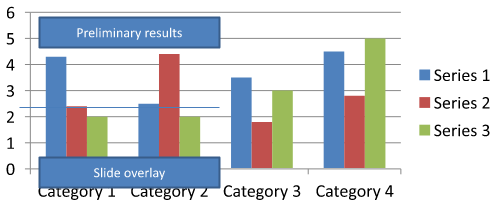
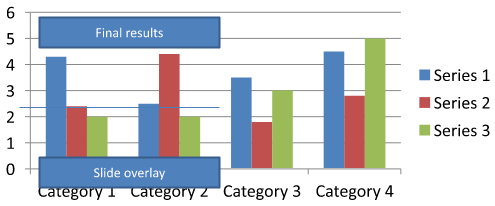
Tải về chart-annotations.pptx và đặt nó trong thư mục làm việc của ứng dụng. Slide đầu tiên của tệp chứa một biểu đồ có chú thích chưa nhóm ghi “Preliminary results”, một đường thuộc về biểu đồ và một hộp văn bản slide thông thường ghi “Slide overlay”. Ví dụ tìm biểu đồ đầu tiên trên slide đó và thay đổi chú thích thành “Final results” khi báo cáo đã sẵn sàng xuất bản. Nó kiểm tra xem bộ sưu tập có rỗng hay không và chỉ chỉnh sửa một AutoShape có khung văn bản không null trả về bởi getTextFrame và có nội dung văn bản mong đợi.
use aspose\slides\Presentation;
use aspose\slides\SaveFormat;

$presentation = new Presentation("chart-annotations.pptx");
try {
    $slide = $presentation->getSlides()->get_Item(0);

    $chartType = new JavaClass("com.aspose.slides.IChart");
    $autoShapeType = new JavaClass("com.aspose.slides.IAutoShape");
    $chart = null;
    for ($i = 0; $i < java_values($slide->getShapes()->size()); $i++) {
        $shape = $slide->getShapes()->get_Item($i);
        if (java_instanceof($shape, $chartType)) {
            $chart = $shape;
            break;
        }
    }

    if ($chart === null || java_values($chart->getUserShapes()->getShapes()->size()) == 0) {
        echo "No chart or chart-owned shapes found." . PHP_EOL;
        return;
    }

    $updated = false;
    $userShapes = $chart->getUserShapes()->getShapes();
    for ($i = 0; $i < java_values($userShapes->size()); $i++) {
        $shape = $userShapes->get_Item($i);
        if (java_instanceof($shape, $autoShapeType)) {
            $annotation = $shape;
            if (!java_is_null($annotation->getTextFrame()) && java_values($annotation->getTextFrame()->getText()) === "Preliminary results") {
                $annotation->getTextFrame()->setText("Final results");
                $updated = true;
                break;
            }
        }
    }

    if ($updated) {
        $presentation->save("chart-annotations-updated.pptx", SaveFormat::Pptx);
    } else {
        echo "No matching text annotation found." . PHP_EOL;
    }
} finally {
    $presentation->dispose();
}
Đường và hộp văn bản slide vẫn giữ nguyên. Các hình ảnh sau hiển thị đầu vào và kết quả đã lưu, mở lại:
| Before editing | After editing |
|---|---|
 |
 |
Note
Ví dụ chỉ kiểm tra các hình dạng cấp cao nhất thuộc về biểu đồ. Nếu một chú thích nằm bên trong một GroupShape, hãy kiểm tra bộ sưu tập getShapes của nhóm đó nữa. Lặp lại quá trình này một cách đệ quy cho các nhóm lồng nhau, áp dụng các kiểm tra văn bản tương tự cho các hình dạng con của chúng. Một nhóm tự nó là một bộ chứa; không nên coi nó như một hộp văn bản.Câu hỏi thường gặp
Tôi có thể đặt màu nền bán trong suốt cho các cột/khu vực trong khi vẫn giữ viền không trong suốt không?
Có. Độ trong suốt của màu nền và viền được cấu hình riêng biệt. Tùy chọn này hữu ích để cải thiện khả năng đọc của lưới và dữ liệu trong các biểu đồ dày đặc.
Làm sao tôi xử lý các nhãn dữ liệu khi chúng chồng lên nhau?
Giảm kích thước phông chữ, tắt các thành phần nhãn không cần thiết (ví dụ, danh mục), điều chỉnh vị trí nhãn, chỉ hiển thị nhãn cho các điểm được chọn nếu cần, hoặc chuyển định dạng sang “giá trị + chú giải”.
Tôi có thể áp dụng màu nền gradient hoặc họa tiết cho chuỗi dữ liệu không?
Có. Các chuỗi hỗ trợ màu nền đặc, gradient và họa tiết. Trong thực tế, nên dùng gradient một cách tiết kiệm và tránh các kết hợp làm giảm độ tương phản với lưới và văn bản.