
在 PHP 中格式化演示文稿图表
概述
本文介绍了如何使用 Aspose.Slides 在 PowerPoint 演示文稿中格式化图表。它展示了如何自定义关键图表元素,如坐标轴、网格线、标题、图例、绘图区和墙面填充,以提升图表数据的外观和可读性。
它还演示了如何设置图表文字的字体属性、对图表数据应用预设数字格式以及为图表区域启用圆角。这些示例共同展示了如何在演示文稿中控制图表的视觉样式和数据呈现。
格式化图表实体
使用Chart 来格式化图表标题、坐标轴、网格线、图例和绘图区。此示例创建了一个带有标记和默认数据的折线图,然后对其数值轴和分类轴分别应用文本和线条样式。字体大小和线宽以磅为单位指定;分类标签旋转 45 度。
数值轴使用setNumberFormat,独立于源单元格。其刻度范围为 -2 到 15,主间隔为 2,次间隔为 0.5。示例还将百分比格式与setDisplayUnit 设置为千位相结合,因此请根据数据的含义和数量级调整这些设置。由于调用了false的setOverlay,图例保持在绘图区外。通过getBackWall和getFloor 配置背墙和底面填充,但这些表面仅在 3D 图表中可见。
use aspose\slides\ChartType;
use aspose\slides\DisplayUnitType;
use aspose\slides\FillType;
use aspose\slides\FontData;
use aspose\slides\LineDashStyle;
use aspose\slides\NullableBool;
use aspose\slides\Presentation;
use aspose\slides\PresetColor;
use aspose\slides\SaveFormat;
use aspose\slides\TickLabelPositionType;

$presentation = new Presentation();
try {
    $slide = $presentation->getSlides()->get_Item(0);

    $chart = $slide->getShapes()->addChart(ChartType::LineWithMarkers, 50, 50, 500, 400);

    $chart->setTitle(true);
    $chart->getChartTitle()->addTextFrameForOverriding("");
    $chartTitle = $chart->getChartTitle()->getTextFrameForOverriding()->getParagraphs()->get_Item(0)->getPortions()->get_Item(0);
    $chartTitle->setText("Sample Chart");
    $chartTitle->getPortionFormat()->getFillFormat()->setFillType(FillType::Solid);
    $chartTitle->getPortionFormat()->getFillFormat()->getSolidFillColor()->setColor(java("java.awt.Color")->GRAY);
    $chartTitle->getPortionFormat()->setFontHeight(20);
    $chartTitle->getPortionFormat()->setFontBold(NullableBool::True);
    $chartTitle->getPortionFormat()->setFontItalic(NullableBool::True);

    $chart->getAxes()->getVerticalAxis()->getMajorGridLinesFormat()->getLine()->getFillFormat()->setFillType(FillType::Solid);
    $chart->getAxes()->getVerticalAxis()->getMajorGridLinesFormat()->getLine()->getFillFormat()->getSolidFillColor()->setColor(java("java.awt.Color")->BLUE);
    $chart->getAxes()->getVerticalAxis()->getMajorGridLinesFormat()->getLine()->setWidth(5);
    $chart->getAxes()->getVerticalAxis()->getMajorGridLinesFormat()->getLine()->setDashStyle(LineDashStyle::DashDot);

    $chart->getAxes()->getVerticalAxis()->getMinorGridLinesFormat()->getLine()->getFillFormat()->setFillType(FillType::Solid);
    $chart->getAxes()->getVerticalAxis()->getMinorGridLinesFormat()->getLine()->getFillFormat()->getSolidFillColor()->setColor(java("java.awt.Color")->RED);
    $chart->getAxes()->getVerticalAxis()->getMinorGridLinesFormat()->getLine()->setWidth(3);

    $chart->getAxes()->getVerticalAxis()->setNumberFormatLinkedToSource(false);
    $chart->getAxes()->getVerticalAxis()->setDisplayUnit(DisplayUnitType::Thousands);
    $chart->getAxes()->getVerticalAxis()->setNumberFormat("0.0%");

    $chart->getAxes()->getVerticalAxis()->setAutomaticMajorUnit(false);
    $chart->getAxes()->getVerticalAxis()->setAutomaticMaxValue(false);
    $chart->getAxes()->getVerticalAxis()->setAutomaticMinorUnit(false);
    $chart->getAxes()->getVerticalAxis()->setAutomaticMinValue(false);

    $chart->getAxes()->getVerticalAxis()->setMaxValue(15);
    $chart->getAxes()->getVerticalAxis()->setMinValue(-2);
    $chart->getAxes()->getVerticalAxis()->setMinorUnit(0.5);
    $chart->getAxes()->getVerticalAxis()->setMajorUnit(2.0);

    $valueAxisText = $chart->getAxes()->getVerticalAxis()->getTextFormat()->getPortionFormat();
    $valueAxisText->setFontBold(NullableBool::True);
    $valueAxisText->setFontHeight(16);
    $valueAxisText->setFontItalic(NullableBool::True);
    $valueAxisText->getFillFormat()->setFillType(FillType::Solid);
    $valueAxisText->getFillFormat()->getSolidFillColor()->setPresetColor(PresetColor::DarkGreen);
    $valueAxisText->setLatinFont(new FontData("Times New Roman"));

    $chart->getAxes()->getVerticalAxis()->setTitle(true);
    $chart->getAxes()->getVerticalAxis()->getTitle()->addTextFrameForOverriding("");
    $valueAxisTitle = $chart->getAxes()->getVerticalAxis()->getTitle()->getTextFrameForOverriding()->getParagraphs()->get_Item(0)->getPortions()->get_Item(0);
    $valueAxisTitle->setText("Primary Axis");
    $valueAxisTitle->getPortionFormat()->getFillFormat()->setFillType(FillType::Solid);
    $valueAxisTitle->getPortionFormat()->getFillFormat()->getSolidFillColor()->setColor(java("java.awt.Color")->GRAY);
    $valueAxisTitle->getPortionFormat()->setFontHeight(20);
    $valueAxisTitle->getPortionFormat()->setFontBold(NullableBool::True);
    $valueAxisTitle->getPortionFormat()->setFontItalic(NullableBool::True);

    $chart->getAxes()->getHorizontalAxis()->getMajorGridLinesFormat()->getLine()->getFillFormat()->setFillType(FillType::Solid);
    $chart->getAxes()->getHorizontalAxis()->getMajorGridLinesFormat()->getLine()->getFillFormat()->getSolidFillColor()->setColor(new Java("java.awt.Color", 0, 128, 0));
    $chart->getAxes()->getHorizontalAxis()->getMajorGridLinesFormat()->getLine()->setWidth(5);

    $chart->getAxes()->getHorizontalAxis()->getMinorGridLinesFormat()->getLine()->getFillFormat()->setFillType(FillType::Solid);
    $chart->getAxes()->getHorizontalAxis()->getMinorGridLinesFormat()->getLine()->getFillFormat()->getSolidFillColor()->setColor(java("java.awt.Color")->YELLOW);
    $chart->getAxes()->getHorizontalAxis()->getMinorGridLinesFormat()->getLine()->setWidth(3);

    $categoryAxisText = $chart->getAxes()->getHorizontalAxis()->getTextFormat()->getPortionFormat();
    $categoryAxisText->setFontBold(NullableBool::True);
    $categoryAxisText->setFontHeight(16);
    $categoryAxisText->setFontItalic(NullableBool::True);
    $categoryAxisText->getFillFormat()->setFillType(FillType::Solid);
    $categoryAxisText->getFillFormat()->getSolidFillColor()->setColor(java("java.awt.Color")->BLUE);
    $categoryAxisText->setLatinFont(new FontData("Arial"));

    $chart->getAxes()->getHorizontalAxis()->setTitle(true);
    $chart->getAxes()->getHorizontalAxis()->getTitle()->addTextFrameForOverriding("");

    $categoryAxisTitle = $chart->getAxes()->getHorizontalAxis()->getTitle()->getTextFrameForOverriding()->getParagraphs()->get_Item(0)->getPortions()->get_Item(0);
    $categoryAxisTitle->setText("Sample Category");
    $categoryAxisTitle->getPortionFormat()->getFillFormat()->setFillType(FillType::Solid);
    $categoryAxisTitle->getPortionFormat()->getFillFormat()->getSolidFillColor()->setColor(java("java.awt.Color")->GRAY);
    $categoryAxisTitle->getPortionFormat()->setFontHeight(20);
    $categoryAxisTitle->getPortionFormat()->setFontBold(NullableBool::True);
    $categoryAxisTitle->getPortionFormat()->setFontItalic(NullableBool::True);

    $chart->getAxes()->getHorizontalAxis()->setTickLabelPosition(TickLabelPositionType::Low);
    $chart->getAxes()->getHorizontalAxis()->setTickLabelRotationAngle(45);

    $legendText = $chart->getLegend()->getTextFormat()->getPortionFormat();
    $legendText->setFontBold(NullableBool::True);
    $legendText->setFontHeight(16);
    $legendText->setFontItalic(NullableBool::True);
    $legendText->getFillFormat()->setFillType(FillType::Solid);
    $legendText->getFillFormat()->getSolidFillColor()->setPresetColor(PresetColor::DarkRed);

    $chart->getLegend()->setOverlay(false);

    $chart->getBackWall()->setThickness(1);
    $chart->getBackWall()->getFormat()->getFill()->setFillType(FillType::Solid);
    $chart->getBackWall()->getFormat()->getFill()->getSolidFillColor()->setColor(new Java("java.awt.Color", 255, 165, 0));

    $chart->getFloor()->getFormat()->getFill()->setFillType(FillType::Solid);
    $chart->getFloor()->getFormat()->getFill()->getSolidFillColor()->setColor(java("java.awt.Color")->RED);

    $chart->getPlotArea()->getFormat()->getFill()->setFillType(FillType::Solid);
    $chart->getPlotArea()->getFormat()->getFill()->getSolidFillColor()->setPresetColor(PresetColor::LightCyan);

    $presentation->save("FormattedChart_out.pptx", SaveFormat::Pptx);
} finally {
    $presentation->dispose();
}
设置图表的字体属性
通过Chart::getTextFormat 设置图表文字的默认字体大小。示例创建了一个簇状柱形图,使用 20 磅字体,并通过setShowValue 为第一系列启用数值标签。具有显式字体设置的文本元素可以覆盖图表的默认设置。
use aspose\slides\ChartType;
use aspose\slides\Presentation;
use aspose\slides\SaveFormat;

$presentation = new Presentation();
try {
    $slide = $presentation->getSlides()->get_Item(0);

    $chart = $slide->getShapes()->addChart(ChartType::ClusteredColumn, 100, 100, 500, 400);
    $chart->getTextFormat()->getPortionFormat()->setFontHeight(20);
    $chart->getChartData()->getSeries()->get_Item(0)->getLabels()->getDefaultDataLabelFormat()->setShowValue(true);

    $presentation->save("FontPropertiesForChart.pptx", SaveFormat::Pptx);
} finally {
    $presentation->dispose();
}
设置数字格式
使用ChartDataCell::setPresetNumberFormat 将内置数字格式应用于图表工作簿单元格。此示例创建了一个默认、基于单元格数据的簇状柱形图,并对每个系列的值单元格应用格式索引 10(0.00%)。这会改变工作簿中值的显示方式,而不修改底层数字;例如,0.25 将显示为 25.00%。坐标轴和数据标签的格式可以分别配置。
use aspose\slides\ChartType;
use aspose\slides\Presentation;
use aspose\slides\SaveFormat;

$presentation = new Presentation();
try {
    $slide = $presentation->getSlides()->get_Item(0);

    $chart = $slide->getShapes()->addChart(ChartType::ClusteredColumn, 50, 50, 500, 400);
    $series = $chart->getChartData()->getSeries();

    for ($i = 0; $i < java_values($series->size()); $i++) {
        $chartSeries = $series->get_Item($i);
        $dataPoints = $chartSeries->getDataPoints();
        for ($j = 0; $j < java_values($dataPoints->size()); $j++) {
            $dataPoint = $dataPoints->get_Item($j);
            $dataPoint->getValue()->getAsCell()->setPresetNumberFormat(10); // 0.00%
        }
    }

    $presentation->save("PresetNumberFormat_out.pptx", SaveFormat::Pptx);
} finally {
    $presentation->dispose();
}
下表列出了内置数字格式索引及其在英文(美国)地区的代表性 Excel 格式。确切的格式字符串及其显示方式可能因应用程序和地区而异,尤其是货币和日期。某些 Excel 格式也与 OOXML 标准的默认值不同,详情请参阅Microsoft 的数字格式实现说明。
| 索引 | 格式 |
|---|---|
| 0 | General |
| 1 | 0 |
| 2 | 0.00 |
| 3 | #,##0 |
| 4 | #,##0.00 |
| 5 | "$"#,##0_);("$"#,##0) |
| 6 | "$"#,##0_);[Red]("$"#,##0) |
| 7 | "$"#,##0.00_);("$"#,##0.00) |
| 8 | "$"#,##0.00_);[Red]("$"#,##0.00) |
| 9 | 0% |
| 10 | 0.00% |
| 11 | 0.00E+00 |
| 12 | # ?/? |
| 13 | # ??/?? |
| 14 | m/d/yyyy |
| 15 | d-mmm-yy |
| 16 | d-mmm |
| 17 | mmm-yy |
| 18 | h:mm AM/PM |
| 19 | h:mm:ss AM/PM |
| 20 | h:mm |
| 21 | h:mm:ss |
| 22 | m/d/yyyy h:mm |
| 37 | #,##0_);(#,##0) |
| 38 | #,##0_);[Red](#,##0) |
| 39 | #,##0.00_);(#,##0.00) |
| 40 | #,##0.00_);[Red](#,##0.00) |
| 41 | _(* #,##0_);_(* (#,##0);_(* "-"_);_(@_) |
| 42 | _("$"* #,##0_);_("$"* (#,##0);_("$"* "-"_);_(@_) |
| 43 | _(* #,##0.00_);_(* (#,##0.00);_(* "-"??_);_(@_) |
| 44 | _("$"* #,##0.00_);_("$"* (#,##0.00);_("$"* "-"??_);_(@_) |
| 45 | mm:ss |
| 46 | [h]:mm:ss |
| 47 | mm:ss.0 |
| 48 | ##0.0E+0 |
| 49 | @ |
设置图表区域圆角边框
使用true调用Chart::setRoundedCorners 可为图表区域的角落添加圆角。示例创建了一个簇状柱形图,并使用getLineFormat 为其轮廓设置实心灰色和单线样式,然后保存演示文稿。
use aspose\slides\ChartType;
use aspose\slides\FillType;
use aspose\slides\LineStyle;
use aspose\slides\Presentation;
use aspose\slides\SaveFormat;

$presentation = new Presentation();
try {
    $slide = $presentation->getSlides()->get_Item(0);

    $chart = $slide->getShapes()->addChart(ChartType::ClusteredColumn, 20, 100, 600, 400);
    $chart->getLineFormat()->getFillFormat()->setFillType(FillType::Solid);
    $chart->getLineFormat()->getFillFormat()->getSolidFillColor()->setColor(java("java.awt.Color")->GRAY);
    $chart->getLineFormat()->setStyle(LineStyle::Single);
    $chart->setRoundedCorners(true);

    $presentation->save("out.pptx", SaveFormat::Pptx);
} finally {
    $presentation->dispose();
}
编辑已有的图表批注
图表可以包含自定义形状,例如说明报告状态的文本批注。可通过Chart::getUserShapes 访问这些形状。getShapes 返回的集合包含图表拥有的形状。
放置在图表上方的普通文本框属于幻灯片,即使它看起来像图表的一部分。遍历Slide::getShapes 可以找到图表以及普通幻灯片形状,但不会枚举图表内部的单个形状。图表标题和数据标签是独立的图表元素,不是此集合中的自定义批注。
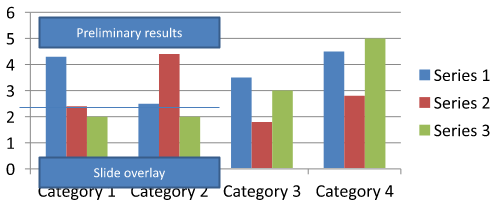
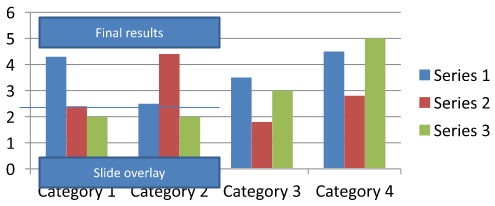
下载chart-annotations.pptx 并放置在应用程序的工作目录中。其第一页包含一个图表,图表上有未分组的批注“Preliminary results”、一个图表拥有的线条,以及一个普通幻灯片文本框“Slide overlay”。示例在该幻灯片上找到第一个图表,并在报告准备发布时将批注更改为“Final results”。它会检查集合是否为空,仅编辑通过getTextFrame 返回非空文本框的AutoShape,并且其文本符合预期。
use aspose\slides\Presentation;
use aspose\slides\SaveFormat;

$presentation = new Presentation("chart-annotations.pptx");
try {
    $slide = $presentation->getSlides()->get_Item(0);

    $chartType = new JavaClass("com.aspose.slides.IChart");
    $autoShapeType = new JavaClass("com.aspose.slides.IAutoShape");
    $chart = null;
    for ($i = 0; $i < java_values($slide->getShapes()->size()); $i++) {
        $shape = $slide->getShapes()->get_Item($i);
        if (java_instanceof($shape, $chartType)) {
            $chart = $shape;
            break;
        }
    }

    if ($chart === null || java_values($chart->getUserShapes()->getShapes()->size()) == 0) {
        echo "No chart or chart-owned shapes found." . PHP_EOL;
        return;
    }

    $updated = false;
    $userShapes = $chart->getUserShapes()->getShapes();
    for ($i = 0; $i < java_values($userShapes->size()); $i++) {
        $shape = $userShapes->get_Item($i);
        if (java_instanceof($shape, $autoShapeType)) {
            $annotation = $shape;
            if (!java_is_null($annotation->getTextFrame()) && java_values($annotation->getTextFrame()->getText()) === "Preliminary results") {
                $annotation->getTextFrame()->setText("Final results");
                $updated = true;
                break;
            }
        }
    }

    if ($updated) {
        $presentation->save("chart-annotations-updated.pptx", SaveFormat::Pptx);
    } else {
        echo "No matching text annotation found." . PHP_EOL;
    }
} finally {
    $presentation->dispose();
}
线条和幻灯片文本框保持不变。以下图像显示了输入以及保存后重新打开的结果:
| 编辑前 | 编辑后 |
|---|---|
 |
 |
Note
示例仅检查顶层的图表拥有的形状。如果批注位于GroupShape内部,则同样检查该组合的getShapes集合。对嵌套组递归执行此操作,对其子形状应用相同的文本检查。组合本身是一个容器;不要将其视为文本框。常见问题
我可以为柱形/区域设置半透明填充,同时保持边框不透明吗?
可以。填充透明度和轮廓是分别配置的。这对于在密集的可视化中提高网格和数据的可读性非常有用。
当数据标签重叠时,我该如何处理?
减小字体大小,禁用非必要的标签组件(例如类别),调整标签位置,必要时仅为选定的数据点显示标签,或将格式切换为“数值 + 图例”。
我可以对系列应用渐变或图案填充吗?
可以。系列支持实色、渐变和图案填充。实际使用时,请适度使用渐变,并避免与网格和文字的对比度下降的组合。