
จัดรูปแบบแผนภูมิการนำเสนอใน PHP
ภาพรวม
บทความนี้อธิบายวิธีจัดรูปแบบแผนภูมิในงานนำเสนอ PowerPoint โดยใช้ Aspose.Slides แสดงวิธีปรับแต่งองค์ประกอบสำคัญของแผนภูมิ เช่น แกน, เส้นกริด, ชื่อเรื่อง, คำอธิบาย, พื้นที่พล็อต และการเติมสีกำแพง เพื่อปรับปรุงลักษณะและความอ่านง่ายของข้อมูลแผนภูมิ
นอกจากนี้ยังสาธิตวิธีตั้งค่าคุณสมบัติตัวอักษรสำหรับข้อความในแผนภูมิ, ใช้รูปแบบตัวเลขที่กำหนดไว้ล่วงหน้าในข้อมูลแผนภูมิ, และเปิดใช้งานมุมโค้งสำหรับพื้นที่แผนภูมิ ตัวอย่างเหล่านี้ร่วมกันแสดงวิธีควบคุมทั้งสไตล์การแสดงผลและการนำเสนอข้อมูลของแผนภูมิในงานนำเสนอ
จัดรูปแบบเอนทิตีแผนภูมิ
ใช้ แผนภูมิ เพื่อจัดรูปแบบชื่อเรื่องของแผนภูมิ, แกน, เส้นกริด, คำอธิบาย, และพื้นที่พล็อต ตัวอย่างนี้สร้างแผนภูมิเส้นพร้อมเครื่องหมายและข้อมูลค่าเริ่มต้น แล้วใช้สไตล์ข้อความและเส้นแยกกันสำหรับแกนค่และแกนหมวดหมู่ ขนาดตัวอักษรและความกว้างของเส้นระบุเป็นจุด; ป้ายชื่อหมวดหมู่อยู่ในมุม 45 องศา
แกนค่ใช้ setNumberFormat อย่างอิสระจากเซลล์ต้นทาง สเกลวิ่งจาก -2 ถึง 15, ด้วยช่วงหลัก 2 และช่วงย่อย 0.5 ตัวอย่างนี้ยังรวมการจัดรูปแบบเป็นเปอร์เซ็นต์กับ setDisplayUnit ที่ตั้งค่าเป็นพัน ดังนั้นปรับการตั้งค่าเหล่านี้ให้สอดคล้องกับความหมายและขนาดของข้อมูลของคุณ คำอธิบายจะอยู่ด้านนอกพื้นที่พล็อตเพราะ setOverlay ถูกเรียกด้วย false การเติมสีผนังด้านหลังและพื้นผ่าน getBackWall และ getFloor แต่พื้นผิวเหล่านี้มองเห็นได้เฉพาะในแผนภูมิ 3 มิติ
use aspose\slides\ChartType;
use aspose\slides\DisplayUnitType;
use aspose\slides\FillType;
use aspose\slides\FontData;
use aspose\slides\LineDashStyle;
use aspose\slides\NullableBool;
use aspose\slides\Presentation;
use aspose\slides\PresetColor;
use aspose\slides\SaveFormat;
use aspose\slides\TickLabelPositionType;

$presentation = new Presentation();
try {
    $slide = $presentation->getSlides()->get_Item(0);

    $chart = $slide->getShapes()->addChart(ChartType::LineWithMarkers, 50, 50, 500, 400);

    $chart->setTitle(true);
    $chart->getChartTitle()->addTextFrameForOverriding("");
    $chartTitle = $chart->getChartTitle()->getTextFrameForOverriding()->getParagraphs()->get_Item(0)->getPortions()->get_Item(0);
    $chartTitle->setText("Sample Chart");
    $chartTitle->getPortionFormat()->getFillFormat()->setFillType(FillType::Solid);
    $chartTitle->getPortionFormat()->getFillFormat()->getSolidFillColor()->setColor(java("java.awt.Color")->GRAY);
    $chartTitle->getPortionFormat()->setFontHeight(20);
    $chartTitle->getPortionFormat()->setFontBold(NullableBool::True);
    $chartTitle->getPortionFormat()->setFontItalic(NullableBool::True);

    $chart->getAxes()->getVerticalAxis()->getMajorGridLinesFormat()->getLine()->getFillFormat()->setFillType(FillType::Solid);
    $chart->getAxes()->getVerticalAxis()->getMajorGridLinesFormat()->getLine()->getFillFormat()->getSolidFillColor()->setColor(java("java.awt.Color")->BLUE);
    $chart->getAxes()->getVerticalAxis()->getMajorGridLinesFormat()->getLine()->setWidth(5);
    $chart->getAxes()->getVerticalAxis()->getMajorGridLinesFormat()->getLine()->setDashStyle(LineDashStyle::DashDot);

    $chart->getAxes()->getVerticalAxis()->getMinorGridLinesFormat()->getLine()->getFillFormat()->setFillType(FillType::Solid);
    $chart->getAxes()->getVerticalAxis()->getMinorGridLinesFormat()->getLine()->getFillFormat()->getSolidFillColor()->setColor(java("java.awt.Color")->RED);
    $chart->getAxes()->getVerticalAxis()->getMinorGridLinesFormat()->getLine()->setWidth(3);

    $chart->getAxes()->getVerticalAxis()->setNumberFormatLinkedToSource(false);
    $chart->getAxes()->getVerticalAxis()->setDisplayUnit(DisplayUnitType::Thousands);
    $chart->getAxes()->getVerticalAxis()->setNumberFormat("0.0%");

    $chart->getAxes()->getVerticalAxis()->setAutomaticMajorUnit(false);
    $chart->getAxes()->getVerticalAxis()->setAutomaticMaxValue(false);
    $chart->getAxes()->getVerticalAxis()->setAutomaticMinorUnit(false);
    $chart->getAxes()->getVerticalAxis()->setAutomaticMinValue(false);

    $chart->getAxes()->getVerticalAxis()->setMaxValue(15);
    $chart->getAxes()->getVerticalAxis()->setMinValue(-2);
    $chart->getAxes()->getVerticalAxis()->setMinorUnit(0.5);
    $chart->getAxes()->getVerticalAxis()->setMajorUnit(2.0);

    $valueAxisText = $chart->getAxes()->getVerticalAxis()->getTextFormat()->getPortionFormat();
    $valueAxisText->setFontBold(NullableBool::True);
    $valueAxisText->setFontHeight(16);
    $valueAxisText->setFontItalic(NullableBool::True);
    $valueAxisText->getFillFormat()->setFillType(FillType::Solid);
    $valueAxisText->getFillFormat()->getSolidFillColor()->setPresetColor(PresetColor::DarkGreen);
    $valueAxisText->setLatinFont(new FontData("Times New Roman"));

    $chart->getAxes()->getVerticalAxis()->setTitle(true);
    $chart->getAxes()->getVerticalAxis()->getTitle()->addTextFrameForOverriding("");
    $valueAxisTitle = $chart->getAxes()->getVerticalAxis()->getTitle()->getTextFrameForOverriding()->getParagraphs()->get_Item(0)->getPortions()->get_Item(0);
    $valueAxisTitle->setText("Primary Axis");
    $valueAxisTitle->getPortionFormat()->getFillFormat()->setFillType(FillType::Solid);
    $valueAxisTitle->getPortionFormat()->getFillFormat()->getSolidFillColor()->setColor(java("java.awt.Color")->GRAY);
    $valueAxisTitle->getPortionFormat()->setFontHeight(20);
    $valueAxisTitle->getPortionFormat()->setFontBold(NullableBool::True);
    $valueAxisTitle->getPortionFormat()->setFontItalic(NullableBool::True);

    $chart->getAxes()->getHorizontalAxis()->getMajorGridLinesFormat()->getLine()->getFillFormat()->setFillType(FillType::Solid);
    $chart->getAxes()->getHorizontalAxis()->getMajorGridLinesFormat()->getLine()->getFillFormat()->getSolidFillColor()->setColor(new Java("java.awt.Color", 0, 128, 0));
    $chart->getAxes()->getHorizontalAxis()->getMajorGridLinesFormat()->getLine()->setWidth(5);

    $chart->getAxes()->getHorizontalAxis()->getMinorGridLinesFormat()->getLine()->getFillFormat()->setFillType(FillType::Solid);
    $chart->getAxes()->getHorizontalAxis()->getMinorGridLinesFormat()->getLine()->getFillFormat()->getSolidFillColor()->setColor(java("java.awt.Color")->YELLOW);
    $chart->getAxes()->getHorizontalAxis()->getMinorGridLinesFormat()->getLine()->setWidth(3);

    $categoryAxisText = $chart->getAxes()->getHorizontalAxis()->getTextFormat()->getPortionFormat();
    $categoryAxisText->setFontBold(NullableBool::True);
    $categoryAxisText->setFontHeight(16);
    $categoryAxisText->setFontItalic(NullableBool::True);
    $categoryAxisText->getFillFormat()->setFillType(FillType::Solid);
    $categoryAxisText->getFillFormat()->getSolidFillColor()->setColor(java("java.awt.Color")->BLUE);
    $categoryAxisText->setLatinFont(new FontData("Arial"));

    $chart->getAxes()->getHorizontalAxis()->setTitle(true);
    $chart->getAxes()->getHorizontalAxis()->getTitle()->addTextFrameForOverriding("");

    $categoryAxisTitle = $chart->getAxes()->getHorizontalAxis()->getTitle()->getTextFrameForOverriding()->getParagraphs()->get_Item(0)->getPortions()->get_Item(0);
    $categoryAxisTitle->setText("Sample Category");
    $categoryAxisTitle->getPortionFormat()->getFillFormat()->setFillType(FillType::Solid);
    $categoryAxisTitle->getPortionFormat()->getFillFormat()->getSolidFillColor()->setColor(java("java.awt.Color")->GRAY);
    $categoryAxisTitle->getPortionFormat()->setFontHeight(20);
    $categoryAxisTitle->getPortionFormat()->setFontBold(NullableBool::True);
    $categoryAxisTitle->getPortionFormat()->setFontItalic(NullableBool::True);

    $chart->getAxes()->getHorizontalAxis()->setTickLabelPosition(TickLabelPositionType::Low);
    $chart->getAxes()->getHorizontalAxis()->setTickLabelRotationAngle(45);

    $legendText = $chart->getLegend()->getTextFormat()->getPortionFormat();
    $legendText->setFontBold(NullableBool::True);
    $legendText->setFontHeight(16);
    $legendText->setFontItalic(NullableBool::True);
    $legendText->getFillFormat()->setFillType(FillType::Solid);
    $legendText->getFillFormat()->getSolidFillColor()->setPresetColor(PresetColor::DarkRed);

    $chart->getLegend()->setOverlay(false);

    $chart->getBackWall()->setThickness(1);
    $chart->getBackWall()->getFormat()->getFill()->setFillType(FillType::Solid);
    $chart->getBackWall()->getFormat()->getFill()->getSolidFillColor()->setColor(new Java("java.awt.Color", 255, 165, 0));

    $chart->getFloor()->getFormat()->getFill()->setFillType(FillType::Solid);
    $chart->getFloor()->getFormat()->getFill()->getSolidFillColor()->setColor(java("java.awt.Color")->RED);

    $chart->getPlotArea()->getFormat()->getFill()->setFillType(FillType::Solid);
    $chart->getPlotArea()->getFormat()->getFill()->getSolidFillColor()->setPresetColor(PresetColor::LightCyan);

    $presentation->save("FormattedChart_out.pptx", SaveFormat::Pptx);
} finally {
    $presentation->dispose();
}
ตั้งค่าคุณสมบัติตัวอักษรสำหรับแผนภูมิ
ตั้งค่าขนาดตัวอักษรค่าเริ่มต้นสำหรับข้อความในแผนภูมิผ่าน Chart::getTextFormat ตัวอย่างนี้สร้างแผนภูมิคอลัมน์แบบกลุ่มพร้อมฟอนต์ขนาด 20 จุดและเปิดใช้งานป้ายค่าของซีรีส์แรกผ่าน setShowValue องค์ประกอบข้อความที่มีการตั้งค่าฟอนต์เฉพาะของตนเองสามารถทับค่าที่ตั้งไว้ของแผนภูมิได้
use aspose\slides\ChartType;
use aspose\slides\Presentation;
use aspose\slides\SaveFormat;

$presentation = new Presentation();
try {
    $slide = $presentation->getSlides()->get_Item(0);

    $chart = $slide->getShapes()->addChart(ChartType::ClusteredColumn, 100, 100, 500, 400);
    $chart->getTextFormat()->getPortionFormat()->setFontHeight(20);
    $chart->getChartData()->getSeries()->get_Item(0)->getLabels()->getDefaultDataLabelFormat()->setShowValue(true);

    $presentation->save("FontPropertiesForChart.pptx", SaveFormat::Pptx);
} finally {
    $presentation->dispose();
}
ตั้งค่ารูปแบบตัวเลข
ใช้ ChartDataCell::setPresetNumberFormat เพื่อใช้รูปแบบตัวเลขในตัวที่สร้างไว้ล่วงหน้าในเซลล์เวิร์กบุ๊กของแผนภูมิ ตัวอย่างนี้สร้างแผนภูมิคอลัมน์แบบกลุ่มด้วยข้อมูลค่าเริ่มต้นที่อาศัยเซลล์และใช้รูปแบบดัชนี 10 (0.00%) กับเซลล์ค่าของแต่ละซีรีส์ นี้ทำให้การแสดงค่าที่เวิร์กบุ๊กเปลี่ยนโดยไม่กระทบตัวเลขจริง ตัวอย่างเช่น 0.25 จะปรากฏเป็น 25.00% สามารถกำหนดรูปแบบแกนและป้ายข้อมูลแยกกันได้
use aspose\slides\ChartType;
use aspose\slides\Presentation;
use aspose\slides\SaveFormat;

$presentation = new Presentation();
try {
    $slide = $presentation->getSlides()->get_Item(0);

    $chart = $slide->getShapes()->addChart(ChartType::ClusteredColumn, 50, 50, 500, 400);
    $series = $chart->getChartData()->getSeries();

    for ($i = 0; $i < java_values($series->size()); $i++) {
        $chartSeries = $series->get_Item($i);
        $dataPoints = $chartSeries->getDataPoints();
        for ($j = 0; $j < java_values($dataPoints->size()); $j++) {
            $dataPoint = $dataPoints->get_Item($j);
            $dataPoint->getValue()->getAsCell()->setPresetNumberFormat(10); // 0.00%
        }
    }

    $presentation->save("PresetNumberFormat_out.pptx", SaveFormat::Pptx);
} finally {
    $presentation->dispose();
}
ตารางต่อไปนี้แสดงดัชนีรูปแบบตัวเลขที่มีในตัวพร้อมรูปแบบ Excel ตัวแทนสำหรับภาษาที่ใช้ในสหรัฐอเมริกา ข้อความรูปแบบที่แท้จริงและการแสดงผลอาจแตกต่างตามแอปพลิเคชันและภาษาท้องถิ่น โดยเฉพาะอย่างยิ่งสำหรับสกุลเงินและวันที่ รูปแบบ Excel บางอย่างก็อาจแตกต่างจากค่าเริ่มต้นในมาตรฐาน OOXML ดังที่อธิบายใน Microsoft’s number format implementation notes
| ดัชนี | รูปแบบ |
|---|---|
| 0 | General |
| 1 | 0 |
| 2 | 0.00 |
| 3 | #,##0 |
| 4 | #,##0.00 |
| 5 | "$"#,##0_);("$"#,##0) |
| 6 | "$"#,##0_);[Red]("$"#,##0) |
| 7 | "$"#,##0.00_);("$"#,##0.00) |
| 8 | "$"#,##0.00_);[Red]("$"#,##0.00) |
| 9 | 0% |
| 10 | 0.00% |
| 11 | 0.00E+00 |
| 12 | # ?/? |
| 13 | # ??/?? |
| 14 | m/d/yyyy |
| 15 | d-mmm-yy |
| 16 | d-mmm |
| 17 | mmm-yy |
| 18 | h:mm AM/PM |
| 19 | h:mm:ss AM/PM |
| 20 | h:mm |
| 21 | h:mm:ss |
| 22 | m/d/yyyy h:mm |
| 37 | #,##0_);(#,##0) |
| 38 | #,##0_);[Red](#,##0) |
| 39 | #,##0.00_);(#,##0.00) |
| 40 | #,##0.00_);[Red](#,##0.00) |
| 41 | _(* #,##0_);_(* (#,##0);_(* "-"_);_(@_) |
| 42 | _("$"* #,##0_);_("$"* (#,##0);_("$"* "-"_);_(@_) |
| 43 | _(* #,##0.00_);_(* (#,##0.00);_(* "-"??_);_(@_) |
| 44 | _("$"* #,##0.00_);_("$"* (#,##0.00);_("$"* "-"??_);_(@_) |
| 45 | mm:ss |
| 46 | [h]:mm:ss |
| 47 | mm:ss.0 |
| 48 | ##0.0E+0 |
| 49 | @ |
ตั้งค่าขอบโค้งของพื้นที่แผนภูมิ
เรียกใช้ Chart::setRoundedCorners ด้วย true เพื่อทำให้มุมของพื้นที่แผนภูมิโค้ง ตัวอย่างนี้สร้างแผนภูมิคอลัมน์แบบกลุ่มและใช้ getLineFormat เพื่อกำหนดเส้นขอบเป็นสีเทาแบบทึบและสไตล์เส้นเดี่ยวก่อนบันทึกงานนำเสนอ
use aspose\slides\ChartType;
use aspose\slides\FillType;
use aspose\slides\LineStyle;
use aspose\slides\Presentation;
use aspose\slides\SaveFormat;

$presentation = new Presentation();
try {
    $slide = $presentation->getSlides()->get_Item(0);

    $chart = $slide->getShapes()->addChart(ChartType::ClusteredColumn, 20, 100, 600, 400);
    $chart->getLineFormat()->getFillFormat()->setFillType(FillType::Solid);
    $chart->getLineFormat()->getFillFormat()->getSolidFillColor()->setColor(java("java.awt.Color")->GRAY);
    $chart->getLineFormat()->setStyle(LineStyle::Single);
    $chart->setRoundedCorners(true);

    $presentation->save("out.pptx", SaveFormat::Pptx);
} finally {
    $presentation->dispose();
}
แก้ไขคำอธิบายแผนภูมิที่มีอยู่
แผนภูมิสามารถมีรูปร่างที่กำหนดเองได้ เช่น คำอธิบายข้อความที่อธิบายสถานะของรายงาน เข้าถึงรูปร่างเหล่านี้ผ่าน Chart::getUserShapes คอลเลกชันที่คืนจาก getShapes มีรูปร่างที่เป็นของแผนภูมิ
กล่องข้อความธรรมดาที่วางเหนือแผนภูมิเป็นของสไลด์ แม้ว่าจะดูเหมือนเป็นส่วนหนึ่งของแผนภูมิก็ตาม การวนลูปผ่าน Slide::getShapes จะพบแผนภูมิและรูปร่างสไลด์ทั่วไป แต่จะไม่ได้ enumerate รูปร่างแต่ละตัวภายในแผนภูมิ ชื่อเรื่องแผนภูมิและป้ายข้อมูลเป็นองค์ประกอบแผนภูมิแยกจากกัน ไม่ใช่คำอธิบายกำหนดเองในคอลเลกชันนี้
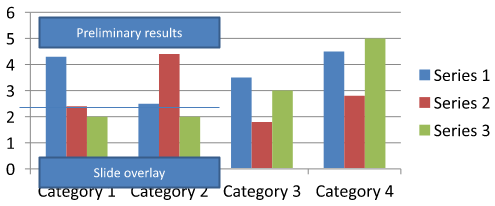
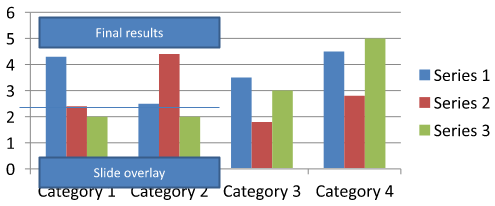
ดาวน์โหลด chart-annotations.pptx แล้ววางไว้ในไดเรกทอรีทำงานของแอปพลิเคชัน สไลด์แรกมีแผนภูมิที่มีคำอธิบายแยกกลุ่มอ่านว่า “Preliminary results”, เส้นที่เป็นของแผนภูมิ, และกล่องข้อความสไลด์ธรรมดาที่อ่านว่า “Slide overlay” ตัวอย่างค้นหาแผนภูมิแรกบนสไลด์นั้นและเปลี่ยนคำอธิบายเป็น “Final results” เมื่อรายงานพร้อมเผยแพร่ มันตรวจสอบว่าคอลเลกชันว่างหรือไม่และแก้ไขเฉพาะ AutoShape ที่มีกรอบข้อความไม่เป็นค่า null จาก getTextFrame และข้อความที่คาดหวัง
use aspose\slides\Presentation;
use aspose\slides\SaveFormat;

$presentation = new Presentation("chart-annotations.pptx");
try {
    $slide = $presentation->getSlides()->get_Item(0);

    $chartType = new JavaClass("com.aspose.slides.IChart");
    $autoShapeType = new JavaClass("com.aspose.slides.IAutoShape");
    $chart = null;
    for ($i = 0; $i < java_values($slide->getShapes()->size()); $i++) {
        $shape = $slide->getShapes()->get_Item($i);
        if (java_instanceof($shape, $chartType)) {
            $chart = $shape;
            break;
        }
    }

    if ($chart === null || java_values($chart->getUserShapes()->getShapes()->size()) == 0) {
        echo "No chart or chart-owned shapes found." . PHP_EOL;
        return;
    }

    $updated = false;
    $userShapes = $chart->getUserShapes()->getShapes();
    for ($i = 0; $i < java_values($userShapes->size()); $i++) {
        $shape = $userShapes->get_Item($i);
        if (java_instanceof($shape, $autoShapeType)) {
            $annotation = $shape;
            if (!java_is_null($annotation->getTextFrame()) && java_values($annotation->getTextFrame()->getText()) === "Preliminary results") {
                $annotation->getTextFrame()->setText("Final results");
                $updated = true;
                break;
            }
        }
    }

    if ($updated) {
        $presentation->save("chart-annotations-updated.pptx", SaveFormat::Pptx);
    } else {
        echo "No matching text annotation found." . PHP_EOL;
    }
} finally {
    $presentation->dispose();
}
เส้นและกล่องข้อความสไลด์ยังคงไม่เปลี่ยนแปลง ภาพต่อไปนี้แสดงผลอินพุตและผลลัพธ์ที่บันทึกแล้วเปิดใหม่:
| ก่อนแก้ไข | หลังแก้ไข |
|---|---|
 |
 |
Note
ตัวอย่างตรวจสอบเฉพาะรูปร่างระดับบนสุดที่เป็นของแผนภูมิ หากคำอธิบายอยู่ภายใน GroupShape ให้ตรวจสอบคอลเลกชัน getShapes ของกลุ่มนั้นด้วย ทำซ้ำแบบรีเคอร์ซีฟสำหรับกลุ่มย่อยทั้งหมดโดยใช้การตรวจสอบข้อความเดียวกันกับรูปร่างลูก กลุ่มเองเป็นคอนเทนเนอร์; อย่าปฏิบัติกลุ่มเป็นกล่องข้อความคำถามที่พบบ่อย
ฉันสามารถตั้งค่าการเติมสีกึ่งโปร่งใสสำหรับคอลัมน์/พื้นที่ในขณะที่ยังคงให้เส้นขอบทึบได้หรือไม่?
ใช่ การเติมความโปร่งแสงและเส้นขอบถูกกำหนดค่าแยกกัน สิ่งนี้เป็นประโยชน์ในการเพิ่มความอ่านง่ายของกริดและข้อมูลในภาพที่หนาแน่น
ฉันจะจัดการกับป้ายข้อมูลเมื่อมันทับซ้อนกันได้อย่างไร?
ลดขนาดตัวอักษร ปิดใช้งานส่วนประกอบของป้ายที่ไม่จำเป็น (เช่น หมวดหมู่) ปรับตำแหน่งป้าย แสดงป้ายเฉพาะจุดที่เลือกหากจำเป็น หรือสลับรูปแบบเป็น “ค่า + คำอธิบาย”
ฉันสามารถใช้การเติมสีแบบไล่สีหรือแพทเทิร์นกับซีรีส์ได้หรือไม่?
ได้ ซีรีส์รองรับการเติมสีแบบทึบ, ไล่สี, และแพทเทิร์น ในการใช้งานจริงควรใช้ไล่สีอย่างระมัดระวังและหลีกเลี่ยงการผสมผสานที่ทำให้คอนทราสต์กับกริดและข้อความลดลง