
슬라이드
Contents
[
Hide
]
이 문서는 Aspose.Slides for Android via Java를 사용하여 슬라이드를 다루는 방법을 보여주는 일련의 예제를 제공합니다. Presentation 클래스를 사용하여 슬라이드를 추가, 액세스, 복제, 재정렬 및 제거하는 방법을 배울 수 있습니다.
아래 각 예제에는 간단한 설명과 이어지는 Java 코드 스니펫이 포함되어 있습니다.
슬라이드 추가
새 슬라이드를 추가하려면 먼저 레이아웃을 선택해야 합니다. 이 예제에서는 Blank 레이아웃을 사용하여 프레젠테이션에 빈 슬라이드를 추가합니다.
static void addSlide() {
    Presentation presentation = new Presentation();
    try {
        ILayoutSlide blankLayout = presentation.getLayoutSlides().getByType(SlideLayoutType.Blank);

        presentation.getSlides().addEmptySlide(blankLayout);
    } finally {
        presentation.dispose();
    }
}
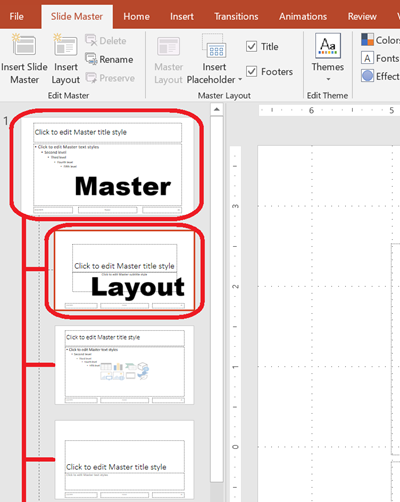
💡 Note: 각 슬라이드 레이아웃은 전체 디자인 및 플레이스홀더 구조를 정의하는 마스터 슬라이드에서 파생됩니다. 아래 이미지는 마스터 슬라이드와 해당 레이아웃이 PowerPoint에서 어떻게 구성되는지를 보여줍니다.
인덱스로 슬라이드 접근
슬라이드의 인덱스를 사용하여 슬라이드에 접근하거나, 참조를 기반으로 슬라이드의 인덱스를 찾을 수 있습니다. 이는 특정 슬라이드를 반복하거나 수정할 때 유용합니다.
static void accessSlide() {
    Presentation presentation = new Presentation();
    try {
        // 또 다른 빈 슬라이드를 추가합니다.
        ILayoutSlide blankLayout = presentation.getLayoutSlides().getByType(SlideLayoutType.Blank);
        presentation.getSlides().addEmptySlide(blankLayout);

        // 인덱스로 슬라이드에 접근합니다.
        ISlide firstSlide = presentation.getSlides().get_Item(0);
        ISlide secondSlide = presentation.getSlides().get_Item(1);

        // 참조에서 슬라이드 인덱스를 가져와 인덱스로 접근합니다.
        int secondSlideIndex = presentation.getSlides().indexOf(secondSlide);
        ISlide secondSlideByIndex = presentation.getSlides().get_Item(secondSlideIndex);
    } finally {
        presentation.dispose();
    }
}
슬라이드 복제
이 예제는 기존 슬라이드를 복제하는 방법을 보여줍니다. 복제된 슬라이드는 슬라이드 컬렉션의 끝에 자동으로 추가됩니다.
static void cloneSlide() {
    Presentation presentation = new Presentation();
    try {
        ISlide firstSlide = presentation.getSlides().get_Item(0);

        ISlide clonedSlide = presentation.getSlides().addClone(firstSlide);

        int clonedSlideIndex = presentation.getSlides().indexOf(clonedSlide);
    } finally {
        presentation.dispose();
    }
}
슬라이드 재정렬
슬라이드 중 하나를 새 인덱스로 이동하여 순서를 변경할 수 있습니다. 이 경우 복제된 슬라이드를 첫 번째 위치로 이동합니다.
static void reorderSlide() {
    Presentation presentation = new Presentation();
    try {
        ISlide firstSlide = presentation.getSlides().get_Item(0);

        ISlide clonedSlide = presentation.getSlides().addClone(firstSlide);

        presentation.getSlides().reorder(0, clonedSlide);
    } finally {
        presentation.dispose();
    }
}
슬라이드 제거
슬라이드를 제거하려면 해당 슬라이드를 참조하고 remove를 호출하면 됩니다. 이 예제에서는 두 번째 슬라이드를 추가한 뒤 원본 슬라이드를 제거하여 새 슬라이드만 남깁니다.
static void removeSlide() {
    Presentation presentation = new Presentation();
    try {
        ILayoutSlide blankLayout = presentation.getLayoutSlides().getByType(SlideLayoutType.Blank);
        ISlide secondSlide = presentation.getSlides().addEmptySlide(blankLayout);

        ISlide firstSlide = presentation.getSlides().get_Item(0);
        presentation.getSlides().remove(firstSlide);
    } finally {
        presentation.dispose();
    }
}