
C++'da Sunum Grafiklerini Biçimlendirme
Genel Bakış
Bu makale, Aspose.Slides kullanarak PowerPoint sunumlarındaki grafiklerin nasıl biçimlendirileceğini açıklar. Eksenler, ızgara çizgileri, başlıklar, lejantlar, veri alanı ve duvar dolguları gibi temel grafik öğelerinin nasıl özelleştirileceğini göstererek grafik verilerinin görünümünü ve okunabilirliğini artırır.
Ayrıca grafik metni için yazı tipi özelliklerinin nasıl ayarlanacağını, grafiğin verilerine önceden tanımlı sayısal biçimlerin nasıl uygulanacağını ve grafik alanının köşelerinin nasıl yuvarlatılacağını gösterir. Bu örnekler, bir sunumdaki grafiğin görsel stilini ve veri sunumunu nasıl kontrol edebileceğinizi ortaya koyar.
Grafik Öğelerini Biçimlendirme
IChart kullanarak grafik başlıklarını, eksenleri, ızgara çizgilerini, lejantları ve veri alanını biçimlendirin. Bu örnek, işaretçili bir çizgi grafiği oluşturur ve varsayılan verileri kullanır, ardından değer ve kategori eksenlerine ayrı metin ve çizgi stilleri uygular. Yazı tipi boyutları ve çizgi kalınlıkları puan cinsindendir; kategori etiketleri 45 derece döndürülür.
Değer ekseni, kaynak hücrelerden bağımsız olarak get_NumberFormat kullanır. Ölçeği -2 ile 15 arasındadır, büyük aralıklar 2, küçük aralıklar 0,5’tir. Örnek ayrıca yüzde biçimlendirmesini get_DisplayUnit ile binler birimine ayarlayarak birleştirir; bu ayarları verinizin anlamına ve büyüklüğüne göre uyarlayın. Lejant, get_Overlay devre dışı bırakıldığı için veri alanının dışındadır. Arka duvar ve taban dolguları get_BackWall ve get_Floor aracılığıyla yapılandırılır, ancak bu yüzeyler yalnızca 3B grafiklerde görünür.
#include <system/shared_ptr.h>
#include <DOM/Presentation.h>
#include <DOM/ISlide.h>
#include <DOM/IShapeCollection.h>
#include <DOM/IChart.h>
#include <Export/SaveFormat.h>
#include <DOM/Chart/ChartType.h>
#include <DOM/Chart/IChartTextFormat.h>
#include <DOM/Chart/IChartPortionFormat.h>
#include <DOM/IPortionFormat.h>
#include <drawing/color.h>
#include <DOM/FillType.h>
#include <DOM/NullableBool.h>
#include <DOM/LineDashStyle.h>
#include <DOM/Fonts/FontData.h>
#include <DOM/IFillFormat.h>
#include <DOM/IColorFormat.h>
#include <DOM/ILineFormat.h>
#include <DOM/ILineFillFormat.h>
#include <DOM/ITextFrame.h>
#include <DOM/IParagraphCollection.h>
#include <DOM/IParagraph.h>
#include <DOM/IPortionCollection.h>
#include <DOM/IPortion.h>
#include <DOM/Chart/IAxesManager.h>
#include <DOM/Chart/IAxis.h>
#include <DOM/Chart/IChartLinesFormat.h>
#include <DOM/Chart/IChartTitle.h>
#include <DOM/Chart/IFormat.h>
#include <DOM/Chart/DisplayUnitType.h>
#include <DOM/Chart/TickLabelPositionType.h>
#include <DOM/Chart/ILegend.h>
#include <DOM/Chart/IChartWall.h>
#include <DOM/Chart/IChartPlotArea.h>

using namespace Aspose::Slides;
using namespace Aspose::Slides::Charts;
using namespace Aspose::Slides::Export;

auto presentation = System::MakeObject<Presentation>();
auto slide = presentation->get_Slide(0);

auto chart = slide->get_Shapes()->AddChart(ChartType::LineWithMarkers, 50, 50, 500, 400);

chart->set_HasTitle(true);
chart->get_ChartTitle()->AddTextFrameForOverriding(u"");
auto chartTitle = chart->get_ChartTitle()->get_TextFrameForOverriding()->get_Paragraphs()->idx_get(0)->get_Portions()->idx_get(0);
chartTitle->set_Text(u"Sample Chart");
chartTitle->get_PortionFormat()->get_FillFormat()->set_FillType(FillType::Solid);
chartTitle->get_PortionFormat()->get_FillFormat()->get_SolidFillColor()->set_Color(System::Drawing::Color::get_Gray());
chartTitle->get_PortionFormat()->set_FontHeight(20);
chartTitle->get_PortionFormat()->set_FontBold(NullableBool::True);
chartTitle->get_PortionFormat()->set_FontItalic(NullableBool::True);

chart->get_Axes()->get_VerticalAxis()->get_MajorGridLinesFormat()->get_Line()->get_FillFormat()->set_FillType(FillType::Solid);
chart->get_Axes()->get_VerticalAxis()->get_MajorGridLinesFormat()->get_Line()->get_FillFormat()->get_SolidFillColor()->set_Color(System::Drawing::Color::get_Blue());
chart->get_Axes()->get_VerticalAxis()->get_MajorGridLinesFormat()->get_Line()->set_Width(5);
chart->get_Axes()->get_VerticalAxis()->get_MajorGridLinesFormat()->get_Line()->set_DashStyle(LineDashStyle::DashDot);

chart->get_Axes()->get_VerticalAxis()->get_MinorGridLinesFormat()->get_Line()->get_FillFormat()->set_FillType(FillType::Solid);
chart->get_Axes()->get_VerticalAxis()->get_MinorGridLinesFormat()->get_Line()->get_FillFormat()->get_SolidFillColor()->set_Color(System::Drawing::Color::get_Red());
chart->get_Axes()->get_VerticalAxis()->get_MinorGridLinesFormat()->get_Line()->set_Width(3);

chart->get_Axes()->get_VerticalAxis()->set_IsNumberFormatLinkedToSource(false);
chart->get_Axes()->get_VerticalAxis()->set_DisplayUnit(DisplayUnitType::Thousands);
chart->get_Axes()->get_VerticalAxis()->set_NumberFormat(u"0.0%");

chart->get_Axes()->get_VerticalAxis()->set_IsAutomaticMajorUnit(false);
chart->get_Axes()->get_VerticalAxis()->set_IsAutomaticMaxValue(false);
chart->get_Axes()->get_VerticalAxis()->set_IsAutomaticMinorUnit(false);
chart->get_Axes()->get_VerticalAxis()->set_IsAutomaticMinValue(false);

chart->get_Axes()->get_VerticalAxis()->set_MaxValue(15.0f);
chart->get_Axes()->get_VerticalAxis()->set_MinValue(-2.0f);
chart->get_Axes()->get_VerticalAxis()->set_MinorUnit(0.5f);
chart->get_Axes()->get_VerticalAxis()->set_MajorUnit(2.0f);

auto valueAxisText = chart->get_Axes()->get_VerticalAxis()->get_TextFormat()->get_PortionFormat();
valueAxisText->set_FontBold(NullableBool::True);
valueAxisText->set_FontHeight(16);
valueAxisText->set_FontItalic(NullableBool::True);
valueAxisText->get_FillFormat()->set_FillType(FillType::Solid);
valueAxisText->get_FillFormat()->get_SolidFillColor()->set_Color(System::Drawing::Color::get_DarkGreen());
auto valueAxisFont = System::MakeObject<FontData>(u"Times New Roman");
valueAxisText->set_LatinFont(valueAxisFont);

chart->get_Axes()->get_VerticalAxis()->set_HasTitle(true);
chart->get_Axes()->get_VerticalAxis()->get_Title()->AddTextFrameForOverriding(u"");
auto valueAxisTitle = chart->get_Axes()->get_VerticalAxis()->get_Title()->get_TextFrameForOverriding()->get_Paragraphs()->idx_get(0)->get_Portions()->idx_get(0);
valueAxisTitle->set_Text(u"Primary Axis");
valueAxisTitle->get_PortionFormat()->get_FillFormat()->set_FillType(FillType::Solid);
valueAxisTitle->get_PortionFormat()->get_FillFormat()->get_SolidFillColor()->set_Color(System::Drawing::Color::get_Gray());
valueAxisTitle->get_PortionFormat()->set_FontHeight(20);
valueAxisTitle->get_PortionFormat()->set_FontBold(NullableBool::True);
valueAxisTitle->get_PortionFormat()->set_FontItalic(NullableBool::True);

chart->get_Axes()->get_HorizontalAxis()->get_MajorGridLinesFormat()->get_Line()->get_FillFormat()->set_FillType(FillType::Solid);
chart->get_Axes()->get_HorizontalAxis()->get_MajorGridLinesFormat()->get_Line()->get_FillFormat()->get_SolidFillColor()->set_Color(System::Drawing::Color::get_Green());
chart->get_Axes()->get_HorizontalAxis()->get_MajorGridLinesFormat()->get_Line()->set_Width(5);

chart->get_Axes()->get_HorizontalAxis()->get_MinorGridLinesFormat()->get_Line()->get_FillFormat()->set_FillType(FillType::Solid);
chart->get_Axes()->get_HorizontalAxis()->get_MinorGridLinesFormat()->get_Line()->get_FillFormat()->get_SolidFillColor()->set_Color(System::Drawing::Color::get_Yellow());
chart->get_Axes()->get_HorizontalAxis()->get_MinorGridLinesFormat()->get_Line()->set_Width(3);

auto categoryAxisText = chart->get_Axes()->get_HorizontalAxis()->get_TextFormat()->get_PortionFormat();
categoryAxisText->set_FontBold(NullableBool::True);
categoryAxisText->set_FontHeight(16);
categoryAxisText->set_FontItalic(NullableBool::True);
categoryAxisText->get_FillFormat()->set_FillType(FillType::Solid);
categoryAxisText->get_FillFormat()->get_SolidFillColor()->set_Color(System::Drawing::Color::get_Blue());
auto categoryAxisFont = System::MakeObject<FontData>(u"Arial");
categoryAxisText->set_LatinFont(categoryAxisFont);

chart->get_Axes()->get_HorizontalAxis()->set_HasTitle(true);
chart->get_Axes()->get_HorizontalAxis()->get_Title()->AddTextFrameForOverriding(u"");

auto categoryAxisTitle = chart->get_Axes()->get_HorizontalAxis()->get_Title()->get_TextFrameForOverriding()->get_Paragraphs()->idx_get(0)->get_Portions()->idx_get(0);
categoryAxisTitle->set_Text(u"Sample Category");
categoryAxisTitle->get_PortionFormat()->get_FillFormat()->set_FillType(FillType::Solid);
categoryAxisTitle->get_PortionFormat()->get_FillFormat()->get_SolidFillColor()->set_Color(System::Drawing::Color::get_Gray());
categoryAxisTitle->get_PortionFormat()->set_FontHeight(20);
categoryAxisTitle->get_PortionFormat()->set_FontBold(NullableBool::True);
categoryAxisTitle->get_PortionFormat()->set_FontItalic(NullableBool::True);

chart->get_Axes()->get_HorizontalAxis()->set_TickLabelPosition(TickLabelPositionType::Low);
chart->get_Axes()->get_HorizontalAxis()->set_TickLabelRotationAngle(45);

auto legendText = chart->get_Legend()->get_TextFormat()->get_PortionFormat();
legendText->set_FontBold(NullableBool::True);
legendText->set_FontHeight(16);
legendText->set_FontItalic(NullableBool::True);
legendText->get_FillFormat()->set_FillType(FillType::Solid);
legendText->get_FillFormat()->get_SolidFillColor()->set_Color(System::Drawing::Color::get_DarkRed());

chart->get_Legend()->set_Overlay(false);

chart->get_BackWall()->set_Thickness(1);
chart->get_BackWall()->get_Format()->get_Fill()->set_FillType(FillType::Solid);
chart->get_BackWall()->get_Format()->get_Fill()->get_SolidFillColor()->set_Color(System::Drawing::Color::get_Orange());

chart->get_Floor()->get_Format()->get_Fill()->set_FillType(FillType::Solid);
chart->get_Floor()->get_Format()->get_Fill()->get_SolidFillColor()->set_Color(System::Drawing::Color::get_Red());

chart->get_PlotArea()->get_Format()->get_Fill()->set_FillType(FillType::Solid);
chart->get_PlotArea()->get_Format()->get_Fill()->get_SolidFillColor()->set_Color(System::Drawing::Color::get_LightCyan());

presentation->Save(u"FormattedChart_out.pptx", SaveFormat::Pptx);
Bir Grafik İçin Yazı Tipi Özelliklerini Ayarlama
Grafik metni için varsayılan yazı tipi boyutunu Chart::get_TextFormat aracılığıyla ayarlayın. Örnek, 20 puanlık bir yazı tipiyle bir kümeleme sütun grafiği oluşturur ve ilk serinin değer etiketlerini set_ShowValue ile etkinleştirir. Kendi açık yazı tipi ayarlarına sahip metin öğeleri, grafik varsayılanını geçersiz kılabilir.
#include <system/shared_ptr.h>
#include <DOM/Presentation.h>
#include <DOM/ISlide.h>
#include <DOM/IShapeCollection.h>
#include <DOM/IChart.h>
#include <Export/SaveFormat.h>
#include <DOM/Chart/ChartType.h>
#include <DOM/Chart/IChartTextFormat.h>
#include <DOM/Chart/IChartPortionFormat.h>
#include <DOM/IPortionFormat.h>
#include <DOM/Chart/IChartData.h>
#include <DOM/Chart/IChartSeriesCollection.h>
#include <DOM/Chart/IChartSeries.h>
#include <DOM/Chart/IDataLabelCollection.h>
#include <DOM/Chart/IDataLabelFormat.h>

using namespace Aspose::Slides;
using namespace Aspose::Slides::Charts;
using namespace Aspose::Slides::Export;

auto presentation = System::MakeObject<Presentation>();
auto slide = presentation->get_Slide(0);

auto chart = slide->get_Shapes()->AddChart(ChartType::ClusteredColumn, 100, 100, 500, 400);
chart->get_TextFormat()->get_PortionFormat()->set_FontHeight(20);
chart->get_ChartData()->get_Series()->idx_get(0)->get_Labels()->get_DefaultDataLabelFormat()->set_ShowValue(true);

presentation->Save(u"FontPropertiesForChart.pptx", SaveFormat::Pptx);
Sayısal Biçimi Ayarlama
IGraphDataCell::set_PresetNumberFormat kullanarak grafik çalışma kitabı hücrelerine yerleşik bir sayı biçimi uygulayın. Bu örnek, varsayılan, hücre tabanlı veriyle bir kümeleme sütun grafiği oluşturur ve her seri değer hücresine biçim dizini 10 (0.00%) uygular. Bu, sayıları değiştirmeden çalışma kitabında değerlerin nasıl gösterileceğini değiştirir; örneğin, 0.25 değeri 25,00% olarak görüntülenir. Eksen ve veri etiketi biçimleri ayrı ayrı yapılandırılabilir.
#include <system/shared_ptr.h>
#include <DOM/Presentation.h>
#include <DOM/ISlide.h>
#include <DOM/IShapeCollection.h>
#include <DOM/IChart.h>
#include <Export/SaveFormat.h>
#include <DOM/Chart/ChartType.h>
#include <DOM/Chart/IChartTextFormat.h>
#include <DOM/Chart/IChartPortionFormat.h>
#include <DOM/IPortionFormat.h>
#include <DOM/Chart/IChartData.h>
#include <DOM/Chart/IChartSeriesCollection.h>
#include <DOM/Chart/IChartSeries.h>
#include <DOM/Chart/IChartDataPointCollection.h>
#include <DOM/Chart/IChartDataPoint.h>
#include <DOM/Chart/IDoubleChartValue.h>
#include <DOM/Chart/IChartDataCell.h>

using namespace Aspose::Slides;
using namespace Aspose::Slides::Charts;
using namespace Aspose::Slides::Export;

auto presentation = System::MakeObject<Presentation>();
auto slide = presentation->get_Slide(0);

auto chart = slide->get_Shapes()->AddChart(ChartType::ClusteredColumn, 50, 50, 500, 400);
auto series = chart->get_ChartData()->get_Series();

for (auto chartSeries : series)
{
    for (auto dataPoint : chartSeries->get_DataPoints())
    {
        dataPoint->get_Value()->get_AsCell()->set_PresetNumberFormat(10); // 0.00%
    }
}

presentation->Save(u"PresetNumberFormat_out.pptx", SaveFormat::Pptx);
Aşağıdaki tablo, İngiliz (Amerika Birleşik Devletleri) bölgesi için temsilci Excel biçimleriyle birlikte yerleşik sayı biçimi dizinlerini listeler. Tam biçim dizeleri ve görüntüleri uygulama ve bölgeye göre değişebilir, özellikle para birimi ve tarih biçimlerinde. Bazı Excel biçimleri, Microsoft’un sayı biçimi uygulama notları’nda açıklandığı gibi OOXML standardındaki varsayılanlardan farklılık gösterebilir.
| Dizin | Biçim |
|---|---|
| 0 | General |
| 1 | 0 |
| 2 | 0.00 |
| 3 | #,##0 |
| 4 | #,##0.00 |
| 5 | "$"#,##0_);("$"#,##0) |
| 6 | "$"#,##0_);[Red]("$"#,##0) |
| 7 | "$"#,##0.00_);("$"#,##0.00) |
| 8 | "$"#,##0.00_);[Red]("$"#,##0.00) |
| 9 | 0% |
| 10 | 0.00% |
| 11 | 0.00E+00 |
| 12 | # ?/? |
| 13 | # ??/?? |
| 14 | m/d/yyyy |
| 15 | d-mmm-yy |
| 16 | d-mmm |
| 17 | mmm-yy |
| 18 | h:mm AM/PM |
| 19 | h:mm:ss AM/PM |
| 20 | h:mm |
| 21 | h:mm:ss |
| 22 | m/d/yyyy h:mm |
| 37 | #,##0_);(#,##0) |
| 38 | #,##0_);[Red](#,##0) |
| 39 | #,##0.00_);(#,##0.00) |
| 40 | #,##0.00_);[Red](#,##0.00) |
| 41 | _(* #,##0_);_(* (#,##0);_(* "-"_);_(@_) |
| 42 | _("$"* #,##0_);_("$"* (#,##0);_("$"* "-"_);_(@_) |
| 43 | _(* #,##0.00_);_(* (#,##0.00);_(* "-"??_);_(@_) |
| 44 | _("$"* #,##0.00_);_("$"* (#,##0.00);_("$"* "-"??_);_(@_) |
| 45 | mm:ss |
| 46 | [h]:mm:ss |
| 47 | mm:ss.0 |
| 48 | ##0.0E+0 |
| 49 | @ |
Grafik Alanı Yuvarlatılmış Kenarlıkları Ayarlama
IChart::set_HasRoundedCorners etkinleştirerek grafik alanının köşelerini yuvarlayın. Örnek, bir kümeleme sütun grafiği oluşturur ve get_LineFormat kullanarak kenarlığını katı gri bir renkle ve tek çizgi stiliyle belirler, ardından sunumu kaydeder.
#include <system/shared_ptr.h>
#include <DOM/Presentation.h>
#include <DOM/ISlide.h>
#include <DOM/IShapeCollection.h>
#include <DOM/IChart.h>
#include <Export/SaveFormat.h>
#include <DOM/Chart/ChartType.h>
#include <DOM/Chart/IChartTextFormat.h>
#include <DOM/Chart/IChartPortionFormat.h>
#include <DOM/IPortionFormat.h>
#include <drawing/color.h>
#include <DOM/FillType.h>
#include <DOM/LineStyle.h>
#include <DOM/ILineFormat.h>
#include <DOM/ILineFillFormat.h>
#include <DOM/IColorFormat.h>

using namespace Aspose::Slides;
using namespace Aspose::Slides::Charts;
using namespace Aspose::Slides::Export;

auto presentation = System::MakeObject<Presentation>();
auto slide = presentation->get_Slide(0);

auto chart = slide->get_Shapes()->AddChart(ChartType::ClusteredColumn, 20, 100, 600, 400);
chart->get_LineFormat()->get_FillFormat()->set_FillType(FillType::Solid);
chart->get_LineFormat()->get_FillFormat()->get_SolidFillColor()->set_Color(System::Drawing::Color::get_Gray());
chart->get_LineFormat()->set_Style(LineStyle::Single);
chart->set_HasRoundedCorners(true);

presentation->Save(u"out.pptx", SaveFormat::Pptx);
Mevcut Grafik Açıklamalarını Düzenleme
Bir grafik, rapor durumunu açıklayan bir metin notu gibi özel şekiller içerebilir. Bu şekillere IChart::get_UserShapes aracılığıyla erişilir; aynı zamanda Chart::get_UserShapes altında da listelenir. get_Shapes koleksiyonu, grafik tarafından sahip olunan şekilleri içerir.
Grafiğin üzerine yerleştirilen sıradan bir metin kutusu, grafiğin bir parçası gibi görünse de slayta aittir. Slide::get_Shapes içinde yineleyerek grafik ve sıradan slayt şekilleri bulunur, ancak grafiğin içindeki bireysel şekiller listelenmez. Grafik başlıkları ve veri etiketleri ayrı grafik öğeleridir, bu koleksiyonda özel açıklama olarak yer almaz.
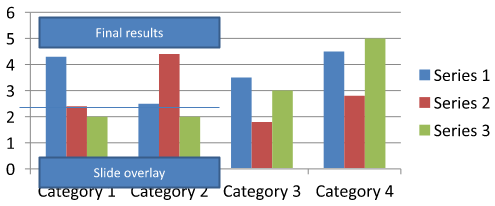
chart-annotations.pptx dosyasını indirin ve uygulamanın çalışma dizinine yerleştirin. İlk slaytı, “Preliminary results” metnini içeren ayrılmış bir açıklama, grafik tarafından sahip olunan bir çizgi ve “Slide overlay” metnini içeren sıradan bir slayt metin kutusu barındırır. Örnek, bu slayttaki ilk grafiği bulur ve rapor yayınlanmaya hazır olduğunda açıklamayı “Final results” olarak değiştirir. Boş bir koleksiyon olup olmadığını kontrol eder ve yalnızca IAutoShape içinde null olmayan get_TextFrame ve beklenen metni içeren şekli düzenler.
#include <system/shared_ptr.h>
#include <DOM/Presentation.h>
#include <DOM/ISlide.h>
#include <DOM/IShapeCollection.h>
#include <DOM/IChart.h>
#include <Export/SaveFormat.h>
#include <system/console.h>
#include <DOM/IGroupShape.h>
#include <DOM/IAutoShape.h>
#include <DOM/ITextFrame.h>

using namespace Aspose::Slides;
using namespace Aspose::Slides::Charts;
using namespace Aspose::Slides::Export;

auto presentation = System::MakeObject<Presentation>(u"chart-annotations.pptx");
auto slide = presentation->get_Slide(0);

System::SharedPtr<IChart> chart;
for (auto shape : slide->get_Shapes())
{
    auto candidate = System::DynamicCast<IChart>(shape);
    if (candidate != nullptr)
    {
        chart = candidate;
        break;
    }
}

if (chart == nullptr || chart->get_UserShapes()->get_Shapes()->get_Count() == 0)
{
    System::Console::WriteLine(u"No chart or chart-owned shapes found.");
    return;
}

auto updated = false;
for (auto shape : chart->get_UserShapes()->get_Shapes())
{
    auto annotation = System::DynamicCast<IAutoShape>(shape);
    if (annotation != nullptr &&
        annotation->get_TextFrame() != nullptr &&
        annotation->get_TextFrame()->get_Text() == u"Preliminary results")
    {
        annotation->get_TextFrame()->set_Text(u"Final results");
        updated = true;
        break;
    }
}

if (updated)
{
    presentation->Save(u"chart-annotations-updated.pptx", SaveFormat::Pptx);
}
else
{
    System::Console::WriteLine(u"No matching text annotation found.");
}
Çizgi ve slayt metin kutusu değişmeden kalır. Aşağıdaki görseller girdi ve kaydedilip yeniden açılan sonucu gösterir:
| Düzenleme öncesi | Düzenleme sonrası |
|---|---|
 |
 |
Note
The example inspects only the top-level chart-owned shapes. If an annotation is inside an IGroupShape, inspect that group’s get_Shapes collection as well. Repeat this recursively for nested groups, applying the same text checks to their child shapes. A group itself is a container; do not treat it as a text box.SSS
Sütunlar/alalar için kenarı opak tutarak yarı saydam dolgular ayarlayabilir miyim?
Evet. Dolgu şeffaflığı ve dış hat ayrı ayrı yapılandırılır. Bu, yoğun görselleştirmelerde ızgara ve veri okunabilirliğini artırmak için faydalıdır.
Etiketler üst üste geldiğinde ne yapmalıyım?
Yazı tipi boyutunu azaltın, gereksiz etiket bileşenlerini devre dışı bırakın (örneğin, kategorileri), etiket konumunu ayarlayın, gerekirse yalnızca seçili puanlar için etiket gösterin veya formatı “değer + lejant” şeklinde değiştirin.
Serilere degrade veya desen dolgular uygulayabilir miyim?
Evet. Seriler katı, degrade ve desen dolgularını destekler. Pratikte degradeleri ölçülü kullanın ve ızgara ve metinle kontrastı azaltan kombinasyonlardan kaçının.