
C++에서 프레젠테이션 차트 서식 지정
개요
이 문서는 Aspose.Slides를 사용하여 PowerPoint 프레젠테이션에서 차트를 서식 지정하는 방법을 설명합니다. 축, 눈금선, 제목, 범례, 플롯 영역 및 벽 채우기와 같은 핵심 차트 요소를 사용자 지정하여 차트 데이터의 외관과 가독성을 향상시키는 방법을 보여줍니다.
또한 차트 텍스트의 글꼴 속성을 설정하고, 차트 데이터에 사전 설정된 숫자 형식을 적용하며, 차트 영역에 둥근 모서리를 활성화하는 방법을 시연합니다. 이러한 예제들은 프레젠테이션에서 차트의 시각적 스타일과 데이터 표시를 모두 제어하는 방법을 보여줍니다.
차트 엔터티 서식 지정
Use IChart to format chart titles, axes, grid lines, legends, and the plot area. This example creates a line chart with markers and default data, then applies separate text and line styles to its value and category axes. Font sizes and line widths are specified in points; category labels are rotated by 45 degrees.
The value axis uses get_NumberFormat independently of the source cells. Its scale runs from -2 to 15, with major intervals of 2 and minor intervals of 0.5. The example also combines percentage formatting with get_DisplayUnit set to thousands, so adapt these settings to the meaning and magnitude of your data. The legend stays outside the plot area because get_Overlay is disabled. Back-wall and floor fills are configured through get_BackWall and get_Floor, but these surfaces are only visible in 3D charts.
#include <system/shared_ptr.h>
#include <DOM/Presentation.h>
#include <DOM/ISlide.h>
#include <DOM/IShapeCollection.h>
#include <DOM/IChart.h>
#include <Export/SaveFormat.h>
#include <DOM/Chart/ChartType.h>
#include <DOM/Chart/IChartTextFormat.h>
#include <DOM/Chart/IChartPortionFormat.h>
#include <DOM/IPortionFormat.h>
#include <drawing/color.h>
#include <DOM/FillType.h>
#include <DOM/NullableBool.h>
#include <DOM/LineDashStyle.h>
#include <DOM/Fonts/FontData.h>
#include <DOM/IFillFormat.h>
#include <DOM/IColorFormat.h>
#include <DOM/ILineFormat.h>
#include <DOM/ILineFillFormat.h>
#include <DOM/ITextFrame.h>
#include <DOM/IParagraphCollection.h>
#include <DOM/IParagraph.h>
#include <DOM/IPortionCollection.h>
#include <DOM/IPortion.h>
#include <DOM/Chart/IAxesManager.h>
#include <DOM/Chart/IAxis.h>
#include <DOM/Chart/IChartLinesFormat.h>
#include <DOM/Chart/IChartTitle.h>
#include <DOM/Chart/IFormat.h>
#include <DOM/Chart/DisplayUnitType.h>
#include <DOM/Chart/TickLabelPositionType.h>
#include <DOM/Chart/ILegend.h>
#include <DOM/Chart/IChartWall.h>
#include <DOM/Chart/IChartPlotArea.h>

using namespace Aspose::Slides;
using namespace Aspose::Slides::Charts;
using namespace Aspose::Slides::Export;

auto presentation = System::MakeObject<Presentation>();
auto slide = presentation->get_Slide(0);

auto chart = slide->get_Shapes()->AddChart(ChartType::LineWithMarkers, 50, 50, 500, 400);

chart->set_HasTitle(true);
chart->get_ChartTitle()->AddTextFrameForOverriding(u"");
auto chartTitle = chart->get_ChartTitle()->get_TextFrameForOverriding()->get_Paragraphs()->idx_get(0)->get_Portions()->idx_get(0);
chartTitle->set_Text(u"Sample Chart");
chartTitle->get_PortionFormat()->get_FillFormat()->set_FillType(FillType::Solid);
chartTitle->get_PortionFormat()->get_FillFormat()->get_SolidFillColor()->set_Color(System::Drawing::Color::get_Gray());
chartTitle->get_PortionFormat()->set_FontHeight(20);
chartTitle->get_PortionFormat()->set_FontBold(NullableBool::True);
chartTitle->get_PortionFormat()->set_FontItalic(NullableBool::True);

chart->get_Axes()->get_VerticalAxis()->get_MajorGridLinesFormat()->get_Line()->get_FillFormat()->set_FillType(FillType::Solid);
chart->get_Axes()->get_VerticalAxis()->get_MajorGridLinesFormat()->get_Line()->get_FillFormat()->get_SolidFillColor()->set_Color(System::Drawing::Color::get_Blue());
chart->get_Axes()->get_VerticalAxis()->get_MajorGridLinesFormat()->get_Line()->set_Width(5);
chart->get_Axes()->get_VerticalAxis()->get_MajorGridLinesFormat()->get_Line()->set_DashStyle(LineDashStyle::DashDot);

chart->get_Axes()->get_VerticalAxis()->get_MinorGridLinesFormat()->get_Line()->get_FillFormat()->set_FillType(FillType::Solid);
chart->get_Axes()->get_VerticalAxis()->get_MinorGridLinesFormat()->get_Line()->get_FillFormat()->get_SolidFillColor()->set_Color(System::Drawing::Color::get_Red());
chart->get_Axes()->get_VerticalAxis()->get_MinorGridLinesFormat()->get_Line()->set_Width(3);

chart->get_Axes()->get_VerticalAxis()->set_IsNumberFormatLinkedToSource(false);
chart->get_Axes()->get_VerticalAxis()->set_DisplayUnit(DisplayUnitType::Thousands);
chart->get_Axes()->get_VerticalAxis()->set_NumberFormat(u"0.0%");

chart->get_Axes()->get_VerticalAxis()->set_IsAutomaticMajorUnit(false);
chart->get_Axes()->get_VerticalAxis()->set_IsAutomaticMaxValue(false);
chart->get_Axes()->get_VerticalAxis()->set_IsAutomaticMinorUnit(false);
chart->get_Axes()->get_VerticalAxis()->set_IsAutomaticMinValue(false);

chart->get_Axes()->get_VerticalAxis()->set_MaxValue(15.0f);
chart->get_Axes()->get_VerticalAxis()->set_MinValue(-2.0f);
chart->get_Axes()->get_VerticalAxis()->set_MinorUnit(0.5f);
chart->get_Axes()->get_VerticalAxis()->set_MajorUnit(2.0f);

auto valueAxisText = chart->get_Axes()->get_VerticalAxis()->get_TextFormat()->get_PortionFormat();
valueAxisText->set_FontBold(NullableBool::True);
valueAxisText->set_FontHeight(16);
valueAxisText->set_FontItalic(NullableBool::True);
valueAxisText->get_FillFormat()->set_FillType(FillType::Solid);
valueAxisText->get_FillFormat()->get_SolidFillColor()->set_Color(System::Drawing::Color::get_DarkGreen());
auto valueAxisFont = System::MakeObject<FontData>(u"Times New Roman");
valueAxisText->set_LatinFont(valueAxisFont);

chart->get_Axes()->get_VerticalAxis()->set_HasTitle(true);
chart->get_Axes()->get_VerticalAxis()->get_Title()->AddTextFrameForOverriding(u"");
auto valueAxisTitle = chart->get_Axes()->get_VerticalAxis()->get_Title()->get_TextFrameForOverriding()->get_Paragraphs()->idx_get(0)->get_Portions()->idx_get(0);
valueAxisTitle->set_Text(u"Primary Axis");
valueAxisTitle->get_PortionFormat()->get_FillFormat()->set_FillType(FillType::Solid);
valueAxisTitle->get_PortionFormat()->get_FillFormat()->get_SolidFillColor()->set_Color(System::Drawing::Color::get_Gray());
valueAxisTitle->get_PortionFormat()->set_FontHeight(20);
valueAxisTitle->get_PortionFormat()->set_FontBold(NullableBool::True);
valueAxisTitle->get_PortionFormat()->set_FontItalic(NullableBool::True);

chart->get_Axes()->get_HorizontalAxis()->get_MajorGridLinesFormat()->get_Line()->get_FillFormat()->set_FillType(FillType::Solid);
chart->get_Axes()->get_HorizontalAxis()->get_MajorGridLinesFormat()->get_Line()->get_FillFormat()->get_SolidFillColor()->set_Color(System::Drawing::Color::get_Green());
chart->get_Axes()->get_HorizontalAxis()->get_MajorGridLinesFormat()->get_Line()->set_Width(5);

chart->get_Axes()->get_HorizontalAxis()->get_MinorGridLinesFormat()->get_Line()->get_FillFormat()->set_FillType(FillType::Solid);
chart->get_Axes()->get_HorizontalAxis()->get_MinorGridLinesFormat()->get_Line()->get_FillFormat()->get_SolidFillColor()->set_Color(System::Drawing::Color::get_Yellow());
chart->get_Axes()->get_HorizontalAxis()->get_MinorGridLinesFormat()->get_Line()->set_Width(3);

auto categoryAxisText = chart->get_Axes()->get_HorizontalAxis()->get_TextFormat()->get_PortionFormat();
categoryAxisText->set_FontBold(NullableBool::True);
categoryAxisText->set_FontHeight(16);
categoryAxisText->set_FontItalic(NullableBool::True);
categoryAxisText->get_FillFormat()->set_FillType(FillType::Solid);
categoryAxisText->get_FillFormat()->get_SolidFillColor()->set_Color(System::Drawing::Color::get_Blue());
auto categoryAxisFont = System::MakeObject<FontData>(u"Arial");
categoryAxisText->set_LatinFont(categoryAxisFont);

chart->get_Axes()->get_HorizontalAxis()->set_HasTitle(true);
chart->get_Axes()->get_HorizontalAxis()->get_Title()->AddTextFrameForOverriding(u"");

auto categoryAxisTitle = chart->get_Axes()->get_HorizontalAxis()->get_Title()->get_TextFrameForOverriding()->get_Paragraphs()->idx_get(0)->get_Portions()->idx_get(0);
categoryAxisTitle->set_Text(u"Sample Category");
categoryAxisTitle->get_PortionFormat()->get_FillFormat()->set_FillType(FillType::Solid);
categoryAxisTitle->get_PortionFormat()->get_FillFormat()->get_SolidFillColor()->set_Color(System::Drawing::Color::get_Gray());
categoryAxisTitle->get_PortionFormat()->set_FontHeight(20);
categoryAxisTitle->get_PortionFormat()->set_FontBold(NullableBool::True);
categoryAxisTitle->get_PortionFormat()->set_FontItalic(NullableBool::True);

chart->get_Axes()->get_HorizontalAxis()->set_TickLabelPosition(TickLabelPositionType::Low);
chart->get_Axes()->get_HorizontalAxis()->set_TickLabelRotationAngle(45);

auto legendText = chart->get_Legend()->get_TextFormat()->get_PortionFormat();
legendText->set_FontBold(NullableBool::True);
legendText->set_FontHeight(16);
legendText->set_FontItalic(NullableBool::True);
legendText->get_FillFormat()->set_FillType(FillType::Solid);
legendText->get_FillFormat()->get_SolidFillColor()->set_Color(System::Drawing::Color::get_DarkRed());

chart->get_Legend()->set_Overlay(false);

chart->get_BackWall()->set_Thickness(1);
chart->get_BackWall()->get_Format()->get_Fill()->set_FillType(FillType::Solid);
chart->get_BackWall()->get_Format()->get_Fill()->get_SolidFillColor()->set_Color(System::Drawing::Color::get_Orange());

chart->get_Floor()->get_Format()->get_Fill()->set_FillType(FillType::Solid);
chart->get_Floor()->get_Format()->get_Fill()->get_SolidFillColor()->set_Color(System::Drawing::Color::get_Red());

chart->get_PlotArea()->get_Format()->get_Fill()->set_FillType(FillType::Solid);
chart->get_PlotArea()->get_Format()->get_Fill()->get_SolidFillColor()->set_Color(System::Drawing::Color::get_LightCyan());

presentation->Save(u"FormattedChart_out.pptx", SaveFormat::Pptx);
차트의 글꼴 속성 설정
Set the default font size for chart text through Chart::get_TextFormat. The example creates a clustered column chart with a 20-point font and enables value labels for the first series through set_ShowValue. Text elements with their own explicit font settings can override the chart default.
#include <system/shared_ptr.h>
#include <DOM/Presentation.h>
#include <DOM/ISlide.h>
#include <DOM/IShapeCollection.h>
#include <DOM/IChart.h>
#include <Export/SaveFormat.h>
#include <DOM/Chart/ChartType.h>
#include <DOM/Chart/IChartTextFormat.h>
#include <DOM/Chart/IChartPortionFormat.h>
#include <DOM/IPortionFormat.h>
#include <DOM/Chart/IChartData.h>
#include <DOM/Chart/IChartSeriesCollection.h>
#include <DOM/Chart/IChartSeries.h>
#include <DOM/Chart/IDataLabelCollection.h>
#include <DOM/Chart/IDataLabelFormat.h>

using namespace Aspose::Slides;
using namespace Aspose::Slides::Charts;
using namespace Aspose::Slides::Export;

auto presentation = System::MakeObject<Presentation>();
auto slide = presentation->get_Slide(0);

auto chart = slide->get_Shapes()->AddChart(ChartType::ClusteredColumn, 100, 100, 500, 400);
chart->get_TextFormat()->get_PortionFormat()->set_FontHeight(20);
chart->get_ChartData()->get_Series()->idx_get(0)->get_Labels()->get_DefaultDataLabelFormat()->set_ShowValue(true);

presentation->Save(u"FontPropertiesForChart.pptx", SaveFormat::Pptx);
숫자 형식 설정
Use IChartDataCell::set_PresetNumberFormat to apply a built-in number format to chart workbook cells. This example creates a clustered column chart with default, cell-backed data and applies format index 10 (0.00%) to each series value cell. This changes how the values are displayed in the workbook without changing the underlying numbers; for example, 0.25 is displayed as 25.00%. Axis and data-label formats can be configured separately.
#include <system/shared_ptr.h>
#include <DOM/Presentation.h>
#include <DOM/ISlide.h>
#include <DOM/IShapeCollection.h>
#include <DOM/IChart.h>
#include <Export/SaveFormat.h>
#include <DOM/Chart/ChartType.h>
#include <DOM/Chart/IChartTextFormat.h>
#include <DOM/Chart/IChartPortionFormat.h>
#include <DOM/IPortionFormat.h>
#include <DOM/Chart/IChartData.h>
#include <DOM/Chart/IChartSeriesCollection.h>
#include <DOM/Chart/IChartSeries.h>
#include <DOM/Chart/IChartDataPointCollection.h>
#include <DOM/Chart/IChartDataPoint.h>
#include <DOM/Chart/IDoubleChartValue.h>
#include <DOM/Chart/IChartDataCell.h>

using namespace Aspose::Slides;
using namespace Aspose::Slides::Charts;
using namespace Aspose::Slides::Export;

auto presentation = System::MakeObject<Presentation>();
auto slide = presentation->get_Slide(0);

auto chart = slide->get_Shapes()->AddChart(ChartType::ClusteredColumn, 50, 50, 500, 400);
auto series = chart->get_ChartData()->get_Series();

for (auto chartSeries : series)
{
    for (auto dataPoint : chartSeries->get_DataPoints())
    {
        dataPoint->get_Value()->get_AsCell()->set_PresetNumberFormat(10); // 0.00%
    }
}

presentation->Save(u"PresetNumberFormat_out.pptx", SaveFormat::Pptx);
다음 표는 영어(미국) 로케일에 대한 대표적인 Excel 형식을 가진 내장 숫자 형식 인덱스를 나열합니다. 정확한 형식 문자열과 표시 방식은 애플리케이션 및 로케일에 따라 다를 수 있으며, 특히 통화와 날짜 형식이 그렇습니다. 일부 Excel 형식은 Microsoft의 숫자 형식 구현 노트에 설명된 OOXML 표준 기본값과도 차이가 있습니다.
| 인덱스 | 형식 |
|---|---|
| 0 | General |
| 1 | 0 |
| 2 | 0.00 |
| 3 | #,##0 |
| 4 | #,##0.00 |
| 5 | "$"#,##0_);("$"#,##0) |
| 6 | "$"#,##0_);[Red]("$"#,##0) |
| 7 | "$"#,##0.00_);("$"#,##0.00) |
| 8 | "$"#,##0.00_);[Red]("$"#,##0.00) |
| 9 | 0% |
| 10 | 0.00% |
| 11 | 0.00E+00 |
| 12 | # ?/? |
| 13 | # ??/?? |
| 14 | m/d/yyyy |
| 15 | d-mmm-yy |
| 16 | d-mmm |
| 17 | mmm-yy |
| 18 | h:mm AM/PM |
| 19 | h:mm:ss AM/PM |
| 20 | h:mm |
| 21 | h:mm:ss |
| 22 | m/d/yyyy h:mm |
| 37 | #,##0_);(#,##0) |
| 38 | #,##0_);[Red](#,##0) |
| 39 | #,##0.00_);(#,##0.00) |
| 40 | #,##0.00_);[Red](#,##0.00) |
| 41 | _(* #,##0_);_(* (#,##0);_(* "-"_);_(@_) |
| 42 | _("$"* #,##0_);_("$"* (#,##0);_("$"* "-"_);_(@_) |
| 43 | _(* #,##0.00_);_(* (#,##0.00);_(* "-"??_);_(@_) |
| 44 | _("$"* #,##0.00_);_("$"* (#,##0.00);_("$"* "-"??_);_(@_) |
| 45 | mm:ss |
| 46 | [h]:mm:ss |
| 47 | mm:ss.0 |
| 48 | ##0.0E+0 |
| 49 | @ |
차트 영역 둥근 테두리 설정
Enable IChart::set_HasRoundedCorners to round the corners of the chart area. The example creates a clustered column chart and uses get_LineFormat to give its outline a solid gray color and a single-line style before saving the presentation.
#include <system/shared_ptr.h>
#include <DOM/Presentation.h>
#include <DOM/ISlide.h>
#include <DOM/IShapeCollection.h>
#include <DOM/IChart.h>
#include <Export/SaveFormat.h>
#include <DOM/Chart/ChartType.h>
#include <DOM/Chart/IChartTextFormat.h>
#include <DOM/Chart/IChartPortionFormat.h>
#include <DOM/IPortionFormat.h>
#include <drawing/color.h>
#include <DOM/FillType.h>
#include <DOM/LineStyle.h>
#include <DOM/ILineFormat.h>
#include <DOM/ILineFillFormat.h>
#include <DOM/IColorFormat.h>

using namespace Aspose::Slides;
using namespace Aspose::Slides::Charts;
using namespace Aspose::Slides::Export;

auto presentation = System::MakeObject<Presentation>();
auto slide = presentation->get_Slide(0);

auto chart = slide->get_Shapes()->AddChart(ChartType::ClusteredColumn, 20, 100, 600, 400);
chart->get_LineFormat()->get_FillFormat()->set_FillType(FillType::Solid);
chart->get_LineFormat()->get_FillFormat()->get_SolidFillColor()->set_Color(System::Drawing::Color::get_Gray());
chart->get_LineFormat()->set_Style(LineStyle::Single);
chart->set_HasRoundedCorners(true);

presentation->Save(u"out.pptx", SaveFormat::Pptx);
기존 차트 주석 편집
A chart can contain custom shapes, such as a text annotation explaining the status of a report. Access these shapes through IChart::get_UserShapes, also listed under Chart::get_UserShapes in the Chart API Reference. Its get_Shapes collection contains the chart-owned shapes.
An ordinary text box placed over a chart belongs to the slide, even if it looks like part of the chart. Iterating through Slide::get_Shapes finds the chart and ordinary slide shapes, but does not enumerate the individual shapes inside the chart. Chart titles and data labels are separate chart elements, not custom annotations in this collection.
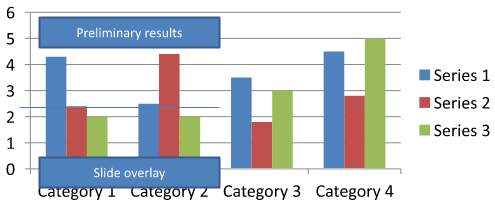
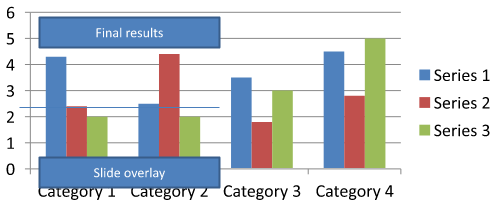
Download chart-annotations.pptx and place it in the application’s working directory. Its first slide contains a chart with an ungrouped annotation reading “Preliminary results”, a chart-owned line, and an ordinary slide text box reading “Slide overlay”. The example finds the first chart on that slide and changes the annotation to “Final results” when the report is ready to publish. It checks for an empty collection and only edits an IAutoShape with a non-null get_TextFrame and the expected text.
#include <system/shared_ptr.h>
#include <DOM/Presentation.h>
#include <DOM/ISlide.h>
#include <DOM/IShapeCollection.h>
#include <DOM/IChart.h>
#include <Export/SaveFormat.h>
#include <system/console.h>
#include <DOM/IGroupShape.h>
#include <DOM/IAutoShape.h>
#include <DOM/ITextFrame.h>

using namespace Aspose::Slides;
using namespace Aspose::Slides::Charts;
using namespace Aspose::Slides::Export;

auto presentation = System::MakeObject<Presentation>(u"chart-annotations.pptx");
auto slide = presentation->get_Slide(0);

System::SharedPtr<IChart> chart;
for (auto shape : slide->get_Shapes())
{
    auto candidate = System::DynamicCast<IChart>(shape);
    if (candidate != nullptr)
    {
        chart = candidate;
        break;
    }
}

if (chart == nullptr || chart->get_UserShapes()->get_Shapes()->get_Count() == 0)
{
    System::Console::WriteLine(u"No chart or chart-owned shapes found.");
    return;
}

auto updated = false;
for (auto shape : chart->get_UserShapes()->get_Shapes())
{
    auto annotation = System::DynamicCast<IAutoShape>(shape);
    if (annotation != nullptr &&
        annotation->get_TextFrame() != nullptr &&
        annotation->get_TextFrame()->get_Text() == u"Preliminary results")
    {
        annotation->get_TextFrame()->set_Text(u"Final results");
        updated = true;
        break;
    }
}

if (updated)
{
    presentation->Save(u"chart-annotations-updated.pptx", SaveFormat::Pptx);
}
else
{
    System::Console::WriteLine(u"No matching text annotation found.");
}
The line and the slide text box remain unchanged. The following images show the input and the saved, reopened result:
| 편집 전 | 편집 후 |
|---|---|
 |
 |
Note
The example inspects only the top-level chart-owned shapes. If an annotation is inside an IGroupShape, inspect that group’s get_Shapes collection as well. Repeat this recursively for nested groups, applying the same text checks to their child shapes. A group itself is a container; do not treat it as a text box.FAQ
열/영역에 반투명 채우기를 적용하면서 테두리는 불투명하게 유지할 수 있나요?
예. 채우기 투명도와 외곽선은 별도로 구성됩니다. 이는 복잡한 시각화에서 격자와 데이터의 가독성을 개선하는 데 유용합니다.
레이블이 겹칠 때 어떻게 처리할 수 있나요?
글꼴 크기를 줄이거나, 중요하지 않은 레이블 구성 요소(예: 카테고리)를 비활성화하고, 레이블 위치를 조정하거나, 필요에 따라 선택된 포인트에만 레이블을 표시하거나, 형식을 “값 + 범례"로 전환하십시오.
시리즈에 그라디언트 또는 패턴 채우기를 적용할 수 있나요?
예. 시리즈는 단색, 그라디언트 및 패턴 채우기를 지원합니다. 실제 사용에서는 그라디언트를 절제해서 사용하고, 격자와 텍스트 대비를 감소시키는 조합은 피하는 것이 좋습니다.