
Python üzerinden Java ile Sunumlarda Bağlayıcıları Yönetme
Genel Bakış
Bir bağlayıcı, iki şekilden biri hareket ettiğinde bile her iki şekle de bağlı kalabilen bir satırdır. Uçları, PowerPoint’te yeşil noktalara karşılık gelen bağlantı noktalarına bağlanır. Bazı bükülmüş ve eğimli bağlayıcılar ayrıca turuncu noktalara karşılık gelen ayar noktalarını gösterir; bu noktalar, bağlayıcı segmentlerinin konumunu kontrol eder.
Aspose.Slides, bağlayıcıları Connector sınıfı aracılığıyla temsil eder. Bağlayıcıları oluşturabilir, uçlarını şekillere bağlayabilir, bağlantı noktalarını seçebilir, yeniden yönlendirebilir ve ayar noktalarına sahip bağlayıcıların geometrisini değiştirebilirsiniz.
Bağlayıcı Türleri
ShapeType sınıfı düz, bükülmüş ve eğimli bağlayıcı ön ayarlarını içerir. Aşağıdaki tablo, kullanılabilir bağlayıcı geometrilerini ve her ön ayarın tanımladığı ayar noktası sayısını gösterir.
| Bağlayıcı | Görsel | Ayar Noktası Sayısı |
|---|---|---|
| ShapeType.Line |  |
0 |
| ShapeType.StraightConnector1 |  |
0 |
| ShapeType.BentConnector2 | 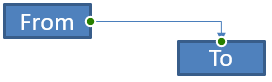 |
0 |
| ShapeType.BentConnector3 |  |
1 |
| ShapeType.BentConnector4 |  |
2 |
| ShapeType.BentConnector5 | 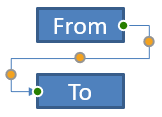 |
3 |
| ShapeType.CurvedConnector2 | 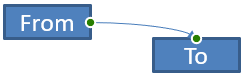 |
0 |
| ShapeType.CurvedConnector3 | 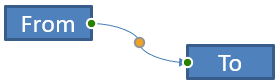 |
1 |
| ShapeType.CurvedConnector4 | 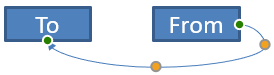 |
2 |
| ShapeType.CurvedConnector5 | 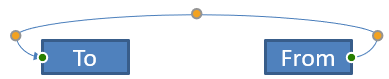 |
3 |
Ayarlama noktalarının sayısı ve anlamı, seçilen bağlayıcı ön ayarının bir parçasıdır. İki farklı bağlayıcı tipinin aynı koleksiyon düzenine sahip olduğunu varsaymayın.
İki Şekli Bağla
ShapeCollection.addConnector metodunu kullanarak bir bağlayıcı ekleyebilir ve Connector.setStartShapeConnectedTo ve Connector.setEndShapeConnectedTo metodlarıyla uçlarını bağlayabilirsiniz. Her iki uç da bağlandıktan sonra, Connector.reroute kısa bir yol seçer.
Aşağıdaki örnek, bir elips ve bir dikdörtgeni bükülmüş bir bağlayıcı ile bağlar:
import jpype
import asposeslides

if not jpype.isJVMStarted():
    jpype.startJVM()

from asposeslides.api import Presentation, ShapeType, SaveFormat

presentation = Presentation()
try:
    slide = presentation.getSlides().get_Item(0)

    ellipse = slide.getShapes().addAutoShape(ShapeType.Ellipse, 40, 80, 120, 80)
    rectangle = slide.getShapes().addAutoShape(ShapeType.Rectangle, 320, 240, 140, 80)
    connector = slide.getShapes().addConnector(ShapeType.BentConnector2, 0, 0, 10, 10)

    connector.setStartShapeConnectedTo(ellipse)
    connector.setEndShapeConnectedTo(rectangle)
    connector.reroute()

    presentation.save("connected-shapes.pptx", SaveFormat.Pptx)
finally:
    presentation.dispose()
Warning
reroute metodunun çağrılması, setStartShapeConnectionSiteIndex ve setEndShapeConnectionSiteIndex değerlerini değiştirebilir. Bağlantı noktalarının sabit kalması gerekiyorsa, yeniden yönlendirmeden sonra belirli bağlantı noktalarını atayın.Bağlantı Noktasını Seç
Her bağlanabilir şekil, Shape.getConnectionSiteCount aracılığıyla site sayısını raporlar. Bağlayıcı ucuna atamadan önce sıfır tabanlı bir site dizini doğrulayın; site sayısı şekil geometrisine göre değişir.
Bu örnek, elips üzerindeki belirli bir site mevcut olduğunda bağlayıcıyı o siteye bağlar:
import jpime
import asposeslides

if not jpime.isJVMStarted():
    jpime.startJVM()

from asposeslides.api import Presentation, ShapeType, SaveFormat

presentation = Presentation()
try:
    slide = presentation.getSlides().get_Item(0)

    ellipse = slide.getShapes().addAutoShape(ShapeType.Ellipse, 40, 80, 120, 80)
    rectangle = slide.getShapes().addAutoShape(ShapeType.Rectangle, 320, 240, 140, 80)
    connector = slide.getShapes().addConnector(ShapeType.BentConnector3, 0, 0, 10, 10)

    connector.setStartShapeConnectedTo(ellipse)
    connector.setEndShapeConnectedTo(rectangle)

    preferred_site_index = 2
    if preferred_site_index < ellipse.getConnectionSiteCount():
        connector.setStartShapeConnectionSiteIndex(preferred_site_index)
    else:
        print(f"The ellipse has only {ellipse.getConnectionSiteCount()} connection sites.")

    presentation.save("specific-connection-site.pptx", SaveFormat.Pptx)
finally:
    presentation.dispose()
Bir Bağlayıcı Noktasını Ayarla
Ayarlama noktalarına sahip bağlayıcılar, GeometryShape.getAdjustments üzerinden bu noktaları sunar. Her bir AdjustValue öğesini inceleyin ve değerini setRawValue ile değiştirmeden önce getType değerini kontrol edin. Ön ayar şekil ayarlamalarıyla ilgili genel kurallar Shape Manipulation içinde açıklanmıştır.
Bağlayıcı ayarlamalarının sayısı, sırası, anlamı ve geçerli değer aralığı bağlayıcı ön ayarına bağlıdır. Ayar türü yalnızca okunabilir, ayar değeri ise yazılabilir. Aynı anlamsal tipe sahip birden fazla ayar bulunduğunda ek tanımlama için yalnızca okunabilir getName yöntemi kullanılabilir.
Engelin Etrafında Yönlendir
Aşağıdaki yerleşimde, iki şekil arasındaki bir BentConnector5 üçüncü bir şeklin içinden geçer:
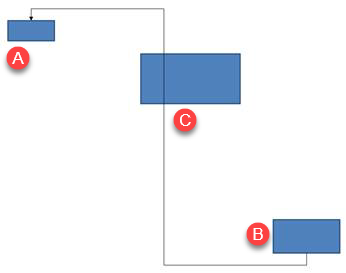
Bu kod, engelli bağlayıcıyı oluşturur:
import jpype
import asposeslides

if not jpype.isJVMStarted():
    jpype.startJVM()

from asposeslides.api import Presentation, ShapeType, SaveFormat, LineArrowheadStyle, FillType

Color = jpype.JClass("java.awt.Color")

presentation = Presentation()
try:
    slide = presentation.getSlides().get_Item(0)

    slide.getShapes().addAutoShape(ShapeType.Rectangle, 300, 150, 150, 75)
    source_shape = slide.getShapes().addAutoShape(ShapeType.Rectangle, 500, 400, 100, 50)
    target_shape = slide.getShapes().addAutoShape(ShapeType.Rectangle, 100, 100, 70, 30)
    connector = slide.getShapes().addConnector(ShapeType.BentConnector5, 20, 20, 400, 300)

    connector.getLineFormat().setEndArrowheadStyle(LineArrowheadStyle.Triangle)
    connector.getLineFormat().getFillFormat().setFillType(FillType.Solid)
    connector.getLineFormat().getFillFormat().getSolidFillColor().setColor(Color.BLACK)
    connector.setStartShapeConnectedTo(source_shape)
    connector.setEndShapeConnectedTo(target_shape)
    connector.setStartShapeConnectionSiteIndex(2)

    presentation.save("connector-obstruction.pptx", SaveFormat.Pptx)
finally:
    presentation.dispose()
Dikey bükülmeyi hareket ettirmek, bağlayıcının engeli atlayacak şekilde rotasını değiştirir:
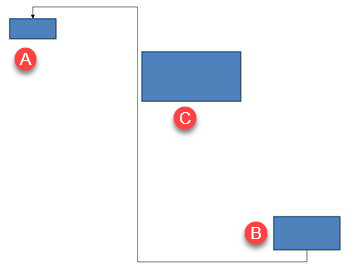
Koleksiyon indeksinin 1 her zaman dik bükülmeyi temsil ettiğini varsaymak yerine, bu örnek ConnectorBendPositionY arar ve yalnızca beklenen anlamsal tip mevcutsa değiştirir:
import jpype
import asposeslides

if not jpype.isJVMStarted():
    jpype.startJVM()

from asposeslides.api import Presentation, ShapeType, SaveFormat, LineArrowheadStyle, FillType, ShapeAdjustmentType

Color = jpype.JClass("java.awt.Color")

presentation = Presentation()
try:
    slide = presentation.getSlides().get_Item(0)

    slide.getShapes().addAutoShape(ShapeType.Rectangle, 300, 150, 150, 75)
    source_shape = slide.getShapes().addAutoShape(ShapeType.Rectangle, 500, 400, 100, 50)
    target_shape = slide.getShapes().addAutoShape(ShapeType.Rectangle, 100, 100, 70, 30)
    connector = slide.getShapes().addConnector(ShapeType.BentConnector5, 20, 20, 400, 300)

    connector.getLineFormat().setEndArrowheadStyle(LineArrowheadStyle.Triangle)
    connector.getLineFormat().getFillFormat().setFillType(FillType.Solid)
    connector.getLineFormat().getFillFormat().getSolidFillColor().setColor(Color.BLACK)
    connector.setStartShapeConnectedTo(source_shape)
    connector.setEndShapeConnectedTo(target_shape)
    connector.setStartShapeConnectionSiteIndex(2)

    vertical_bend = None
    for adjustment_index in range(connector.getAdjustments().size()):
        adjustment = connector.getAdjustments().get_Item(adjustment_index)
        print(f"{adjustment.getName()}: {adjustment.getType()}, raw value = {adjustment.getRawValue()}")
        if adjustment.getType() == ShapeAdjustmentType.ConnectorBendPositionY:
            vertical_bend = adjustment
            break

    if vertical_bend is None:
        print("The connector does not expose a vertical bend adjustment.")
    else:
        vertical_bend.setRawValue(60000)
        presentation.save("connector-obstruction-fixed.pptx", SaveFormat.Pptx)
finally:
    presentation.dispose()
Bir BentConnector5, iki ConnectorBendPositionX ve bir ConnectorBendPositionY ayarına sahiptir. İhtiyacınız olan tip birden fazla kez ortaya çıkıyorsa, seçim yapmadan önce getName ve ön ayarın bilinen geometrisini inceleyin. Bir ayar ShapeAdjustmentType.Custom rapor ediyorsa, anlamı ve aralığı ön ayara özgüdür ve sözleşme bilinene kadar değiştirilmemelidir.
Ayarlama Değerlerini Bağlayıcı Geometrisiyle İlişkilendirme
Bükülmüş bağlayıcılar için ayar değerleri, bireysel segmentlerin konumlarını tahmin etmekte kullanılabilir. Bu hesaplamalar bağlayıcı ön ayarına özeldir:
- BentConnector4 normalde bir ConnectorBendPositionX ve bir ConnectorBendPositionY ayarı sunar.
- Bu bükülme konumları için, getRawValue tarafından döndürülen değeri
100000.0ile bölmek, örneklerde kullanılan bağlayıcı çerçeve genişliği veya yüksekliğinin kesirini verir. - Bir bağlayıcı çerçevesi döndürülebilir veya çevrilebilir; bu nedenle çerçeve koordinatları slayt koordinatlarıyla karşılaştırılmadan önce dönüştürülmelidir.
Aşağıdaki örnekler, önce ayarları tanımlamak için getType kullanır. Koleksiyon indekslerine taşınabilir kimlik olarak güvenmezler.
Döndürülmemiş Bağlayıcı
İlk yerleşimde, iki metin şekli bir BentConnector4 ile bağlanmıştır:
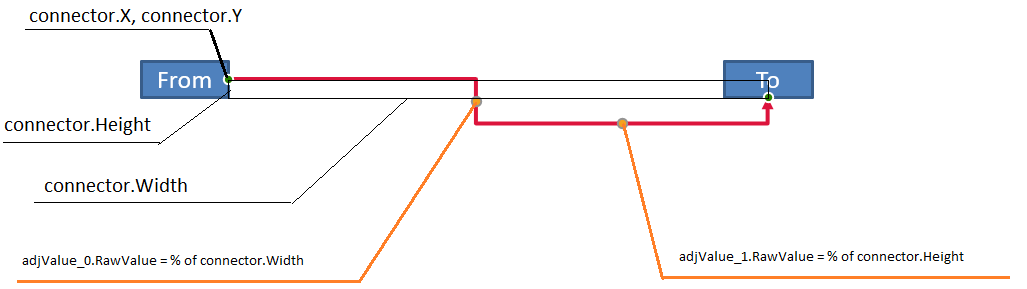
Bu örnek bağlayıcıyı inceler ve yatay ve dik bükülme ayarlarını elde eder:
import jpype
import asposeslides

if not jpype.isJVMStarted():
    jpype.startJVM()

from asposeslides.api import Presentation, ShapeType, LineArrowheadStyle, FillType

Color = jpype.JClass("java.awt.Color")

presentation = Presentation()
try:
    slide = presentation.getSlides().get_Item(0)

    source_shape = slide.getShapes().addAutoShape(ShapeType.Rectangle, 100, 100, 60, 25)
    source_shape.getTextFrame().setText("From")
    target_shape = slide.getShapes().addAutoShape(ShapeType.Rectangle, 500, 100, 60, 25)
    target_shape.getTextFrame().setText("To")
    connector = slide.getShapes().addConnector(ShapeType.BentConnector4, 20, 20, 400, 300)

    connector.getLineFormat().setEndArrowheadStyle(LineArrowheadStyle.Triangle)
    connector.getLineFormat().getFillFormat().setFillType(FillType.Solid)
    connector.getLineFormat().getFillFormat().getSolidFillColor().setColor(Color.RED)
    connector.getLineFormat().setWidth(3)
    connector.setStartShapeConnectedTo(source_shape)
    connector.setStartShapeConnectionSiteIndex(3)
    connector.setEndShapeConnectedTo(target_shape)
    connector.setEndShapeConnectionSiteIndex(2)

    for adjustment_index in range(connector.getAdjustments().size()):
        adjustment = connector.getAdjustments().get_Item(adjustment_index)
        print(f"{adjustment.getName()}: {adjustment.getType()}, raw value = {adjustment.getRawValue()}")
finally:
    presentation.dispose()
Her iki bükülmeyi de değiştirmek için, beklenen tipleri bulup her iki değer de bulunduğunda değiştirin:
import jpype
import asposeslides

if not jpype.isJVMStarted():
    jpype.startJVM()

from asposeslides.api import Presentation, ShapeType, SaveFormat, ShapeAdjustmentType

presentation = Presentation()
try:
    slide = presentation.getSlides().get_Item(0)

    source_shape = slide.getShapes().addAutoShape(ShapeType.Rectangle, 100, 100, 60, 25)
    target_shape = slide.getShapes().addAutoShape(ShapeType.Rectangle, 500, 100, 60, 25)
    connector = slide.getShapes().addConnector(ShapeType.BentConnector4, 20, 20, 400, 300)
    connector.setStartShapeConnectedTo(source_shape)
    connector.setStartShapeConnectionSiteIndex(3)
    connector.setEndShapeConnectedTo(target_shape)
    connector.setEndShapeConnectionSiteIndex(2)

    horizontal_bend = None
    vertical_bend = None
    for adjustment_index in range(connector.getAdjustments().size()):
        adjustment = connector.getAdjustments().get_Item(adjustment_index)
        if adjustment.getType() == ShapeAdjustmentType.ConnectorBendPositionX:
            horizontal_bend = adjustment
        elif adjustment.getType() == ShapeAdjustmentType.ConnectorBendPositionY:
            vertical_bend = adjustment

    if horizontal_bend is None or vertical_bend is None:
        print("The connector does not expose the expected bend adjustments.")
    else:
        horizontal_bend.setRawValue(horizontal_bend.getRawValue() + 20000)
        vertical_bend.setRawValue(vertical_bend.getRawValue() + 200000)
        presentation.save("connector-adjusted.pptx", SaveFormat.Pptx)
finally:
    presentation.dispose()
Sonuç, yatay ve dik segmentleri hareket etmiş bir bağlayıcıdır:

Anlamsal tipler bilindiğinde, değerler bağlayıcı‑çerçeve koordinatlarına dönüştürülebilir. Bu örnek, iki bükülme ayarıyla kontrol edilen dik segmentin üzerine ince bir dikdörtgen çizer:
import jpype
import asposeslides

if not jpype.isJVMStarted():
    jpype.startJVM()

from asposeslides.api import Presentation, ShapeType, SaveFormat, ShapeAdjustmentType

presentation = Presentation()
try:
    slide = presentation.getSlides().get_Item(0)

    source_shape = slide.getShapes().addAutoShape(ShapeType.Rectangle, 100, 100, 60, 25)
    target_shape = slide.getShapes().addAutoShape(ShapeType.Rectangle, 500, 100, 60, 25)
    connector = slide.getShapes().addConnector(ShapeType.BentConnector4, 20, 20, 400, 300)
    connector.setStartShapeConnectedTo(source_shape)
    connector.setStartShapeConnectionSiteIndex(3)
    connector.setEndShapeConnectedTo(target_shape)
    connector.setEndShapeConnectionSiteIndex(2)

    horizontal_bend = None
    vertical_bend = None
    for adjustment_index in range(connector.getAdjustments().size()):
        adjustment = connector.getAdjustments().get_Item(adjustment_index)
        if adjustment.getType() == ShapeAdjustmentType.ConnectorBendPositionX:
            horizontal_bend = adjustment
        elif adjustment.getType() == ShapeAdjustmentType.ConnectorBendPositionY:
            vertical_bend = adjustment

    if horizontal_bend is None or vertical_bend is None:
        print("The connector does not expose the expected bend adjustments.")
    else:
        x = connector.getX() + connector.getWidth() * horizontal_bend.getRawValue() / 100000.0
        y = connector.getY()
        height = connector.getHeight() * vertical_bend.getRawValue() / 100000.0
        slide.getShapes().addAutoShape(ShapeType.Rectangle, x, y, 1, height)
        presentation.save("connector-segment-guide.pptx", SaveFormat.Pptx)
finally:
    presentation.dispose()
Kılavuz şekil, hesaplanan segmenti işaretler:

Döndürülmüş veya Çevrilmiş Bağlayıcı
Aynı bağlayıcı geometrisi dikey yönlendirildiğinde, Shape.getFrame, ShapeFrame.getFlipH ve ShapeFrame.getFlipV değerleri, bağlayıcı‑çerçeve koordinatlarının slayt koordinatlarına dönüşümünü etkiler.
Bu örnek dikey yönlendirilmiş bağlayıcıyı oluşturur ve ayarlar:
import jpype
import asposeslides

if not jpype.isJVMStarted():
    jpype.startJVM()

from asposeslides.api import Presentation, ShapeType, SaveFormat, LineArrowheadStyle, FillType, ShapeAdjustmentType

Color = jpype.JClass("java.awt.Color")

presentation = Presentation()
try:
    slide = presentation.getSlides().get_Item(0)

    source_shape = slide.getShapes().addAutoShape(ShapeType.Rectangle, 100, 100, 60, 25)
    source_shape.getTextFrame().setText("From")
    target_shape = slide.getShapes().addAutoShape(ShapeType.Rectangle, 100, 400, 60, 25)
    target_shape.getTextFrame().setText("To 1")
    connector = slide.getShapes().addConnector(ShapeType.BentConnector4, 20, 20, 400, 300)

    connector.getLineFormat().setEndArrowheadStyle(LineArrowheadStyle.Triangle)
    connector.getLineFormat().getFillFormat().setFillType(FillType.Solid)
    connector_color = Color(102, 205, 170)
    connector.getLineFormat().getFillFormat().getSolidFillColor().setColor(connector_color)
    connector.getLineFormat().setWidth(3)
    connector.setStartShapeConnectedTo(source_shape)
    connector.setStartShapeConnectionSiteIndex(2)
    connector.setEndShapeConnectedTo(target_shape)
    connector.setEndShapeConnectionSiteIndex(3)

    for adjustment_index in range(connector.getAdjustments().size()):
        adjustment = connector.getAdjustments().get_Item(adjustment_index)
        if adjustment.getType() == ShapeAdjustmentType.ConnectorBendPositionX:
            adjustment.setRawValue(adjustment.getRawValue() + 20000)
        elif adjustment.getType() == ShapeAdjustmentType.ConnectorBendPositionY:
            adjustment.setRawValue(adjustment.getRawValue() + 200000)

    presentation.save("vertical-connector-adjusted.pptx", SaveFormat.Pptx)
finally:
    presentation.dispose()
Ayarlanan bağlayıcı, şekiller arasında dikey olarak görünür:
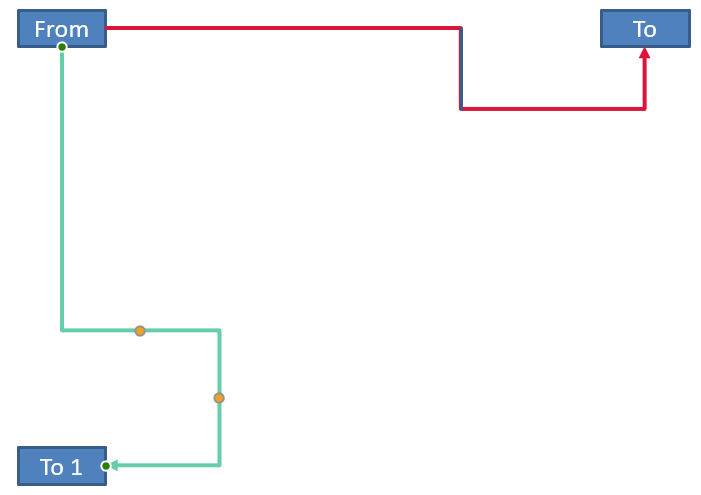
Arbitrary bir dönme açısı alpha için, bir bağlayıcı‑çerçeve noktasını (x, y) çerçeve merkezine (x0, y0) göre döndürün:
X = (x - x0) * cos(alpha) - (y - y0) * sin(alpha) + x0
Y = (x - x0) * sin(alpha) + (y - y0) * cos(alpha) + y0
Aşağıdaki kod, bu örnekte kullanılan 90‑derece yönlendirmesini işler ve karşılık gelen bağlayıcı segmentinin üzerine kırmızı bir kılavuz çizer:
import jpype
import asposeslides

if not jpype.isJVMStarted():
    jpype.startJVM()

from asposeslides.api import Presentation, ShapeType, SaveFormat, FillType, ShapeAdjustmentType, NullableBool

Color = jpype.JClass("java.awt.Color")

presentation = Presentation()
try:
    slide = presentation.getSlides().get_Item(0)

    source_shape = slide.getShapes().addAutoShape(ShapeType.Rectangle, 100, 100, 60, 25)
    target_shape = slide.getShapes().addAutoShape(ShapeType.Rectangle, 100, 400, 60, 25)
    connector = slide.getShapes().addConnector(ShapeType.BentConnector4, 20, 20, 400, 300)
    connector.setStartShapeConnectedTo(source_shape)
    connector.setStartShapeConnectionSiteIndex(2)
    connector.setEndShapeConnectedTo(target_shape)
    connector.setEndShapeConnectionSiteIndex(3)

    horizontal_bend = None
    vertical_bend = None
    for adjustment_index in range(connector.getAdjustments().size()):
        adjustment = connector.getAdjustments().get_Item(adjustment_index)
        if adjustment.getType() == ShapeAdjustmentType.ConnectorBendPositionX:
            horizontal_bend = adjustment
        elif adjustment.getType() == ShapeAdjustmentType.ConnectorBendPositionY:
            vertical_bend = adjustment

    if horizontal_bend is None or vertical_bend is None:
        print("The connector does not expose the expected bend adjustments.")
    else:
        horizontal_bend.setRawValue(horizontal_bend.getRawValue() + 20000)
        vertical_bend.setRawValue(vertical_bend.getRawValue() + 200000)

        x = connector.getX()
        y = connector.getY()
        if connector.getFrame().getFlipH() == NullableBool.True_:
            x += connector.getWidth()
        if connector.getFrame().getFlipV() == NullableBool.True_:
            y += connector.getHeight()

        x += connector.getWidth() * horizontal_bend.getRawValue() / 100000.0
        rotated_x = connector.getFrame().getCenterX() - y + connector.getFrame().getCenterY()
        rotated_y = x - connector.getFrame().getCenterX() + connector.getFrame().getCenterY()
        segment_width = connector.getHeight() * vertical_bend.getRawValue() / 100000.0
        guide = slide.getShapes().addAutoShape(ShapeType.Rectangle, rotated_x, rotated_y, segment_width, 1)
        guide.getLineFormat().getFillFormat().setFillType(FillType.Solid)
        guide.getLineFormat().getFillFormat().getSolidFillColor().setColor(Color.RED)

        presentation.save("rotated-connector-segment-guide.pptx", SaveFormat.Pptx)
finally:
    presentation.dispose()
Kırmızı kılavuz, koordinat dönüşümünden sonra hesaplanan segmenti işaretler:
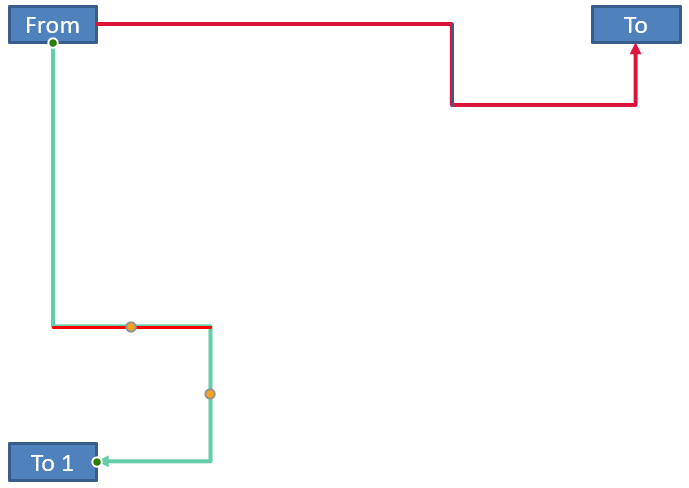
Bu formüller, örneklerde kullanılan ön ayarları açıklar; evrensel bir bağlayıcı modeli değildir. Farklı bir ön ayara aynı hesabı uygulamadan önce ayar tiplerini, çerçeve yönelimini ve değer aralıklarını doğrulayın.
Bağlayıcı Yön Açısını Bul
Düz bir bağlayıcının yönü, genişlik ve yükseklik kullanılarak, yatay ve dik çevirmeler uygulanarak hesaplanabilir. Aşağıdaki örnek, slayt koordinatlarında pozitif yatay ekseninden saat yönünde açıyı rapor eder:
import jpype
import asposeslides
import math

if not jpype.isJVMStarted():
    jpype.startJVM()

from asposeslides.api import Presentation, ShapeType, NullableBool

presentation = Presentation()
try:
    slide = presentation.getSlides().get_Item(0)
    connector = slide.getShapes().addConnector(ShapeType.StraightConnector1, 100, 100, 200, 100)

    flip_h = connector.getFrame().getFlipH() == NullableBool.True_
    flip_v = connector.getFrame().getFlipV() == NullableBool.True_
    delta_x = connector.getWidth() * (-1 if flip_h else 1)
    delta_y = connector.getHeight() * (-1 if flip_v else 1)
    angle = math.atan2(delta_y, delta_x) * 180.0 / math.pi

    if angle < 0:
        angle += 360

    print(f"Connector direction: {angle:.2f} degrees")
finally:
    presentation.dispose()
SSS
Bir bağlayıcının bir şekle bağlanıp bağlanamayacağını nasıl anlayabilirim?
Şeklin getConnectionSiteCount değerini kontrol edin. Pozitif bir sayı, şeklin bağlantı noktaları sunduğunu gösterir. Bağlayıcı ucuna atamadan önce seçilen site indeksini doğrulayın; site sayısı şekil geometrisine göre değişir.
Bir bağlayıcı ayarını koleksiyon indeksine göre tanımlayabilir miyim?
Bir indeks yalnızca bilinen bir bağlayıcı ön ayarı ve koleksiyon düzeni için anlamlıdır. Değeri değiştirmeden önce AdjustValue.getType kontrol edin ve aynı anlamsal tip birden çok kez ortaya çıktığında ek bilgi için AdjustValue.getName kullanın.
Bağlı bir şekil silindiğinde ne olur?
İlgili bağlayıcı ucu ayrılır. Bağlayıcı slayt üzerinde kalır ve silinebilir, serbest bir satır olarak konumlandırılabilir veya başka bir şekle bağlanabilir.
Bir slayt kopyalandığında bağlayıcı bağlamaları korunur mu?
Bağlı şekiller slayt ile birlikte kopyalandığında bağlamalar genellikle korunur. Bir bağlayıcı, hedef şekillerinden biri olmadan kopyalanırsa, etkilenen uç yeniden bağlanmalıdır.