
مدیریت اتصالگرها در ارائهها در پایتون از طریق جاوا
نمای کلی
یک اتصالگر خطی است که میتواند هنگام جابجایی هر یک از دو شکل به آنها متصل بماند. انتهای آن به نقاط اتصال متصل میشود که در پاورپوینت با نقطههای سبز نمایش داده میشوند. برخی از اتصالگرهای خمیده و منحنی همچنین نقاط تنظیمی را که با نقطههای نارنجی نشان داده میشوند، افشا میکنند؛ این نقاط موقعیت بخشهای مختلف اتصالگر را کنترل مینمایند.
Aspose.Slides اتصالگرها را از طریق کلاس Connector نشان میدهد. میتوانید آنها را ایجاد کنید، انتهایشان را به اشکال متصل کنید، نقاط اتصال را انتخاب کنید، مسیرشان را دوباره تنظیم کنید و هندسهٔ اتصالگرهایی که نقاط تنظیمی دارند را تغییر دهید.
انواع اتصالگر
کلاس ShapeType شامل پیشتنظیمات اتصالگرهای مستقیم، خمیده و منحنی است. جدول زیر هندسههای موجود اتصالگرها و تعداد نقاط تنظیمی تعریفشده برای هر پیشتنظیم را نشان میدهد.


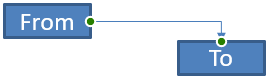


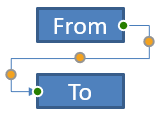
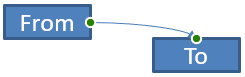
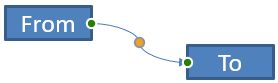
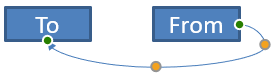
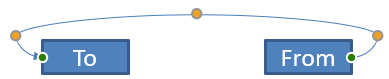
تعداد و معنای نقاط تنظیمی جزئی از پیشتنظیم انتخابشدهٔ اتصالگر است. فرض نکنید که دو نوع اتصالگر متفاوت همان طرحبندی مجموعه را افشا میکنند.
اتصال دو شکل
از ShapeCollection.addConnector برای افزودن یک اتصالگر استفاده کنید و از Connector.setStartShapeConnectedTo و Connector.setEndShapeConnectedTo برای متصل کردن انتهای آن بهره بگیرید. پس از اینکه هر دو انتها متصل شد، Connector.reroute مسیر کوتاهی بین اشکال انتخاب میکند.
مثال زیر یک بیضی و یک مستطیل را با یک اتصالگر خمیده به هم وصل میکند:
import jpype
import asposeslides

if not jpype.isJVMStarted():
    jpype.startJVM()

from asposeslides.api import Presentation, ShapeType, SaveFormat

presentation = Presentation()
try:
    slide = presentation.getSlides().get_Item(0)

    ellipse = slide.getShapes().addAutoShape(ShapeType.Ellipse, 40, 80, 120, 80)
    rectangle = slide.getShapes().addAutoShape(ShapeType.Rectangle, 320, 240, 140, 80)
    connector = slide.getShapes().addConnector(ShapeType.BentConnector2, 0, 0, 10, 10)

    connector.setStartShapeConnectedTo(ellipse)
    connector.setEndShapeConnectedTo(rectangle)
    connector.reroute()

    presentation.save("connected-shapes.pptx", SaveFormat.Pptx)
finally:
    presentation.dispose()
هشدار
فراخوانی reroute میتواند مقدارهای setStartShapeConnectionSiteIndex و setEndShapeConnectionSiteIndex را تغییر دهد. پس از تغییر مسیر، در صورت نیاز به ثابت ماندن این سایتها، آنها را بهصورت خاص اختصاص دهید.انتخاب یک نقطهٔ اتصال
هر شکل قابل اتصال، تعداد نقاط اتصال خود را از طریق Shape.getConnectionSiteCount گزارش میدهد. پیش از اختصاص یک نقطهٔ صفرمحور به انتهای اتصالگر، مقدار ایندکس مورد نظر را اعتبارسنجی کنید؛ تعداد نقاط بسته به هندسهٔ شکل متفاوت است.
این مثال اتصالگر را به نقطهای خاص در بیضی متصل میکند به شرطی که آن نقطه وجود داشته باشد:
import jpype
import asposeslides

if not jpype.isJVMStarted():
    jpype.startJVM()

from asposeslides.api import Presentation, ShapeType, SaveFormat

presentation = Presentation()
try:
    slide = presentation.getSlides().get_Item(0)

    ellipse = slide.getShapes().addAutoShape(ShapeType.Ellipse, 40, 80, 120, 80)
    rectangle = slide.getShapes().addAutoShape(ShapeType.Rectangle, 320, 240, 140, 80)
    connector = slide.getShapes().addConnector(ShapeType.BentConnector3, 0, 0, 10, 10)

    connector.setStartShapeConnectedTo(ellipse)
    connector.setEndShapeConnectedTo(rectangle)

    preferred_site_index = 2
    if preferred_site_index < ellipse.getConnectionSiteCount():
        connector.setStartShapeConnectionSiteIndex(preferred_site_index)
    else:
        print(f"The ellipse has only {ellipse.getConnectionSiteCount()} connection sites.")

    presentation.save("specific-connection-site.pptx", SaveFormat.Pptx)
finally:
    presentation.dispose()
تنظیم یک نقطهٔ اتصالگر
اتصالگرهایی که نقاط تنظیمی دارند، این نقاط را از طریق GeometryShape.getAdjustments در دسترس میگذارند. قبل از تغییر هر AdjustValue مقدار getType آن را بررسی کنید و سپس با setRawValue مقدار را تنظیم کنید. قوانین کلی شناسایی تنظیمات پیشتنظیمشدهٔ شکل در بخش Manipulation of Shapes توضیح داده شده است.
تعداد، ترتیب، معنا و بازهٔ مقدارهای معتبر تنظیمات اتصالگر بستگی به پیشتنظیم اتصالگر دارد. نوع تنظیم فقط‑خواندنی است، در حالی که مقدار تنظیم قابل نوشتن است. متد فقط‑خواندنی getName هنگام وجود چند تنظیم از نوع معنایی یکسان، اطلاعات شناسایی بیشتری فراهم میکند.
مسیر دور موانع
در چینش زیر، یک اتصالگر BentConnector5 بین دو شکل از یک شکل سوم عبور میکند:
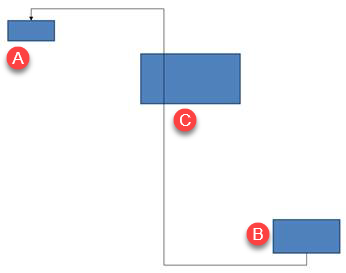
این کد اتصالگر مسدودشده را میسازد:
import jpype
import asposeslides

if not jpype.isJVMStarted():
    jpype.startJVM()

from asposeslides.api import Presentation, ShapeType, SaveFormat, LineArrowheadStyle, FillType

Color = jpype.JClass("java.awt.Color")

presentation = Presentation()
try:
    slide = presentation.getSlides().get_Item(0)

    slide.getShapes().addAutoShape(ShapeType.Rectangle, 300, 150, 150, 75)
    source_shape = slide.getShapes().addAutoShape(ShapeType.Rectangle, 500, 400, 100, 50)
    target_shape = slide.getShapes().addAutoShape(ShapeType.Rectangle, 100, 100, 70, 30)
    connector = slide.getShapes().addConnector(ShapeType.BentConnector5, 20, 20, 400, 300)

    connector.getLineFormat().setEndArrowheadStyle(LineArrowheadStyle.Triangle)
    connector.getLineFormat().getFillFormat().setFillType(FillType.Solid)
    connector.getLineFormat().getFillFormat().getSolidFillColor().setColor(Color.BLACK)
    connector.setStartShapeConnectedTo(source_shape)
    connector.setEndShapeConnectedTo(target_shape)
    connector.setStartShapeConnectionSiteIndex(2)

    presentation.save("connector-obstruction.pptx", SaveFormat.Pptx)
finally:
    presentation.dispose()
جابجایی خم عمودی مسیر را طوری تغییر میدهد که اتصالگر مانع را دور بزند:
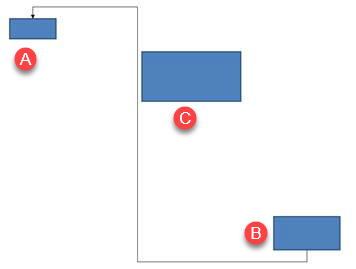
به جای فرض اینکه ایندکس مجموعهٔ 1 همیشه به خم عمودی اشاره دارد، این مثال به دنبال ConnectorBendPositionY میگردد و تنها در صورت حضور نوع معنایی مورد انتظار، آن را تغییر میدهد:
import jpype
import asposeslides

if not jpype.isJVMStarted():
    jpype.startJVM()

from asposeslides.api import Presentation, ShapeType, SaveFormat, LineArrowheadStyle, FillType, ShapeAdjustmentType

Color = jpype.JClass("java.awt.Color")

presentation = Presentation()
try:
    slide = presentation.getSlides().get_Item(0)

    slide.getShapes().addAutoShape(ShapeType.Rectangle, 300, 150, 150, 75)
    source_shape = slide.getShapes().addAutoShape(ShapeType.Rectangle, 500, 400, 100, 50)
    target_shape = slide.getShapes().addAutoShape(ShapeType.Rectangle, 100, 100, 70, 30)
    connector = slide.getShapes().addConnector(ShapeType.BentConnector5, 20, 20, 400, 300)

    connector.getLineFormat().setEndArrowheadStyle(LineArrowheadStyle.Triangle)
    connector.getLineFormat().getFillFormat().setFillType(FillType.Solid)
    connector.getLineFormat().getFillFormat().getSolidFillColor().setColor(Color.BLACK)
    connector.setStartShapeConnectedTo(source_shape)
    connector.setEndShapeConnectedTo(target_shape)
    connector.setStartShapeConnectionSiteIndex(2)

    vertical_bend = None
    for adjustment_index in range(connector.getAdjustments().size()):
        adjustment = connector.getAdjustments().get_Item(adjustment_index)
        print(f"{adjustment.getName()}: {adjustment.getType()}, raw value = {adjustment.getRawValue()}")
        if adjustment.getType() == ShapeAdjustmentType.ConnectorBendPositionY:
            vertical_bend = adjustment
            break

    if vertical_bend is None:
        print("The connector does not expose a vertical bend adjustment.")
    else:
        vertical_bend.setRawValue(60000)
        presentation.save("connector-obstruction-fixed.pptx", SaveFormat.Pptx)
finally:
    presentation.dispose()
یک BentConnector5 دو تنظیم ConnectorBendPositionX و یک تنظیم ConnectorBendPositionY دارد. اگر نوع مورد نیاز شما بیش از یکبار رخ داد، پیش از انتخاب، getName و هندسهٔ شناخته شدهٔ آن پیشتنظیم را بررسی کنید. اگر یک تنظیم مقدار ShapeAdjustmentType.Custom دهد، معنای آن و بازهٔ مقدار را بهعنوان پیشتنظیم خاص در نظر بگیرید و تا زمانی که قرارداد مربوطه روشن نشود، آن را تغییر ندهید.
رابطهٔ مقادیر تنظیمی با هندسهٔ اتصالگر
برای اتصالگرهای خمیده، مقادیر تنظیمی میتوانند برای تخمین موقعیت بخشهای جداگانهٔ اتصالگر استفاده شوند. این محاسبهها به پیشتنظیم اتصالگر وابسته است:
- BentConnector4 معمولاً یک تنظیم ConnectorBendPositionX و یک تنظیم ConnectorBendPositionY افشا میکند.
- برای این موقعیتهای خم، تقسیم مقدار بازگرداندهشده توسط getRawValue بر
100000.0کسر عرض یا ارتفاع قاب اتصالگر را که در مثالهای زیر استفاده میشود، تولید میکند. - قاب اتصالگر میتواند چرخش یا انعکاس پیدا کند، بنابراین مختصات قاب قبل از مقایسه با مختصات اسلاید باید تبدیل شوند.
مثالهای زیر ابتدا از طریق getType تنظیمات را شناسایی میکنند؛ آنها ایندکسهای مجموعه را بهعنوان شناسهٔ قابلانتقال در نظر نمیگیرند.
اتصالگر بدون چرخش
چینش اولیه شامل دو شکل متنی است که توسط یک BentConnector4 به هم متصل هستند:
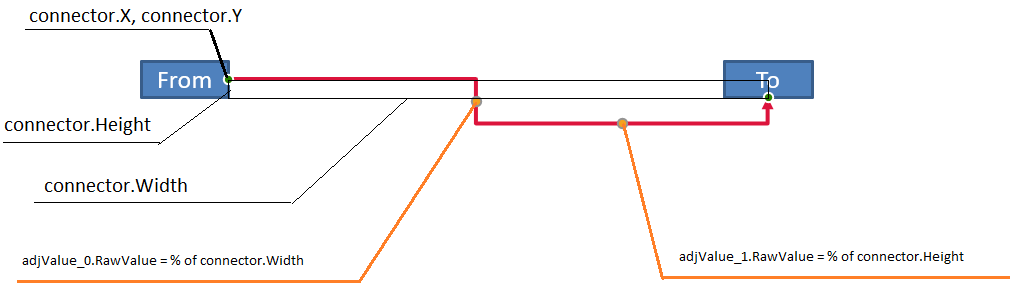
این مثال اتصالگر را بررسی میکند و تنظیمات خم افقی و عمودی آن را به دست میآورد:
import jpype
import asposeslides

if not jpype.isJVMStarted():
    jpype.startJVM()

from asposeslides.api import Presentation, ShapeType, LineArrowheadStyle, FillType

Color = jpype.JClass("java.awt.Color")

presentation = Presentation()
try:
    slide = presentation.getSlides().get_Item(0)

    source_shape = slide.getShapes().addAutoShape(ShapeType.Rectangle, 100, 100, 60, 25)
    source_shape.getTextFrame().setText("From")
    target_shape = slide.getShapes().addAutoShape(ShapeType.Rectangle, 500, 100, 60, 25)
    target_shape.getTextFrame().setText("To")
    connector = slide.getShapes().addConnector(ShapeType.BentConnector4, 20, 20, 400, 300)

    connector.getLineFormat().setEndArrowheadStyle(LineArrowheadStyle.Triangle)
    connector.getLineFormat().getFillFormat().setFillType(FillType.Solid)
    connector.getLineFormat().getFillFormat().getSolidFillColor().setColor(Color.RED)
    connector.getLineFormat().setWidth(3)
    connector.setStartShapeConnectedTo(source_shape)
    connector.setStartShapeConnectionSiteIndex(3)
    connector.setEndShapeConnectedTo(target_shape)
    connector.setEndShapeConnectionSiteIndex(2)

    for adjustment_index in range(connector.getAdjustments().size()):
        adjustment = connector.getAdjustments().get_Item(adjustment_index)
        print(f"{adjustment.getName()}: {adjustment.getType()}, raw value = {adjustment.getRawValue()}")
finally:
    presentation.dispose()
برای تغییر هر دو خم، هر نوع مورد انتظار را پیدا کنید و مقادیر را فقط پس از یافتن هر دو تغییر دهید:
import jpype
import asposeslides

if not jpype.isJVMStarted():
    jpype.startJVM()

from asposeslides.api import Presentation, ShapeType, SaveFormat, ShapeAdjustmentType

presentation = Presentation()
try:
    slide = presentation.getSlides().get_Item(0)

    source_shape = slide.getShapes().addAutoShape(ShapeType.Rectangle, 100, 100, 60, 25)
    target_shape = slide.getShapes().addAutoShape(ShapeType.Rectangle, 500, 100, 60, 25)
    connector = slide.getShapes().addConnector(ShapeType.BentConnector4, 20, 20, 400, 300)
    connector.setStartShapeConnectedTo(source_shape)
    connector.setStartShapeConnectionSiteIndex(3)
    connector.setEndShapeConnectedTo(target_shape)
    connector.setEndShapeConnectionSiteIndex(2)

    horizontal_bend = None
    vertical_bend = None
    for adjustment_index in range(connector.getAdjustments().size()):
        adjustment = connector.getAdjustments().get_Item(adjustment_index)
        if adjustment.getType() == ShapeAdjustmentType.ConnectorBendPositionX:
            horizontal_bend = adjustment
        elif adjustment.getType() == ShapeAdjustmentType.ConnectorBendPositionY:
            vertical_bend = adjustment

    if horizontal_bend is None or vertical_bend is None:
        print("The connector does not expose the expected bend adjustments.")
    else:
        horizontal_bend.setRawValue(horizontal_bend.getRawValue() + 20000)
        vertical_bend.setRawValue(vertical_bend.getRawValue() + 200000)
        presentation.save("connector-adjusted.pptx", SaveFormat.Pptx)
finally:
    presentation.dispose()
نتیجه یک اتصالگر است که بخشهای افقی و عمودی آن جابجا شدهاند:

پس از شناخت انواع معنایی، میتوان مقادیر را به مختصات قاب اتصالگر تبدیل کرد. این مثال یک مستطیل نازک را بر روی بخش عمودی که توسط دو تنظیم خم کنترل میشود رسم میکند:
import jpype
import asposeslides

if not jpype.isJVMStarted():
    jpype.startJVM()

from asposeslides.api import Presentation, ShapeType, SaveFormat, ShapeAdjustmentType

presentation = Presentation()
try:
    slide = presentation.getSlides().get_Item(0)

    source_shape = slide.getShapes().addAutoShape(ShapeType.Rectangle, 100, 100, 60, 25)
    target_shape = slide.getShapes().addAutoShape(ShapeType.Rectangle, 500, 100, 60, 25)
    connector = slide.getShapes().addConnector(ShapeType.BentConnector4, 20, 20, 400, 300)
    connector.setStartShapeConnectedTo(source_shape)
    connector.setStartShapeConnectionSiteIndex(3)
    connector.setEndShapeConnectedTo(target_shape)
    connector.setEndShapeConnectionSiteIndex(2)

    horizontal_bend = None
    vertical_bend = None
    for adjustment_index in range(connector.getAdjustments().size()):
        adjustment = connector.getAdjustments().get_Item(adjustment_index)
        if adjustment.getType() == ShapeAdjustmentType.ConnectorBendPositionX:
            horizontal_bend = adjustment
        elif adjustment.getType() == ShapeAdjustmentType.ConnectorBendPositionY:
            vertical_bend = adjustment

    if horizontal_bend is None or vertical_bend is None:
        print("The connector does not expose the expected bend adjustments.")
    else:
        x = connector.getX() + connector.getWidth() * horizontal_bend.getRawValue() / 100000.0
        y = connector.getY()
        height = connector.getHeight() * vertical_bend.getRawValue() / 100000.0
        slide.getShapes().addAutoShape(ShapeType.Rectangle, x, y, 1, height)
        presentation.save("connector-segment-guide.pptx", SaveFormat.Pptx)
finally:
    presentation.dispose()
شکل راهنما بخش محاسبهشده را نشان میدهد:

اتصالگر چرخیده یا معکوسشده
وقتی همان هندسهٔ اتصالگر بهصورت عمودی تنظیم میشود، مقادیر Shape.getFrame، ShapeFrame.getFlipH و ShapeFrame.getFlipV بر تبدیل مختصات قاب به مختصات اسلاید تأثیر میگذارند.
این مثال اتصالگر عمودی را ایجاد و تنظیم میکند:
import jpype
import asposeslides

if not jpype.isJVMStarted():
    jpype.startJVM()

from asposeslides.api import Presentation, ShapeType, SaveFormat, LineArrowheadStyle, FillType, ShapeAdjustmentType

Color = jpype.JClass("java.awt.Color")

presentation = Presentation()
try:
    slide = presentation.getSlides().get_Item(0)

    source_shape = slide.getShapes().addAutoShape(ShapeType.Rectangle, 100, 100, 60, 25)
    source_shape.getTextFrame().setText("From")
    target_shape = slide.getShapes().addAutoShape(ShapeType.Rectangle, 100, 400, 60, 25)
    target_shape.getTextFrame().setText("To 1")
    connector = slide.getShapes().addConnector(ShapeType.BentConnector4, 20, 20, 400, 300)

    connector.getLineFormat().setEndArrowheadStyle(LineArrowheadStyle.Triangle)
    connector.getLineFormat().getFillFormat().setFillType(FillType.Solid)
    connector_color = Color(102, 205, 170)
    connector.getLineFormat().getFillFormat().getSolidFillColor().setColor(connector_color)
    connector.getLineFormat().setWidth(3)
    connector.setStartShapeConnectedTo(source_shape)
    connector.setStartShapeConnectionSiteIndex(2)
    connector.setEndShapeConnectedTo(target_shape)
    connector.setEndShapeConnectionSiteIndex(3)

    for adjustment_index in range(connector.getAdjustments().size()):
        adjustment = connector.getAdjustments().get_Item(adjustment_index)
        if adjustment.getType() == ShapeAdjustmentType.ConnectorBendPositionX:
            adjustment.setRawValue(adjustment.getRawValue() + 20000)
        elif adjustment.getType() == ShapeAdjustmentType.ConnectorBendPositionY:
            adjustment.setRawValue(adjustment.getRawValue() + 200000)

    presentation.save("vertical-connector-adjusted.pptx", SaveFormat.Pptx)
finally:
    presentation.dispose()
اتصالگر تنظیمشده بهصورت عمودی بین دو شکل ظاهر میشود:
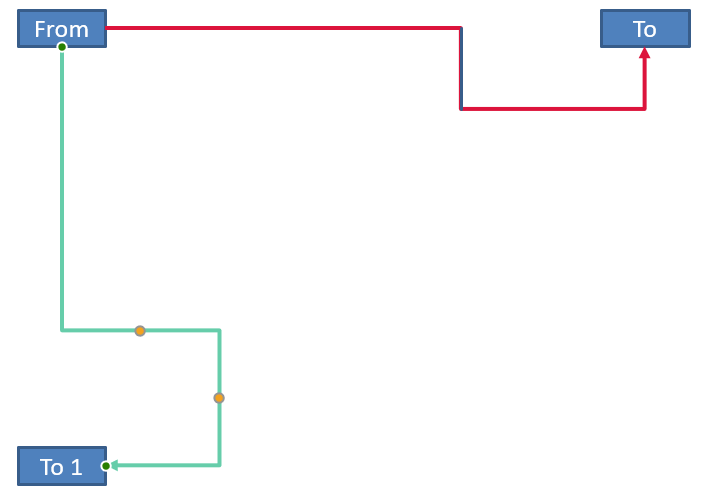
برای زاویهٔ چرخش دلخواه alpha، نقطهٔ (x, y) قاب اتصالگر را حول مرکز چارچوب (x0, y0) میچرخانیم:
X = (x - x0) * cos(alpha) - (y - y0) * sin(alpha) + x0
Y = (x - x0) * sin(alpha) + (y - y0) * cos(alpha) + y0
کد زیر جهتگیری ۹۰‑درجه استفاده شده در این مثال را پردازش میکند و یک راهنمای قرمز بر روی بخش متناظر اتصالگر میکشد:
import jpype
import asposeslides

if not jpype.isJVMStarted():
    jpype.startJVM()

from asposeslides.api import Presentation, ShapeType, SaveFormat, FillType, ShapeAdjustmentType, NullableBool

Color = jpype.JClass("java.awt.Color")

presentation = Presentation()
try:
    slide = presentation.getSlides().get_Item(0)

    source_shape = slide.getShapes().addAutoShape(ShapeType.Rectangle, 100, 100, 60, 25)
    target_shape = slide.getShapes().addAutoShape(ShapeType.Rectangle, 100, 400, 60, 25)
    connector = slide.getShapes().addConnector(ShapeType.BentConnector4, 20, 20, 400, 300)
    connector.setStartShapeConnectedTo(source_shape)
    connector.setStartShapeConnectionSiteIndex(2)
    connector.setEndShapeConnectedTo(target_shape)
    connector.setEndShapeConnectionSiteIndex(3)

    horizontal_bend = None
    vertical_bend = None
    for adjustment_index in range(connector.getAdjustments().size()):
        adjustment = connector.getAdjustments().get_Item(adjustment_index)
        if adjustment.getType() == ShapeAdjustmentType.ConnectorBendPositionX:
            horizontal_bend = adjustment
        elif adjustment.getType() == ShapeAdjustmentType.ConnectorBendPositionY:
            vertical_bend = adjustment

    if horizontal_bend is None or vertical_bend is None:
        print("The connector does not expose the expected bend adjustments.")
    else:
        horizontal_bend.setRawValue(horizontal_bend.getRawValue() + 20000)
        vertical_bend.setRawValue(vertical_bend.getRawValue() + 200000)

        x = connector.getX()
        y = connector.getY()
        if connector.getFrame().getFlipH() == NullableBool.True_:
            x += connector.getWidth()
        if connector.getFrame().getFlipV() == NullableBool.True_:
            y += connector.getHeight()

        x += connector.getWidth() * horizontal_bend.getRawValue() / 100000.0
        rotated_x = connector.getFrame().getCenterX() - y + connector.getFrame().getCenterY()
        rotated_y = x - connector.getFrame().getCenterX() + connector.getFrame().getCenterY()
        segment_width = connector.getHeight() * vertical_bend.getRawValue() / 100000.0
        guide = slide.getShapes().addAutoShape(ShapeType.Rectangle, rotated_x, rotated_y, segment_width, 1)
        guide.getLineFormat().getFillFormat().setFillType(FillType.Solid)
        guide.getLineFormat().getFillFormat().getSolidFillColor().setColor(Color.RED)

        presentation.save("rotated-connector-segment-guide.pptx", SaveFormat.Pptx)
finally:
    presentation.dispose()
راهنمای قرمز پس از تبدیل مختصات، بخش محاسبهشده را علامتگذاری میکند:
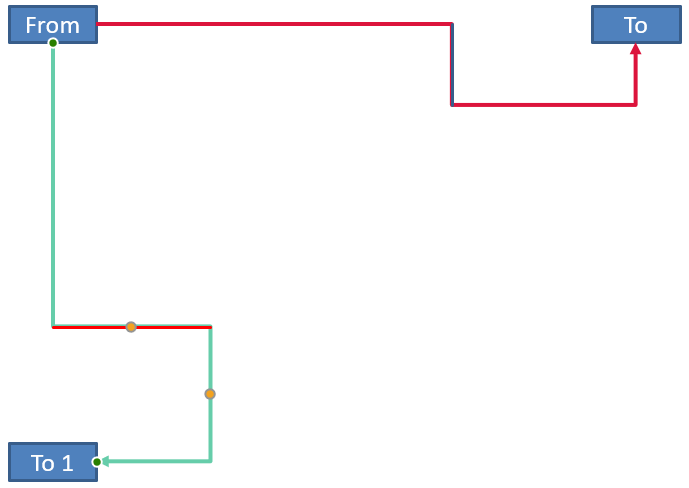
این فرمولها پیشتنظیمهای استفادهشده در مثالها را توصیف میکنند، نه یک مدل عمومی برای تمام اتصالگرها. قبل از اعمال همان محاسبه به پیشتنظیم دیگری، انواع تنظیمات، جهتگیری چارچوب و بازهٔ مقادیر را اعتبارسنجی کنید.
یافتن زاویهٔ جهت اتصالگر
جهت یک اتصالگر مستقیم میتواند از عرض و ارتفاع آن، بههمراه اعمال چرخشهای افقی و عمودی، محاسبه شود. مثال زیر زاویهٔ ساعتگرد نسبت به محور افقی مثبت در مختصات اسلاید را گزارش میکند:
import jpype
import asposeslides
import math

if not jpype.isJVMStarted():
    jpype.startJVM()

from asposeslides.api import Presentation, ShapeType, NullableBool

presentation = Presentation()
try:
    slide = presentation.getSlides().get_Item(0)
    connector = slide.getShapes().addConnector(ShapeType.StraightConnector1, 100, 100, 200, 100)

    flip_h = connector.getFrame().getFlipH() == NullableBool.True_
    flip_v = connector.getFrame().getFlipV() == NullableBool.True_
    delta_x = connector.getWidth() * (-1 if flip_h else 1)
    delta_y = connector.getHeight() * (-1 if flip_v else 1)
    angle = math.atan2(delta_y, delta_x) * 180.0 / math.pi

    if angle < 0:
        angle += 360

    print(f"Connector direction: {angle:.2f} degrees")
finally:
    presentation.dispose()
پرسشهای متداول
چگونه میتوانم تشخیص دهم که یک اتصالگر میتواند به یک شکل وصل شود؟
مقدار getConnectionSiteCount شکل را بررسی کنید. عدد مثبت به این معناست که شکل نقاط اتصال را افشا میکند. پیش از اختصاص ایندکس سایت منتخب به هر یک از انتهای اتصالگر، آن را اعتبارسنجی کنید.
آیا میتوانم یک تنظیم اتصالگر را بر اساس ایندکس مجموعه شناسایی کنم؟
یک ایندکس فقط برای پیشتنظیم شناختهشدهٔ اتصالگر و طرحبندی مجموعه معنا دارد. پیش از تغییر مقدار، AdjustValue.getType را بررسی کنید و وقتی یک نوع معنایی چندین بار ظاهر میشود، از AdjustValue.getName بهعنوان اطلاعات تکمیلی استفاده کنید.
وقتی یک shape متصل حذف شود چه اتفاقی میافتد؟
انتهای مربوط به اتصالگر قطع میشود. اتصالگر در اسلاید باقی میماند و میتواند حذف، بهعنوان خط آزاد موقعیتیابی یا به شکل دیگری متصل شود.
آیا اتصالات هنگام کپی اسلاید حفظ میشوند؟
بهطور کلی، وقتی اشکال متصل همراه با اسلاید کپی میشوند، اتصالات نیز حفظ میشوند. اگر یک اتصالگر بدون یکی از اشکال هدفش کپی شود، باید انتهای تحتتاثیر دوباره متصل گردد.