
Analyzing your prompt, please hold on...
An error occurred while retrieving the results. Please refresh the page and try again.
To create “Aspose Words for Python via Java” package we useJCC
Download and install JRE (it is notnecessary because you can use %JDK_HOME%\jre)
JCC requires JDK so download and install it.
Download and install Python
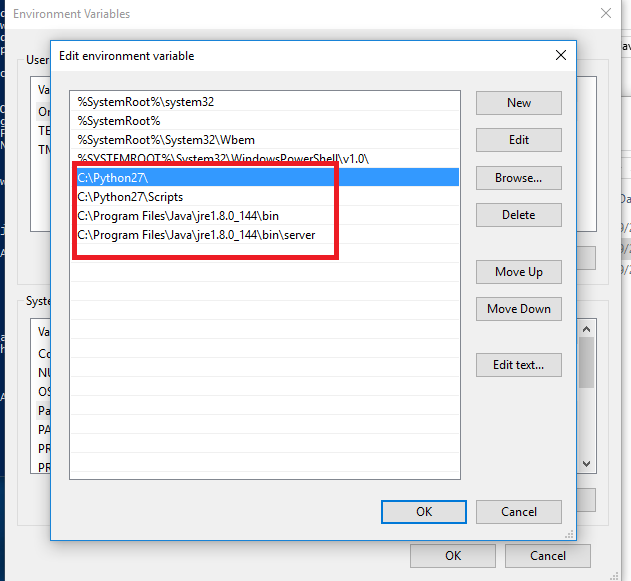
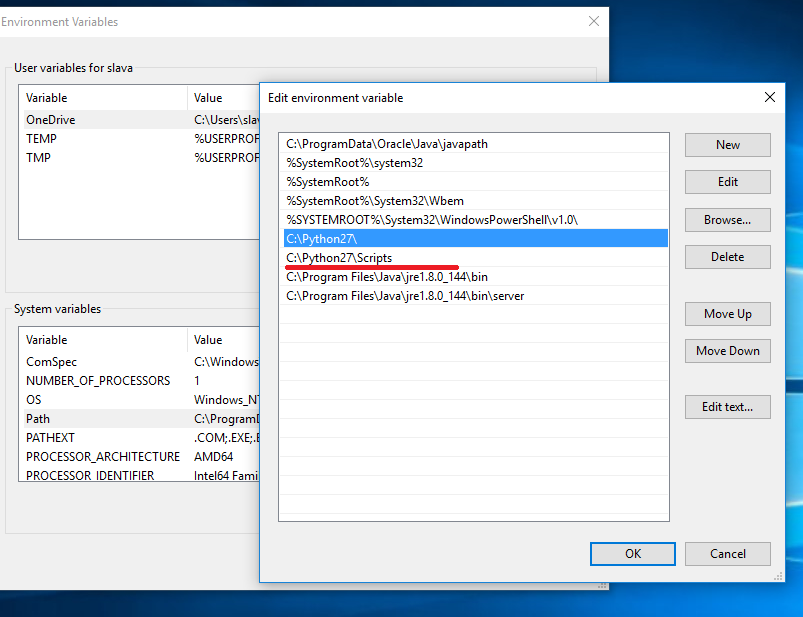
Make sure Java’s and Python’s paths are on the environment variables list
Install wheel
> pip install wheelDownload and install Microsoft Visual C++ Compiler for Python 2.7
Download and unzip JCC
Run following command in JCC directory
JCC-3.0> python .\setup.py buildThen run install command
JCC-3.0> python .\setup.py installCheck JCC egg has been installed
> ls C:\Python27\Lib\site-packages\JCC-3.0-py2.7-win-amd64.eggCheck if python is installed
> python
Python 2.7.13 (default, Jan 19 2017, 14:48:08)
[GCC 6.3.0 20170118] on linux2
Type "help", "copyright", "credits" or "license" for more information.
In order to get things working make sure Java is installed, if it isn’t then do following:
> sudo add-apt-repository ppa:webupd8team/java
\> sudo apt-get update
\> sudo apt-get install oracle-java8-installer
Install svn
> sudo apt install subversionCheck out JCC’s sources
> svn co https://svn.apache.org/repos/asf/lucene/pylucene/trunk/jcc jccMake sure that setuptools is installed
> pip install setuptoolsRun following commands
> jcc/$ python setup.py build
\> jcc/$ python setup.py install --prefix=~/.local
Make sure JCC has been installed
> ls /home/_username_/.local/lib/python2.7/site-packagesMake sure Java, JCC and wheel are installed.
Then run create_aspose_words.py with appropriate arguments
> python .\create_aspose_words.py .\Aspose.Words.jdk16.jar 17.8 aspose_wordsThe first argument is the path to the Aspose.Words jar;
The second is the version;
The third is the python module name.
Result .whl file will be saved in .\dist directory
> pip install .\aspose_words-17.8-cp27-none-win_amd64.whlCheck if python is installed
> python
Python 2.7.13 (default, Jan 19 2017, 14:48:08)
[GCC 6.3.0 20170118] on linux2
Type "help", "copyright", "credits" or "license" for more information.
In order to get things working make sure Java is installed, if it isn’t then do following:
> sudo add-apt-repository ppa:webupd8team/java
\> sudo apt-get update
\> sudo apt-get install oracle-java8-installer
Make sure pip is installed if it isn’t then
> sudo apt install python-pipRun terminal and use following command:
> pip install --prefix=~/.local aspose_words-17.8-cp27-none-linux_x86_64.whl> python
import aspose_words
aspose_words.initVM(aspose_words.CLASSPATH)
d = aspose_words.Document()
db = aspose_words.DocumentBuilder(d)
db.writeln('Hello world!')
d.save('/home/slava/test.docx')
Analyzing your prompt, please hold on...
An error occurred while retrieving the results. Please refresh the page and try again.