
Handling Attachments and Embedded Objects
Managing Email Attachments
An email attachment is a computer file which is sent along with an email message. The file may be sent as a separate message as well as a part of the message to which it is attached. The Attachment class is used to manage and manipulate attached files within an email message.
All messages include a body. In addition to the body, you might want to send additional files. These are sent as attachments and are represented as the instance of the Attachment class. You can send any number of attachments but the size of the attachment is limited by the mail server. Gmail, for example, does not support file sizes greater than 10MB.
Try it out!
Add or remove email attachments online with the free Aspose.Email Editor App.
Adding Attachments
To attach a file to an email message, please follow these steps:
- Create an instance of the MailMessage class.
- Create an instance of the Attachment class.
- Load attachment into the Attachment instance.
- Add the Attachment instance into the MailMessage class instance.
The following code snippet shows you how to add an attachment to an email.
Above, we described how to add attachments to your email message with Aspose.Email. What follows shows how to remove attachments, and display information about them on the screen.
Adding a Reference Attachment
A reference attachment is a type of attachment that includes a link or a reference to a file or an item, rather than including the file or the item itself in the email message. When the recipients of the email click the reference attachment, they will be able to access the linked file if they have the appropriate permissions to do so. By using a reference attachment, you can send a smaller email message and make sure that everyone has access to the most up-to-date version of the file or the item.
The code snippet below shows how to add a reference attachment to an email. The code performs the following steps:
- Loads the email message file with the MailMessage.load() method.
- Creates a new ReferenceAttachment object, passing the attachment URL to its constructor.
- Sets the name of the attachment through the
nameproperty. - Sets the provider type of the attachment to AttachmentProviderType.ONE_DRIVE_PRO through the
provider_typeproperty. - Sets the permission type of the attachment to AttachmentPermissionType.ANYONE_CAN_EDIT through the
permission_typeproperty. - Adds the object to the attachments collection of the message.
import aspose.email as ae

eml = ae.MailMessage.load(data_dir + "message.eml")

ref_attach = ae.ReferenceAttachment("https://onedrive.live.com/download?resid=ABC123")
ref_attach.name = "Document.docx"
ref_attach.provider_type = ae.AttachmentProviderType.ONE_DRIVE_PRO
ref_attach.permission_type = ae.AttachmentPermissionType.ANYONE_CAN_EDIT

eml.attachments.append(ref_attach)

eml.save(data_dir + "ReferenceAttachment_out.eml", ae.SaveOptions.default_eml)
Removing Attachments
To remove an attachment, follow the steps given below:
- Create an instance of the MailMessage class.
- Load an attachment from a specified file path using the Attachment class.
- Add the attachment to the MailMessage instance’s attachments collection.
- Print the count of attachments before removing any.
- Remove the attachment from the MailMessage instance’s attachments collection.
- Print the count of attachments after removing the attachment.
The following code snippet shows you how to remove an attachment:
Retrieving Attachment File Names
To display the attachment file name, follow these steps:
- Loop through the attachments in the loaded email.
- For each attachment, print its name using a loop that enumerates the attachments.
The following code snippet shows you how to display an attachment file name on the screen.
Extracting Attachments
In Aspose.Email the MailMessage class is used to work with attachments. An email attachment is a computer file which is sent along with an email message. It may be sent as a separate message as well as a part of the message to which it is attached. The file is represented as an instance of the Attachment class. To extract attachments from email messages, follow these steps:
- Create an instance of the MailMessage class.
- Load an email file into the MailMessage instance.
- Create an instance of the Attachment class and use it in a loop to extract all attachments.
- Save the attachment and display it on screen.
- Specify sender and recepient address in the MailMessage instance.
- Now you can send email using the SmtpClient class.
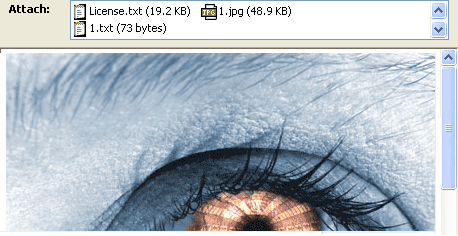
The following code snippet shows you how to extract email attachments:
| Extracted attachments in email |
|---|
 |
Retrieving Content-Description from Attachments
Aspose.Email API provides the capability to read Content-Description from attachment headers. The following code snippet shows you how to retrieve content description from an attachment:
Identifying Embedded Message Attachments
Retrieving Attachments from Signed Emails
Signed emails contain a single smime.p7m attachment, which means that the email is encrypted by S/MIME. The smime.p7m file is the digital signature itself. To see the real contents of such an email, use the remove_signature method. It returns a new MailMessage object without the digital signature, with the original attachments restored.
import aspose.email as ae

signed_eml = ae.MailMessage.load(data_dir + "signed.eml")

if signed_eml.is_signed:
    for i, attachment in enumerate(signed_eml.attachments):
        print(f"Signed email attachment{i}: {attachment.name}")

    # The email is signed. Remove the signature.
    eml = signed_eml.remove_signature()
    print("Signature removed.")

    for i, attachment in enumerate(eml.attachments):
        print(f"Email attachment{i}: {attachment.name}")
Inline Images Handling
Adding an Inline Image to the Email Body
The LinkedResource class is used with the MailMessage class to embed objects into an email message. To add an embedded object, follow these steps:
- Create an instance of the MailMessage class.
- Specify the from, to and subject values in the
MailMessageinstance. - Create instances of the AlternateView class for the plain text and the HTML representations of the body.
- Create an instance of the LinkedResource class and set its
content_idproperty. - Add the linked resource to the
linked_resourcescollection of the message. - Add the alternate views to the
alternate_viewscollection of the message.
To embed an image, use the cid prefix in the src value of the img tag. The cid value maps to the content_id of the linked resource, so <img src='cid:barcode'> maps to a LinkedResource whose content_id is barcode.
You can send any number of embedded objects, but the size of the message is limited by the mail server.
import aspose.email as ae

eml = ae.MailMessage()
eml.from_address = ae.MailAddress("AndrewIrwin@from.com")
eml.to.append(ae.MailAddress("SusanMarc@to.com"))
eml.subject = "This is an email"

# Create the plain text part. It is viewable by the clients that do not support HTML.
plain_view = ae.AlternateView.create_alternate_view_from_string(
    "This is my plain text content", None, "text/plain")

# Create the HTML part referencing the embedded image by its content id
html_view = ae.AlternateView.create_alternate_view_from_string(
    "Here is an embedded image.<img src=cid:barcode>", None, "text/html")

# Create the LinkedResource (the embedded image)
barcode = ae.LinkedResource(data_dir + "1.jpg", "image/jpeg")
barcode.content_id = "barcode"

eml.linked_resources.append(barcode)
eml.alternate_views.append(plain_view)
eml.alternate_views.append(html_view)

eml.save(data_dir + "EmbeddedImage_out.msg", ae.SaveOptions.default_msg_unicode)
Removing an Inline Image from the Email Body
The linked_resources property of the MailMessage class returns a LinkedResourceCollection. Its remove_at method completely removes an embedded object from a message you are composing. Pass True as the second argument to also delete every reference to the object from the message body:
import aspose.email as ae

eml = ae.MailMessage()
eml.from_address = ae.MailAddress("sender@from.com")
eml.to.append(ae.MailAddress("receiver@to.com"))

barcode = ae.LinkedResource(data_dir + "1.png", "image/png")
barcode.content_id = "barcode"
eml.linked_resources.append(barcode)
eml.html_body = "<html><body>Here is an image <img src='cid:barcode'></body></html>"

# Remove the inline image together with all the references to it in the body
eml.linked_resources.remove_at(0, True)

eml.save(data_dir + "NoLinkedResources_out.eml", ae.SaveOptions.default_eml)
In a message that has been loaded from a file, the inline images are exposed through the attachments collection, each carrying a content_id, and the linked_resources collection is empty. Remove them from the attachments collection instead:
import aspose.email as ae

eml = ae.MailMessage.load(data_dir + "EmlWithLinkedResources.eml")

inline_images = [attachment for attachment in eml.attachments if attachment.content_id]
for image in inline_images:
    eml.attachments.remove(image)
Working with Embedded Objects
An embedded object is an object that was created with one application and embedded in a document or a file created with another application. For example, a Microsoft Excel spreadsheet can be embedded in a Microsoft Word report, or a video file can be embedded in a Microsoft PowerPoint presentation. When a file is embedded, rather than inserted or pasted into another document, it retains its original format. The embedded document can be opened in the original application and modified.
Extracting Embedded Objects
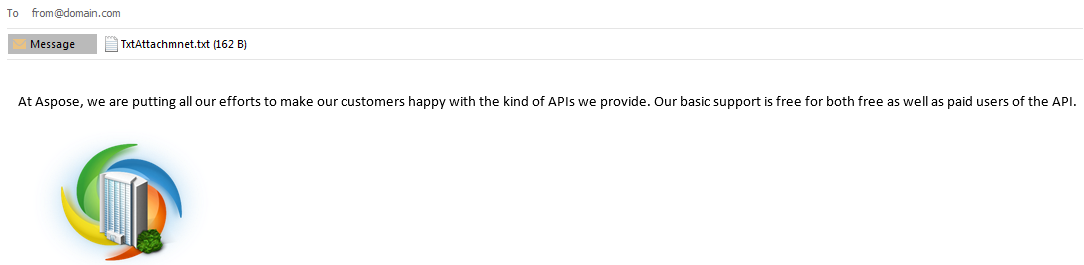
The following code sample demonstrates how to extract embedded objects from an email file using Aspose.Email for Python via .NET.
- Create an instance of the MailMessage class.
- Load an email file in the MailMessage instance.
- Create a loop and an instance of the Attachment class in it.
- Save the attachment and display it on screen.
- Specify sender and recepient address in the MailMessage instance.
- Send email using the SmtpClient class.
| Extracted embedded objects in email |
|---|
 |
Extracting Linked Images in HTML Emails
Aspose.Email can extract the image resources that the HTML body links to externally and embed them into the HTML output. Set the extract_html_body_resources_as_attachments property of the HtmlSaveOptions class to True, and the linked images and other resources of the HTML body are extracted and embedded. This helps to preserve the original appearance of the messages with linked content.
import aspose.email as ae

# Load the email message
mail_message = ae.MailMessage.load(data_dir + "input.eml")

# Set the options to extract external HTML resources
options = ae.HtmlSaveOptions()
options.extract_html_body_resources_as_attachments = True

# Save the HTML representation of the email
mail_message.save(data_dir + "output.html", options)