إضافة أشكال القوس إلى PDF في Python
Contents
[
Hide
]
إضافة كائن قوس
Aspose.PDF لبيثون عبر .NET يتيح لك إضافة قوس الأشكال إلى صفحات PDF باستخدام رسم بياني فئة. يمكنك رسم الأقواس المحددة ومقاطع القوس المملوءة للمخططات والرسوم التوضيحية الفنية.
اتبع الخطوات أدناه:
- ابتكر مستند مثال.
- ابتكر كائن الرسم البياني بأبعاد معينة.
- مجموعة الحدود لكائن الرسم البياني.
- قم بإنشاء كائن قوس مطابق.
- أضف هذا الكائن إلى مجموعة الأشكال في كائن الرسم البياني.
- أضِف رسم بياني الاعتراض على مجموعة الفقرات من الصفحة.
- احفظ ملف PDF الخاص بنا.
يعرض مقتطف الشفرة التالي كيفية إضافة قوس كائن.
import aspose.pdf as ap
import aspose.pdf.drawing as drawing

def add_arc(outfile: str):
    document = ap.Document()
    page = document.pages.add()
    graph = drawing.Graph(400, 400)
    graph.border = ap.BorderInfo(ap.BorderSide.ALL, ap.Color.green)

    arc1 = drawing.Arc(100, 100, 95, 0, 90)
    arc1.graph_info.color = ap.Color.green_yellow
    graph.shapes.add(arc1)

    arc2 = drawing.Arc(100, 100, 90, 70, 180)
    arc2.graph_info.color = ap.Color.dark_blue
    graph.shapes.add(arc2)

    arc3 = drawing.Arc(100, 100, 85, 120, 210)
    arc3.graph_info.color = ap.Color.red
    graph.shapes.add(arc3)

    page.paragraphs.add(graph)
    document.save(outfile)
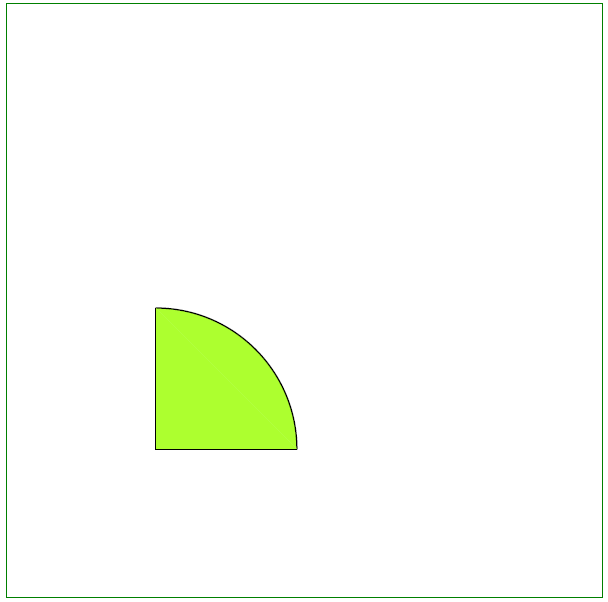
إنشاء كائن القوس المملوء
يوضح هذا المثال كيفية إضافة مقطع قوس مليء بالألوان.
import aspose.pdf as ap
import aspose.pdf.drawing as drawing

def add_arc_filled(outfile: str):
    document = ap.Document()
    page = document.pages.add()
    graph = drawing.Graph(400, 400)
    graph.border = ap.BorderInfo(ap.BorderSide.ALL, ap.Color.green)

    arc = drawing.Arc(100, 100, 95, 0, 90)

    arc.graph_info.fill_color = ap.Color.green_yellow
    graph.shapes.add(arc)

    line = drawing.Line([195, 100, 100, 100, 100, 195])
    line.graph_info.fill_color = ap.Color.green_yellow
    graph.shapes.add(line)

    page.paragraphs.add(graph)
    document.save(outfile)
نتيجة إضافة قوس مملوء: