
WordArt-Effekte in PHP erstellen und anwenden
Übersicht
WordArt-Effekte ermöglichen das Gestalten von Text mit Füllungen, Konturen, Schatten, Spiegelungen, Leuchteffekten, Transformationen und 3D-Formatierung. Dieser Artikel erklärt, wie Sie diese Effekte in PowerPoint‑Präsentationen mit Aspose.Slides für PHP via Java erstellen und anpassen, ohne dass Microsoft Office installiert sein muss.
Einfaches WordArt‑Vorlage erstellen und auf Text anwenden
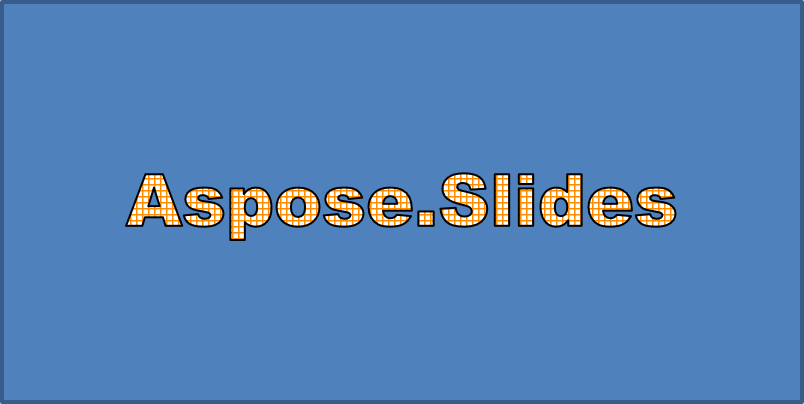
Die folgenden Beispiele erstellen einen einfachen WordArt-Stil, indem sie Text, Schriftart, Musterfüllung und Kontur festlegen.
Jedes Beispiel erstellt eine neue Präsentation und fügt ihrer ersten Folie ein Rechteck hinzu; eine Eingabedatei ist nicht erforderlich. Das erste Beispiel setzt den Text auf „Aspose.Slides“. Position und Abmessungen der Form werden in Punkt gemessen:
use aspose\slides\Presentation;
use aspose\slides\ShapeType;

$presentation = new Presentation();
try {
    $slide = $presentation->getSlides()->get_Item(0);

    $autoShape = $slide->getShapes()->addAutoShape(ShapeType::Rectangle, 20, 20, 400, 200);
    $textFrame = $autoShape->getTextFrame();

    $portion = $textFrame->getParagraphs()->get_Item(0)->getPortions()->get_Item(0);
    $portion->setText("Aspose.Slides");
} finally {
    $presentation->dispose();
}
Stellen Sie die Schriftart auf Arial Black mit 36 Punkt ein, um die Formatierung deutlicher sichtbar zu machen:
use aspose\slides\FontData;
use aspose\slides\Presentation;
use aspose\slides\ShapeType;

$presentation = new Presentation();
try {
    $slide = $presentation->getSlides()->get_Item(0);

    $autoShape = $slide->getShapes()->addAutoShape(ShapeType::Rectangle, 20, 20, 400, 200);

    $portion = $autoShape->getTextFrame()->getParagraphs()->get_Item(0)->getPortions()->get_Item(0);
    $portion->setText("Aspose.Slides");
    $font = new FontData("Arial Black");
    $portion->getPortionFormat()->setLatinFont($font);
    $portion->getPortionFormat()->setFontHeight(36);
} finally {
    $presentation->dispose();
}
Wenden Sie ein SmallGrid-Muster mit einem dunkelorangenen Vordergrund und einem weißen Hintergrund an und fügen Sie anschließend eine schwarze Textkontur mit einer Breite von 1 Punkt hinzu:
use aspose\slides\FillType;
use aspose\slides\FontData;
use aspose\slides\PatternStyle;
use aspose\slides\Presentation;
use aspose\slides\ShapeType;

$presentation = new Presentation();
try {
    $slide = $presentation->getSlides()->get_Item(0);

    $autoShape = $slide->getShapes()->addAutoShape(ShapeType::Rectangle, 20, 20, 400, 200);

    $portion = $autoShape->getTextFrame()->getParagraphs()->get_Item(0)->getPortions()->get_Item(0);
    $portion->setText("Aspose.Slides");
    $font = new FontData("Arial Black");
    $portion->getPortionFormat()->setLatinFont($font);
    $portion->getPortionFormat()->setFontHeight(36);

    $portion->getPortionFormat()->getFillFormat()->setFillType(FillType::Pattern);
    $darkOrange = new Java("java.awt.Color", 255, 140, 0);
    $portion->getPortionFormat()->getFillFormat()->getPatternFormat()->getForeColor()->setColor($darkOrange);
    $portion->getPortionFormat()->getFillFormat()->getPatternFormat()->getBackColor()->setColor(java("java.awt.Color")->WHITE);
    $portion->getPortionFormat()->getFillFormat()->getPatternFormat()->setPatternStyle(PatternStyle::SmallGrid);

    $portion->getPortionFormat()->getLineFormat()->setWidth(1);
    $portion->getPortionFormat()->getLineFormat()->getFillFormat()->setFillType(FillType::Solid);
    $portion->getPortionFormat()->getLineFormat()->getFillFormat()->getSolidFillColor()->setColor(java("java.awt.Color")->BLACK);
} finally {
    $presentation->dispose();
}
Der resultierende Text:
Andere WordArt‑Effekte anwenden
Die folgenden Beispiele zeigen, wie Schatten-, Spiegelungs-, Leuchteffekte, Transformationen und 3D‑Effekte auf Text angewendet werden.
Außenschatten-Effekte anwenden
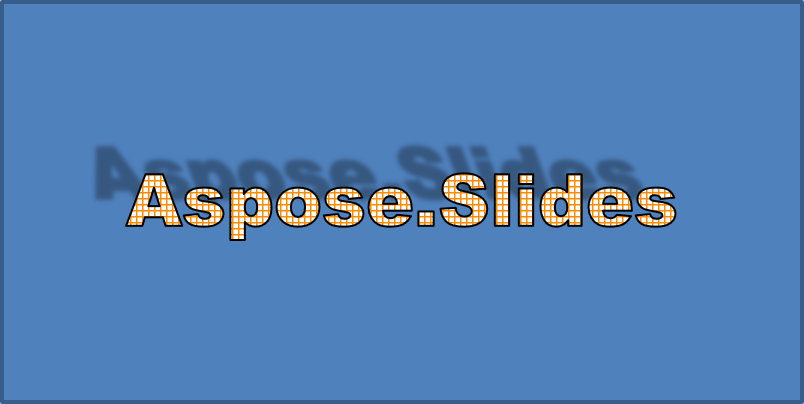
Ein Außenschatten fügt Tiefe hinzu, indem er einen Schatten hinter den Text legt. Sie können seine Farbe, Richtung, Entfernung, Unschärferadius, Skalierung und Schrägstellung anpassen.
Dieses Beispiel ruft enableOuterShadowEffect auf und legt einen schwarzen Schatten mit einem Unschärferadius von 4 Punkten, einer Richtung von 230 Grad und einer Entfernung von 30 Punkten fest. Skalierungswerte von 100 erhalten die Schattengröße, während eine horizontale Schrägstellung von 20 Grad ihn kippt. Die Alpha‑Transformation setzt seine Deckkraft auf 32 %:
use aspose\slides\ColorTransformOperation;
use aspose\slides\FontData;
use aspose\slides\Presentation;
use aspose\slides\ShapeType;

$presentation = new Presentation();
try {
    $slide = $presentation->getSlides()->get_Item(0);

    $autoShape = $slide->getShapes()->addAutoShape(ShapeType::Rectangle, 20, 20, 400, 200);

    $portion = $autoShape->getTextFrame()->getParagraphs()->get_Item(0)->getPortions()->get_Item(0);
    $portion->setText("Aspose.Slides");
    $font = new FontData("Arial Black");
    $portion->getPortionFormat()->setLatinFont($font);
    $portion->getPortionFormat()->setFontHeight(36);

    $portion->getPortionFormat()->getEffectFormat()->enableOuterShadowEffect();
    $portion->getPortionFormat()->getEffectFormat()->getOuterShadowEffect()->getShadowColor()->setColor(java("java.awt.Color")->BLACK);
    $portion->getPortionFormat()->getEffectFormat()->getOuterShadowEffect()->setScaleHorizontal(100);
    $portion->getPortionFormat()->getEffectFormat()->getOuterShadowEffect()->setScaleVertical(100);
    $portion->getPortionFormat()->getEffectFormat()->getOuterShadowEffect()->setBlurRadius(4);
    $portion->getPortionFormat()->getEffectFormat()->getOuterShadowEffect()->setDirection(230);
    $portion->getPortionFormat()->getEffectFormat()->getOuterShadowEffect()->setDistance(30);
    $portion->getPortionFormat()->getEffectFormat()->getOuterShadowEffect()->setSkewHorizontal(20);
    $portion->getPortionFormat()->getEffectFormat()->getOuterShadowEffect()->setSkewVertical(0);
    $portion->getPortionFormat()->getEffectFormat()->getOuterShadowEffect()->getShadowColor()->getColorTransform()->add(ColorTransformOperation::SetAlpha, 0.32);
} finally {
    $presentation->dispose();
}
Der resultierende Text:
Note
- Wenn Außenschatten und voreingestellte Schatten zusammen verwendet werden, wird nur der Außenschatten angewendet.
- Falls Außenschatten und Innenschatten gleichzeitig verwendet werden, hängt der resultierende Effekt von der PowerPoint-Version ab. Zum Beispiel wird der Effekt in PowerPoint 2013 verdoppelt, während in PowerPoint 2007 nur der Außenschatten angewendet wird.
Spiegelungseffekte anwenden
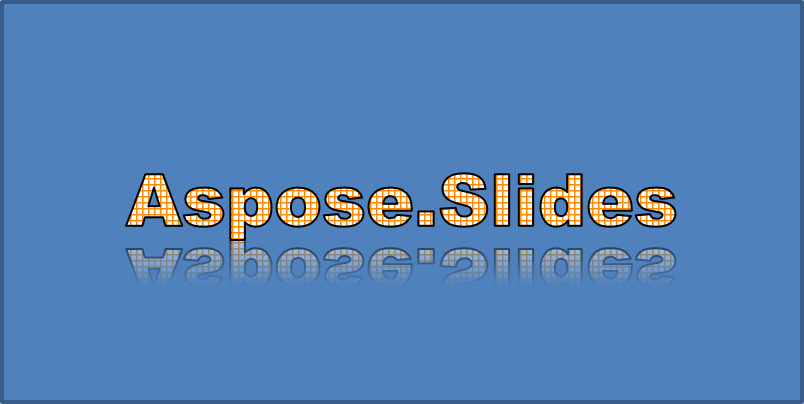
Eine Spiegelung erzeugt eine gespiegelte Kopie des Textes. Passen Sie Position, Skalierung, Unschärfe und Deckkraft an, um das Aussehen zu steuern.
Dieses Beispiel ruft enableReflectionEffect auf und dreht die Spiegelung vertikal mit einer Skalierung von -100 %. Es verwendet einen Unschärferadius von 0,5 Punkt und eine Entfernung von 4,72 Punkten. Die Deckkraft verringert sich von 60 % auf 0,9 % zwischen den Positionen 0 % und 60 % entlang der Spiegelung:
use aspose\slides\FontData;
use aspose\slides\Presentation;
use aspose\slides\RectangleAlignment;
use aspose\slides\ShapeType;

$presentation = new Presentation();
try {
    $slide = $presentation->getSlides()->get_Item(0);

    $autoShape = $slide->getShapes()->addAutoShape(ShapeType::Rectangle, 20, 20, 400, 200);

    $portion = $autoShape->getTextFrame()->getParagraphs()->get_Item(0)->getPortions()->get_Item(0);
    $portion->setText("Aspose.Slides");
    $font = new FontData("Arial Black");
    $portion->getPortionFormat()->setLatinFont($font);
    $portion->getPortionFormat()->setFontHeight(36);

    $portion->getPortionFormat()->getEffectFormat()->enableReflectionEffect();
    $portion->getPortionFormat()->getEffectFormat()->getReflectionEffect()->setBlurRadius(0.5);
    $portion->getPortionFormat()->getEffectFormat()->getReflectionEffect()->setDistance(4.72);
    $portion->getPortionFormat()->getEffectFormat()->getReflectionEffect()->setStartPosAlpha(0);
    $portion->getPortionFormat()->getEffectFormat()->getReflectionEffect()->setEndPosAlpha(60);
    $portion->getPortionFormat()->getEffectFormat()->getReflectionEffect()->setDirection(90);
    $portion->getPortionFormat()->getEffectFormat()->getReflectionEffect()->setScaleHorizontal(100);
    $portion->getPortionFormat()->getEffectFormat()->getReflectionEffect()->setScaleVertical(-100);
    $portion->getPortionFormat()->getEffectFormat()->getReflectionEffect()->setStartReflectionOpacity(60);
    $portion->getPortionFormat()->getEffectFormat()->getReflectionEffect()->setEndReflectionOpacity(0.9);
    $portion->getPortionFormat()->getEffectFormat()->getReflectionEffect()->setRectangleAlign(RectangleAlignment::BottomLeft);
} finally {
    $presentation->dispose();
}
Der resultierende Text:
Leuchteffekte anwenden
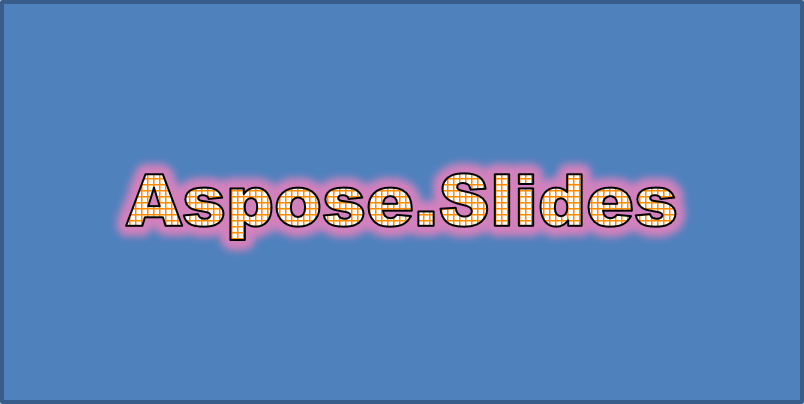
Ein Leuchteffekt fügt dem Text eine weiche farbige Kontur hinzu. Passen Sie seine Farbe, Deckkraft und Radius an, um den Effekt zu steuern.
Dieses Beispiel ruft enableGlowEffect auf und wendet ein rotes Leuchten mit 54 % Deckkraft und einem Radius von 7 Punkten an:
use aspose\slides\ColorTransformOperation;
use aspose\slides\FontData;
use aspose\slides\Presentation;
use aspose\slides\ShapeType;

$presentation = new Presentation();
try {
    $slide = $presentation->getSlides()->get_Item(0);

    $autoShape = $slide->getShapes()->addAutoShape(ShapeType::Rectangle, 20, 20, 400, 200);

    $portion = $autoShape->getTextFrame()->getParagraphs()->get_Item(0)->getPortions()->get_Item(0);
    $portion->setText("Aspose.Slides");
    $font = new FontData("Arial Black");
    $portion->getPortionFormat()->setLatinFont($font);
    $portion->getPortionFormat()->setFontHeight(36);

    $portion->getPortionFormat()->getEffectFormat()->enableGlowEffect();
    $portion->getPortionFormat()->getEffectFormat()->getGlowEffect()->getColor()->setColor(java("java.awt.Color")->RED);
    $portion->getPortionFormat()->getEffectFormat()->getGlowEffect()->getColor()->getColorTransform()->add(ColorTransformOperation::SetAlpha, 0.54);
    $portion->getPortionFormat()->getEffectFormat()->getGlowEffect()->setRadius(7);
} finally {
    $presentation->dispose();
}
Der resultierende Text:
WordArt‑Transformationen anwenden
WordArt‑Transformationen biegen, strecken oder verzerren einen Textblock.
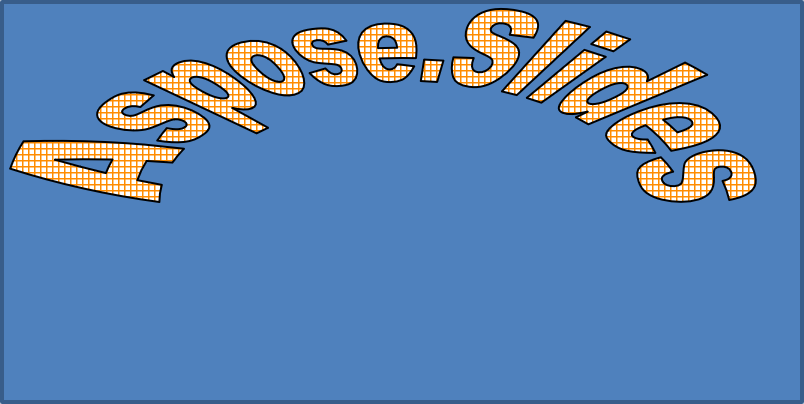
Setzen Sie setTransform auf ArchUpPour, um den gesamten Textrahmen nach oben zu krümmen:
use aspose\slides\Presentation;
use aspose\slides\ShapeType;
use aspose\slides\TextShapeType;

$presentation = new Presentation();
try {
    $slide = $presentation->getSlides()->get_Item(0);

    $autoShape = $slide->getShapes()->addAutoShape(ShapeType::Rectangle, 20, 20, 400, 200);

    $textFrame = $autoShape->getTextFrame();
    $textFrame->setText("Aspose.Slides");
    $textFrame->getTextFrameFormat()->setTransform(TextShapeType::ArchUpPour);
} finally {
    $presentation->dispose();
}
Der resultierende Text:
Note
Aspose.Slides für PHP via Java bietet eine Reihe vordefinierter Transformationstypen.3D‑Effekte auf Formen und Text anwenden
Sie können 3D‑Effekte auf eine Form oder auf deren Text anwenden. Abschrägungen, Extrusion, Beleuchtung und Kameraeinstellungen bestimmen das Ergebnis.
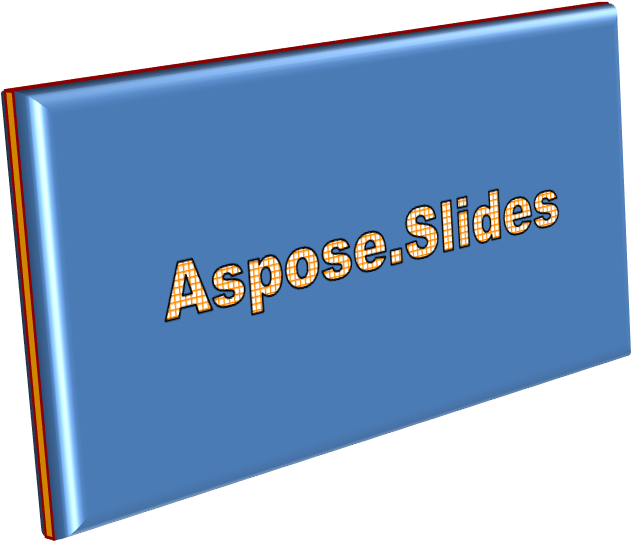
Das folgende Beispiel verwendet ThreeDFormat, um dem Rechteck kreisförmige Abschrägungen, orangefarbene Extrusion und eine dunkelrote Kontur hinzuzufügen. Abschrägungsmaße, Extrusionshöhe, Konturbreite und Tiefe werden in Punkt gemessen. Ein Plastikmaterial, ausgeglichene Beleuchtung, um 40 Grad um die Z‑Achse rotiert, und eine Perspektivkamera definieren das Aussehen:
use aspose\slides\BevelPresetType;
use aspose\slides\CameraPresetType;
use aspose\slides\LightRigPresetType;
use aspose\slides\LightingDirection;
use aspose\slides\MaterialPresetType;
use aspose\slides\Presentation;
use aspose\slides\ShapeType;

$presentation = new Presentation();
try {
    $slide = $presentation->getSlides()->get_Item(0);

    $autoShape = $slide->getShapes()->addAutoShape(ShapeType::Rectangle, 20, 20, 400, 200);
    $autoShape->getTextFrame()->setText("Aspose.Slides");

    $autoShape->getThreeDFormat()->getBevelBottom()->setBevelType(BevelPresetType::Circle);
    $autoShape->getThreeDFormat()->getBevelBottom()->setHeight(10.5);
    $autoShape->getThreeDFormat()->getBevelBottom()->setWidth(10.5);

    $autoShape->getThreeDFormat()->getBevelTop()->setBevelType(BevelPresetType::Circle);
    $autoShape->getThreeDFormat()->getBevelTop()->setHeight(12.5);
    $autoShape->getThreeDFormat()->getBevelTop()->setWidth(11);

    $orange = new Java("java.awt.Color", 255, 165, 0);
    $autoShape->getThreeDFormat()->getExtrusionColor()->setColor($orange);
    $autoShape->getThreeDFormat()->setExtrusionHeight(6);

    $darkRed = new Java("java.awt.Color", 139, 0, 0);
    $autoShape->getThreeDFormat()->getContourColor()->setColor($darkRed);
    $autoShape->getThreeDFormat()->setContourWidth(1.5);

    $autoShape->getThreeDFormat()->setDepth(3);

    $autoShape->getThreeDFormat()->setMaterial(MaterialPresetType::Plastic);

    $autoShape->getThreeDFormat()->getLightRig()->setDirection(LightingDirection::Top);
    $autoShape->getThreeDFormat()->getLightRig()->setLightType(LightRigPresetType::Balanced);
    $autoShape->getThreeDFormat()->getLightRig()->setRotation(0, 0, 40);

    $autoShape->getThreeDFormat()->getCamera()->setCameraType(CameraPresetType::PerspectiveContrastingRightFacing);
} finally {
    $presentation->dispose();
}
Die resultierende Form:
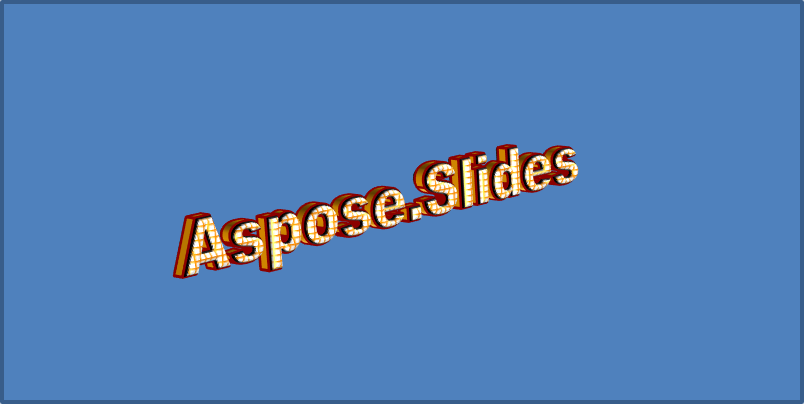
Dieses Beispiel wendet eine ähnliche 3D‑Formatierung auf den Text über TextFrameFormat::getThreeDFormat an. Kleinere Abschrägungen formen die Buchstabenränder, während Extrusion und Beleuchtung dem Text Tiefe verleihen:
use aspose\slides\BevelPresetType;
use aspose\slides\CameraPresetType;
use aspose\slides\LightRigPresetType;
use aspose\slides\LightingDirection;
use aspose\slides\MaterialPresetType;
use aspose\slides\Presentation;
use aspose\slides\ShapeType;

$presentation = new Presentation();
try {
    $slide = $presentation->getSlides()->get_Item(0);

    $autoShape = $slide->getShapes()->addAutoShape(ShapeType::Rectangle, 20, 20, 400, 200);
    $textFrame = $autoShape->getTextFrame();
    $textFrame->setText("Aspose.Slides");

    $textFrame->getTextFrameFormat()->getThreeDFormat()->getBevelBottom()->setBevelType(BevelPresetType::Circle);
    $textFrame->getTextFrameFormat()->getThreeDFormat()->getBevelBottom()->setHeight(3.5);
    $textFrame->getTextFrameFormat()->getThreeDFormat()->getBevelBottom()->setWidth(3.5);

    $textFrame->getTextFrameFormat()->getThreeDFormat()->getBevelTop()->setBevelType(BevelPresetType::Circle);
    $textFrame->getTextFrameFormat()->getThreeDFormat()->getBevelTop()->setHeight(4);
    $textFrame->getTextFrameFormat()->getThreeDFormat()->getBevelTop()->setWidth(4);

    $orange = new Java("java.awt.Color", 255, 165, 0);
    $textFrame->getTextFrameFormat()->getThreeDFormat()->getExtrusionColor()->setColor($orange);
    $textFrame->getTextFrameFormat()->getThreeDFormat()->setExtrusionHeight(6);

    $darkRed = new Java("java.awt.Color", 139, 0, 0);
    $textFrame->getTextFrameFormat()->getThreeDFormat()->getContourColor()->setColor($darkRed);
    $textFrame->getTextFrameFormat()->getThreeDFormat()->setContourWidth(1.5);

    $textFrame->getTextFrameFormat()->getThreeDFormat()->setDepth(3);

    $textFrame->getTextFrameFormat()->getThreeDFormat()->setMaterial(MaterialPresetType::Plastic);

    $textFrame->getTextFrameFormat()->getThreeDFormat()->getLightRig()->setDirection(LightingDirection::Top);
    $textFrame->getTextFrameFormat()->getThreeDFormat()->getLightRig()->setLightType(LightRigPresetType::Balanced);
    $textFrame->getTextFrameFormat()->getThreeDFormat()->getLightRig()->setRotation(0, 0, 40);

    $textFrame->getTextFrameFormat()->getThreeDFormat()->getCamera()->setCameraType(CameraPresetType::PerspectiveContrastingRightFacing);
} finally {
    $presentation->dispose();
}
Der resultierende Text:
Note
Die Anwendung von 3D‑Effekten auf Text oder deren Formen – und die Interaktion zwischen diesen Effekten – wird durch bestimmte Regeln gesteuert. Betrachten Sie eine Szene, die sowohl Text als auch die ihn enthaltende Form umfasst. Ein 3D‑Effekt umfasst die 3D‑Darstellung des Objekts und die Szene, in der es platziert ist.
- Wird für sowohl die Form als auch den Text eine Szene festgelegt, hat die Szene der Form Vorrang und die Szene des Textes wird ignoriert.
- Fehlt der Form eine eigene Szene, aber sie hat eine 3D‑Darstellung, wird die Szene des Textes verwendet.
- Hat die Form keinerlei 3D‑Effekt, wird sie als flach behandelt und der 3D‑Effekt wird nur auf den Text angewendet.
Dieses Verhalten bezieht sich auf die Methoden ThreeDFormat::getLightRig und ThreeDFormat::getCamera.
Weitere Beispiele für 3D‑Formatierung finden Sie unter 3D‑Effekte in Präsentationen mit PHP erstellen.
FAQ
Kann ich WordArt‑Effekte mit unterschiedlichen Schriftarten oder Schriftsystemen (z. B. Arabisch, Chinesisch) verwenden?
Ja, Aspose.Slides für PHP via Java unterstützt Unicode und funktioniert mit allen gängigen Schriftarten und Schriftsystemen. WordArt‑Effekte wie Schatten, Füllung und Kontur können unabhängig von der Sprache angewendet werden, wobei die Verfügbarkeit und Darstellung von Schriftarten von den Systemschriftarten abhängen kann.
Kann ich WordArt‑Effekte auf Elemente des Folienmasters anwenden?
Ja, Sie können WordArt‑Effekte auf Formen in Master‑Folien anwenden, einschließlich Titel‑Platzhaltern, Fußzeilen oder Hintergrundtexten. Änderungen am Master‑Layout werden in allen zugehörigen Folien übernommen.
Beeinflussen WordArt‑Effekte die Dateigröße der Präsentation?
Leicht. WordArt‑Effekte wie Schatten, Leuchten und Farbverläufe können die Dateigröße aufgrund zusätzlicher Formatierungsmetadaten leicht erhöhen, wobei der Unterschied in der Regel vernachlässigbar ist.
Kann ich das Ergebnis von WordArt‑Effekten anzeigen, ohne die Präsentation zu speichern?
Ja, Sie können Folien mit WordArt zu Bildern (z. B. PNG, JPEG) rendern, indem Sie Slide::getImage verwenden, oder einzelne Formen mit Shape::getImage rendern. So können Sie das Ergebnis im Speicher oder auf dem Bildschirm anzeigen, bevor Sie die vollständige Präsentation speichern oder exportieren.