
在 PHP 中建立與套用 WordArt 效果
概觀
WordArt 效果讓您以填充、輪廓、陰影、反射、發光、變形和 3D 格式化來設定文字樣式。本篇文章說明如何在未安裝 Microsoft Office 的環境下,使用 Aspose.Slides for PHP via Java 在 PowerPoint 簡報中建立與自訂這些效果。
建立簡易 WordArt 範本並套用至文字
以下範例透過設定文字、字型、圖樣填滿與輪廓來建立簡易的 WordArt 樣式。
每個範例會建立新簡報並在其第一張投影片加入矩形;不需要輸入檔案。第一個範例將文字設為 “Aspose.Slides”。形狀的位置與尺寸以點 (point) 為單位測量:
use aspose\slides\Presentation;
use aspose\slides\ShapeType;

$presentation = new Presentation();
try {
    $slide = $presentation->getSlides()->get_Item(0);

    $autoShape = $slide->getShapes()->addAutoShape(ShapeType::Rectangle, 20, 20, 400, 200);
    $textFrame = $autoShape->getTextFrame();

    $portion = $textFrame->getParagraphs()->get_Item(0)->getPortions()->get_Item(0);
    $portion->setText("Aspose.Slides");
} finally {
    $presentation->dispose();
}
將字型設定為 36 點的 Arial Black,使格式更為顯眼:
use aspose\slides\FontData;
use aspose\slides\Presentation;
use aspose\slides\ShapeType;

$presentation = new Presentation();
try {
    $slide = $presentation->getSlides()->get_Item(0);

    $autoShape = $slide->getShapes()->addAutoShape(ShapeType::Rectangle, 20, 20, 400, 200);

    $portion = $autoShape->getTextFrame()->getParagraphs()->get_Item(0)->getPortions()->get_Item(0);
    $portion->setText("Aspose.Slides");
    $font = new FontData("Arial Black");
    $portion->getPortionFormat()->setLatinFont($font);
    $portion->getPortionFormat()->setFontHeight(36);
} finally {
    $presentation->dispose();
}
套用 SmallGrid 圖樣,前景為深橙色、背景為白色,接著加入寬度為 1 點的黑色文字輪廓:
use aspose\slides\FillType;
use aspose\slides\FontData;
use aspose\slides\PatternStyle;
use aspose\slides\Presentation;
use aspose\slides\ShapeType;

$presentation = new Presentation();
try {
    $slide = $presentation->getSlides()->get_Item(0);

    $autoShape = $slide->getShapes()->addAutoShape(ShapeType::Rectangle, 20, 20, 400, 200);

    $portion = $autoShape->getTextFrame()->getParagraphs()->get_Item(0)->getPortions()->get_Item(0);
    $portion->setText("Aspose.Slides");
    $font = new FontData("Arial Black");
    $portion->getPortionFormat()->setLatinFont($font);
    $portion->getPortionFormat()->setFontHeight(36);

    $portion->getPortionFormat()->getFillFormat()->setFillType(FillType::Pattern);
    $darkOrange = new Java("java.awt.Color", 255, 140, 0);
    $portion->getPortionFormat()->getFillFormat()->getPatternFormat()->getForeColor()->setColor($darkOrange);
    $portion->getPortionFormat()->getFillFormat()->getPatternFormat()->getBackColor()->setColor(java("java.awt.Color")->WHITE);
    $portion->getPortionFormat()->getFillFormat()->getPatternFormat()->setPatternStyle(PatternStyle::SmallGrid);

    $portion->getPortionFormat()->getLineFormat()->setWidth(1);
    $portion->getPortionFormat()->getLineFormat()->getFillFormat()->setFillType(FillType::Solid);
    $portion->getPortionFormat()->getLineFormat()->getFillFormat()->getSolidFillColor()->setColor(java("java.awt.Color")->BLACK);
} finally {
    $presentation->dispose();
}
產生的文字:

套用其他 WordArt 效果
以下範例示範如何對文字套用陰影、反射、發光、變形與 3D 效果。
套用外部陰影效果
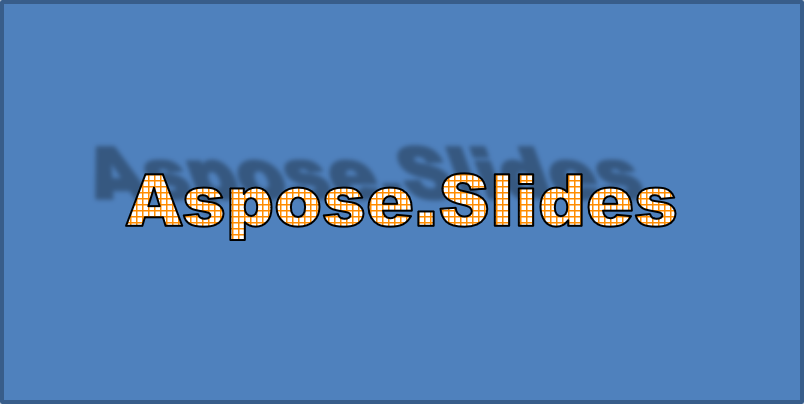
外部陰影透過在文字背後放置陰影來增添深度。您可以自訂其顏色、方向、距離、模糊半徑、比例與斜切。
此範例呼叫 enableOuterShadowEffect,並設定黑色陰影,模糊半徑為 4 點、方向為 230 度、距離為 30 點。比例值為 100 維持陰影大小,水平斜切以 20 度傾斜。Alpha 變換將不透明度設為 32%:
use aspose\slides\ColorTransformOperation;
use aspose\slides\FontData;
use aspose\slides\Presentation;
use aspose\slides\ShapeType;

$presentation = new Presentation();
try {
    $slide = $presentation->getSlides()->get_Item(0);

    $autoShape = $slide->getShapes()->addAutoShape(ShapeType::Rectangle, 20, 20, 400, 200);

    $portion = $autoShape->getTextFrame()->getParagraphs()->get_Item(0)->getPortions()->get_Item(0);
    $portion->setText("Aspose.Slides");
    $font = new FontData("Arial Black");
    $portion->getPortionFormat()->setLatinFont($font);
    $portion->getPortionFormat()->setFontHeight(36);

    $portion->getPortionFormat()->getEffectFormat()->enableOuterShadowEffect();
    $portion->getPortionFormat()->getEffectFormat()->getOuterShadowEffect()->getShadowColor()->setColor(java("java.awt.Color")->BLACK);
    $portion->getPortionFormat()->getEffectFormat()->getOuterShadowEffect()->setScaleHorizontal(100);
    $portion->getPortionFormat()->getEffectFormat()->getOuterShadowEffect()->setScaleVertical(100);
    $portion->getPortionFormat()->getEffectFormat()->getOuterShadowEffect()->setBlurRadius(4);
    $portion->getPortionFormat()->getEffectFormat()->getOuterShadowEffect()->setDirection(230);
    $portion->getPortionFormat()->getEffectFormat()->getOuterShadowEffect()->setDistance(30);
    $portion->getPortionFormat()->getEffectFormat()->getOuterShadowEffect()->setSkewHorizontal(20);
    $portion->getPortionFormat()->getEffectFormat()->getOuterShadowEffect()->setSkewVertical(0);
    $portion->getPortionFormat()->getEffectFormat()->getOuterShadowEffect()->getShadowColor()->getColorTransform()->add(ColorTransformOperation::SetAlpha, 0.32);
} finally {
    $presentation->dispose();
}
產生的文字:
Note
- 當同時使用外部陰影與預設陰影時,只會套用外部陰影。
- 若同時使用外部陰影與內部陰影,最終效果取決於 PowerPoint 版本。例如在 PowerPoint 2013 中效果會加倍,而在 PowerPoint 2007 中則僅套用外部陰影。
套用反射效果
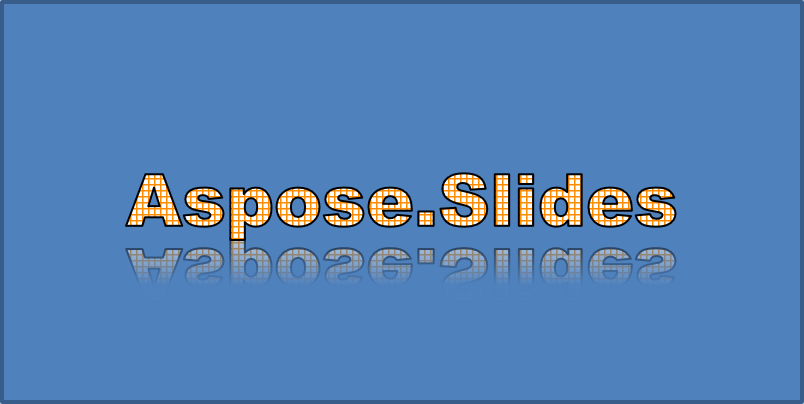
反射會產生文字的鏡像副本。您可調整其位置、比例、模糊與不透明度以控制外觀。
此範例呼叫 enableReflectionEffect,將反射垂直翻轉,比例為 -100%。使用 0.5 點的模糊半徑與 4.72 點的距離。沿著反射位置從 0% 到 60% 時,不透明度從 60% 降至 0.9%:
use aspose\slides\FontData;
use aspose\slides\Presentation;
use aspose\slides\RectangleAlignment;
use aspose\slides\ShapeType;

$presentation = new Presentation();
try {
    $slide = $presentation->getSlides()->get_Item(0);

    $autoShape = $slide->getShapes()->addAutoShape(ShapeType::Rectangle, 20, 20, 400, 200);

    $portion = $autoShape->getTextFrame()->getParagraphs()->get_Item(0)->getPortions()->get_Item(0);
    $portion->setText("Aspose.Slides");
    $font = new FontData("Arial Black");
    $portion->getPortionFormat()->setLatinFont($font);
    $portion->getPortionFormat()->setFontHeight(36);

    $portion->getPortionFormat()->getEffectFormat()->enableReflectionEffect();
    $portion->getPortionFormat()->getEffectFormat()->getReflectionEffect()->setBlurRadius(0.5);
    $portion->getPortionFormat()->getEffectFormat()->getReflectionEffect()->setDistance(4.72);
    $portion->getPortionFormat()->getEffectFormat()->getReflectionEffect()->setStartPosAlpha(0);
    $portion->getPortionFormat()->getEffectFormat()->getReflectionEffect()->setEndPosAlpha(60);
    $portion->getPortionFormat()->getEffectFormat()->getReflectionEffect()->setDirection(90);
    $portion->getPortionFormat()->getEffectFormat()->getReflectionEffect()->setScaleHorizontal(100);
    $portion->getPortionFormat()->getEffectFormat()->getReflectionEffect()->setScaleVertical(-100);
    $portion->getPortionFormat()->getEffectFormat()->getReflectionEffect()->setStartReflectionOpacity(60);
    $portion->getPortionFormat()->getEffectFormat()->getReflectionEffect()->setEndReflectionOpacity(0.9);
    $portion->getPortionFormat()->getEffectFormat()->getReflectionEffect()->setRectangleAlign(RectangleAlignment::BottomLeft);
} finally {
    $presentation->dispose();
}
產生的文字:
套用發光效果
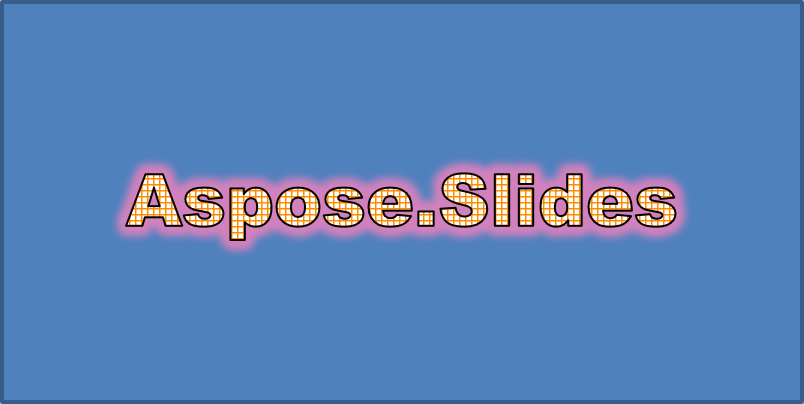
發光會在文字周圍添加柔和的彩色輪廓。您可調整其顏色、不透明度與半徑來控制效果。
此範例呼叫 enableGlowEffect,套用紅色發光,透明度 54%,半徑為 7 點:
use aspose\slides\ColorTransformOperation;
use aspose\slides\FontData;
use aspose\slides\Presentation;
use aspose\slides\ShapeType;

$presentation = new Presentation();
try {
    $slide = $presentation->getSlides()->get_Item(0);

    $autoShape = $slide->getShapes()->addAutoShape(ShapeType::Rectangle, 20, 20, 400, 200);

    $portion = $autoShape->getTextFrame()->getParagraphs()->get_Item(0)->getPortions()->get_Item(0);
    $portion->setText("Aspose.Slides");
    $font = new FontData("Arial Black");
    $portion->getPortionFormat()->setLatinFont($font);
    $portion->getPortionFormat()->setFontHeight(36);

    $portion->getPortionFormat()->getEffectFormat()->enableGlowEffect();
    $portion->getPortionFormat()->getEffectFormat()->getGlowEffect()->getColor()->setColor(java("java.awt.Color")->RED);
    $portion->getPortionFormat()->getEffectFormat()->getGlowEffect()->getColor()->getColorTransform()->add(ColorTransformOperation::SetAlpha, 0.54);
    $portion->getPortionFormat()->getEffectFormat()->getGlowEffect()->setRadius(7);
} finally {
    $presentation->dispose();
}
產生的文字:
套用 WordArt 變形
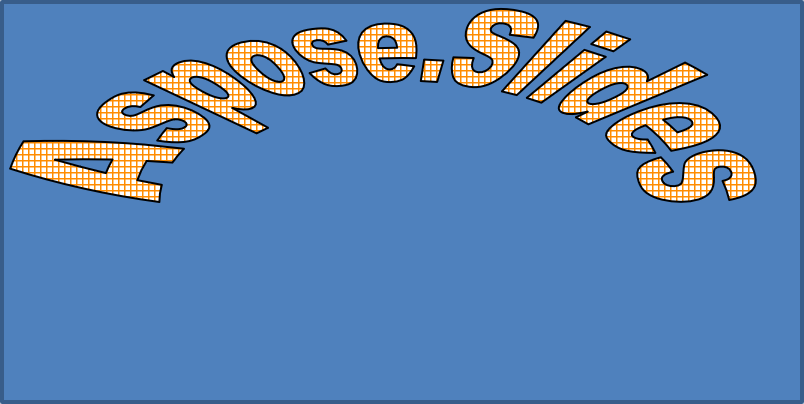
WordArt 變形會彎曲、拉伸或扭曲文字區塊。
設定 setTransform 為 ArchUpPour,即可將整個文字框向上彎曲:
use aspose\slides\Presentation;
use aspose\slides\ShapeType;
use aspose\slides\TextShapeType;

$presentation = new Presentation();
try {
    $slide = $presentation->getSlides()->get_Item(0);

    $autoShape = $slide->getShapes()->addAutoShape(ShapeType::Rectangle, 20, 20, 400, 200);

    $textFrame = $autoShape->getTextFrame();
    $textFrame->setText("Aspose.Slides");
    $textFrame->getTextFrameFormat()->setTransform(TextShapeType::ArchUpPour);
} finally {
    $presentation->dispose();
}
產生的文字:
Note
Aspose.Slides for PHP via Java 提供一組預先定義的 transformation types。套用 3D 效果至圖形與文字
您可以對圖形或其文字套用 3D 效果。斜角、擠出、光照與相機設定會決定最終外觀。
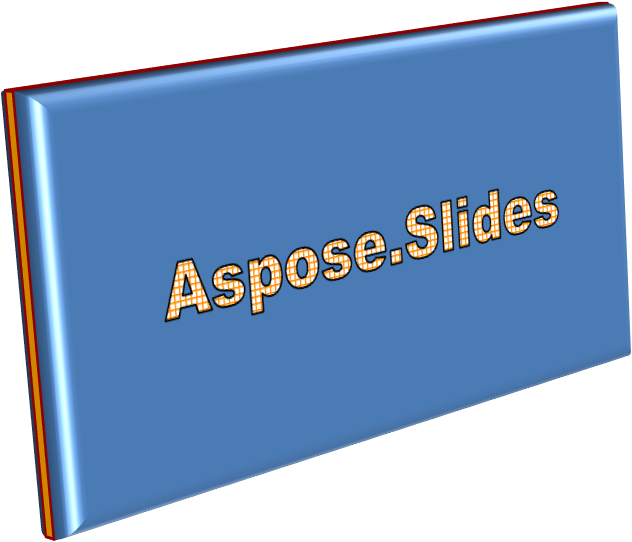
以下範例使用 ThreeDFormat 為矩形加入圓形斜角、橙色擠出與深紅色輪廓。斜角尺寸、擠出高度、輪廓寬度與深度皆以點為單位。塑膠材質、以 Z 軸旋轉 40 度的平衡光照,以及透視相機定義其外觀:
use aspose\slides\BevelPresetType;
use aspose\slides\CameraPresetType;
use aspose\slides\LightRigPresetType;
use aspose\slides\LightingDirection;
use aspose\slides\MaterialPresetType;
use aspose\slides\Presentation;
use aspose\slides\ShapeType;

$presentation = new Presentation();
try {
    $slide = $presentation->getSlides()->get_Item(0);

    $autoShape = $slide->getShapes()->addAutoShape(ShapeType::Rectangle, 20, 20, 400, 200);
    $autoShape->getTextFrame()->setText("Aspose.Slides");

    $autoShape->getThreeDFormat()->getBevelBottom()->setBevelType(BevelPresetType::Circle);
    $autoShape->getThreeDFormat()->getBevelBottom()->setHeight(10.5);
    $autoShape->getThreeDFormat()->getBevelBottom()->setWidth(10.5);

    $autoShape->getThreeDFormat()->getBevelTop()->setBevelType(BevelPresetType::Circle);
    $autoShape->getThreeDFormat()->getBevelTop()->setHeight(12.5);
    $autoShape->getThreeDFormat()->getBevelTop()->setWidth(11);

    $orange = new Java("java.awt.Color", 255, 165, 0);
    $autoShape->getThreeDFormat()->getExtrusionColor()->setColor($orange);
    $autoShape->getThreeDFormat()->setExtrusionHeight(6);

    $darkRed = new Java("java.awt.Color", 139, 0, 0);
    $autoShape->getThreeDFormat()->getContourColor()->setColor($darkRed);
    $autoShape->getThreeDFormat()->setContourWidth(1.5);

    $autoShape->getThreeDFormat()->setDepth(3);

    $autoShape->getThreeDFormat()->setMaterial(MaterialPresetType::Plastic);

    $autoShape->getThreeDFormat()->getLightRig()->setDirection(LightingDirection::Top);
    $autoShape->getThreeDFormat()->getLightRig()->setLightType(LightRigPresetType::Balanced);
    $autoShape->getThreeDFormat()->getLightRig()->setRotation(0, 0, 40);

    $autoShape->getThreeDFormat()->getCamera()->setCameraType(CameraPresetType::PerspectiveContrastingRightFacing);
} finally {
    $presentation->dispose();
}
產生的圖形:
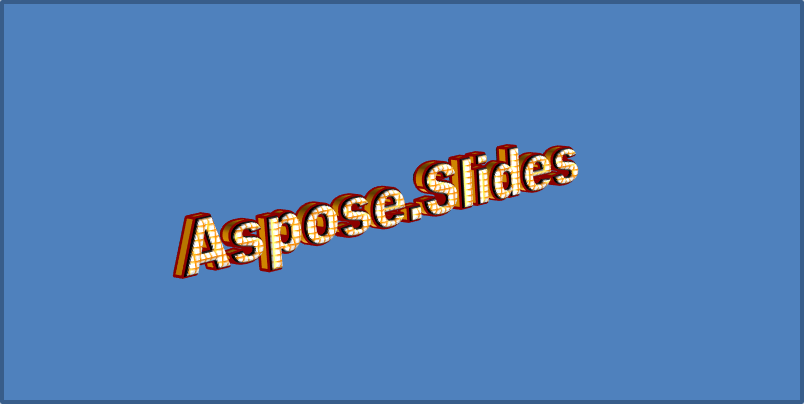
此範例透過 TextFrameFormat::getThreeDFormat 為文字套用類似的 3D 格式。較小的斜角塑造字母邊緣,而擠出與光照則為文字增添深度:
use aspose\slides\BevelPresetType;
use aspose\slides\CameraPresetType;
use aspose\slides\LightRigPresetType;
use aspose\slides\LightingDirection;
use aspose\slides\MaterialPresetType;
use aspose\slides\Presentation;
use aspose\slides\ShapeType;

$presentation = new Presentation();
try {
    $slide = $presentation->getSlides()->get_Item(0);

    $autoShape = $slide->getShapes()->addAutoShape(ShapeType::Rectangle, 20, 20, 400, 200);
    $textFrame = $autoShape->getTextFrame();
    $textFrame->setText("Aspose.Slides");

    $textFrame->getTextFrameFormat()->getThreeDFormat()->getBevelBottom()->setBevelType(BevelPresetType::Circle);
    $textFrame->getTextFrameFormat()->getThreeDFormat()->getBevelBottom()->setHeight(3.5);
    $textFrame->getTextFrameFormat()->getThreeDFormat()->getBevelBottom()->setWidth(3.5);

    $textFrame->getTextFrameFormat()->getThreeDFormat()->getBevelTop()->setBevelType(BevelPresetType::Circle);
    $textFrame->getTextFrameFormat()->getThreeDFormat()->getBevelTop()->setHeight(4);
    $textFrame->getTextFrameFormat()->getThreeDFormat()->getBevelTop()->setWidth(4);

    $orange = new Java("java.awt.Color", 255, 165, 0);
    $textFrame->getTextFrameFormat()->getThreeDFormat()->getExtrusionColor()->setColor($orange);
    $textFrame->getTextFrameFormat()->getThreeDFormat()->setExtrusionHeight(6);

    $darkRed = new Java("java.awt.Color", 139, 0, 0);
    $textFrame->getTextFrameFormat()->getThreeDFormat()->getContourColor()->setColor($darkRed);
    $textFrame->getTextFrameFormat()->getThreeDFormat()->setContourWidth(1.5);

    $textFrame->getTextFrameFormat()->getThreeDFormat()->setDepth(3);

    $textFrame->getTextFrameFormat()->getThreeDFormat()->setMaterial(MaterialPresetType::Plastic);

    $textFrame->getTextFrameFormat()->getThreeDFormat()->getLightRig()->setDirection(LightingDirection::Top);
    $textFrame->getTextFrameFormat()->getThreeDFormat()->getLightRig()->setLightType(LightRigPresetType::Balanced);
    $textFrame->getTextFrameFormat()->getThreeDFormat()->getLightRig()->setRotation(0, 0, 40);

    $textFrame->getTextFrameFormat()->getThreeDFormat()->getCamera()->setCameraType(CameraPresetType::PerspectiveContrastingRightFacing);
} finally {
    $presentation->dispose();
}
產生的文字:
Note
文字或其圖形套用 3D 效果以及這些效果之間的互動,受到特定規則的約束。考慮同時包含文字與其所在圖形的情境。3D 效果包括物件的 3D 表示以及其所置於的場景。
- 若圖形與文字皆設定場景,則以圖形的場景為優先,文字的場景會被忽略。
- 若圖形沒有自己的場景但具有 3D 表示,則使用文字的場景。
- 若圖形根本沒有 3D 效果,則視為平面,僅對文字套用 3D 效果。
這些行為與 ThreeDFormat::getLightRig 與 ThreeDFormat::getCamera 方法相關。
如需更多 3D 格式化範例,請參閱 Create 3D Effects in Presentations Using PHP。
常見問題
我可以在不同字型或文字系統(例如阿拉伯文、中文)上使用 WordArt 效果嗎?
是的,Aspose.Slides for PHP via Java 支援 Unicode,且可與所有主流字型與文字系統一同使用。無論語言為何,都能套用陰影、填充與輪廓等 WordArt 效果,雖然字型的可用性與渲染可能取決於系統字型。
我可以將 WordArt 效果套用到投影片母片元素嗎?
是的,您可以對母片投影片上的圖形套用 WordArt 效果,包括標題佔位符、頁尾或背景文字。對母片佈局所做的變更會反映至所有相關投影片。
WordArt 效果會影響簡報檔案大小嗎?
稍微會。陰影、發光與漸層填充等 WordArt 效果可能會因為新增格式化資訊而略為增加檔案大小,但差異通常可以忽略不計。
我可以在未儲存簡報的情況下預覽 WordArt 效果的結果嗎?
是的,您可以使用 Slide::getImage 或 Shape::getImage 將包含 WordArt 的投影片或個別圖形轉換為影像(例如 PNG、JPEG),以便在記憶體或螢幕上預覽結果,無需儲存或匯出完整簡報。