
تبدیل ارائهها به HTML5 در PHP
بررسی کلی
این مقاله توضیح میدهد که چگونه ارائههای پاورپوینت را به HTML5 تبدیل کنید با استفاده از Aspose.Slides برای PHP از طریق Java. این مقاله به صادرات پایه، کنترل انیمیشنهای اشکال و انتقال اسلایدها، و چیدمان نظرات میپردازد. همچنین خروجی HTML5 را با خروجی مبتنی بر SVG صادرات استاندارد HTML مقایسه میکند.
صدور PowerPoint به HTML5
مثال زیر یک ارائه را از پوشه کاری بارگذاری میکند و آن را در قالب HTML5 ذخیره میسازد. این مثال از تنظیمات پیشفرض صادرات استفاده میکند؛ مثال بعدی نشان میدهد که چگونه پخش انیمیشنها را به صورت صریح کنترل کنید. مسیر ورودی را با مسیر ارائهتان جایگزین کنید.
use aspose\slides\Presentation;
use aspose\slides\SaveFormat;

$presentation = new Presentation("pres.pptx");
try {
    $presentation->save("pres.html", SaveFormat::Html5);
} finally {
    $presentation->dispose();
}
Note
علاوه بر سند HTML، صادرات فایلهای CSS و JavaScript پشتیبانیکننده برای استایل اسلایدها، انیمیشنها، افکتها و ناوبری مینویسد. هنگام جابجایی یا انتشار خروجی این فایلها را همراه سند HTML نگه دارید. صفحه تولید شده همچنین jQuery و Anime.js را از CDNهای عمومی بارگذاری میکند؛ بدون اینها ناوبری اسلایدها و انیمیشنها اجرا نمیشوند.برای صادرات بدون پخش انیمیشن اشکال یا انتقال اسلایدها، مقدار false را به setAnimateShapes و setAnimateTransitions در Html5Options پاس دهید. این تنظیمات مستقل هستند، بنابراین میتوانید یکی را فعال کنید و دیگری را غیرفعال. مثال ارائه را با هر دو نوع انیمیشن غیرفعال شده در صفحه تولید شده صادر میکند.
use aspose\slides\Html5Options;
use aspose\slides\Presentation;
use aspose\slides\SaveFormat;

$html5Options = new Html5Options();
$html5Options->setAnimateShapes(false);
$html5Options->setAnimateTransitions(false);

$presentation = new Presentation("pres.pptx");
try {
    $presentation->save("pres5.html", SaveFormat::Html5, $html5Options);
} finally {
    $presentation->dispose();
}
صدور PowerPoint به HTML
صدور استاندارد HTML از روش رندرینگ متفاوتی استفاده میکند: محتوای اسلاید با SVG داخل یک صفحه HTML نشان داده میشود. مثال زیر یک ارائه را به سند HTML تبدیل میکند با استفاده از این روش رندرینگ.
use aspose\slides\Presentation;
use aspose\slides\SaveFormat;

$presentation = new Presentation("pres.pptx");
try {
    $presentation->save("pres.html", SaveFormat::Html);
} finally {
    $presentation->dispose();
}
نشانهگذاری سادهسازیشده زیر ساختار صفحه تولید شده را نشان میدهد. عنصر SVG شامل محتوای رندر شده اسلاید است؛ متن جایگزین نشاندهنده آن محتوا است و خروجی واقعی صادرات نیست.
<body>
<div class="slide" name="slide" id="slideslideIface1">
     <svg version="1.1">
         <g> THE SLIDE CONTENT GOES HERE </g>
     </svg>
</div>
</body>
Warning
صادرات مبتنی بر SVG اشکال PowerPoint را به عنوان عناصر جداگانه HTML نمایش نمیدهد. زمانی که به گزینههای انیمیشن اشکال و انتقال اسلاید که در این مقاله نشان داده شدهاند نیاز دارید، از صادرات HTML5 استفاده کنید.صدور PowerPoint به نمای اسلاید HTML5
صادرات HTML5 صفحهای برای مشاهده و ناوبری اسلایدهای ارائه در مرورگر تولید میکند. این مثال هم setAnimateShapes و هم setAnimateTransitions را فعال میسازد تا نمای اسلاید صادر شده بتواند افکتهای ارائه منبع را پخش کند.
از ارائهای استفاده کنید که قبلاً شامل انیمیشنهای اشکال و انتقال اسلاید باشد تا اثر این تنظیمات را ببینید. فعال کردن آنها افکت جدیدی به اسلایدهایی که هیچ افکتی ندارند اضافه نمیکند. پس از صادرات، سند HTML5 تولید شده را در مرورگری که فایلهای پشتیبانیاش در دسترس است باز کنید.
use aspose\slides\Html5Options;
use aspose\slides\Presentation;
use aspose\slides\SaveFormat;

$html5Options = new Html5Options();
$html5Options->setAnimateShapes(true);
$html5Options->setAnimateTransitions(true);

$presentation = new Presentation("pres.pptx");
try {
    $presentation->save("HTML5-slide-view.html", SaveFormat::Html5, $html5Options);
} finally {
    $presentation->dispose();
}
تبدیل یک ارائه به سند HTML5 با نظرات
میتوانید نظرات موجود اسلایدها را در خروجی HTML5 گنجانید تا خوانندگان بازخورد را در کنار محتوای اسلاید ببینند. مثال در این بخش انتظار دارد ارائه منبع شامل نظرات باشد، همانطور که در زیر نشان داده شده است. این مثال نظرات را صادر میکند؛ نظرات جدیدی ایجاد نمیکند.
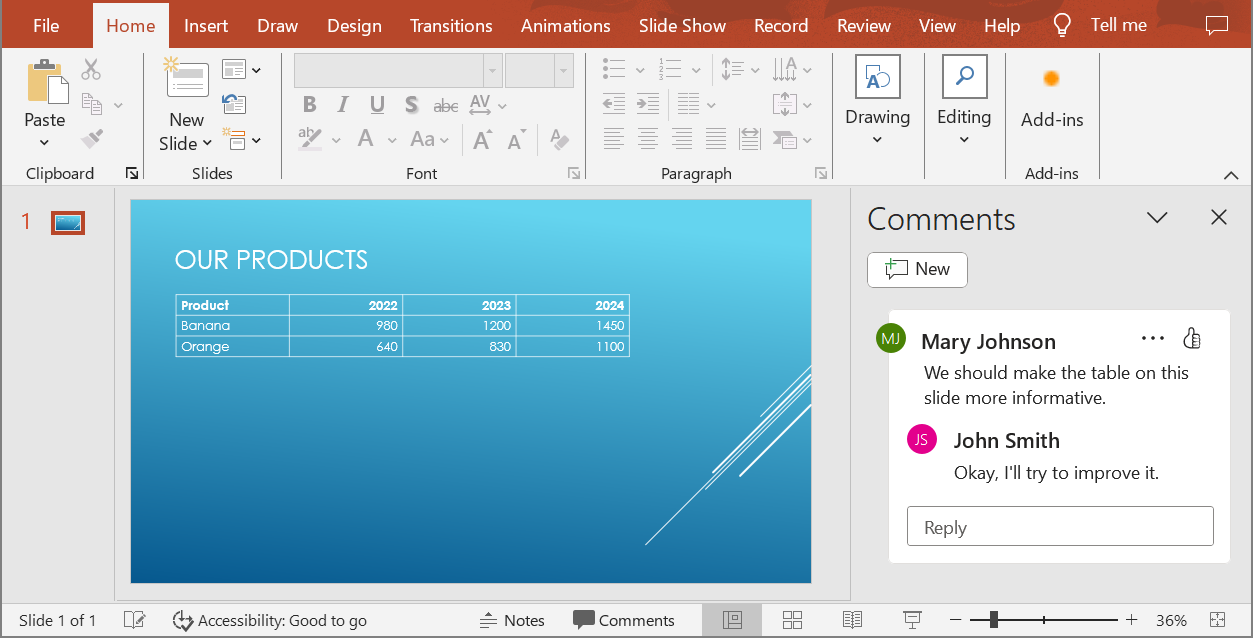
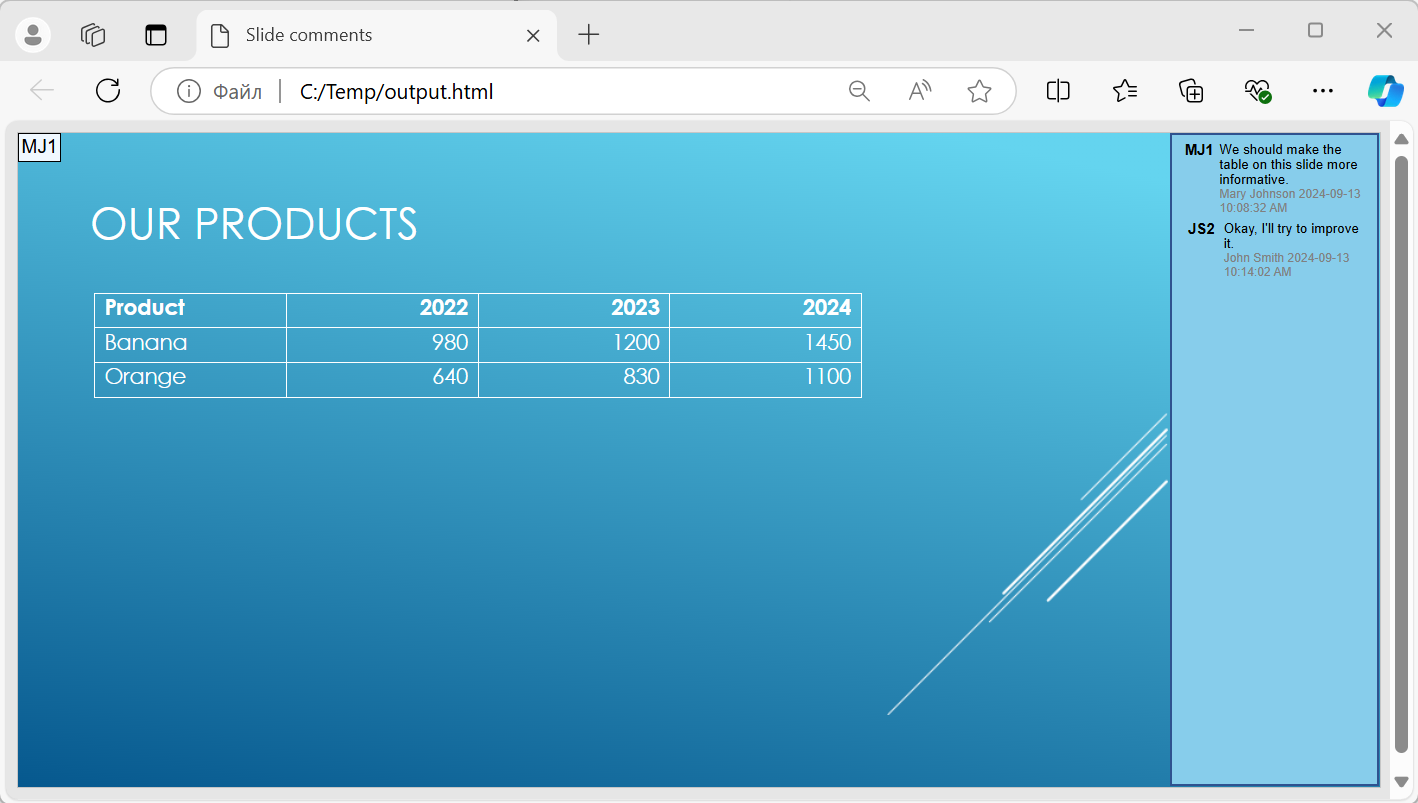
یک شیء NotesCommentsLayoutingOptions را به متد setSlidesLayoutOptions از Html5Options پاس دهید. با استفاده از setCommentsPosition، مقدار Right را از شمارنده CommentsPositions انتخاب کنید تا نظرات را در سمت راست هر اسلاید قرار دهید.
مثال زیر ارائه را با این چیدمان نظرات به HTML5 صادر میکند. ارائهای بدون نظرات متن نظری برای نمایش نخواهد داشت.
use aspose\slides\CommentsPositions;
use aspose\slides\Html5Options;
use aspose\slides\NotesCommentsLayoutingOptions;
use aspose\slides\Presentation;
use aspose\slides\SaveFormat;

$layoutOptions = new NotesCommentsLayoutingOptions();
$layoutOptions->setCommentsPosition(CommentsPositions::Right);

$html5Options = new Html5Options();
$html5Options->setSlidesLayoutOptions($layoutOptions);

$presentation = new Presentation("sample.pptx");
try {
    $presentation->save("output.html", SaveFormat::Html5, $html5Options);
} finally {
    $presentation->dispose();
}
حذف پیوندهای JavaScript هنگام صادرات
فرض کنید hyperlinks.pptx متنی لینکدار با هدف javascript:alert('Hello') و یک پیوند عادی https://example.com/ داشته باشد. برای حذف پیوند JavaScript هنگام صادرات، مقدار true را به SaveOptions::setSkipJavaScriptLinks پاس دهید. مقدار پیشفرض false است، بنابراین این پیوندها فیلتر نمیشوند مگر آنکه گزینه را فعال کنید.
مثال زیر ارائه را از پوشه کاری بارگذاری میکند و با استفاده از Html5Options صادر مینماید:
use aspose\slides\Html5Options;
use aspose\slides\Presentation;
use aspose\slides\SaveFormat;

$html5Options = new Html5Options();
$html5Options->setSkipJavaScriptLinks(true);

$presentation = new Presentation("hyperlinks.pptx");
try {
    $presentation->save("filtered-html5.html", SaveFormat::Html5, $html5Options);
} finally {
    $presentation->dispose();
}
فایل صادر شده پیوند JavaScript را حذف میکند در حالی که متن آن و پیوند HTTPS عادی را حفظ میکند. ارائه منبع بدون تغییر باقی میماند.
این گزینه پیوندهای JavaScript را فیلتر میکند؛ تمام اسکریپتها یا سایر محتوای فعال را حذف نمیکند و رعایت CSP را نیز تضمین نمیکند. به عنوان مثال، خروجی HTML5 همچنان اسکریپتهای مورد نیاز برای ناوبری اسلایدها و انیمیشنها را شامل میشود.
سوالات متداول
آیا میتوانم کنترل کنم آیا انیمیشنهای اشیاء و انتقال اسلایدها در HTML5 اجرا شوند؟
بله، صادرات HTML5 گزینههای جداگانهای برای فعال یا غیرفعال کردن shape animations و slide transitions فراهم میکند.
آیا نظرات پشتیبانی میشوند و میتوان آنها را نسبت به اسلاید کجا قرار داد؟
بله، نظرات موجود میتوانند در خروجی HTML5 گنجانده شوند و از طریق layout settings قابل موقعیتیابی هستند (به عنوان مثال، در سمت راست اسلاید).
آیا میتوانم پیوندهایی که JavaScript را فراخوانی میکنند برای دلایل امنیتی یا CSP حذف کنم؟
بله، تنظیم setSkipJavaScriptLinks به شما امکان میدهد تا پیوندهای حاوی فراخوانیهای JavaScript را در زمان ذخیرهسازی نادیده بگیرید. مقدار پیشفرض false است. برای مثال صادرات HTML5 و حوزه فیلتر به حذف پیوندهای JavaScript هنگام صادرات مراجعه کنید. این تنظیم JavaScript مورد استفاده توسط نمایشگر HTML5 برای ناوبری و انیمیشنها را حذف نمیکند.