
แปลงงานนำเสนอเป็น HTML5 ใน PHP
ภาพรวม
บทความนี้อธิบายวิธีแปลงงานนำเสนอ PowerPoint เป็น HTML5 ด้วย Aspose.Slides สำหรับ PHP ผ่าน Java โดยครอบคลุมการส่งออกพื้นฐาน การควบคุมการเคลื่อนไหวของรูปทรงและการเปลี่ยนสไลด์ รวมถึงการจัดวางความคิดเห็น นอกจากนี้ยังเปรียบเทียบผลลัพธ์ HTML5 กับผลลัพธ์แบบ SVG ของการส่งออก HTML ปกติ
ส่งออก PowerPoint เป็น HTML5
ตัวอย่างต่อไปนี้โหลดงานนำเสนอจากไดเรกทอรีทำงานและบันทึกเป็นรูปแบบ HTML5 โดยใช้การตั้งค่าส่งออกเริ่มต้น; ตัวอย่างต่อไปจะแสดงวิธีควบคุมการเล่นแอนิเมชันอย่างชัดเจน ให้เปลี่ยนเส้นทางของไฟล์เข้าเป็นเส้นทางของงานนำเสนอของคุณ
use aspose\slides\Presentation;
use aspose\slides\SaveFormat;

$presentation = new Presentation("pres.pptx");
try {
    $presentation->save("pres.html", SaveFormat::Html5);
} finally {
    $presentation->dispose();
}
Note
นอกเหนือจากเอกสาร HTML การส่งออกยังเขียนไฟล์ CSS และ JavaScript ที่สนับสนุนการจัดรูปแบบสไลด์ แอนิเมชัน เอฟเฟ็กต์และการนำทาง ให้เก็บไฟล์เหล่านี้ไว้กับเอกสาร HTML เมื่อย้ายหรือเผยแพร่ผลลัพธ์ หน้าเว็บที่สร้างขึ้นยังโหลด jQuery และ Anime.js จาก CDN สาธารณะ; หากไม่มีไฟล์เหล่านี้ การนำทางสไลด์และแอนิเมชันจะไม่ทำงานเพื่อส่งออกโดยไม่เล่นแอนิเมชันรูปทรงหรือการเปลี่ยนสไลด์ ให้ส่งค่า false ไปยัง setAnimateShapes และ setAnimateTransitions ใน Html5Options. การตั้งค่าเหล่านี้เป็นอิสระต่อกัน ดังนั้นคุณสามารถเปิดใช้งานหนึ่งในขณะที่ปิดอีกอันได้ ตัวอย่างนี้ส่งออกงานนำเสนอโดยปิดการทำงานของแอนิเมชันทั้งสองประเภทในหน้าที่สร้างขึ้น
use aspose\slides\Html5Options;
use aspose\slides\Presentation;
use aspose\slides\SaveFormat;

$html5Options = new Html5Options();
$html5Options->setAnimateShapes(false);
$html5Options->setAnimateTransitions(false);

$presentation = new Presentation("pres.pptx");
try {
    $presentation->save("pres5.html", SaveFormat::Html5, $html5Options);
} finally {
    $presentation->dispose();
}
ส่งออก PowerPoint เป็น HTML
การส่งออก HTML มาตรฐานใช้แนวทางการเรนเดอร์ที่แตกต่าง: เนื้อหาสไลด์จะแสดงเป็น SVG ภายในหน้า HTML ตัวอย่างต่อไปนี้แปลงงานนำเสนอเป็นเอกสาร HTML โดยใช้แนวทางการเรนเดอร์นี้
use aspose\slides\Presentation;
use aspose\slides\SaveFormat;

$presentation = new Presentation("pres.pptx");
try {
    $presentation->save("pres.html", SaveFormat::Html);
} finally {
    $presentation->dispose();
}
โครงสร้าง markup ที่ง่ายขึ้นด้านล่างแสดงโครงสร้างของหน้าที่สร้างขึ้น عنصر SVG จะบรรจุเนื้อหาสไลด์ที่เรนเดอร์; ข้อความตัวแทนจะแสดงว่าเป็นเนื้อหานั้นและไม่ใช่ผลลัพธ์การส่งออกจริง
<body>
<div class="slide" name="slide" id="slideslideIface1">
     <svg version="1.1">
         <g> THE SLIDE CONTENT GOES HERE </g>
     </svg>
</div>
</body>
Warning
การส่งออกแบบ SVG ไม่เปิดเผยรูปทรง PowerPoint เป็นองค์ประกอบ HTML แยกแต่ละตัว ใช้การส่งออก HTML5 เมื่อคุณต้องการตัวเลือกการเคลื่อนไหวของรูปทรงและการเปลี่ยนสไลด์ที่แสดงในบทความนี้ส่งออก PowerPoint เป็นมุมมองสไลด์ HTML5
การส่งออก HTML5 สร้างหน้าเพื่อดูและนำทางสไลด์ของงานนำเสนอในเบราว์เซอร์ ตัวอย่างนี้เปิดใช้งานทั้ง setAnimateShapes และ setAnimateTransitions เพื่อให้มุมมองสไลด์ที่ส่งออกสามารถเล่นเอฟเฟ็กต์จากงานนำเสนอแหล่งต้นทางได้
ใช้งานนำเสนอที่มีแอนิเมชันรูปทรงและการเปลี่ยนสไลด์ไว้แล้วเพื่อดูผลของการตั้งค่าเหล่านี้ การเปิดใช้งานไม่เพิ่มเอฟเฟ็กต์ใหม่ให้สไลด์ที่ไม่มีเอฟเฟ็กต์ หลังจากส่งออก ให้เปิดเอกสาร HTML5 ที่สร้างขึ้นในเบราว์เซอร์พร้อมไฟล์สนับสนุนที่พร้อมใช้งาน
use aspose\slides\Html5Options;
use aspose\slides\Presentation;
use aspose\slides\SaveFormat;

$html5Options = new Html5Options();
$html5Options->setAnimateShapes(true);
$html5Options->setAnimateTransitions(true);

$presentation = new Presentation("pres.pptx");
try {
    $presentation->save("HTML5-slide-view.html", SaveFormat::Html5, $html5Options);
} finally {
    $presentation->dispose();
}
แปลงงานนำเสนอเป็นเอกสาร HTML5 พร้อมความคิดเห็น
คุณสามารถรวมความคิดเห็นสไลด์ที่มีอยู่ในผลลัพธ์ HTML5 เพื่อให้ผู้อ่านเห็นข้อเสนอแนะควบคู่กับเนื้อหาสไลด์ ตัวอย่างในส่วนนี้คาดหวังว่าต้นฉบับงานนำเสนอจะมีความคิดเห็นตามที่แสดงด้านล่าง และจะส่งออกความคิดเห็นเหล่านั้น; ไม่ได้สร้างใหม่
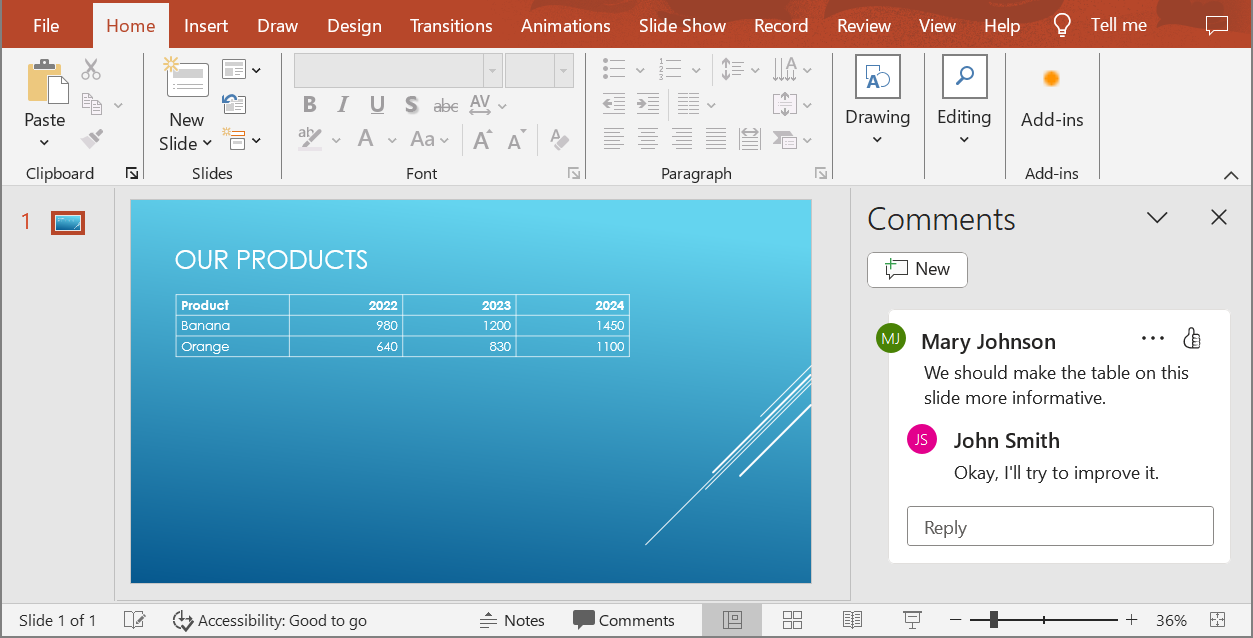
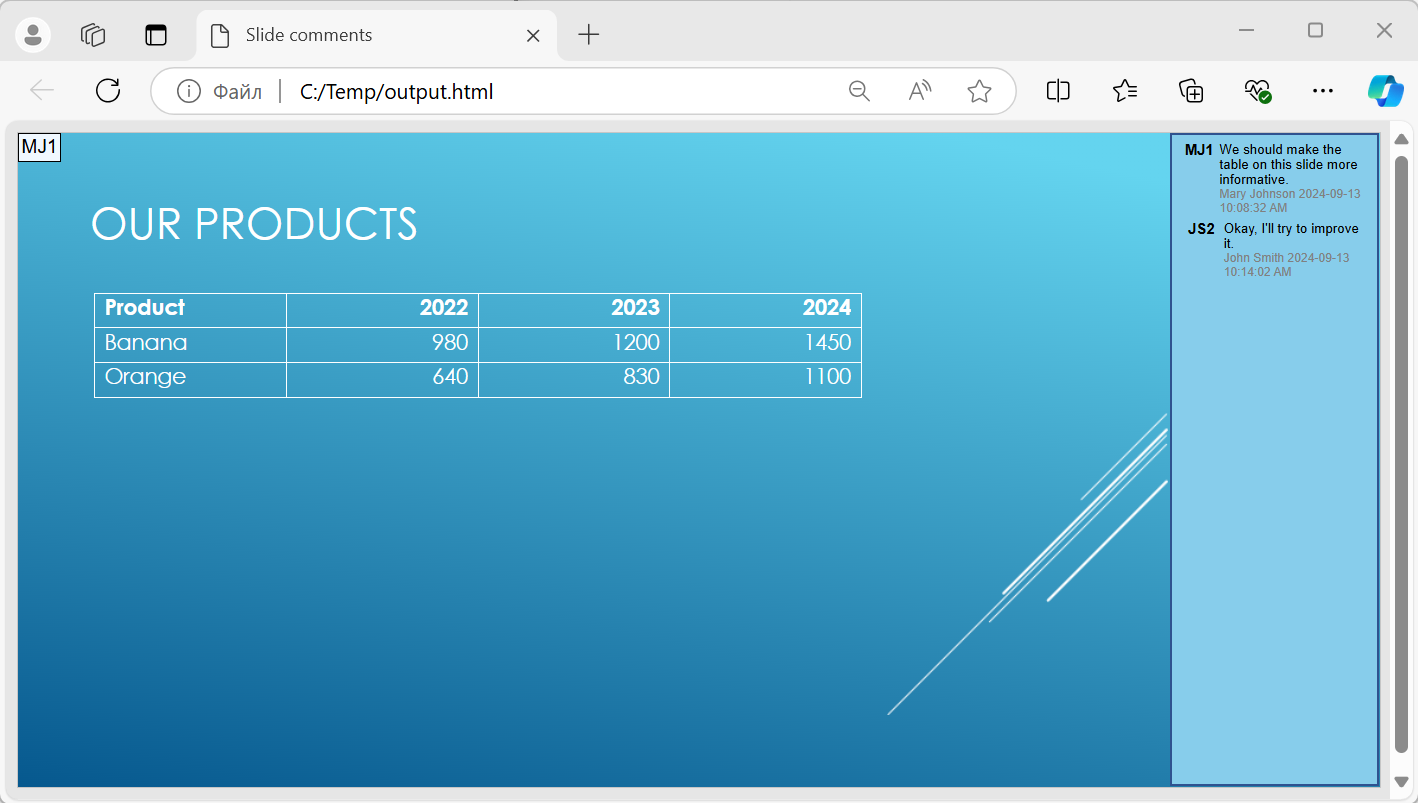
ส่งออบเจ็กต์ NotesCommentsLayoutingOptions ไปยังเมธอด setSlidesLayoutOptions ของ Html5Options. ใช้ setCommentsPosition เพื่อเลือก Right จาก enumeration CommentsPositions เพื่อวางความคิดเห็นทางด้านขวาของแต่ละสไลด์
ตัวอย่างต่อไปนี้ส่งออกงานนำเสนอเป็น HTML5 พร้อมเค้าโครงความคิดเห็นนี้ งานนำเสนอที่ไม่มีความคิดเห็นจะไม่มีข้อความแสดง
use aspose\slides\CommentsPositions;
use aspose\slides\Html5Options;
use aspose\slides\NotesCommentsLayoutingOptions;
use aspose\slides\Presentation;
use aspose\slides\SaveFormat;

$layoutOptions = new NotesCommentsLayoutingOptions();
$layoutOptions->setCommentsPosition(CommentsPositions::Right);

$html5Options = new Html5Options();
$html5Options->setSlidesLayoutOptions($layoutOptions);

$presentation = new Presentation("sample.pptx");
try {
    $presentation->save("output.html", SaveFormat::Html5, $html5Options);
} finally {
    $presentation->dispose();
}
ยกเว้นลิงก์ JavaScript ระหว่างการส่งออก
สมมติว่า hyperlinks.pptx มีข้อความลิงก์ที่มีเป้าหมาย javascript:alert('Hello') และลิงก์ธรรมดา https://example.com/ เพื่อยกเว้นลิงก์ JavaScript ระหว่างการส่งออก ให้ส่งค่า true ไปยัง SaveOptions::setSkipJavaScriptLinks. ค่าเริ่มต้นคือ false ดังนั้นลิงก์เหล่านี้จะไม่ถูกกรองเว้นแต่คุณเปิดใช้งานตัวเลือกนี้
ตัวอย่างต่อไปนี้โหลดงานนำเสนอจากไดเรกทอรีทำงานและส่งออกโดยใช้ Html5Options:
use aspose\slides\Html5Options;
use aspose\slides\Presentation;
use aspose\slides\SaveFormat;

$html5Options = new Html5Options();
$html5Options->setSkipJavaScriptLinks(true);

$presentation = new Presentation("hyperlinks.pptx");
try {
    $presentation->save("filtered-html5.html", SaveFormat::Html5, $html5Options);
} finally {
    $presentation->dispose();
}
ไฟล์ที่ส่งออกจะละเว้นลิงก์ JavaScript แต่คงข้อความและลิงก์ HTTPS ปกติไว้ งานนำเสนอแหล่งต้นทางจะไม่ได้รับการเปลี่ยนแปลง
ตัวเลือกนี้กรองลิงก์ JavaScript; ไม่ได้ลบสคริปต์ทั้งหมดหรือเนื้อหาเชิงโต้ตอบอื่น ๆ และไม่รับประกันการปฏิบัติตาม CSP ตัวอย่างเช่น ผลลัพธ์ HTML5 ยังคงมีสคริปต์สำหรับการนำทางสไลด์และแอนิเมชัน
คำถามที่พบบ่อย
Can I control whether object animations and slide transitions will play in HTML5?
ได้, การส่งออก HTML5 มีตัวเลือกแยกกันเพื่อเปิดหรือปิด shape animations และ slide transitions.
Are comments supported, and where can they be placed relative to the slide?
ได้, ความคิดเห็นที่มีอยู่สามารถรวมในผลลัพธ์ HTML5 ได้ และสามารถกำหนดตำแหน่ง (เช่น ทางด้านขวาของสไลด์) ผ่าน layout settings สำหรับบันทึกและความคิดเห็น.
Can I skip links that invoke JavaScript for security or CSP reasons?
ได้, การตั้งค่า setSkipJavaScriptLinks อนุญาตให้ละเว้นลิงก์ที่เรียก JavaScript ระหว่างการบันทึก ค่าเริ่มต้นคือ false. ดูที่ ยกเว้นลิงก์ JavaScript ระหว่างการส่งออก สำหรับตัวอย่างการส่งออก HTML5 และขอบเขตของฟิลเตอร์ ตัวเลือกนี้ไม่ได้ลบ JavaScript ที่ใช้โดยผู้ชม HTML5 สำหรับการนำทางและแอนิเมชัน.