
Convertire le presentazioni in HTML5 in PHP
Panoramica
Questo articolo spiega come convertire le presentazioni PowerPoint in HTML5 usando Aspose.Slides per PHP via Java. Copre l’esportazione di base, il controllo delle animazioni di forme e delle transizioni delle diapositive, e il layout dei commenti. Confronta inoltre l’output HTML5 con l’output basato su SVG dell’esportazione HTML standard.
Esporta PowerPoint in HTML5
Il seguente esempio carica una presentazione dalla directory di lavoro e la salva in formato HTML5. Usa le impostazioni predefinite di esportazione; il prossimo esempio mostra come controllare esplicitamente la riproduzione delle animazioni. Sostituisci il percorso di input con il percorso della tua presentazione.
use aspose\slides\Presentation;
use aspose\slides\SaveFormat;

$presentation = new Presentation("pres.pptx");
try {
    $presentation->save("pres.html", SaveFormat::Html5);
} finally {
    $presentation->dispose();
}
Nota
Oltre al documento HTML, l’esportazione scrive file CSS e JavaScript di supporto per lo stile delle diapositive, le animazioni, gli effetti e la navigazione. Mantieni questi file insieme al documento HTML quando sposti o pubblichi l’output. La pagina generata carica anche jQuery e Anime.js da CDN pubblici; senza di essi, la navigazione delle diapositive e le animazioni non funzionano.Per esportare senza riprodurre le animazioni delle forme o le transizioni delle diapositive, passa false a setAnimateShapes e setAnimateTransitions in Html5Options. Queste impostazioni sono indipendenti, quindi puoi abilitare una mentre disabiliti l’altra. L’esempio esporta la presentazione con entrambi i tipi di animazione disabilitati nella pagina generata.
use aspose\slides\Html5Options;
use aspose\slides\Presentation;
use aspose\slides\SaveFormat;

$html5Options = new Html5Options();
$html5Options->setAnimateShapes(false);
$html5Options->setAnimateTransitions(false);

$presentation = new Presentation("pres.pptx");
try {
    $presentation->save("pres5.html", SaveFormat::Html5, $html5Options);
} finally {
    $presentation->dispose();
}
Esporta PowerPoint in HTML
L’esportazione HTML standard utilizza un approccio di rendering diverso: il contenuto delle diapositive è rappresentato da SVG all’interno di una pagina HTML. Il seguente esempio converte una presentazione in un documento HTML usando questo approccio di rendering.
use aspose\slides\Presentation;
use aspose\slides\SaveFormat;

$presentation = new Presentation("pres.pptx");
try {
    $presentation->save("pres.html", SaveFormat::Html);
} finally {
    $presentation->dispose();
}
Il markup semplificato di seguito illustra la struttura della pagina generata. L’elemento SVG contiene il contenuto della diapositiva renderizzato; il testo segnaposto rappresenta quel contenuto e non è l’output letterale dell’esportazione.
<body>
<div class="slide" name="slide" id="slideslideIface1">
     <svg version="1.1">
         <g> THE SLIDE CONTENT GOES HERE </g>
     </svg>
</div>
</body>
Attenzione
L’esportazione basata su SVG non espone le forme PowerPoint come elementi HTML individuali. Usa l’esportazione HTML5 quando hai bisogno delle opzioni di animazione delle forme e di transizione delle diapositive illustrate in questo articolo.Esporta PowerPoint in visualizzazione diapositiva HTML5
L’esportazione HTML5 produce una pagina per visualizzare e navigare le diapositive della presentazione in un browser. Questo esempio abilita sia setAnimateShapes sia setAnimateTransitions affinché la visualizzazione delle diapositive esportata possa riprodurre gli effetti della presentazione originale.
Usa una presentazione che contiene già animazioni di forme e transizioni diapositive per vedere l’effetto di queste impostazioni. Abilitarle non aggiunge nuovi effetti alle diapositive che non ne hanno. Dopo l’esportazione, apri il documento HTML5 generato in un browser con i file di supporto disponibili.
use aspose\slides\Html5Options;
use aspose\slides\Presentation;
use aspose\slides\SaveFormat;

$html5Options = new Html5Options();
$html5Options->setAnimateShapes(true);
$html5Options->setAnimateTransitions(true);

$presentation = new Presentation("pres.pptx");
try {
    $presentation->save("HTML5-slide-view.html", SaveFormat::Html5, $html5Options);
} finally {
    $presentation->dispose();
}
Converti una presentazione in un documento HTML5 con commenti
Puoi includere i commenti delle diapositive esistenti nell’output HTML5 in modo che i lettori possano vedere il feedback accanto al contenuto della diapositiva. L’esempio in questa sezione si aspetta che la presentazione di origine contenga commenti, come illustrato di seguito. Esporta quei commenti; non ne crea di nuovi.
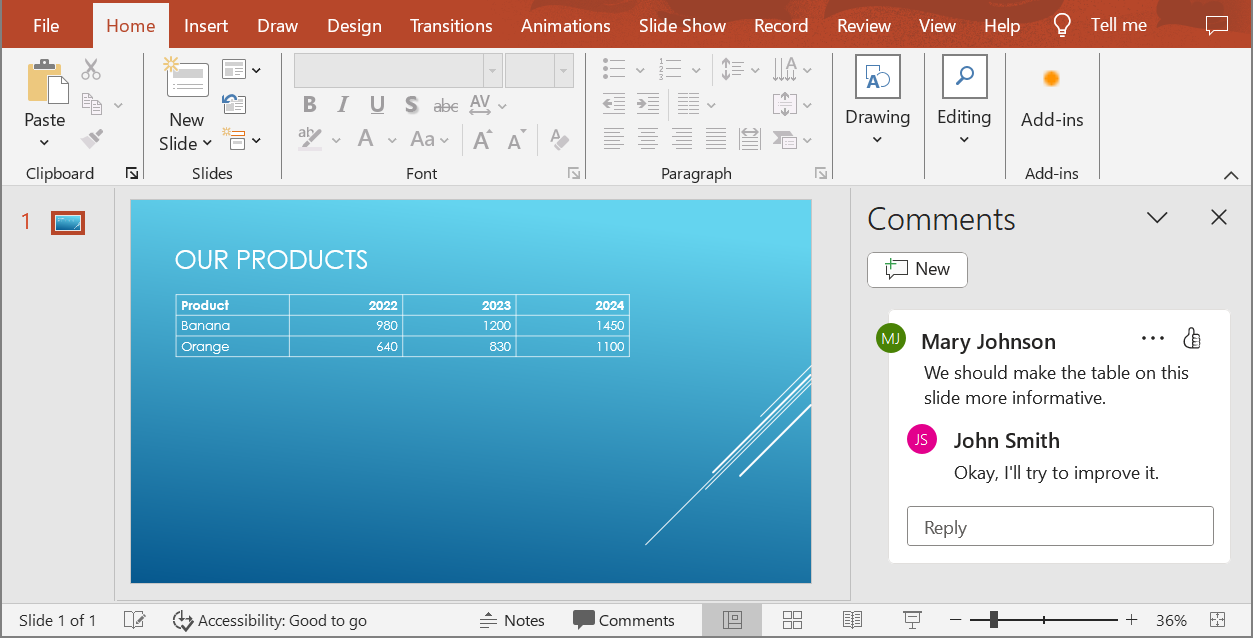
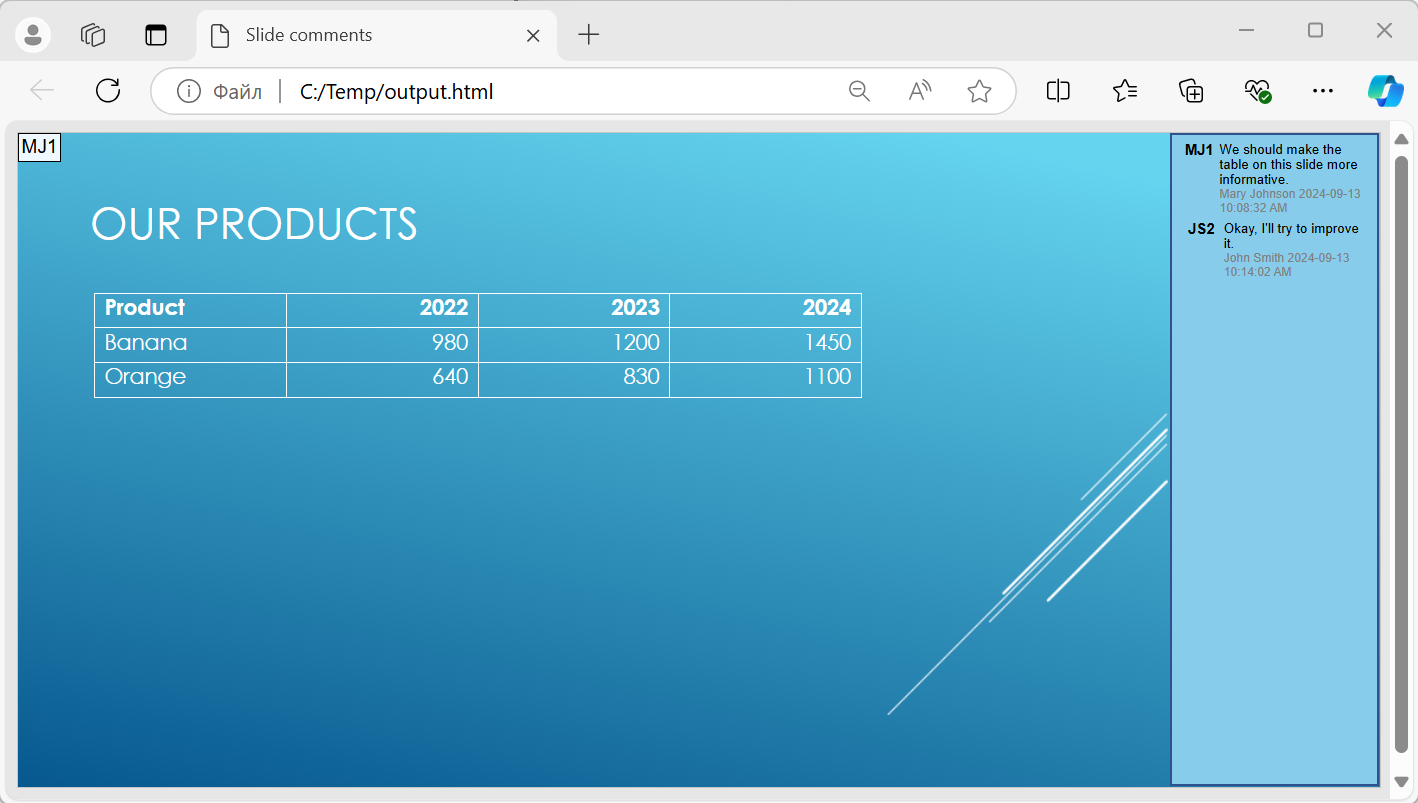
Passa un oggetto NotesCommentsLayoutingOptions al metodo setSlidesLayoutOptions di Html5Options. Usa setCommentsPosition per selezionare Right dall’enumerazione CommentsPositions per posizionare i commenti a destra di ogni diapositiva.
Il seguente esempio esporta la presentazione in HTML5 con questo layout dei commenti. Una presentazione senza commenti non avrà alcun testo di commento da visualizzare.
use aspose\slides\CommentsPositions;
use aspose\slides\Html5Options;
use aspose\slides\NotesCommentsLayoutingOptions;
use aspose\slides\Presentation;
use aspose\slides\SaveFormat;

$layoutOptions = new NotesCommentsLayoutingOptions();
$layoutOptions->setCommentsPosition(CommentsPositions::Right);

$html5Options = new Html5Options();
$html5Options->setSlidesLayoutOptions($layoutOptions);

$presentation = new Presentation("sample.pptx");
try {
    $presentation->save("output.html", SaveFormat::Html5, $html5Options);
} finally {
    $presentation->dispose();
}
Escludi i collegamenti ipertestuali JavaScript durante l’esportazione
Supponiamo che hyperlinks.pptx contenga testo collegato con una destinazione javascript:alert('Hello') e un collegamento ordinario https://example.com/. Per escludere il collegamento ipertestuale JavaScript durante l’esportazione, passa true a SaveOptions::setSkipJavaScriptLinks. Il valore predefinito è false, quindi questi collegamenti non vengono filtrati a meno che tu non attivi l’opzione.
Il seguente esempio carica la presentazione dalla directory di lavoro e la esporta usando Html5Options:
use aspose\slides\Html5Options;
use aspose\slides\Presentation;
use aspose\slides\SaveFormat;

$html5Options = new Html5Options();
$html5Options->setSkipJavaScriptLinks(true);

$presentation = new Presentation("hyperlinks.pptx");
try {
    $presentation->save("filtered-html5.html", SaveFormat::Html5, $html5Options);
} finally {
    $presentation->dispose();
}
Il file esportato omette il collegamento ipertestuale JavaScript mantenendo il suo testo e il collegamento HTTPS ordinario. La presentazione di origine rimane invariata.
Questa opzione filtra i collegamenti ipertestuali JavaScript; non rimuove tutti gli script o altri contenuti attivi, né garantisce la conformità CSP. Per esempio, l’output HTML5 include ancora script per la navigazione delle diapositive e le animazioni.
FAQ
Posso controllare se le animazioni degli oggetti e le transizioni delle diapositive verranno riprodotte in HTML5?
Sì, l’esportazione HTML5 fornisce opzioni separate per abilitare o disabilitare le animazioni delle forme e le transizioni delle diapositive.
I commenti sono supportati e dove possono essere posizionati rispetto alla diapositiva?
Sì, i commenti esistenti possono essere inclusi nell’output HTML5 e posizionati (ad esempio, a destra della diapositiva) tramite le impostazioni di layout per note e commenti.
Posso saltare i collegamenti che invocano JavaScript per motivi di sicurezza o CSP?
Sì, l’impostazione setSkipJavaScriptLinks consente di saltare i collegamenti ipertestuali con chiamate JavaScript durante il salvataggio. Il valore predefinito è false. Vedi Escludi i collegamenti ipertestuali JavaScript durante l’esportazione per un esempio di esportazione HTML5 e per l’ambito del filtro. Questa impostazione non rimuove il JavaScript utilizzato dal visualizzatore HTML5 per la navigazione e le animazioni.