
Chuyển đổi bản trình bày sang HTML5 trong PHP
Tổng quan
Bài viết này giải thích cách chuyển đổi bản trình bày PowerPoint sang HTML5 bằng Aspose.Slides cho PHP qua Java. Nó đề cập đến việc xuất cơ bản, kiểm soát hoạt ảnh hình dạng và chuyển tiếp slide, và bố cục nhận xét. Nó cũng so sánh đầu ra HTML5 với đầu ra dựa trên SVG của xuất HTML tiêu chuẩn.
Xuất PowerPoint sang HTML5
Ví dụ dưới đây tải một bản trình bày từ thư mục làm việc và lưu nó ở định dạng HTML5. Nó sử dụng các cài đặt xuất mặc định; ví dụ tiếp theo cho thấy cách kiểm soát việc phát hoạt ảnh một cách rõ ràng. Thay thế đường dẫn đầu vào bằng đường dẫn tới bản trình bày của bạn.
use aspose\slides\Presentation;
use aspose\slides\SaveFormat;

$presentation = new Presentation("pres.pptx");
try {
    $presentation->save("pres.html", SaveFormat::Html5);
} finally {
    $presentation->dispose();
}
Note
Bên cạnh tài liệu HTML, quá trình xuất còn ghi các tệp CSS và JavaScript hỗ trợ cho việc định dạng slide, hoạt ảnh, hiệu ứng và điều hướng. Giữ các tệp này cùng với tài liệu HTML khi di chuyển hoặc công bố đầu ra. Trang được tạo cũng tải jQuery và Anime.js từ các CDN công cộng; nếu không có chúng, việc điều hướng slide và hoạt ảnh sẽ không hoạt động.Để xuất mà không phát hoạt ảnh hình dạng hoặc chuyển tiếp slide, truyền false cho setAnimateShapes và setAnimateTransitions trong Html5Options. Các cài đặt này độc lập, vì vậy bạn có thể bật một trong khi tắt cái kia. Ví dụ xuất bản trình bày với cả hai loại hoạt ảnh được tắt trong trang được tạo.
use aspose\slides\Html5Options;
use aspose\slides\Presentation;
use aspose\slides\SaveFormat;

$html5Options = new Html5Options();
$html5Options->setAnimateShapes(false);
$html5Options->setAnimateTransitions(false);

$presentation = new Presentation("pres.pptx");
try {
    $presentation->save("pres5.html", SaveFormat::Html5, $html5Options);
} finally {
    $presentation->dispose();
}
Xuất PowerPoint sang HTML
Xuất HTML tiêu chuẩn sử dụng một cách tiếp cận render khác: nội dung slide được biểu diễn bằng SVG bên trong một trang HTML. Ví dụ dưới đây chuyển đổi một bản trình bày sang tài liệu HTML bằng cách render này.
use aspose\slides\Presentation;
use aspose\slides\SaveFormat;

$presentation = new Presentation("pres.pptx");
try {
    $presentation->save("pres.html", SaveFormat::Html);
} finally {
    $presentation->dispose();
}
Mã đánh dấu đơn giản bên dưới minh họa cấu trúc của trang được tạo. Phần tử SVG chứa nội dung slide đã được render; văn bản placeholder đại diện cho nội dung đó và không phải là đầu ra xuất thực tế.
<body>
<div class="slide" name="slide" id="slideslideIface1">
     <svg version="1.1">
         <g> THE SLIDE CONTENT GOES HERE </g>
     </svg>
</div>
</body>
Warning
Việc xuất dựa trên SVG không hiển thị các hình dạng PowerPoint như các phần tử HTML riêng lẻ. Sử dụng xuất HTML5 khi bạn cần các tùy chọn hoạt ảnh hình dạng và chuyển tiếp slide được trình bày trong bài viết này.Xuất PowerPoint sang chế độ xem slide HTML5
Xuất HTML5 tạo ra một trang để xem và duyệt các slide của bản trình bày trong trình duyệt. Ví dụ này bật cả setAnimateShapes và setAnimateTransitions để chế độ xem slide đã xuất có thể phát hiệu ứng từ bản trình bày nguồn.
Sử dụng một bản trình bày đã có sẵn các hoạt ảnh hình dạng và chuyển tiếp slide để thấy hiệu ứng của các cài đặt này. Bật chúng không thêm hiệu ứng mới cho các slide không có. Sau khi xuất, mở tài liệu HTML5 đã tạo trong trình duyệt với các tệp hỗ trợ có sẵn.
use aspose\slides\Html5Options;
use aspose\slides\Presentation;
use aspose\slides\SaveFormat;

$html5Options = new Html5Options();
$html5Options->setAnimateShapes(true);
$html5Options->setAnimateTransitions(true);

$presentation = new Presentation("pres.pptx");
try {
    $presentation->save("HTML5-slide-view.html", SaveFormat::Html5, $html5Options);
} finally {
    $presentation->dispose();
}
Chuyển đổi một bản trình bày sang tài liệu HTML5 có bình luận
Bạn có thể bao gồm các bình luận slide hiện có trong đầu ra HTML5 để người đọc có thể xem phản hồi bên cạnh nội dung slide. Ví dụ trong phần này giả định bản trình bày nguồn chứa các bình luận, như minh họa bên dưới. Nó xuất các bình luận đó; không tạo bình luận mới.
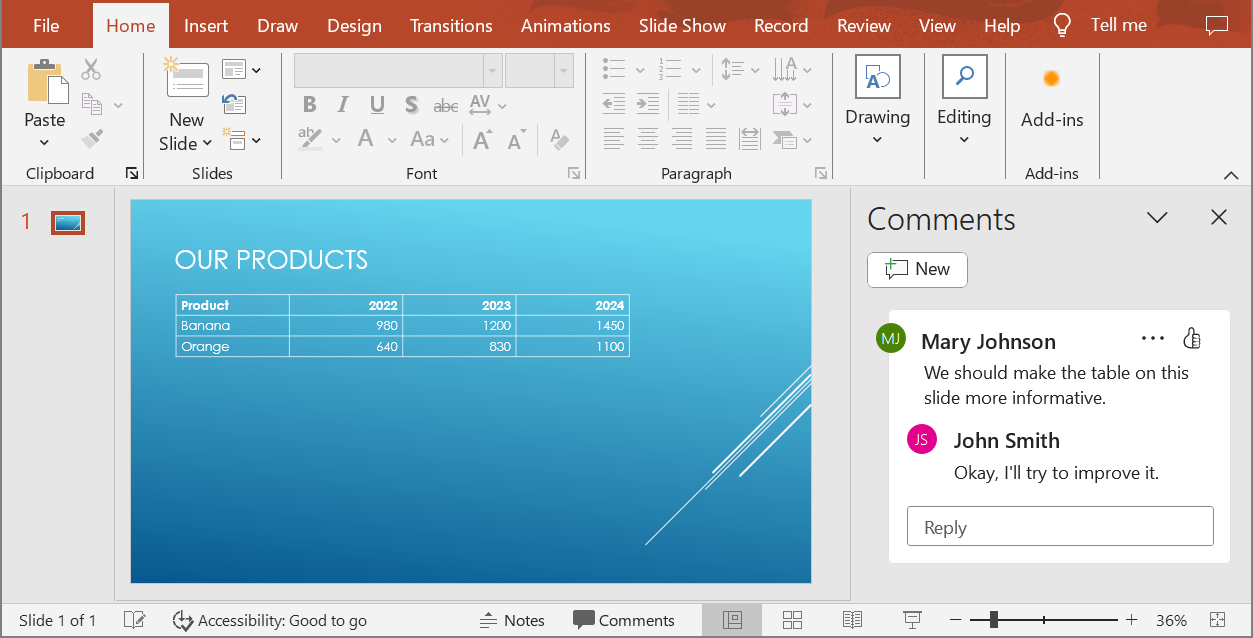
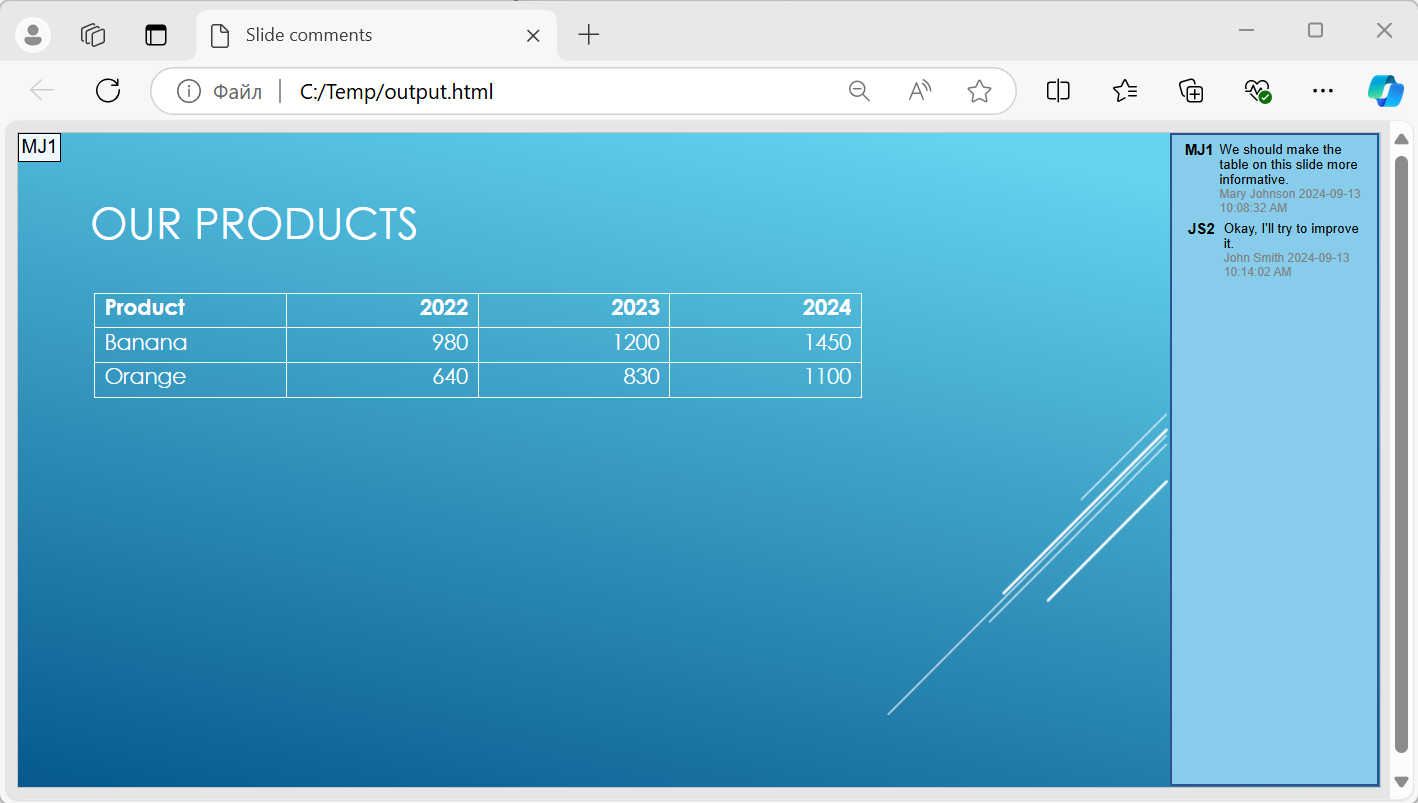
Truyền một đối tượng NotesCommentsLayoutingOptions đến phương thức setSlidesLayoutOptions của Html5Options. Sử dụng setCommentsPosition để chọn Right từ liệt kê CommentsPositions nhằm đặt các bình luận ở phía bên phải của mỗi slide.
Ví dụ dưới đây xuất bản trình bày sang HTML5 với bố cục bình luận này. Một bản trình bày không có bình luận sẽ không có văn bản bình luận nào để hiển thị.
use aspose\slides\CommentsPositions;
use aspose\slides\Html5Options;
use aspose\slides\NotesCommentsLayoutingOptions;
use aspose\slides\Presentation;
use aspose\slides\SaveFormat;

$layoutOptions = new NotesCommentsLayoutingOptions();
$layoutOptions->setCommentsPosition(CommentsPositions::Right);

$html5Options = new Html5Options();
$html5Options->setSlidesLayoutOptions($layoutOptions);

$presentation = new Presentation("sample.pptx");
try {
    $presentation->save("output.html", SaveFormat::Html5, $html5Options);
} finally {
    $presentation->dispose();
}
Loại trừ siêu liên kết JavaScript khi xuất
Giả sử hyperlinks.pptx chứa văn bản liên kết với mục tiêu javascript:alert('Hello') và một liên kết thường https://example.com/. Để loại trừ siêu liên kết JavaScript khi xuất, truyền true cho SaveOptions::setSkipJavaScriptLinks. Mặc định là false, vì vậy các liên kết này không bị lọc trừ khi bạn bật tùy chọn.
Ví dụ dưới đây tải bản trình bày từ thư mục làm việc và xuất nó bằng cách sử dụng Html5Options:
use aspose\slides\Html5Options;
use aspose\slides\Presentation;
use aspose\slides\SaveFormat;

$html5Options = new Html5Options();
$html5Options->setSkipJavaScriptLinks(true);

$presentation = new Presentation("hyperlinks.pptx");
try {
    $presentation->save("filtered-html5.html", SaveFormat::Html5, $html5Options);
} finally {
    $presentation->dispose();
}
Tệp đã xuất bỏ qua siêu liên kết JavaScript trong khi vẫn giữ nguyên văn bản và liên kết HTTPS bình thường. Bản trình bày nguồn không bị thay đổi.
Tùy chọn này lọc các siêu liên kết JavaScript; nó không loại bỏ tất cả các script hoặc nội dung hoạt động khác, cũng không đảm bảo tuân thủ CSP. Ví dụ, đầu ra HTML5 vẫn bao gồm các script cho việc điều hướng slide và hoạt ảnh.
Câu hỏi thường gặp
Tôi có thể kiểm soát việc các hoạt ảnh đối tượng và chuyển tiếp slide có phát trong HTML5 không?
Có, xuất HTML5 cung cấp các tùy chọn riêng để bật hoặc tắt shape animations và slide transitions.
Các bình luận có được hỗ trợ không, và chúng có thể được đặt ở vị trí nào so với slide?
Có, các bình luận hiện có có thể được bao gồm trong đầu ra HTML5 và đặt vị trí (ví dụ, phía bên phải của slide) thông qua layout settings cho ghi chú và bình luận.
Tôi có thể bỏ qua các liên kết gọi JavaScript vì lý do bảo mật hoặc CSP không?
Có, thiết lập setSkipJavaScriptLinks cho phép bạn bỏ qua các siêu liên kết có lời gọi JavaScript khi lưu. Mặc định là false. Xem Exclude JavaScript Hyperlinks During Export để biết ví dụ xuất HTML5 và phạm vi của bộ lọc. Thiết lập này không loại bỏ JavaScript mà trình xem HTML5 sử dụng cho việc điều hướng và hoạt ảnh.