
ใช้เอฟเฟกต์รูปทรงในงานนำเสนอด้วย JavaScript
บทนำ
ในขณะที่เอฟเฟกต์ใน PowerPoint สามารถใช้ทำให้รูปทรงโดดเด่นได้ แต่แตกต่างจาก การเติม หรือเส้นขอบ การใช้เอฟเฟกต์ของ PowerPoint คุณสามารถสร้างการสะท้อนที่น่าเชื่อถือบนรูปทรง กระจายการเรืองแสงของรูปทรง ฯลฯ
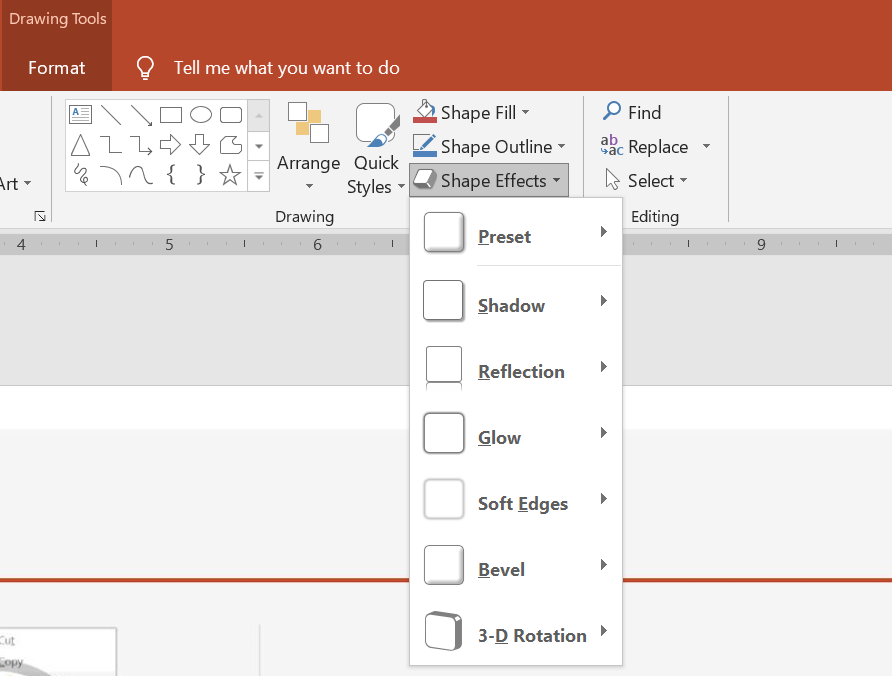
PowerPoint มีเอฟเฟกต์ทั้งหมดหกแบบที่สามารถใช้กับรูปทรงได้ คุณสามารถใช้หนึ่งหรือหลายเอฟเฟกต์กับรูปทรงหนึ่งรูป
บางการรวมกันของเอฟเฟกต์ดูดีกว่าการรวมกันอื่น ๆ ด้วยเหตุผลนี้ PowerPoint มีตัวเลือกภายใต้ Preset ตัวเลือก Preset เป็นการรวมกันของสองหรือหลายเอฟเฟกต์ที่รู้ว่าดูดี วิธีนี้เมื่อเลือก Preset คุณจะไม่ต้องเสียเวลาในการทดสอบหรือรวมเอฟเฟกต์ต่าง ๆ เพื่อหาการรวมที่ดี
Aspose.Slides มีคุณสมบัติและเมธอดภายใต้คลาส EffectFormat ที่ให้คุณสามารถใช้เอฟเฟกต์เดียวกันกับรูปทรงในงานนำเสนอ PowerPoint
ใช้เอฟเฟกต์เงา
Aspose.Slides สำหรับ Node.js ผ่าน Java รองรับเงานอกและเงาภายในสำหรับรูปทรง คุณสามารถปรับแต่งสี, ทิศทาง, ระยะทางและรัศมีเบลอร์ให้ตรงกับการออกแบบงานนำเสนอของคุณ
ใช้เงานอก
ใช้เงานอกเพื่อทำให้การ์ดหรือพาเนลโดดเด่นจากพื้นหลังสไลด์ เงาจะขยายออกนอกขอบของรูปทรง สร้างความรู้สึกว่ารูปทรงลอยขึ้นเหนือสไลด์ ปรับสี, ทิศทาง, ระยะทางและรัศมีเบลอร์ให้ตรงกับแสงและสไตล์ของเทมเพลตของคุณ
โค้ด JavaScript นี้แสดงวิธีใช้ เอฟเฟกต์เงานอก กับสี่เหลี่ยม:
const aspose = { slides: require("aspose.slides.via.java") };
const java = require("java");

const presentation = new aspose.slides.Presentation();
try {
    const slide = presentation.getSlides().get_Item(0);

    const shape = slide.getShapes().addAutoShape(aspose.slides.ShapeType.RoundCornerRectangle, 20, 20, 200, 100);
    shape.getEffectFormat().enableOuterShadowEffect();
    const color = java.newInstanceSync("java.awt.Color", 169, 169, 169);
    shape.getEffectFormat().getOuterShadowEffect().getShadowColor().setColor(color);
    shape.getEffectFormat().getOuterShadowEffect().setDistance(10);
    shape.getEffectFormat().getOuterShadowEffect().setDirection(45);

    presentation.save("shadow_effect.pptx", aspose.slides.SaveFormat.Pptx);
} finally {
    presentation.dispose();
}

ใช้เงาภายใน
เมื่อทำสำเนาการออกแบบภาพของเทมเพลต ให้ใช้เงาภายในเพื่อให้การ์ดหรือพาเนลมีลักษณะฝังลงไป เงานอกขยายออกนอกรูปทรงทำให้ดูยกขึ้น ส่วนเงาภายในทำให้ขอบภายในมีเงา
เรียกใช้งาน enableInnerShadowEffect แล้วกำหนดค่าการเงาที่ส่งกลับจาก getInnerShadowEffect ค่ารัศมีเบลอร์ที่ใหญ่กว่าจะทำให้ขอบนุ่มขึ้น
ตัวอย่าง JavaScript นี้สร้างการ์ดสีฟ้าอ่อนพร้อมเงาภายในสีเทาดำและบันทึกเป็นไฟล์ PPTX ทิศทางเงาเป็น 225 องศา ระยะทางคือ 7 จุด และรัศมีเบลอร์คือ 6 จุด:
const aspose = { slides: require("aspose.slides.via.java") };
const java = require("java");

const presentation = new aspose.slides.Presentation();
try {
    const slide = presentation.getSlides().get_Item(0);

    const shape = slide.getShapes().addAutoShape(aspose.slides.ShapeType.Rectangle, 20, 20, 200, 100);
    shape.getFillFormat().setFillType(java.newByte(aspose.slides.FillType.Solid));
    const fillColor = java.newInstanceSync("java.awt.Color", 173, 216, 230);
    shape.getFillFormat().getSolidFillColor().setColor(fillColor);
    shape.getLineFormat().getFillFormat().setFillType(java.newByte(aspose.slides.FillType.NoFill));

    shape.getEffectFormat().enableInnerShadowEffect();
    const shadow = shape.getEffectFormat().getInnerShadowEffect();
    const color = java.newInstanceSync("java.awt.Color", 105, 105, 105);
    shadow.getShadowColor().setColor(color);
    shadow.setDirection(225);
    shadow.setDistance(7);
    shadow.setBlurRadius(6);

    presentation.save("inner_shadow_effect.pptx", aspose.slides.SaveFormat.Pptx);
} finally {
    presentation.dispose();
}
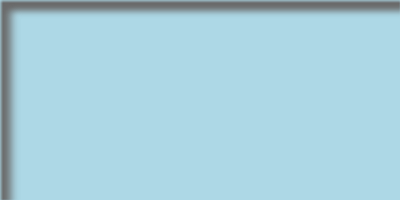
เพื่อลบเงาภายใน ให้เรียก disableInnerShadowEffect บนรูปแบบเอฟเฟกต์ของรูปทรง
ใช้เอฟเฟกต์การสะท้อน
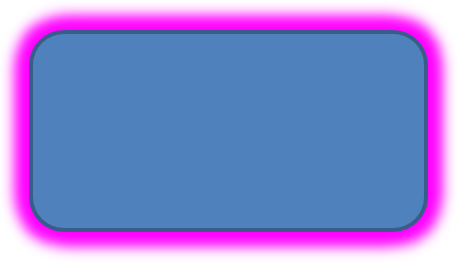
เพื่อใช้เอฟเฟกต์การสะท้อนใน Aspose.Slides สำหรับ Node.js ผ่าน Java คุณสามารถเพิ่มการสะท้อนคล้ายกระจกให้กับรูปทรงโดยปรับพารามิเตอร์เช่น ระยะทาง, ความโปร่งใสและขนาด เอฟเฟกต์นี้ช่วยยกระดับความสวยงามของงานนำเสนอโดยทำให้รูปทรงดูเรียบหรูและเป็นมืออาชีพ การทำงานง่ายด้วยโค้ดง่าย ๆ ทำให้สามารถนำไปใช้เร็วในหลายองค์ประกอบเพื่อการออกแบบที่สอดคล้องกัน
โค้ด JavaScript นี้แสดงวิธีใช้ เอฟเฟ็กต์การสะท้อน กับรูปทรง:
const aspose = { slides: require("aspose.slides.via.java") };
const java = require("java");

const presentation = new aspose.slides.Presentation();
try {
    const slide = presentation.getSlides().get_Item(0);

    const shape = slide.getShapes().addAutoShape(aspose.slides.ShapeType.RoundCornerRectangle, 20, 20, 200, 100);
    shape.getEffectFormat().enableReflectionEffect();
    shape.getEffectFormat().getReflectionEffect().setRectangleAlign(java.newByte(aspose.slides.RectangleAlignment.Bottom));
    shape.getEffectFormat().getReflectionEffect().setDirection(90);
    shape.getEffectFormat().getReflectionEffect().setDistance(40);
    shape.getEffectFormat().getReflectionEffect().setBlurRadius(2);

    presentation.save("reflection_effect.pptx", aspose.slides.SaveFormat.Pptx);
} finally {
    presentation.dispose();
}
ใช้เอฟเฟกต์เรืองแสง
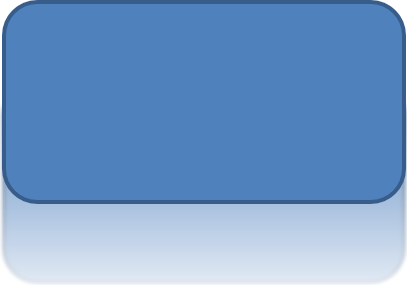
เพื่อใช้เอฟเฟกต์เรืองแสงกับรูปทรงใน Aspose.Slides สำหรับ Node.js ผ่าน Java คุณสามารถเพิ่มออร่าอ่อนนุ่มและเปล่งแสงรอบรูปทรงโดยปรับคุณสมบัติเช่น สีและขนาด เอฟเฟกต์นี้ช่วยทำให้รูปทรงเด่นและเพิ่มองค์ประกอบที่ดึงดูดสายตาให้กับงานนำเสนอของคุณ การทำงานง่ายด้วยโค้ดน้อย ช่วยปรับปรุงรูปลักษณ์โดยรวมของสไลด์ของคุณ
โค้ด JavaScript นี้แสดงวิธีใช้ เอฟเฟ็กต์เรืองแสง กับรูปทรง:
const aspose = { slides: require("aspose.slides.via.java") };
const java = require("java");

const presentation = new aspose.slides.Presentation();
try {
    const slide = presentation.getSlides().get_Item(0);

    const shape = slide.getShapes().addAutoShape(aspose.slides.ShapeType.RoundCornerRectangle, 20, 20, 200, 100);
    shape.getEffectFormat().enableGlowEffect();
    const color = java.getStaticFieldValue("java.awt.Color", "MAGENTA");
    shape.getEffectFormat().getGlowEffect().getColor().setColor(color);
    shape.getEffectFormat().getGlowEffect().setRadius(15);

    presentation.save("glow_effect.pptx", aspose.slides.SaveFormat.Pptx);
} finally {
    presentation.dispose();
}
ใช้เอฟเฟกต์ขอบอ่อน
เพื่อใช้เอฟเฟกต์ขอบอ่อนใน Aspose.Slides สำหรับ Node.js ผ่าน Java คุณสามารถสร้างการเปลี่ยนผ่านที่นุ่มและเบลอร์รอบขอบของรูปทรง เอฟเฟกต์นี้เพิ่มลุคที่ละเอียดอ่อนและประณีต เหมาะสำหรับการออกแบบที่ต้องการลักษณะอ่อนโยนและนุ่มนวล คุณสามารถปรับพารามิเตอร์เช่น รัศมีได้ง่ายเพื่อให้ได้เอฟเฟกต์ที่ต้องการในรูปทรงต่าง ๆ ของงานนำเสนอของคุณ
โค้ด JavaScript นี้แสดงวิธีใช้ เอฟเฟ็กต์ขอบอ่อน กับรูปทรง:
const aspose = { slides: require("aspose.slides.via.java") };

const presentation = new aspose.slides.Presentation();
try {
    const slide = presentation.getSlides().get_Item(0);

    const shape = slide.getShapes().addAutoShape(aspose.slides.ShapeType.RoundCornerRectangle, 20, 20, 200, 150);
    shape.getEffectFormat().enableSoftEdgeEffect();
    shape.getEffectFormat().getSoftEdgeEffect().setRadius(8);

    presentation.save("soft_edges_effect.pptx", aspose.slides.SaveFormat.Pptx);
} finally {
    presentation.dispose();
}

คำถามที่พบบ่อย
ฉันสามารถใช้เอฟเฟกต์หลายอย่างกับรูปทรงเดียวกันได้หรือไม่?
ได้ คุณสามารถรวมเอฟเฟกต์ต่าง ๆ เช่น เงา, การสะท้อน, และเรืองแสง บนรูปทรงเดียวเพื่อสร้างลักษณะที่มีความเคลื่อนไหวมากขึ้น
ฉันสามารถใช้เอฟเฟกต์กับรูปทรงอะไรได้บ้าง?
คุณสามารถใช้เอฟเฟกต์กับรูปทรงหลากหลาย รวมถึงรูปอัตโนมัติ, แผนภูมิ, ตาราง, รูปภาพ, วัตถุ SmartArt, วัตถุ OLE และอื่น ๆ
ฉันสามารถใช้เอฟเฟกต์กับกลุ่มรูปทรงได้หรือไม่?
ได้ คุณสามารถใช้เอฟเฟกต์กับกลุ่มรูปทรงได้ เอฟเฟกต์จะถูกนำไปใช้กับกลุ่มทั้งหมด