
จัดการ Workbook ของแผนภูมิในงานนำเสนอโดยใช้ PHP
ภาพรวม
บทความนี้อธิบายวิธีทำงานกับ workbook ของแผนภูมิใน Aspose.Slides โดยแสดงวิธีอ่านและเขียนข้อมูลแผนภูมิผ่านสตรีม workbook, ใช้เซลล์ workbook เป็นป้ายข้อมูลแผนภูมิ, เข้าถึงคอลเลกชัน worksheet, และระบุประเภทแหล่งข้อมูลสำหรับค่าของแผนภูมิ
นอกจากนี้ยังครอบคลุมการทำงานกับ workbook ภายนอกเป็นแหล่งข้อมูลของแผนภูมิ ตัวอย่างจะแสดงวิธีสร้างและกำหนด workbook ภายนอก, ดึงเส้นทางของ workbook ภายนอกที่เชื่อมโยงกับแผนภูมิ, และแก้ไขข้อมูลแผนภูมิเมื่อ workbook มีพร้อมใช้งาน
สำหรับเซลล์ workbook ที่เป็นข้อมูลที่ขาดหาย, ดู ควบคุมการแสดงผลของเซลล์ที่ว่างเปล่า เพื่อทราบความแตกต่างระหว่างเซลล์ว่างและศูนย์, รวมถึงการเปรียบเทียบแผนภูมิเส้นของโหมดการแสดงผลที่มีให้เลือก
รวมข้อมูลจากแถวและคอลัมน์ที่ซ่อน
ใช้ Chart::setPlotVisibleCellsOnly เพื่อควบคุมว่ากราฟจะวาดข้อมูลจากแถวและคอลัมน์ worksheet ที่ซ่อนหรือไม่ ตั้งเป็น true เพื่อวาดเฉพาะเซลล์ที่มองเห็น, หรือ false เพื่อรวมเซลล์ที่มองเห็นและที่ซ่อน การตั้งค่านี้ควบคุมการวาดของแผนภูมิ; ไม่ได้ซ่อนหรือแสดงแถวหรือคอลัมน์ worksheet
ตัวอย่างงานนำเสนอ มีแผนภูมิคอลัมน์เป็นรูปร่างแรกบนสไลด์แรก Worksheet ฝังอยู่, Sheet1, มีช่วงข้อมูลต้นทาง A1:C4. แถว 3 และคอลัมน์ C ถูกซ่อน, แต่เซลล์ยังคงมีค่า
| แถว Worksheet | A: เดือน | B: ปลีก | C: โฮลเซล (คอลัมน์ที่ซ่อน) |
|---|---|---|---|
| 2 | มกราคม | 10 | 30 |
| 3 (แถวที่ซ่อน) | กุมภาพันธ์ | 40 | 60 |
| 4 | มีนาคม | 20 | 50 |
เข้าถึงเซลล์ต้นทางผ่าน ChartData::getChartDataWorkbook และอ่าน ChartDataCell::isHidden เพื่อตรวจสอบสถานะการซ่อนของเซลล์ วิธีนี้รายงานสถานะการซ่อนโดยไม่เปลี่ยนแปลง ในไฟล์นี้ B2 มองเห็น, B3 อยู่ในแถวที่ซ่อน, และ C2 อยู่ในคอลัมน์ที่ซ่อน; ตัวอย่างพิมพ์ false, true, และ true ตามลำดับ
สำหรับตัวอย่างนี้ ให้รีเฟรชข้อมูลแผนภูมิหลังจากเปลี่ยนการตั้งค่าการวาด: รักษา workbook ฝังด้วย readWorkbookStream และโหลดใหม่ด้วย writeWorkbookStream. เมื่อรวมทุกเซลล์, ใช้ setRange เพื่อกู้คืนช่วงเต็มรวมถึงหมวดหมู่เดือนกุมภาพันธ์ที่ซ่อน การเปลี่ยนค่าสถานะอย่างเดียวไม่เพียงพอที่จะรีเฟรชข้อมูลแผนภูมิที่แคชและป้ายหมวดหมู่ของตัวอย่างนี้
use aspose\slides\Presentation;
use aspose\slides\SaveFormat;

$presentation = new Presentation("hidden-source-data.pptx");
try {
    $slide = $presentation->getSlides()->get_Item(0);

    $shapeCount = java_values($slide->getShapes()->size());
    if ($shapeCount > 0 && java_instanceof($slide->getShapes()->get_Item(0), new JavaClass("com.aspose.slides.IChart"))) {
        $chart = $slide->getShapes()->get_Item(0);
        $workbook = $chart->getChartData()->getChartDataWorkbook();
        echo "B2 hidden: " . (java_values($workbook->getCell(0, "B2")->isHidden()) ? "true" : "false"), PHP_EOL;
        echo "B3 hidden: " . (java_values($workbook->getCell(0, "B3")->isHidden()) ? "true" : "false"), PHP_EOL;
        echo "C2 hidden: " . (java_values($workbook->getCell(0, "C2")->isHidden()) ? "true" : "false"), PHP_EOL;

        $workbookData = $chart->getChartData()->readWorkbookStream();
        foreach ([true, false] as $visibleOnly) {
            $chart->setPlotVisibleCellsOnly($visibleOnly);

            // รีเฟรชข้อมูลแผนภูมิจาก workbook ที่ฝังอยู่.
            $chart->getChartData()->writeWorkbookStream($workbookData);
            if (!$visibleOnly) {
                // กู้คืนช่วงต้นทางทั้งหมด รวมถึงหมวดหมู่ที่ซ่อนอยู่.
                $chart->getChartData()->setRange('Sheet1!$A$1:$C$4');
            }

            $presentation->save("hidden_cells_" . ($visibleOnly ? "true" : "false") . ".pptx", SaveFormat::Pptx);
        }
    } else {
        echo "The first shape is not a chart.", PHP_EOL;
    }
} finally {
    $presentation->dispose();
}
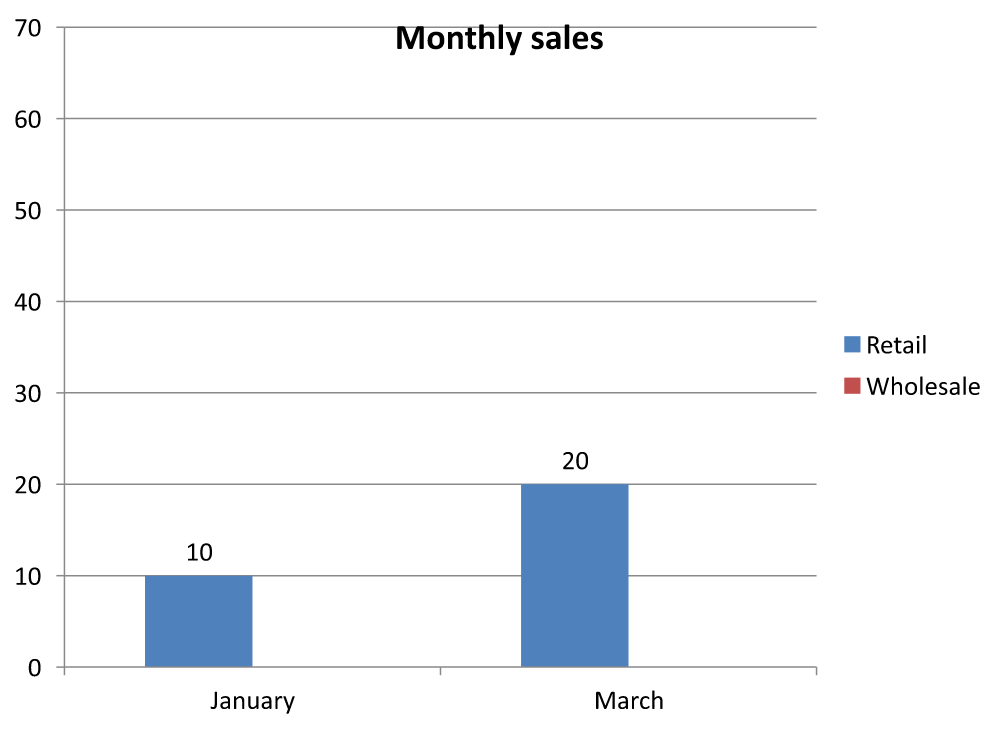
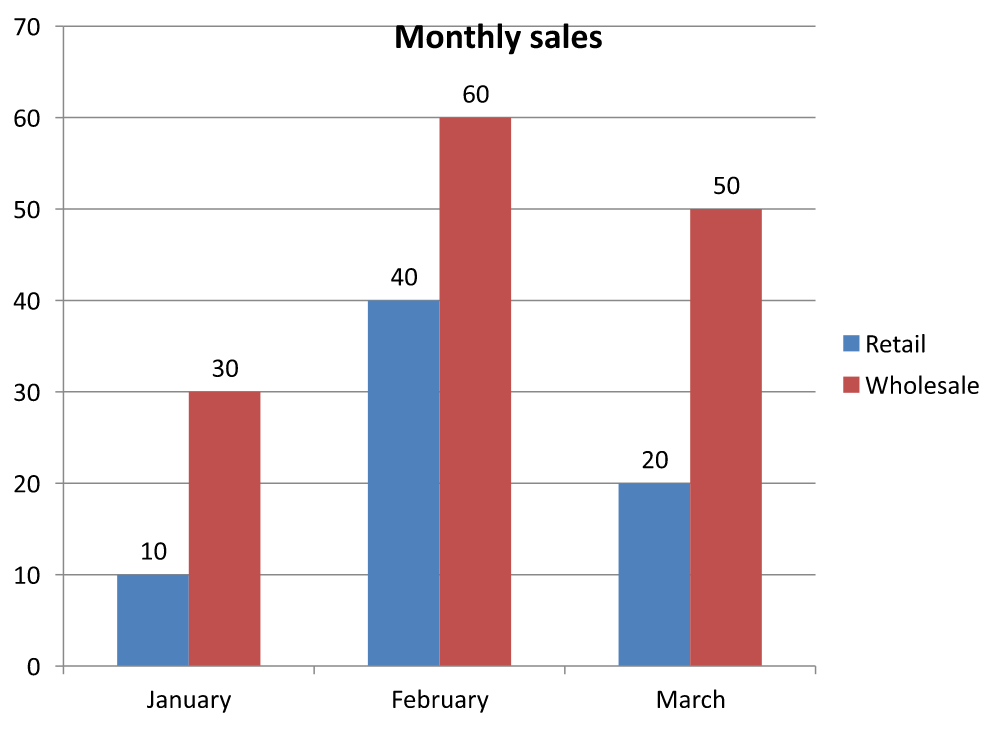
ตัวอย่างบันทึกสองเวอร์ชันของงานนำเสนอ: เวอร์ชันหนึ่งมีค่า Retail ที่มองเห็นเท่านั้น (10 และ 20), อีกเวอร์ชันหนึ่งมีค่าทั้งหกค่า รูปภาพด้านล่างแสดงสองโหมดการวาด แถว 3 และคอลัมน์ C ยังคงซ่อนใน workbook ฝังทั้งสอง
เฉพาะเซลล์ที่มองเห็น (true) |
ทุกเซลล์ (false) |
|---|---|
 |
 |
เซลล์ที่ซ่อนและมีค่าแตกต่างจากเซลล์ที่ว่างเปล่า Chart::setDisplayBlanksAs ควบคุมวิธีการแสดงค่าที่ขาดหาย; ไม่ได้รวมหรือแยกข้อมูลต้นทางที่ซ่อน ดู ควบคุมการแสดงผลของเซลล์ที่ว่างเปล่า เพื่อดูตัวอย่าง
ดึงช่วงข้อมูลของแผนภูมิ
ก่อนอัปเดตข้อมูล workbook ในงานนำเสนอที่มีอยู่, ตรวจสอบช่วงต้นทางเพื่อทราบว่า worksheet ใดที่แผนภูมิใช้ วิธี ChartData::getRange คืนค่าช่วงข้อมูลปัจจุบันในรูปแบบสูตรที่อ้างอิง worksheet เช่น Sheet1!$A$1:$D$5. ที่นี่ Sheet1 คือชื่อ worksheet, ! คั่นกับช่วงเซลล์, และ $A$1:$D$5 ระบุเซลล์ A1 ถึง D5 รวมถึงสัญลักษณ์ดอลลาร์บ่งบอกการอ้างอิงแบบคงที่
วิธีนี้อ่านช่วงปัจจุบันโดยไม่เปลี่ยนแปลงแผนภูมิหรือ workbook ของมัน หากแผนภูมิไม่ใช้ workbook เป็นแหล่งข้อมูล จะโยนข้อยกเว้น ดูข้อมูลเพิ่มเติมที่ ChartData API Reference
ตัวอย่างนี้เปิดงานนำเสนอและตรวจสอบรูปร่างบนแต่ละสไลด์เพื่อหาแผนภูมิ พิมพ์ชื่อแผนภูมิและช่วงต้นทาง หากแผนภูมิไม่ใช้ workbook จะพิมพ์ข้อความแล้วดำเนินต่อไปยังแผนภูมถัดไป
use aspose\slides\Presentation;

$presentation = new Presentation("presentation.pptx");
try {
    $slideCount = java_values($presentation->getSlides()->size());
    for ($slideIndex = 0; $slideIndex < $slideCount; $slideIndex++) {
        $slide = $presentation->getSlides()->get_Item($slideIndex);
        $shapeCount = java_values($slide->getShapes()->size());
        for ($shapeIndex = 0; $shapeIndex < $shapeCount; $shapeIndex++) {
            $shape = $slide->getShapes()->get_Item($shapeIndex);
            if (java_instanceof($shape, new JavaClass("com.aspose.slides.IChart"))) {
                $chart = $shape;
                try {
                    $range = $chart->getChartData()->getRange();
                    echo $chart->getName() . ": " . $range, PHP_EOL;
                } catch (JavaException $exception) {
                    if (java_instanceof($exception, new JavaClass("com.aspose.slides.exceptions.InvalidOperationException"))) {
                        echo $chart->getName() . ": The chart does not use a workbook as its data source.", PHP_EOL;
                    } else {
                        echo $chart->getName() . ": " . $exception->getMessage(), PHP_EOL;
                    }
                }
            }
        }
    }
} finally {
    $presentation->dispose();
}
อ่านและเขียนข้อมูลแผนภูมิจาก Workbook
Aspose.Slides for PHP via Java มีเมธอด readWorkbookStream และ writeWorkbookStream ที่ให้คุณอ่านและเขียน workbook ของข้อมูลแผนภูมิ (ที่มีข้อมูลแผนภูมิแก้ไขด้วย Aspose.Cells) Note ว่าข้อมูลแผนภูมิต้องจัดเรียงในรูปแบบเดียวกันหรือมีโครงสร้างคล้ายกับแหล่งข้อมูล
ตัวอย่างนี้ใช้งานนำเสนอที่มีแผนภูมิเป็นรูปร่างแรกบนสไลด์แรก อ่าน workbook ฝังเป็นอาเรย์ไบต์, ลบ series และ categories ที่มีอยู่, แล้วเขียน workbook เดิมกลับไป การเปลี่ยนแปลงค้างอยู่ในหน่วยความจำ; ตัวอย่างไม่ได้บันทึกงานนำเสนอ
use aspose\slides\Presentation;

$presentation = new Presentation("chart.pptx");
try {
    $slide = $presentation->getSlides()->get_Item(0);

    $shapeCount = java_values($slide->getShapes()->size());
    if ($shapeCount > 0 && java_instanceof($slide->getShapes()->get_Item(0), new JavaClass("com.aspose.slides.IChart"))) {
        $chart = $slide->getShapes()->get_Item(0);
        $chartData = $chart->getChartData();
        $workbookData = $chartData->readWorkbookStream();

        $chartData->getSeries()->clear();
        $chartData->getCategories()->clear();

        $chartData->writeWorkbookStream($workbookData);
    } else {
        echo "The first shape is not a chart.", PHP_EOL;
    }
} finally {
    $presentation->dispose();
}
ตรวจสอบ Layout แผนภูมิหลังการแก้ไข Workbook
เมื่อคุณแทนที่ workbook ฝังด้วย workbook ที่แก้ไขแล้ว, แผนภูมิอาจยังคงมี series และ category collections เดิม ความไม่ตรงกันนี้อาจทำให้ Chart::validateChartLayout ล้มเหลวด้วยข้อผิดพลาด index-out-of-range ควรลบ series และ categories ที่มีอยู่ก่อนเขียน workbook ที่อัปเดตกลับไป ตัวอย่างนี้ใช้แผนภูมิเป็นรูปร่างแรกบนสไลด์แรก คอมเมนต์บ่งบอกตำแหน่งที่การแก้ไข workbook จะเกิดขึ้น; ตัวอย่างที่ทำงานได้เขียน workbook ดั้งเดิมกลับและตรวจสอบ layout ในหน่วยความจำ
use aspose\slides\Presentation;

$presentation = new Presentation("chart.pptx");
try {
    $slide = $presentation->getSlides()->get_Item(0);

    $shapeCount = java_values($slide->getShapes()->size());
    if ($shapeCount > 0 && java_instanceof($slide->getShapes()->get_Item(0), new JavaClass("com.aspose.slides.IChart"))) {
        $chart = $slide->getShapes()->get_Item(0);
        $chartData = $chart->getChartData();
        $workbookData = $chartData->readWorkbookStream();

        // แก้ไขไบต์ของ workbook ที่นี่, ตัวอย่างเช่น, ด้วย Aspose.Cells.

        $chartData->getSeries()->clear();
        $chartData->getCategories()->clear();

        $chartData->writeWorkbookStream($workbookData);
        $chart->validateChartLayout();
    } else {
        echo "The first shape is not a chart.", PHP_EOL;
    }
} finally {
    $presentation->dispose();
}
การลบคอลเลกชันจะทำให้การอ้างอิงข้อมูลล้าสมัยหายไปก่อนที่ workbook จะถูกเขียนกลับ. สร้าง series และ category mappings ที่จำเป็นสำหรับ workbook ที่อัปเดตก่อนใช้แผนภูมิ
กำหนดรูปแบบตัวเลขแบบกำหนดเองสำหรับเซลล์ Workbook
ใช้ ChartDataCell::setCustomNumberFormat เพื่อควบคุมรูปแบบการแสดงค่าตัวเลขใน workbook ฝังของแผนภูมิ ตัวอย่างเช่น รายงานอาจต้องแสดงอัตราการแปลงเป็นเปอร์เซ็นต์กับทศนิยมสี่ตำแหน่งและค่าสัมประสิทธิ์กับทศนิยมห้าตำแหน่ง เก็บค่าทั้งสองเป็นตัวเลขเพื่อให้ยังคงใช้ในการคำนวณและการวาดแผนภูมิได้
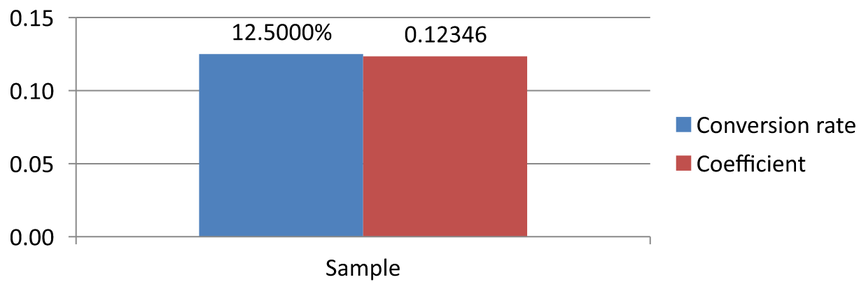
รูปแบบตัวเลขเปลี่ยนการแสดงผล ไม่ได้เปลี่ยนค่าที่เก็บไว้ รูปแบบ 0.0000% จะทำให้ 0.125 แสดงเป็น 12.5000%; ไม่ได้แทนที่ค่าที่เก็บเป็น 12.5. เช่นเดียวกัน 0.00000 จะทำให้ 0.1234567 แสดงเป็น 0.12346 โดยไม่ปัดเศษค่าที่เก็บ หากรูปแบบกำหนดเองเป็นสตริงว่าง ("") จะใช้รูปแบบที่คืนจาก getPresetNumberFormat แทน
ตัวอย่างต่อไปสร้างแผนภูมิคอลัมน์และเข้าถึงเซลล์ผ่าน getChartDataWorkbook. ใน worksheet 0, เซลล์ B2 มีอัตราการแปลงและ C2 มีค่าสัมประสิทธิ์ ทั้งสองเซลล์ให้ค่ากราฟ ตัวอย่างยังเปิดใช้ป้ายค่าที่เชื่อมกับรูปแบบต้นทาง
use aspose\slides\Presentation;
use aspose\slides\ChartType;
use aspose\slides\SlideSizeScaleType;
use aspose\slides\SaveFormat;

$presentation = new Presentation();
try {
    $presentation->getSlideSize()->setSize(720, 270, SlideSizeScaleType::DoNotScale);
    $slide = $presentation->getSlides()->get_Item(0);

    $chart = $slide->getShapes()->addChart(ChartType::ClusteredColumn, 50, 20, 620, 210);
    $chart->setTitle(false);

    $chart->getAxes()->getVerticalAxis()->setNumberFormatLinkedToSource(false);
    $chart->getAxes()->getVerticalAxis()->setNumberFormat("0.00");
    $chart->getAxes()->getVerticalAxis()->setAutomaticMinValue(false);
    $chart->getAxes()->getVerticalAxis()->setMinValue(0);

    $chart->getChartData()->getSeries()->clear();
    $chart->getChartData()->getCategories()->clear();

    $workbook = $chart->getChartData()->getChartDataWorkbook();
    $workbook->clear(0);

    $categoryCell = $workbook->getCell(0, "A2", "Sample");
    $chart->getChartData()->getCategories()->add($categoryCell);

    $percentageCell = $workbook->getCell(0, "B2", 0.125);
    $percentageCell->setCustomNumberFormat("0.0000%");
    $percentageName = $workbook->getCell(0, "B1", "Conversion rate");
    $percentageSeries = $chart->getChartData()->getSeries()->add($percentageName, $chart->getType());
    $percentageSeries->getDataPoints()->addDataPointForBarSeries($percentageCell);

    $precisionCell = $workbook->getCell(0, "C2", 0.1234567);
    $precisionCell->setCustomNumberFormat("0.00000");
    $precisionName = $workbook->getCell(0, "C1", "Coefficient");
    $precisionSeries = $chart->getChartData()->getSeries()->add($precisionName, $chart->getType());
    $precisionSeries->getDataPoints()->addDataPointForBarSeries($precisionCell);

    for ($seriesIndex = 0; $seriesIndex < java_values($chart->getChartData()->getSeries()->size()); $seriesIndex++) {
        $series = $chart->getChartData()->getSeries()->get_Item($seriesIndex);
        $labelFormat = $series->getDataPoints()->get_Item(0)->getLabel()->getDataLabelFormat();
        $labelFormat->setShowValue(true);
        $labelFormat->setNumberFormatLinkedToSource(true);
    }

    $presentation->save("CustomCellFormats.pptx", SaveFormat::Pptx);
} finally {
    $presentation->dispose();
}
รูปแบบเซลล์ workbook แยกจากรูปแบบที่ตั้งโดยตรงบนแกนหรือป้ายข้อมูล ในตัวอย่างนี้แต่ละป้ายแสดงค่าจากเซลล์ต้นทางเพราะ setShowValue ตั้งเป็น true และตามรูปแบบตัวเลขของต้นทางเพราะ setNumberFormatLinkedToSource ตั้งเป็น true. หลังจากบันทึกและเปิดงานนำเสนอใหม่ ป้ายจะแสดง 12.5000% และ 0.12346 ตามที่แสดงด้านล่าง แกนแนวตั้งใช้รูปแบบตัวเลขของตนเองที่ตั้งด้วย setNumberFormat เป็น 0.00, และ setNumberFormatLinkedToSource ตั้งเป็น false.
หากต้องการจัดรูปแบบป้ายข้อมูลแยกจากแหล่งข้อมูล ให้ตั้งค่าสถานะเชื่อมต้นทางเป็น false แล้วกำหนดรูปแบบด้วย setNumberFormat. วิธีนี้จะไม่เปลี่ยนรูปแบบของเซลล์ workbook ตัวอย่างเช่น รูปแบบป้ายอิสระ 0.00 จะทำให้ค่าที่แรกแสดงเป็น 0.13 ในขณะที่ B2 ยังคงแสดง 12.5000%. ดู Chart Data Labels สำหรับการจัดรูปแบบป้ายโดยตรง
ภาพด้านล่างสร้างจากงานนำเสนอที่บันทึกแล้วและเปิดใหม่อีกครั้ง:
ตั้งค่าเซลล์ Workbook เป็นป้ายข้อมูลแผนภูมิ
คุณสามารถใช้ข้อความจากเซลล์ workbook เป็นป้ายข้อมูลแผนภูมิได้
ตัวอย่างนี้เพิ่มแผนภูมิบับเบิลที่มีข้อมูลเริ่มต้นบนสไลด์แรกของงานนำเสนอที่มีอยู่ ใช้เซลล์ A10:A12 ใน worksheet 0 สำหรับป้ายสามอันแรกของ series แรก, เปิดใช้ป้ายจากเซลล์, แล้วบันทึกงานนำเสนอที่อัปเดต
use aspose\slides\Presentation;
use aspose\slides\ChartType;
use aspose\slides\SaveFormat;

$presentation = new Presentation("chart2.pptx");
try {
    $slide = $presentation->getSlides()->get_Item(0);

    $chart = $slide->getShapes()->addChart(ChartType::Bubble, 50, 50, 600, 400, true);
    $series = $chart->getChartData()->getSeries()->get_Item(0);
    $workbook = $chart->getChartData()->getChartDataWorkbook();

    $series->getLabels()->getDefaultDataLabelFormat()->setShowLabelValueFromCell(true);
    $series->getLabels()->get_Item(0)->setValueFromCell($workbook->getCell(0, "A10", "Label 0 cell value"));
    $series->getLabels()->get_Item(1)->setValueFromCell($workbook->getCell(0, "A11", "Label 1 cell value"));
    $series->getLabels()->get_Item(2)->setValueFromCell($workbook->getCell(0, "A12", "Label 2 cell value"));

    $presentation->save("resultchart.pptx", SaveFormat::Pptx);
} finally {
    $presentation->dispose();
}
จัดการ Worksheets
เมธอด ChartDataWorkbook::getWorksheets ให้คุณเข้าถึง worksheets ใน workbook ของแผนภูมิ ตัวอย่างนี้สร้างแผนภูมิพายที่มีข้อมูลเริ่มต้นและพิมพ์ชื่อ worksheet แต่ละอันลงคอนโซล
use aspose\slides\Presentation;
use aspose\slides\ChartType;

$presentation = new Presentation();
try {
    $slide = $presentation->getSlides()->get_Item(0);

    $chart = $slide->getShapes()->addChart(ChartType::Pie, 50, 50, 400, 500);
    $workbook = $chart->getChartData()->getChartDataWorkbook();

    for ($i = 0; $i < java_values($workbook->getWorksheets()->size()); $i++) {
        echo $workbook->getWorksheets()->get_Item($i)->getName(), PHP_EOL;
    }
} finally {
    $presentation->dispose();
}
ระบุประเภทแหล่งข้อมูล
ค่าจุด series สามารถเก็บเป็นลิเทอรัลตัวเลขโดยตรงได้ ดู Set Series Values Using Numeric Literals สำหรับตัวอย่างเต็มที่บันทึกและอ่านค่าเหล่านั้น ประเภทของแหล่งข้อมูลของค่าจุดแยกจากการกำหนดค่า workbook ภายในหรือภายนอกของแผนภูมิ; การใช้ลิเทอรัลตัวเลขไม่ได้ทำให้ workbook ฝังหายไปโดยอัตโนมัติ
ตัวอย่างนี้สร้างแผนภูมิคอลัมน์ 3D ที่มีข้อมูลเริ่มต้นและกำหนดชื่อ series สองชื่อโดยใช้แหล่งข้อมูลต่างกัน ชื่อแรกใช้สตริงลิเทอรัล; ชื่อที่สองใช้เซลล์ C1 ใน worksheet 0. การนับ enum DataSourceType เลือกแหล่งข้อมูลสำหรับแต่ละชื่อ ตัวอย่างบันทึกงานนำเสนอพร้อมชื่อ series ที่อัปเดต
use aspose\slides\Presentation;
use aspose\slides\ChartType;
use aspose\slides\SaveFormat;
use aspose\slides\DataSourceType;

$presentation = new Presentation();
try {
    $slide = $presentation->getSlides()->get_Item(0);

    $chart = $slide->getShapes()->addChart(ChartType::Column3D, 50, 50, 600, 400, true);
    $literalName = $chart->getChartData()->getSeries()->get_Item(0)->getName();

    $literalName->setDataSourceType(DataSourceType::StringLiterals);
    $literalName->setData("LiteralString");

    $cellName = $chart->getChartData()->getSeries()->get_Item(1)->getName();
    $nameCell = $chart->getChartData()->getChartDataWorkbook()->getCell(0, "C1", "NewCell");
    $cellName->setDataSourceType(DataSourceType::Worksheet);
    $cellName->setData($nameCell);

    $presentation->save("pres.pptx", SaveFormat::Pptx);
} finally {
    $presentation->dispose();
}
ตรวจจับรูปแบบ Workbook ฝังที่ไม่รองรับ
Aspose.Slides ไม่รองรับรูปแบบ workbook Excel แบบไบนารี (.xlsb) ที่อาจฝังในบางแผนภูมิ คุณสามารถใช้เมธอด getEmbeddedWorkbookType บน ChartData ร่วมกับ enum WorkbookType เพื่อตรวจจับรูปแบบที่ไม่รองรับและข้ามแผนภูมินั้น ตัวอย่างตรวจสอบรูปร่างบนสไลด์แรกของงานนำเสนอที่มีอยู่, ข้ามรูปร่างที่ไม่ใช่แผนภูมิ, แล้วพิมพ์ข้อความวินิจฉัยสำหรับแต่ละแผนภูมิที่มี workbook .xlsb ฝัง
use aspose\slides\Presentation;
use aspose\slides\ChartDataSourceType;
use aspose\slides\WorkbookType;

$presentation = new Presentation("sample.pptx");
try {
    $slide = $presentation->getSlides()->get_Item(0);

    $shapeCount = java_values($slide->getShapes()->size());
    for ($shapeIndex = 0; $shapeIndex < $shapeCount; $shapeIndex++) {
        $shape = $slide->getShapes()->get_Item($shapeIndex);
        if (!java_instanceof($shape, new JavaClass("com.aspose.slides.IChart"))) {
            continue;
        }

        $chart = $shape;
        $chartData = $chart->getChartData();
        $isInternalWorkbook = java_values($chartData->getDataSourceType()) == ChartDataSourceType::InternalWorkbook;
        $isBinaryMacro = java_values($chartData->getEmbeddedWorkbookType()) == WorkbookType::WorkbookBinaryMacro;

        if ($isInternalWorkbook && $isBinaryMacro) {
            echo "Skipping a chart with an unsupported .xlsb workbook.", PHP_EOL;
            continue;
        }

        // อ่านหรือแก้ไขข้อมูล workbook ของแผนภูมิที่รองรับที่นี่.
    }
} finally {
    $presentation->dispose();
}
Workbook ภายนอก
Aspose.Slides รองรับการใช้ workbook ภายนอกเป็นแหล่งข้อมูลของแผนภูมิ
สร้าง Workbook ภายนอก
ใช้ readWorkbookStream และ setExternalWorkbook เพื่อส่งออก workbook ของแผนภูมิที่ฝังลงไฟล์และเชื่อมแผนภูมิกับ workbook ภายนอกนั้น
ตัวอย่างนี้สร้างแผนภูมิเพายที่มีข้อมูลเริ่มต้นและส่งออก workbook ของมัน. การเขียนไฟล์เสร็จสิ้นก่อนกำหนด workbook ภายนอกเป็นแหล่งข้อมูลของแผนภูมิ, แล้วบันทึกงานนำเสนอที่เชื่อมแล้ว
use aspose\slides\Presentation;
use aspose\slides\ChartType;
use aspose\slides\SaveFormat;

$presentation = new Presentation();
try {
    $slide = $presentation->getSlides()->get_Item(0);

    $chart = $slide->getShapes()->addChart(ChartType::Pie, 50, 50, 400, 600);
    $workbookPath = new Java("java.io.File", "externalWorkbook1.xlsx");
    $workbookData = $chart->getChartData()->readWorkbookStream();
    try {
        $fileStream = new Java("java.io.FileOutputStream", $workbookPath);
        try {
            $fileStream->write($workbookData);
        } finally {
            $fileStream->close();
        }
        $chart->getChartData()->setExternalWorkbook($workbookPath->getAbsolutePath());

        $presentation->save("externalWorkbook.pptx", SaveFormat::Pptx);
    } catch (JavaException $exception) {
        echo "Could not write the external workbook: " . $exception->getMessage(), PHP_EOL;
    }
} finally {
    $presentation->dispose();
}
กำหนด Workbook ภายนอก
โดยใช้เมธอด setExternalWorkbook คุณสามารถกำหนด workbook ภายนอกให้กับแผนภูมิเป็นแหล่งข้อมูลได้ เมธอดนี้ยังใช้เพื่ออัปเดตเส้นทางไปยัง workbook ภายนอก (หากไฟล์ถูกย้าย)
แม้คุณจะไม่สามารถแก้ไขข้อมูลใน workbook ที่จัดเก็บในตำแหน่งระยะไกลหรือทรัพยากรได้, คุณยังสามารถใช้ workbook เหล่านั้นเป็นแหล่งข้อมูลภายนอกได้ หากระบุเส้นทางสัมพัทธ์สำหรับ workbook ภายนอก ระบบจะทำการแปลงเป็นเส้นทางเต็มโดยอัตโนมัติ
ตัวอย่างนี้ใช้ workbook ภายนอกที่ Worksheet ชื่อ Sheet1 มีชื่อ series ใน B1, ชื่อหมวดใน A2:A4, และค่าตัวเลขใน B2:B4. ตัวอย่างสร้างแผนภูมิเพาย, เชื่อม workbook, และใช้ setRange เพื่อแมป A1:B4 ไปยัง series หนึ่งและสามหมวด. แล้วบันทึกงานนำเสนอที่เชื่อมแผนภูมิ
use aspose\slides\Presentation;
use aspose\slides\ChartType;
use aspose\slides\SaveFormat;

$presentation = new Presentation();
try {
    $slide = $presentation->getSlides()->get_Item(0);

    $chart = $slide->getShapes()->addChart(ChartType::Pie, 50, 50, 400, 600, true);
    $chartData = $chart->getChartData();
    $workbookFile = new Java("java.io.File", "externalWorkbook.xlsx");
    $workbookPath = $workbookFile->getAbsolutePath();

    $chartData->setExternalWorkbook($workbookPath);
    $chartData->setRange('Sheet1!$A$1:$B$4');

    $presentation->save("Presentation_with_externalWorkbook.pptx", SaveFormat::Pptx);
} finally {
    $presentation->dispose();
}
พารามิเตอร์ updateChartData ของ setExternalWorkbook ควบคุมว่าจะโหลด workbook หรือไม่
- เมื่อ
updateChartDataเป็นfalse, จะอัปเดตเฉพาะเส้นทาง workbook. ข้อมูลแผนภูมิจะไม่ถูกโหลดหรืออัปเดตจาก workbook เป้าหมาย, ดังนั้น workbook สามารถไม่มีอยู่ได้ - เมื่อ
updateChartDataเป็นtrue, ข้อมูลแผนภูมิจะอัปเดตจาก workbook เป้าหมาย
ตัวอย่างต่อไปกำหนด URL ตัวอย่างด้วย updateChartData เป็น false. งานนำเสนอจะยังคงมีข้อมูลแผนภูมิพายเริ่มต้นและบันทึกโดยไม่โหลด workbook ที่ไม่มี
use aspose\slides\Presentation;
use aspose\slides\ChartType;
use aspose\slides\SaveFormat;

$presentation = new Presentation();
try {
    $slide = $presentation->getSlides()->get_Item(0);

    $chart = $slide->getShapes()->addChart(ChartType::Pie, 50, 50, 400, 600, true);
    $chart->getChartData()->setExternalWorkbook("https://example.com/unavailable-workbook.xlsx", false);

    $presentation->save("SetExternalWorkbookWithUpdateChartData.pptx", SaveFormat::Pptx);
} finally {
    $presentation->dispose();
}
ดึงเส้นทาง Workbook แหล่งข้อมูลภายนอกของแผนภูมิ
เพื่อระบุ workbook ที่เชื่อมกับแผนภูมิ, ตรวจสอบว่าแผนภูมิใช้แหล่งข้อมูลภายนอกหรือไม่และดึงเส้นทาง workbook ของมัน
ตัวอย่างนี้ตรวจสอบรูปร่างแรกบนสไลด์แรกของงานนำเสนอที่เชื่อม workbook ภายนอก หากเป็นแผนภูมิที่เชื่อมกับ workbook ภายนอก ตัวอย่างพิมพ์ getExternalWorkbookPath ลงคอนโซล แล้วบันทึกสำเนาของงานนำเสนอ
use aspose\slides\Presentation;
use aspose\slides\SaveFormat;
use aspose\slides\ChartDataSourceType;

$presentation = new Presentation("externalWorkbook.pptx");
try {
    $slide = $presentation->getSlides()->get_Item(0);

    $shapeCount = java_values($slide->getShapes()->size());
    if ($shapeCount > 0 && java_instanceof($slide->getShapes()->get_Item(0), new JavaClass("com.aspose.slides.IChart"))) {
        $chart = $slide->getShapes()->get_Item(0);
        $chartData = $chart->getChartData();
        if (java_values($chartData->getDataSourceType()) == ChartDataSourceType::ExternalWorkbook) {
            echo $chartData->getExternalWorkbookPath(), PHP_EOL;
        } else {
            echo "The chart does not use an external workbook.", PHP_EOL;
        }
    } else {
        echo "The first shape is not a chart.", PHP_EOL;
    }

    $presentation->save("Result.pptx", SaveFormat::Pptx);
} finally {
    $presentation->dispose();
}
แก้ไขข้อมูลแผนภูมิ
คุณสามารถแก้ไขข้อมูลใน workbook ภายนอกได้เช่นเดียวกับที่ทำกับ workbook ภายใน เมื่อ workbook ภายนอกไม่สามารถโหลดได้ จะเกิดข้อยกเว้น
ตัวอย่างนี้ใช้แผนภูมิที่เป็นรูปร่างแรกบนสไลด์แรกและเชื่อมกับ workbook ภายนอกที่เข้าถึงได้. ตั้งค่า cell-backed value ของจุดข้อมูลแรกใน series แรกเป็น 100 แล้วบันทึกงานนำเสนอที่อัปเดต การแก้ไขค่าเซลล์สามารถอัปเดตไฟล์ XLSX ภายนอกที่เชื่อมต่อได้, ดังนั้นใช้สำเนาถ้าต้องการเก็บ workbook เดิมไว้
use aspose\slides\Presentation;
use aspose\slides\SaveFormat;

$presentation = new Presentation("presentation.pptx");
try {
    $slide = $presentation->getSlides()->get_Item(0);

    $shapeCount = java_values($slide->getShapes()->size());
    if ($shapeCount > 0 && java_instanceof($slide->getShapes()->get_Item(0), new JavaClass("com.aspose.slides.IChart"))) {
        $chart = $slide->getShapes()->get_Item(0);
        $series = $chart->getChartData()->getSeries();
        if (java_values($series->size()) > 0 && java_values($series->get_Item(0)->getDataPoints()->size()) > 0) {
            $valueCell = $series->get_Item(0)->getDataPoints()->get_Item(0)->getValue()->getAsCell();
            if (!java_is_null($valueCell)) {
                $valueCell->setValue(100);
                $presentation->save("presentation_out.pptx", SaveFormat::Pptx);
            } else {
                echo "The first data point is not linked to a workbook cell.", PHP_EOL;
            }
        } else {
            echo "The chart has no data points to edit.", PHP_EOL;
        }
    } else {
        echo "The first shape is not a chart.", PHP_EOL;
    }
} finally {
    $presentation->dispose();
}
กู้คืน Workbook จากแคชของแผนภูมิ
หากแผนภูมิใช้ workbook ภายนอกที่หายไปหรือไม่สามารถใช้งานได้, Aspose.Slides สามารถสร้าง workbook ของแผนภูมิจากข้อมูลที่แคชในงานนำเสนอได้ สร้าง LoadOptions, เรียก LoadOptions::setSpreadsheetOptions, แล้วตั้ง SpreadsheetOptions::setRecoverWorkbookFromChartCache เป็น true ก่อนเปิดงานนำเสนอ
ตัวอย่าง PHP ด้านล่างกู้คืนข้อมูล workbook สำหรับแผนภูมิที่เป็นรูปร่างแรกบนสไลด์แรกและอ้างอิง workbook ภายนอกที่ไม่สามารถเข้าถึงได้. เข้าถึงข้อมูลที่กู้คืนผ่าน Chart::getChartData และ ChartData::getChartDataWorkbook:
use aspose\slides\Presentation;
use aspose\slides\SpreadsheetOptions;
use aspose\slides\LoadOptions;

$spreadsheetOptions = new SpreadsheetOptions();
$spreadsheetOptions->setRecoverWorkbookFromChartCache(true);

$loadOptions = new LoadOptions();
$loadOptions->setSpreadsheetOptions($spreadsheetOptions);

$presentation = new Presentation("presentation.pptx", $loadOptions);
try {
    $slide = $presentation->getSlides()->get_Item(0);

    $shapeCount = java_values($slide->getShapes()->size());
    if ($shapeCount > 0 && java_instanceof($slide->getShapes()->get_Item(0), new JavaClass("com.aspose.slides.IChart"))) {
        $chart = $slide->getShapes()->get_Item(0);
        $recoveredWorkbook = $chart->getChartData()->getChartDataWorkbook();

        // อ่านหรือแก้ไขข้อมูล workbook ที่กู้คืนที่นี่.
    } else {
        echo "The first shape is not a chart.", PHP_EOL;
    }
} finally {
    $presentation->dispose();
}
หาก workbook ภายนอกไม่สามารถใช้งานได้และการกู้คืนถูกปิด, Aspose.Slides จะโยนข้อยกเว้น เปิดการกู้คืนเฉพาะเมื่อการใช้ข้อมูลแคชของแผนภูมิเป็นวิธีสำรองที่ยอมรับได้, เนื่องจากแคชอาจไม่มีการเปลี่ยนแปลงที่ทำกับ workbook ภายนอกหลังจากที่งานนำเสนอถูกอัปเดตครั้งสุดท้าย
FAQ
ฉันจะตรวจสอบได้หรือไม่ว่าแผนภูมิใดเชื่อมกับ workbook ภายนอกหรือที่ฝังอยู่?
ได้. แผนภูมิมี data source type และ path to an external workbook; หากแหล่งเป็น workbook ภายนอก คุณสามารถอ่านเส้นทางเต็มเพื่อยืนยันว่าไฟล์ภายนอกกำลังถูกใช้
รองรับเส้นทางสัมพัทธ์ไปยัง workbook ภายนอกหรือไม่, แล้วเก็บอย่างไร?
รองรับ. หากคุณระบุเส้นทางสัมพัทธ์ ระบบจะทำการแปลงเป็นเส้นทางเต็มโดยอัตโนมัติ งานนำเสนอเก็บเส้นทางเต็มในไฟล์ PPTX, ดังนั้นการย้าย workbook อาจต้องอัปเดตลิงก์
ฉันสามารถใช้ workbook ที่อยู่บนทรัพยากร/แชร์เครือข่ายได้หรือไม่?
ได้, workbook ดังกล่าวสามารถใช้เป็นแหล่งข้อมูลภายนอกได้ อย่างไรก็ตาม, การแก้ไข workbook ระยะไกลโดยตรงจาก Aspose.Slides ไม่ได้รับการสนับสนุน — สามารถใช้เป็นแหล่งข้อมูลเท่านั้น
Aspose.Slides จะเขียนทับไฟล์ XLSX ภายนอกเมื่อบันทึกงานนำเสนอหรือไม่?
งานนำเสนอเก็บ link to the external file. การแก้ไขข้อมูลแผนภูมิที่อิงเซลล์อาจอัปเดตไฟล์ XLSX ภายในเครื่องที่เชื่อมกับลิงก์ ใช้สำเนาของ workbook หากต้องการให้ไฟล์ต้นฉบับไม่เปลี่ยนแปลง
ถ้าไฟล์ภายนอกมีการป้องกันด้วยรหัสผ่านควรทำอย่างไร?
Aspose.Slides ไม่รับรหัสผ่านเมื่อเชื่อมโยง วิธีทั่วไปคือถอดการป้องกันล่วงหน้า หรือเตรียมสำเนาที่ถอดรหัส (เช่น ใช้ Aspose.Cells) แล้วเชื่อมโยงกับสำเนานั้น
หลายแผนภูมิสามารถอ้างอิง workbook ภายนอกเดียวกันได้หรือไม่?
ได้. แต่ละแผนภูมิเก็บลิงก์ของตนเอง หากทั้งหมดชี้ไปที่ไฟล์เดียวกัน การอัปเดตไฟล์นั้นจะสะท้อนในแต่ละแผนภูมิในครั้งต่อไปที่โหลดข้อมูล**