
在 Java 中管理簡報的項目符號與編號清單
概述
Aspose.Slides for Java 讓您能在 PowerPoint 與 OpenDocument 簡報中建立與格式化項目符號與編號清單。清單項目是其項目符號設定透過段落格式來控制的段落。
使用 IParagraph.getParagraphFormat 方法存取段落層級的清單設定。主要入口是 IParagraphFormat.getBullet,它會傳回一個 IBulletFormat 物件。透過此物件,您可以設定項目符號類型、符號、圖片、顏色、大小、編號樣式以及起始編號。
本篇說明如何:
- 建立自訂符號的項目符號清單
- 建立圖片項目符號
- 透過設定段落深度建立多層次清單
- 建立編號清單
- 檢視與變更既有簡報中的清單格式
建立項目符號清單
若要建立項目符號清單,將 IParagraph 物件新增至 ITextFrame,然後將 IBulletFormat.setType 設為 BulletType.Symbol。接著可使用 IBulletFormat.setChar、IBulletFormat.getColor 與 IBulletFormat.setHeight 來控制項目符號外觀。
以下 Java 程式碼示範如何在投影片中建立項目符號清單:
Presentation presentation = new Presentation();
try {
    ISlide slide = presentation.getSlides().get_Item(0);
    IAutoShape autoShape = slide.getShapes().addAutoShape(ShapeType.Rectangle, 20, 20, 200, 50);

    ITextFrame textFrame = autoShape.getTextFrame();
    textFrame.getParagraphs().clear();

    Color bulletColor = new Color(205, 92, 92);

    Paragraph paragraph1 = new Paragraph();
    paragraph1.getParagraphFormat().getBullet().setType(BulletType.Symbol);
    paragraph1.getParagraphFormat().getBullet().setChar('*');
    paragraph1.getParagraphFormat().setIndent(15);
    paragraph1.getParagraphFormat().getBullet().setBulletHardColor(NullableBool.True);
    paragraph1.getParagraphFormat().getBullet().getColor().setColor(bulletColor);
    paragraph1.getParagraphFormat().getBullet().setHeight(100);
    paragraph1.setText("The first paragraph");
    textFrame.getParagraphs().add(paragraph1);

    Paragraph paragraph2 = new Paragraph();
    paragraph2.getParagraphFormat().getBullet().setType(BulletType.Symbol);
    paragraph2.getParagraphFormat().getBullet().setChar('*');
    paragraph2.getParagraphFormat().setIndent(15);
    paragraph2.getParagraphFormat().getBullet().setBulletHardColor(NullableBool.True);
    paragraph2.getParagraphFormat().getBullet().getColor().setColor(bulletColor);
    paragraph2.getParagraphFormat().getBullet().setHeight(100);
    paragraph2.setText("The second paragraph");
    textFrame.getParagraphs().add(paragraph2);

    presentation.save("symbol_bullets.pptx", SaveFormat.Pptx);
} finally {
    presentation.dispose();
}
結果:

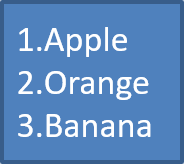
建立編號清單
當項目的順序很重要時,請使用編號清單。將 IBulletFormat.setType 設為 BulletType.Numbered。您也可以使用 IBulletFormat.setNumberedBulletStyle 選擇編號格式,或在清單須從非 1 的值開始時使用 IBulletFormat.setNumberedBulletStartWith。
以下 Java 程式碼示範如何在投影片中建立編號清單:
Presentation presentation = new Presentation();
try {
    ISlide slide = presentation.getSlides().get_Item(0);
    IAutoShape autoShape = slide.getShapes().addAutoShape(ShapeType.Rectangle, 20, 20, 90, 80);

    ITextFrame textFrame = autoShape.getTextFrame();
    textFrame.getParagraphs().clear();

    Paragraph paragraph1 = new Paragraph();
    paragraph1.getParagraphFormat().getBullet().setType(BulletType.Numbered);
    paragraph1.setText("Apple");
    textFrame.getParagraphs().add(paragraph1);

    Paragraph paragraph2 = new Paragraph();
    paragraph2.getParagraphFormat().getBullet().setType(BulletType.Numbered);
    paragraph2.setText("Orange");
    textFrame.getParagraphs().add(paragraph2);

    Paragraph paragraph3 = new Paragraph();
    paragraph3.getParagraphFormat().getBullet().setType(BulletType.Numbered);
    paragraph3.setText("Banana");
    textFrame.getParagraphs().add(paragraph3);

    presentation.save("numbered_bullets.pptx", SaveFormat.Pptx);
} finally {
    presentation.dispose();
}
結果:
建立圖片項目符號
Aspose.Slides 允許您將一般的項目符號符號替換為圖片。圖片項目符號最適合使用簡單且在小尺寸下仍可辨識的圖像,例如圖示或小型透明 PNG 檔案。
理想情況下,如果您打算以圖片取代一般的項目符號,最好挑選具透明背景的簡易圖形。此類圖像非常適合作為自訂項目符號。
請記住,圖片會被縮小至非常小的尺寸。因此,我們強烈建議選擇在作為清單項目符號時仍能保持清晰且具視覺效果的圖像。
若要建立圖片項目符號,請將圖片加入 Presentation.getImages,並將回傳的圖片物件指派給 IBulletFormat.getPicture。在指派圖片前,先將 IBulletFormat.setType 設為 BulletType.Picture。
假設我們有一個「image.png」:

以下 Java 程式碼示範如何在投影片中建立圖片項目符號:
Presentation presentation = new Presentation();
try {
    ISlide slide = presentation.getSlides().get_Item(0);
    IAutoShape autoShape = slide.getShapes().addAutoShape(ShapeType.Rectangle, 20, 20, 200, 50);

    ITextFrame textFrame = autoShape.getTextFrame();
    textFrame.getParagraphs().clear();

    IPPImage bulletImage = presentation.getImages().addImage(Images.fromFile("image.png"));

    Paragraph paragraph1 = new Paragraph();
    paragraph1.getParagraphFormat().getBullet().setType(BulletType.Picture);
    paragraph1.getParagraphFormat().getBullet().getPicture().setImage(bulletImage);
    paragraph1.getParagraphFormat().setIndent(15);
    paragraph1.getParagraphFormat().getBullet().setHeight(100);
    paragraph1.setText("The first paragraph");
    textFrame.getParagraphs().add(paragraph1);

    Paragraph paragraph2 = new Paragraph();
    paragraph2.getParagraphFormat().getBullet().setType(BulletType.Picture);
    paragraph2.getParagraphFormat().getBullet().getPicture().setImage(bulletImage);
    paragraph2.getParagraphFormat().setIndent(15);
    paragraph2.getParagraphFormat().getBullet().setHeight(100);
    paragraph2.setText("The second paragraph");
    textFrame.getParagraphs().add(paragraph2);

    presentation.save("picture_bullets.pptx", SaveFormat.Pptx);
} finally {
    presentation.dispose();
}
結果:

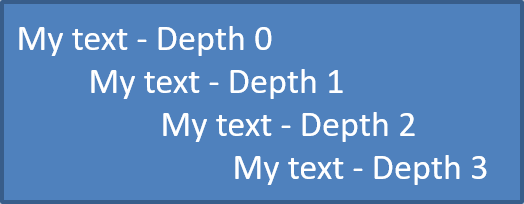
建立多層次清單
使用 IParagraphFormat.setDepth 可將清單項目放在不同層級。層級 0 為最上層,層級 1 為其下的子層,依此類推。
以下 Java 程式碼示範如何建立多層次項目符號清單:
Presentation presentation = new Presentation();
try {
    ISlide slide = presentation.getSlides().get_Item(0);
    IAutoShape autoShape = slide.getShapes().addAutoShape(ShapeType.Rectangle, 20, 20, 260, 110);

    ITextFrame textFrame = autoShape.getTextFrame();
    textFrame.getParagraphs().clear();

    Paragraph paragraph1 = new Paragraph();
    paragraph1.getParagraphFormat().setDepth((short) 0);
    paragraph1.setText("My text - Depth 0");
    textFrame.getParagraphs().add(paragraph1);

    Paragraph paragraph2 = new Paragraph();
    paragraph2.getParagraphFormat().setDepth((short) 1);
    paragraph2.setText("My text - Depth 1");
    textFrame.getParagraphs().add(paragraph2);

    Paragraph paragraph3 = new Paragraph();
    paragraph3.getParagraphFormat().setDepth((short) 2);
    paragraph3.setText("My text - Depth 2");
    textFrame.getParagraphs().add(paragraph3);

    Paragraph paragraph4 = new Paragraph();
    paragraph4.getParagraphFormat().setDepth((short) 3);
    paragraph4.setText("My text - Depth 3");
    textFrame.getParagraphs().add(paragraph4);

    presentation.save("multilevel_bullets.pptx", SaveFormat.Pptx);
} finally {
    presentation.dispose();
}
結果:
變更既有清單
若要變更既有簡報中的清單格式,存取目標段落並更新其 IParagraphFormat.getBullet 設定。建立清單時使用的相同屬性,也可用於檢視或修改從 PPT、PPTX 或 ODP 檔案載入的清單。
以下 Java 程式碼將文字框中的第一個段落改為使用編號清單樣式:
Presentation presentation = new Presentation("input.pptx");
try {
    ISlide slide = presentation.getSlides().get_Item(0);
    IAutoShape autoShape = (IAutoShape) slide.getShapes().get_Item(0);
    IParagraph paragraph = autoShape.getTextFrame().getParagraphs().get_Item(0);

    paragraph.getParagraphFormat().getBullet().setType(BulletType.Numbered);
    paragraph.getParagraphFormat().getBullet().setNumberedBulletStyle(NumberedBulletStyle.BulletRomanUCPeriod);
    paragraph.getParagraphFormat().getBullet().setNumberedBulletStartWith((short) 1);
    paragraph.getParagraphFormat().setMarginLeft(30);
    paragraph.getParagraphFormat().setIndent(-20);

    presentation.save("updated_list.pptx", SaveFormat.Pptx);
} finally {
    presentation.dispose();
}
常見問題
是否可以將項目符號清單與編號清單匯出為 PDF 或圖像?
可以。當目標格式支援相應的文字佈局與項目符號功能時,Aspose.Slides 會保留清單格式。
我可以編輯既有簡報中的清單嗎?
可以。載入簡報、存取目標段落、檢視或更新其 IParagraphFormat.getBullet 設定,然後儲存簡報。
清單可以包含非拉丁文字嗎?
可以。清單項目文字支援 Unicode 字元,您可以在多語言簡報中建立清單。請確保簡報使用的字型支援您所需的字元。