
Kelola Daftar Berpoin dan Bernomor dalam Presentasi di Java
Gambaran Umum
Aspose.Slides untuk Java memungkinkan Anda membuat dan memformat daftar berpoin dan bernomor dalam presentasi PowerPoint dan OpenDocument. Suatu item daftar adalah paragraf yang pengaturan poinnya dikendalikan melalui format paragrafnya.
Gunakan metode IParagraph.getParagraphFormat untuk mengakses pengaturan daftar pada tingkat paragraf. Titik masuk utama adalah IParagraphFormat.getBullet, yang mengembalikan objek IBulletFormat. Dengan objek ini, Anda dapat mengatur jenis poin, simbol, gambar, warna, ukuran, gaya penomoran, dan nomor awal.
Artikel ini menunjukkan cara:
- membuat daftar berpoin dengan simbol khusus
- membuat poin gambar
- membuat daftar berjenjang dengan mengatur kedalaman paragraf
- membuat daftar bernomor
- memeriksa dan mengubah pemformatan daftar dalam presentasi yang ada
Buat Daftar Berpoin
Untuk membuat daftar berpoin, tambahkan objek IParagraph ke sebuah ITextFrame dan atur IBulletFormat.setType ke BulletType.Symbol. Anda kemudian dapat mengatur IBulletFormat.setChar, IBulletFormat.getColor, dan IBulletFormat.setHeight untuk mengontrol tampilan poin.
Kode Java berikut memperlihatkan cara membuat daftar berpoin dalam sebuah slide:
Presentation presentation = new Presentation();
try {
    ISlide slide = presentation.getSlides().get_Item(0);
    IAutoShape autoShape = slide.getShapes().addAutoShape(ShapeType.Rectangle, 20, 20, 200, 50);

    ITextFrame textFrame = autoShape.getTextFrame();
    textFrame.getParagraphs().clear();

    Color bulletColor = new Color(205, 92, 92);

    Paragraph paragraph1 = new Paragraph();
    paragraph1.getParagraphFormat().getBullet().setType(BulletType.Symbol);
    paragraph1.getParagraphFormat().getBullet().setChar('*');
    paragraph1.getParagraphFormat().setIndent(15);
    paragraph1.getParagraphFormat().getBullet().setBulletHardColor(NullableBool.True);
    paragraph1.getParagraphFormat().getBullet().getColor().setColor(bulletColor);
    paragraph1.getParagraphFormat().getBullet().setHeight(100);
    paragraph1.setText("The first paragraph");
    textFrame.getParagraphs().add(paragraph1);

    Paragraph paragraph2 = new Paragraph();
    paragraph2.getParagraphFormat().getBullet().setType(BulletType.Symbol);
    paragraph2.getParagraphFormat().getBullet().setChar('*');
    paragraph2.getParagraphFormat().setIndent(15);
    paragraph2.getParagraphFormat().getBullet().setBulletHardColor(NullableBool.True);
    paragraph2.getParagraphFormat().getBullet().getColor().setColor(bulletColor);
    paragraph2.getParagraphFormat().getBullet().setHeight(100);
    paragraph2.setText("The second paragraph");
    textFrame.getParagraphs().add(paragraph2);

    presentation.save("symbol_bullets.pptx", SaveFormat.Pptx);
} finally {
    presentation.dispose();
}
Hasilnya:

Buat Daftar Bernomor
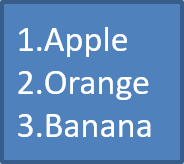
Gunakan daftar bernomor ketika urutan item penting. Atur IBulletFormat.setType ke BulletType.Numbered. Anda juga dapat memilih format penomoran dengan IBulletFormat.setNumberedBulletStyle atau mengatur IBulletFormat.setNumberedBulletStartWith ketika daftar harus dimulai dari nilai selain 1.
Kode Java berikut menunjukkan cara membuat daftar bernomor dalam sebuah slide:
Presentation presentation = new Presentation();
try {
    ISlide slide = presentation.getSlides().get_Item(0);
    IAutoShape autoShape = slide.getShapes().addAutoShape(ShapeType.Rectangle, 20, 20, 90, 80);

    ITextFrame textFrame = autoShape.getTextFrame();
    textFrame.getParagraphs().clear();

    Paragraph paragraph1 = new Paragraph();
    paragraph1.getParagraphFormat().getBullet().setType(BulletType.Numbered);
    paragraph1.setText("Apple");
    textFrame.getParagraphs().add(paragraph1);

    Paragraph paragraph2 = new Paragraph();
    paragraph2.getParagraphFormat().getBullet().setType(BulletType.Numbered);
    paragraph2.setText("Orange");
    textFrame.getParagraphs().add(paragraph2);

    Paragraph paragraph3 = new Paragraph();
    paragraph3.getParagraphFormat().getBullet().setType(BulletType.Numbered);
    paragraph3.setText("Banana");
    textFrame.getParagraphs().add(paragraph3);

    presentation.save("numbered_bullets.pptx", SaveFormat.Pptx);
} finally {
    presentation.dispose();
}
Hasilnya:
Buat Poin Gambar
Aspose.Slides memungkinkan Anda mengganti simbol poin standar dengan gambar. Poin gambar paling cocok untuk gambar sederhana yang tetap terbaca pada ukuran kecil, seperti ikon atau file PNG transparan kecil.
Untuk membuat poin gambar, tambahkan gambar ke Presentation.getImages dan tetapkan objek gambar yang dikembalikan ke IBulletFormat.getPicture. Atur IBulletFormat.setType ke BulletType.Picture sebelum menugaskan gambar.
Misalkan kita memiliki “image.png”:

Kode Java berikut memperlihatkan cara membuat poin gambar dalam sebuah slide:
Presentation presentation = new Presentation();
try {
    ISlide slide = presentation.getSlides().get_Item(0);
    IAutoShape autoShape = slide.getShapes().addAutoShape(ShapeType.Rectangle, 20, 20, 200, 50);

    ITextFrame textFrame = autoShape.getTextFrame();
    textFrame.getParagraphs().clear();

    IPPImage bulletImage = presentation.getImages().addImage(Images.fromFile("image.png"));

    Paragraph paragraph1 = new Paragraph();
    paragraph1.getParagraphFormat().getBullet().setType(BulletType.Picture);
    paragraph1.getParagraphFormat().getBullet().getPicture().setImage(bulletImage);
    paragraph1.getParagraphFormat().setIndent(15);
    paragraph1.getParagraphFormat().getBullet().setHeight(100);
    paragraph1.setText("The first paragraph");
    textFrame.getParagraphs().add(paragraph1);

    Paragraph paragraph2 = new Paragraph();
    paragraph2.getParagraphFormat().getBullet().setType(BulletType.Picture);
    paragraph2.getParagraphFormat().getBullet().getPicture().setImage(bulletImage);
    paragraph2.getParagraphFormat().setIndent(15);
    paragraph2.getParagraphFormat().getBullet().setHeight(100);
    paragraph2.setText("The second paragraph");
    textFrame.getParagraphs().add(paragraph2);

    presentation.save("picture_bullets.pptx", SaveFormat.Pptx);
} finally {
    presentation.dispose();
}
Hasilnya:

Buat Daftar Multilevel
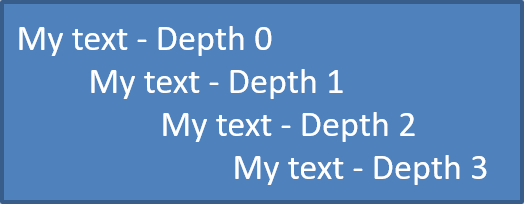
Gunakan IParagraphFormat.setDepth untuk menempatkan item daftar pada level yang berbeda. Level 0 adalah level teratas, level 1 berada di dalamnya, dan seterusnya.
Kode Java berikut memperlihatkan cara membuat daftar berpoin berjenjang:
Presentation presentation = new Presentation();
try {
    ISlide slide = presentation.getSlides().get_Item(0);
    IAutoShape autoShape = slide.getShapes().addAutoShape(ShapeType.Rectangle, 20, 20, 260, 110);

    ITextFrame textFrame = autoShape.getTextFrame();
    textFrame.getParagraphs().clear();

    Paragraph paragraph1 = new Paragraph();
    paragraph1.getParagraphFormat().setDepth((short) 0);
    paragraph1.setText("My text - Depth 0");
    textFrame.getParagraphs().add(paragraph1);

    Paragraph paragraph2 = new Paragraph();
    paragraph2.getParagraphFormat().setDepth((short) 1);
    paragraph2.setText("My text - Depth 1");
    textFrame.getParagraphs().add(paragraph2);

    Paragraph paragraph3 = new Paragraph();
    paragraph3.getParagraphFormat().setDepth((short) 2);
    paragraph3.setText("My text - Depth 2");
    textFrame.getParagraphs().add(paragraph3);

    Paragraph paragraph4 = new Paragraph();
    paragraph4.getParagraphFormat().setDepth((short) 3);
    paragraph4.setText("My text - Depth 3");
    textFrame.getParagraphs().add(paragraph4);

    presentation.save("multilevel_bullets.pptx", SaveFormat.Pptx);
} finally {
    presentation.dispose();
}
Hasilnya:
Ubah Daftar yang Ada
Untuk mengubah pemformatan daftar dalam presentasi yang ada, akses paragraf target dan perbarui pengaturan IParagraphFormat.getBullet‑nya. Properti yang sama yang digunakan untuk membuat daftar dapat digunakan untuk memeriksa atau memodifikasi daftar yang dimuat dari file PPT, PPTX, atau ODP.
Kode Java berikut mengubah paragraf pertama dalam sebuah bingkai teks untuk menggunakan gaya daftar bernomor:
Presentation presentation = new Presentation("input.pptx");
try {
    ISlide slide = presentation.getSlides().get_Item(0);
    IAutoShape autoShape = (IAutoShape) slide.getShapes().get_Item(0);
    IParagraph paragraph = autoShape.getTextFrame().getParagraphs().get_Item(0);

    paragraph.getParagraphFormat().getBullet().setType(BulletType.Numbered);
    paragraph.getParagraphFormat().getBullet().setNumberedBulletStyle(NumberedBulletStyle.BulletRomanUCPeriod);
    paragraph.getParagraphFormat().getBullet().setNumberedBulletStartWith((short) 1);
    paragraph.getParagraphFormat().setMarginLeft(30);
    paragraph.getParagraphFormat().setIndent(-20);

    presentation.save("updated_list.pptx", SaveFormat.Pptx);
} finally {
    presentation.dispose();
}
FAQ
Apakah daftar berpoin dan bernomor dapat diekspor ke PDF atau gambar?
Ya. Aspose.Slides mempertahankan pemformatan daftar ketika format target mendukung tata letak teks dan fitur poin yang sesuai.
Apakah saya dapat mengedit daftar dalam presentasi yang ada?
Ya. Muat presentasi, akses paragraf target, periksa atau perbarui pengaturan IParagraphFormat.getBullet, dan simpan presentasi.
Apakah daftar dapat berisi teks non‑Latin?
Ya. Teks item daftar dapat berisi karakter Unicode, sehingga Anda dapat membuat daftar dalam presentasi multibahasa. Pastikan font yang digunakan dalam presentasi mendukung karakter yang Anda butuhkan.